

Key takeaways
- Pros: simple; excellent software support; mic and instrument inputs.
- Cons: one mic input; less gain; no automatic level tools.
For recording in 2026, the best sound card is a USB audio interface with an XLR microphone preamp. The Focusrite Scarlett Solo (4th Gen) is the safest pick for one voice or one guitar, the Audient EVO 4 is the easiest to set levels on, the Scarlett 2i2 (4th Gen) is the best two-input upgrade, and the Behringer UMC202HD is the lowest-cost route to clean XLR recording. A motherboard jack or a gaming sound card cannot record a studio microphone properly, because it lacks a balanced preamp and phantom power.
This guide focuses on the recording chain itself: how much preamp gain you need, how the monitoring path avoids delay, which interface suits vocals, podcasts, guitars and streams, and who should skip each model. It uses published specifications and describes products by class where a number could not be confirmed.
Quick answer: pick by what you record
| Recording job | Inputs needed | Best match |
|---|---|---|
| One voice: podcast, voice-over, singing | 1 XLR | Focusrite Scarlett Solo (4th Gen), Universal Audio Volt 1 |
| Voice plus guitar, or two hosts | 2 XLR or combo | Audient EVO 4, Scarlett 2i2 (4th Gen), PreSonus Studio 24c |
| Quiet, low-output dynamic microphone | 1 high-gain XLR | Scarlett 2i2 (4th Gen), Audient iD4 MkII |
| Hardware synth or drum machine plus mic | 2 inputs plus MIDI | Arturia MiniFuse 2, PreSonus Studio 24c |
| Tightest budget | 2 XLR | Behringer UMC202HD |
How we chose
This is a research-based comparison of manufacturer specifications and the models that recur in 2026 buyer guides. We did not run measurements. We kept products that are current, widely supported by recording software, and clearly different in role. Where sources disagreed or a figure was not published, we describe the class of the product instead of inventing a number.
The criteria, in order:
- Preamp gain and noise. The preamp must reach a healthy recording level on your microphone without being turned to its maximum.
- Phantom power. Condenser microphones require 48 V.
- Input count and type. XLR for microphones, instrument input for guitar and bass, combo jacks for both.
- Monitoring. Direct monitoring and a headphone output with enough level.
- Conversion. 24-bit capture is the standard. Sample rate up to 96 kHz is plenty.
- Convenience tools. Automatic level setting, clip protection and loopback speed up sessions and help beginners.
Spec comparison table
| Model | Inputs | Max rate | Preamp detail | Recording helpers |
|---|---|---|---|---|
| Focusrite Scarlett Solo (4th Gen) | 1 XLR mic, 1 instrument | 24-bit/192 kHz | Lower gain than the 2i2 | Air mode; no Auto Gain or Clip Safe |
| Focusrite Scarlett 2i2 (4th Gen) | 2 combo | 24-bit/192 kHz | Up to 69 dB gain; 116 dB input dynamic range | Auto Gain, Clip Safe, Air mode |
| Audient EVO 4 | 2 combo XLR/TRS | 24-bit/96 kHz | Smartgain automatic level setting | Loopback for streaming and podcasts; USB-C bus power |
| Audient iD4 MkII | 1 mic plus instrument | 24-bit/96 kHz | Audient console-style preamp | Headphone output, simple controls |
| Universal Audio Volt 1 | 1 mic/line, 1 instrument | 24-bit/192 kHz | Vintage preamp mode | USB-C; vintage-style tone option |
| Arturia MiniFuse 2 | 2 combo XLR/TRS | 24-bit/192 kHz class | 56 dB gain, 48 V | MIDI in/out, USB hub port, 5-year warranty |
| PreSonus Studio 24c | 2 mic/instrument/line | 24-bit/192 kHz | Two preamps | MIDI, front-panel metering |
| Behringer UMC202HD | 2 XLR/TRS | 24-bit/192 kHz | Two Midas-designed preamps | Metal chassis, direct monitoring |
Information-gain element 1: a gain budget you can calculate
The most common recording problem is not the converter, it is a preamp running near its maximum gain, which raises hiss. Use a gain budget to check any interface before buying.
- Estimate your microphone’s level. Condenser microphones are usually hotter than dynamic microphones. A low-output dynamic microphone used for quiet speech might need roughly 50 to 60 dB of gain, while a typical condenser often sits well below that. Use the microphone maker’s sensitivity figure when you can.
- Compare to the interface maximum. A Scarlett 2i2 (4th Gen) lists up to 69 dB of gain. The Arturia MiniFuse 2 lists 56 dB. The Audient iD14 MkII, a bigger sibling of the iD4 line, lists 58 dB of analog gain plus 10 dB of digital gain.
- Keep a 10 dB margin. Illustrative example: your microphone needs 50 dB. With a 56 dB maximum, you would work at the extreme end of the control, which leaves 6 dB of margin. With a 69 dB maximum, you run with 19 dB of spare room, and the preamp operates in a more comfortable range.
This is why the answer to “which interface is best for recording?” depends first on the microphone. A condenser or a loud dynamic microphone works well on almost any interface. A quiet dynamic microphone benefits from the highest-gain option, such as the 2i2, or from an inline preamp that adds gain before the interface.
Information-gain element 2: how much delay you will hear while recording
Two paths exist for monitoring. In software monitoring, your voice travels into the computer, through your recording application, and back to your headphones. The delay equals roughly two buffer lengths plus converter overhead. In direct monitoring, the interface mixes your input with playback in hardware before the computer sees it, so the delay is effectively zero.
| Buffer size at 48 kHz | Delay per buffer | Approximate round trip before overhead |
|---|---|---|
| 64 samples | 1.3 ms | 2.7 ms |
| 128 samples | 2.7 ms | 5.3 ms |
| 256 samples | 5.3 ms | 10.7 ms |
| 512 samples | 10.7 ms | 21.3 ms |
As a rule, singers notice delay beyond roughly 10 ms. At 256 samples you are at the edge. Use direct monitoring for vocals, and keep the buffer at 128 samples or below when playing a virtual instrument. Every interface in this list supports a form of direct monitoring, so the choice rarely depends on this feature.
Best sound cards for recording: the shortlist
Best for one voice or one guitar: Focusrite Scarlett Solo (4th Gen)
Spec line: 1 XLR mic input · 1 instrument input · 24-bit/192 kHz · USB-C bus power · stereo headphone output · Air mode.
The Solo is the interface most guides name for a solo voice or guitar. It has a dedicated mic preamp with phantom power and a separate instrument input. Air mode adds presence that flatters voice and acoustic guitar. It has less preamp gain than the 2i2 and lacks Auto Gain and Clip Safe.
Best for: podcasters, voice-over artists, streamers and singers who record one source at a time.
Skip if: you record two people at once, or use a quiet dynamic microphone that needs high gain.
- Pros: simple; excellent software support; mic and instrument inputs.
- Cons: one mic input; less gain; no automatic level tools.
As an Amazon Associate we earn from qualifying purchases at no extra cost to you.

Best for setting levels fast: Audient EVO 4
Spec line: 2 combo XLR/TRS inputs · 24-bit/96 kHz · USB-C bus power · Smartgain automatic level setting · loopback function.
The EVO 4 is built for people who want to press a button and record. With Smartgain, you sing your loudest passage for a few seconds and the interface sets the input level. Loopback sends computer audio back into the recording, which suits podcasts that include a remote guest or streaming that includes system sound.
Best for: beginners, streamers and podcasters who want a quick setup and two inputs.
Skip if: you need MIDI ports or a 192 kHz ceiling. Neither is likely to matter for voice work.
- Pros: Smartgain; loopback; two inputs; bus powered.
- Cons: 96 kHz maximum; no MIDI; a minimal control layout.

Best two-input upgrade with extra gain: Focusrite Scarlett 2i2 (4th Gen)
Spec line: 2 combo inputs · 24-bit/192 kHz · up to 69 dB gain · 116 dB input and 120 dB output dynamic range · Auto Gain · Clip Safe · Air mode.
The 2i2 is the version to choose for a microphone with low output, or when you record two people. Clip Safe watches the signal and lowers the gain if a peak approaches distortion, which helps singers who sometimes get loud. The extra gain headroom is its biggest advantage over the Solo.
Best for: duets, interviews, vocal plus guitar, and quiet dynamic microphones.
Skip if: you record only one source and want to save desk space and money.
- Pros: higher gain; Auto Gain and Clip Safe; wide compatibility.
- Cons: no MIDI; costs more than the Solo.

Best compact single-mic option with console-style preamp: Audient iD4 MkII
Spec line: 1 mic input with Audient console-style preamp · instrument input · 24-bit/96 kHz · USB connection · headphone output.
The iD4 MkII is a small desktop interface aimed at single-source recording. It uses a preamp design derived from Audient’s mixing consoles and gives simple, tactile controls. Check the maker’s sheet for the current connector type and exact gain figure, because sources describe the USB generation differently.
Best for: solo vocalists and guitarists who value preamp quality over input count.
Skip if: you need two microphone inputs, MIDI or software extras.
- Pros: quality preamp; compact; tactile control.
- Cons: one microphone input; 96 kHz maximum; no MIDI.

Best for vintage tone on a single mic: Universal Audio Volt 1
Spec line: 1 mic/line input · instrument input · 24-bit/192 kHz · USB-C · switchable vintage preamp mode.
The Volt 1 puts the Volt family’s vintage mode into the smallest box. Switch it on and the preamp adds a warmer, slightly saturated character, which flatters vocals and guitars. Leave it off for a neutral signal.
Best for: solo singers and guitarists who like a warmer sound without plug-ins.
Skip if: you want a flat, uncolored recording or require two microphone inputs.
- Pros: vintage mode; compact; solid build.
- Cons: a single microphone input; no MIDI; features are limited compared with the Volt 276.

Best for MIDI and a USB hub: Arturia MiniFuse 2
Spec line: 2 combo XLR/TRS inputs · 56 dB gain · 48 V phantom power · 5-pin MIDI in/out · USB hub port · 5-year warranty.
The MiniFuse 2 suits hybrid setups: a microphone, a keyboard and a hardware synth in the same session. The USB hub port frees a laptop port for a controller.
Best for: small desks that mix recording with MIDI gear.
Skip if: your microphone needs more than the available 56 dB of gain.
- Pros: MIDI; hub port; long warranty.
- Cons: moderate gain; fewer smart features.
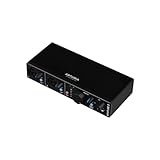
Best budget with MIDI and meters: PreSonus Studio 24c
Spec line: 2 mic/instrument/line inputs · 24-bit/192 kHz · MIDI in/out · front-panel metering · USB-C.
The Studio 24c offers clear level meters on the front panel, which makes setting a recording level easy to see. It includes MIDI and bundled recording software.
Best for: beginners who want metering and MIDI at a lower price tier.
Skip if: you want the quietest preamps or automatic level tools.
- Pros: meters; MIDI; two inputs.
- Cons: no auto-gain; preamps are good rather than best in class.

Best lowest-cost entry: Behringer UMC202HD
Spec line: 2 XLR/TRS inputs · 24-bit/192 kHz · 2 Midas-designed preamps · metal chassis · direct monitoring.
The UMC202HD is the lowest-cost route to proper XLR recording with phantom power. It is not as refined as the Audient or Focusrite units, but it records a clean voice or guitar and works with all common software.
Best for: first-time buyers on a tight budget, or a spare interface for a second room.
Skip if: you record very quiet sources or want automatic level setting.
- Pros: very low cost tier; rugged metal body; two inputs.
- Cons: basic extras; no MIDI; preamp noise matters more with low-output microphones.

Match your microphone to your interface
Condenser microphones
Condensers need 48 V phantom power and produce a strong signal. Any interface here works. Turn phantom power on only after connecting the microphone, and turn it off before disconnecting it.
Dynamic microphones
Dynamic microphones need no phantom power, but many have lower output. Choose the 2i2 or iD4 MkII class if the microphone is quiet, and watch the gain budget calculation above.
USB microphones
A USB microphone has its own converter and bypasses the interface. If you already own one, you do not need a recording interface for it, except to monitor or add a second source.
Ribbon microphones
Some ribbon microphones can be damaged by phantom power in certain conditions, such as a faulty cable. Read the manual and keep phantom power off unless the maker says it is safe.
Recording workflow tips
- Set the level while performing at your loudest. Aim for peaks around minus 12 to minus 6 dBFS in your software. This leaves headroom and avoids clipping.
- Record at 24-bit and 48 kHz. It is a standard for video work and fine for music. Higher rates raise storage use without clear audible benefit for voice.
- Use direct monitoring for vocals. It removes delay and makes the performance feel natural.
- Keep the microphone 4 to 8 inches from the mouth with a pop filter. This improves clarity and lowers the gain you need.
- Treat the room before upgrading the interface. Soft furnishings, rugs and a closed door help more than a new converter.
Best for clean tracking with clear meters: MOTU M2
Spec line: 2 in / 2 out · ESS Sabre32 Ultra DAC · 120 dB output dynamic range as quoted by the maker · USB-C · 5-pin MIDI in and out · color level meters · loopback driver.
For recording, the M2 is useful because its bright meter screen shows input level and clipping at a glance, so you can set gain while standing at the microphone. Conversion is neutral, which means the sound you record is the sound of your microphone and room. The loopback driver captures computer playback for remote guests, and low round-trip latency helps when you monitor through software.
Best for: vocalists and instrumentalists who want an honest, neutral recording path and easy level setting. Skip if: you need more than one headphone output or a high-gain path for a very quiet dynamic microphone. Check the maker gain figure first.
Pros: clear metering; neutral conversion; loopback; MIDI. Cons: single headphone output; no automatic level tools; no color options.

Best four-input recorder with two headphone outputs: Audient EVO 8
Spec line: 4 in / 4 out · 4 XLR/line combo inputs plus a front instrument input · up to 58 dB gain · 24-bit/96 kHz · two headphone outputs · Smartgain · loopback.
The EVO 8 is the choice when a recording session grows past two people. Four combo inputs take microphones, and Smartgain sets each input level from a short loud passage. Two headphone outputs let a host and a guest, or a singer and an engineer, monitor at once. Loopback handles streaming and remote interview audio. The 58 dB gain ceiling is fine for condensers and typical dynamic microphones.
Best for: podcast panels, duos, small bands and anyone recording three or four sources. Skip if: you need MIDI ports or a very high-gain path for ribbon microphones.
Pros: four inputs; two headphone outputs; Smartgain; loopback. Cons: no MIDI; 96 kHz ceiling; moderate gain ceiling.

Best for vintage warmth on two inputs: Universal Audio Volt 2
Spec line: 2 in / 2 out · 24-bit/192 kHz · USB-C · vintage preamp mode modeled on a classic tube design · MIDI in and out.
The Volt 2 gives two inputs and a switchable vintage preamp mode that adds a warmer, slightly denser tone to a voice or acoustic guitar. It works well when you want a finished sound while recording without adding plug-ins. Leave the mode off for a flat capture. Two inputs cover a vocal plus guitar or a two-person interview at an entry-level tier.
Best for: singer-songwriters and two-person recordings who like a warmer tone at tracking time. Skip if: you want a perfectly uncolored signal or automatic level setting.
Pros: vintage mode; two inputs; MIDI; compact. Cons: color is baked in when enabled; no auto gain; no loopback listed.
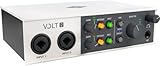
Best single-mic voice interface: Rode AI-1
Spec line: 1 XLR mic input · 48 V phantom power · 24-bit/192 kHz class · USB connection · headphone output.
The AI-1 is a deliberately small, single-purpose interface from a microphone maker. It pairs one XLR input with a studio-grade preamp, phantom power and a headphone output, which covers a voice-over booth, a stream or a single-voice podcast. It has no extras to learn. Check the maker sheet for the exact gain figure and for the connector type, because revisions have differed between sellers.
Best for: solo voice-over artists and podcasters with one XLR microphone and a tight budget. Skip if: you need an instrument input, two microphones or MIDI.
Pros: simple; dedicated mic preamp; compact; entry-level tier. Cons: one input only; no instrument input; no loopback or smart tools.

Best for podcast hosts and guests: Focusrite Vocaster Two
Spec line: 2 XLR mic inputs · Auto Gain · Enhance voice processing · mute buttons · phone and Bluetooth input for remote guests · dual headphone outputs · USB-C.
Vocaster Two is built for talking, not for band tracking. Auto Gain sets each level from a few seconds of speech, Enhance adds a voice-focused tone preset, and the mute buttons let a host cough without editing. A phone input brings a remote guest into the mix, and each person gets a headphone output. It records speech faster than a general-purpose interface, but offers fewer music features.
Best for: two-person podcasts, interviews and streamers who want fast, repeatable voice settings. Skip if: you record guitar or synths. It has no instrument input or MIDI, so choose a Scarlett or an Audient.
Pros: Auto Gain; Enhance; mute buttons; two headphone outputs. Cons: speech-focused; no instrument input; no MIDI.

Best low-cost USB-C starter: PreSonus AudioBox GO
Spec line: 2 in / 2 out · mic and instrument inputs · 24-bit/96 kHz class · USB-C bus power · bundled recording software.
The AudioBox GO is a small bus-powered unit that suits a first microphone and a first guitar. It runs from a laptop with no external power and comes with recording software, so you can start tracking the day it arrives. It is not as refined as the Audient or Focusrite units, and its gain headroom is best matched to condenser microphones or typical dynamics.
Best for: beginners who want a very small, bus-powered unit with included software at an entry-level tier. Skip if: you plan to use a quiet ribbon or low-output dynamic microphone, or need MIDI.
Pros: very compact; bus power; bundled software; entry-level tier. Cons: limited extras; modest gain headroom; 96 kHz class ceiling.

Best premium upgrade for cleaner takes: Focusrite Clarett+ 2Pre
Spec line: 10 in / 4 out · USB-C bus power · 2 Clarett mic preamps with Air mode · 24-bit/192 kHz class · digital inputs for external preamp expansion.
The Clarett+ 2Pre sits above the Scarlett line. Its Clarett preamps are designed for lower noise and a more open top end, with Air mode as an optional presence lift. Digital inputs let you add an outboard preamp unit later, so the interface can follow a studio as it grows. For vocal recording the gain structure and noise floor are the reasons to pay for it.
Best for: serious vocal and acoustic recordists who have outgrown an entry-level box. Skip if: you only record a podcast or have a tight budget. The Solo or the 2i2 cover that job.
Pros: strong preamps; Air mode; expansion; bus power. Cons: premium tier; two mic preamps; no loopback-focused tools.
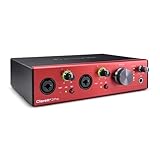
All 15 recording interfaces compared
Start with the number of voices you record at once, then use the tier and strength columns to narrow the list. Tiers are relative within current interfaces.
| Model | Inputs | Tier | Main strength |
|---|---|---|---|
| Focusrite Scarlett Solo (4th Gen) | 1 mic + 1 instrument | Entry-level to mid-range | One voice or guitar |
| Audient EVO 4 | 2 combo | Entry-level | Smartgain and loopback |
| Focusrite Scarlett 2i2 (4th Gen) | 2 combo | Mid-range | Up to 69 dB gain |
| Audient iD4 MkII | 1 mic + instrument | Mid-range | Console-style preamp |
| Universal Audio Volt 1 | 1 mic + 1 instrument | Entry-level | Vintage mode |
| Arturia MiniFuse 2 | 2 combo | Entry-level to mid-range | MIDI and USB hub |
| PreSonus Studio 24c | 2 mic/instrument/line | Entry-level | Meters and MIDI |
| Behringer UMC202HD | 2 XLR/TRS | Entry-level | Lowest-cost XLR |
| MOTU M2 | 2 combo | Mid-range | Meters, neutral sound |
| Audient EVO 8 | 4 combo + front instrument | Mid-range | Four inputs, two headphone outs |
| Universal Audio Volt 2 | 2 inputs | Entry-level | Vintage mode, MIDI |
| Rode AI-1 | 1 XLR | Entry-level | Single-voice simplicity |
| Focusrite Vocaster Two | 2 XLR | Entry-level to mid-range | Podcast host and guest |
| PreSonus AudioBox GO | Mic + instrument | Entry-level | Tiny bus-powered starter |
| Focusrite Clarett+ 2Pre | 2 mic/line | Premium | Cleaner preamps, expansion |
How to choose: thresholds for a recording interface
Use these limits to turn fifteen options into one.
- Number of voices at once: one voice means a single-input unit such as the Solo, Volt 1, iD4 MkII or Rode AI-1. Two voices means two inputs. Three or four voices means a four-input unit such as the EVO 8.
- Microphone gain: add the microphone’s required gain to 10 dB of margin. A condenser needing about 30 to 40 dB is fine on any unit here. A quiet dynamic needing 50 to 60 dB should go on the 2i2 class, which lists up to 69 dB, not on a 56 dB unit.
- Speech versus music: for speech-only shows, Vocaster Two or Audient Smartgain speeds up setup. For music with guitar or synths, choose an interface with an instrument input or MIDI.
- Two people monitoring: pick two headphone outputs, as on the EVO 8 or Vocaster Two.
- Noise floor: if your room is quiet and you record close to the microphone, entry-level preamps work. If you record soft vocals at a distance, move up a tier to a console-style or Clarett preamp.
- Remote guests: loopback or a phone input keeps their audio out of an extra mixer.
When two models satisfy these limits, pick by desk space and bus power. A laptop on the move favors a bus-powered unit.
Frequently asked questions
Do I need an audio interface to record?
You need one for an XLR microphone or a guitar. USB microphones and headset microphones connect directly to the computer, but offer less flexibility.
Is the Scarlett Solo enough for podcasting?
Yes for one host with a typical condenser or dynamic microphone. For two hosts, choose a two-input interface such as the Scarlett 2i2 or the Audient EVO 4.
What does phantom power do?
Phantom power sends 48 volts through the XLR cable to power condenser microphones. Dynamic microphones do not need it, and some ribbon microphones can be damaged by it.
Is 24-bit/192 kHz better for recording?
Not for voice or typical music. 24-bit/48 kHz captures everything most listeners can hear, and higher sample rates raise file size and processing load.
Why is my recording noisy?
The usual cause is gain set too high or a quiet microphone. Move closer, lower the gain, and use a higher-gain interface or an inline preamp if the microphone is low in output.
What is loopback and do I need it?
Loopback routes computer audio into your recording as if it were another input. You need it for streaming, remote podcast guests or capturing software audio, as on the Audient EVO 4.
Can I record guitar through an interface?
Yes. Plug the guitar into the instrument or Hi-Z input, not a line input, then use amplifier simulation software or a physical amplifier with a microphone.
Do I need a separate preamp?
Not for most microphones. If your dynamic microphone is quiet and the interface’s gain is not enough, an inline gain booster or a dedicated preamp is a cost-effective fix.
Bottom line
For one voice or one guitar, buy the Focusrite Scarlett Solo (4th Gen). For quick, reliable level setting and loopback, buy the Audient EVO 4. For two inputs and the most gain, buy the Scarlett 2i2 (4th Gen). Choose the Arturia MiniFuse 2 or PreSonus Studio 24c when MIDI matters, the Universal Audio Volt 1 for a warmer single-mic tone, the Audient iD4 MkII for a console-style single preamp, and the Behringer UMC202HD when budget is the main limit. Check your microphone’s output level first, then use the gain budget to pick the interface.
More from Amazon
Programs that pair well with the guide above. Offers and eligibility are set by Amazon and may change.
Free shipping on eligible items, Prime Video and more. Eligible new members can start with a free trial.
Start a Prime free trialAd-free music streaming. Eligible new subscribers can start with a free trial.
Try Music Unlimited freeA Prime membership for ages 18-24 with a trial period. Eligibility is set by Amazon.
See Prime for Young AdultsAudiobooks and podcasts to listen to on the go. Eligible new members can start with a free trial.
Try Audible freeAs an Amazon Associate we earn from qualifying purchases.





Write Your Review
No reviews yet. Be the first to share your experience!