

Key takeaways
- Purpose fit: playback DAC and amplifier, headset adapter, or recording interface.
- Headphone drive: stated amplifier strength and impedance support, and output types such as balanced 4.4 mm.
- Connection: USB-C versus older micro USB, and whether it is bus-powered.
- Platform support: Windows, macOS, consoles and mobile.
- Controls and inputs: physical knobs, microphone input, optical in and out.
- Software: need for drivers, and whether it is class-compliant.
The best external sound card for most people is the Creative Sound BlasterX G6 for gaming and console use, the Creative Sound Blaster X5 for desktop headphone listening with balanced output, the Creative Sound Blaster X4 for a compact USB-C unit with knobs, and the Focusrite Scarlett Solo or Audient EVO 4 if you record a microphone or instrument rather than just play audio back. An external sound card is a separate box that connects over USB, so it works with laptops, desktops with no free slot, and in many cases consoles.
External units avoid the electrical noise inside a PC case, move easily between machines and need no installation beyond a cable. They split into three families that are often confused: gaming and music DAC-amplifiers that mainly play audio, headset adapters that mainly add virtual surround, and audio interfaces that add microphone preamps for recording. Picking the right family matters more than any spec figure, and this guide sorts them so you can buy the right one the first time.
How we chose
This is a research-based guide, not a lab review. We compared manufacturer specification pages and the buyer criteria that recur in guides to external audio devices, and we included models that are currently sold or widely available. Where a source did not confirm a figure, or where the sources conflicted, we describe the device by spec class instead of quoting a number. Price is shown in tiers.
- Purpose fit: playback DAC and amplifier, headset adapter, or recording interface.
- Headphone drive: stated amplifier strength and impedance support, and output types such as balanced 4.4 mm.
- Connection: USB-C versus older micro USB, and whether it is bus-powered.
- Platform support: Windows, macOS, consoles and mobile.
- Controls and inputs: physical knobs, microphone input, optical in and out.
- Software: need for drivers, and whether it is class-compliant.
External sound cards compared
| Model | Family | Connection | Key specs | Inputs | Price tier |
|---|---|---|---|---|---|
| Creative Sound BlasterX G6 | Gaming DAC-amp | USB (older connector style) | 130 dB DNR, 32-bit/384 kHz, 7.1 virtual surround | Headset mic, optical in | Mid-range |
| Creative Sound Blaster X5 | Desktop DAC-amp | USB-C | Dual Cirrus Logic CS43198, balanced 4.4 mm out | Optical, line, mic | Premium |
| Creative Sound Blaster X4 | Compact DAC-amp | USB-C | About 114 dB class, 24-bit/192 kHz, 7.1 virtual surround | Optical in, mic | Entry-level to mid-range |
| EPOS GSX 300 | Headset adapter | Micro USB | 7.1 virtual surround, 3.5 mm sockets | Headset mic | Entry-level |
| EPOS GSX 1000 2nd Edition | Headset audio station | USB | DAC and amp hybrid, adjustable sidetone, aluminum volume wheel | Headset mic | Mid-range |
| Focusrite Scarlett Solo | Recording interface | USB-C | 24-bit/192 kHz class, one mic preamp, one instrument input | XLR mic, instrument | Entry-level to mid-range |
| Audient EVO 4 | Recording interface | USB-C | Two mic preamps, class-compliant, smart gain (specs from maker, not confirmed in our sources) | 2 inputs | Entry-level to mid-range |
| StarTech 7.1 USB adapter | Basic adapter | USB | 44.1 and 48 kHz sampling, 7.1 channels, 3.5 mm outputs | Mic jack | Entry-level |
How to choose an external sound card
Step one: identify your family
Ask what you need the box to do. If you need cleaner headphone playback, with better amplifier power, you want a DAC-amplifier such as the X5, G6 or X4. If you need virtual surround for a headset and a simple plug, a headset adapter such as the EPOS GSX 300 will do. If you speak or sing into an XLR microphone, or plug in a guitar, you need an audio interface with a microphone preamp such as the Scarlett Solo or EVO 4. Gaming DAC-amps do not provide phantom power or XLR inputs, and recording interfaces do not offer gaming surround features.
Step two: match amplifier strength to headphones
Headphone impedance and sensitivity decide how much voltage you need. Low-impedance headphones up to about 32 ohm are easy to drive from nearly any external unit. Models in the 80 to 150 ohm range benefit from a proper amplifier. High-impedance studio headphones at 250 to 600 ohm need a strong output, such as the one stated for the Sound Blaster X5 and for 600 ohm class Creative amplifiers.
Worked example: how much voltage does a 250 ohm headphone need?
Here is the arithmetic. Suppose your headphones are rated 250 ohm with a sensitivity of 100 dB SPL per milliwatt. You want comfortable peaks of 110 dB SPL. That is 10 dB above the 1 milliwatt reference, so you need 10 milliwatts. Power equals voltage squared divided by resistance, so voltage equals the square root of power times resistance. That is the square root of 0.01 watts times 250 ohm, or about 1.6 volts RMS. A phone-grade output that tops out near 0.5 to 1 volt RMS cannot reach that level cleanly. A desktop unit with a strong amplifier can. Now repeat the sum for a 32 ohm headset with the same sensitivity: the square root of 0.01 times 32 is about 0.57 volt RMS, which almost any device can deliver. The conclusion is that impedance and sensitivity matter more than a decibel figure on a box. Check your headphones’ specification sheet before you choose an external unit.
Step three: pick the connection and check the cable
USB-C is the modern standard and works on current laptops and phones with the right cable. Micro USB, used by units like the EPOS GSX 300, and the older connector style of the Sound BlasterX G6 are still reliable, but cables are harder to replace and some reviewers call them dated. Most units are bus-powered, which means no separate power adapter, but high-power amplifiers on a laptop can drain the battery faster.
Step four: check platform support
Consoles accept USB audio only through certain devices. The G6 is designed to work with PC and consoles, while many interfaces and desktop units are PC and Mac only. Class-compliant devices, which include most recording interfaces such as the Audient EVO 4, work on Mac and mobile without special drivers. Creative devices rely on a Windows app for features such as surround and equalizer settings, so check Mac support on the maker page.
Step five: decide on physical controls
A volume knob and mute button beat any software slider in daily use. The X4 and X5 have physical controls, and the GSX 1000 has a metal wheel. A bare adapter has none, so you must use the operating system for volume.
Best external sound cards
1. Creative Sound BlasterX G6: best for gaming and consoles
Specs: external USB · 130 dB stated DNR · 32-bit/384 kHz · discrete headphone amplifier · 7.1 virtual surround · optical input and output · PC and console support
The G6 is the external card guides recommend most often for gaming. It supports PC and consoles, adds an amplifier and optical connectivity, and fits in a small box.
Best for: gamers with a laptop, desktop or console who want a stronger headphone output.
Skip if: you want a modern connector or balanced output.
- Pros: portable, strong stated specs, console friendly.
- Cons: older connector style, limited recording inputs.
As an Amazon Associate we earn from qualifying purchases at no extra cost to you.

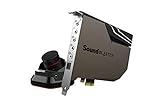
2. Creative Sound Blaster X5: best for desktop music listening
Specs: external USB-C · dual Cirrus Logic CS43198 DACs · balanced 4.4 mm headphone output · strong headphone amplifier · desktop-box form factor with physical controls
The X5 acts like a small desktop DAC and amplifier. The balanced output offers a better connection for compatible headphones and the dual DACs target music fidelity.
Best for: headphone listeners with demanding or balanced-cable headphones.
Skip if: you use a basic gaming headset, as you will not benefit from the extras.
- Pros: balanced output, strong amplifier, premium build.
- Cons: premium tier, takes desk space.

3. Creative Sound Blaster X4: best compact unit with controls
Specs: external USB-C · about 114 dB class · 24-bit/192 kHz · 7.1 virtual surround · optical input · knob controls
The X4 is a lower-tier cousin with a modern connector, an optical input for a console or TV and physical volume control.
Best for: people who want a small box with real knobs for a headset or speakers.
Skip if: your headphones are 250 ohm or higher.
- Pros: USB-C, knobs, optical in, compact.
- Cons: modest amplifier headroom.
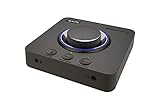
4. EPOS GSX 300: best simple virtual surround adapter
Specs: external micro USB · 7.1 virtual surround · 3.5 mm headset and microphone sockets · small body
The GSX 300 turns a 3.5 mm headset into a virtual surround headset, and it requires almost no setup.
Best for: casual players who want an easy upgrade.
Skip if: you want high-end amplification or a modern connector.
- Pros: easy, small, entry-level tier.
- Cons: micro USB, modest power.

5. EPOS GSX 1000 2nd Edition: best audio station for desk use
Specs: external USB · DAC and amplifier hybrid · adjustable sidetone · aluminum volume wheel · headset connections
The GSX 1000 is built around headset use. The adjustable sidetone lets you hear your own voice, which helps you avoid shouting during voice chat.
Best for: headset-focused users who value sidetone and a tactile wheel.
Skip if: you use open-back headphones or need XLR input.
- Pros: sidetone, wheel, desk friendly.
- Cons: aimed at headsets, mid-range tier.
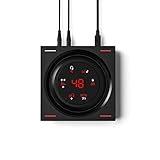
6. Focusrite Scarlett Solo: best for recording one mic or instrument
Specs: USB-C · 24-bit/192 kHz class · one XLR microphone preamp · one instrument input · headphone output · direct monitoring
The Scarlett Solo is an audio interface rather than a gaming sound card, and it is the common starting point for podcasts, voice-over and guitar. It plays back audio cleanly too, but lacks surround features.
Best for: solo creators with an XLR microphone or instrument.
Skip if: you want gaming features or two microphone inputs.
- Pros: reliable drivers, USB-C, quality preamp.
- Cons: one microphone input only, no surround features.

7. Audient EVO 4: best for two inputs and easy setup
Specs: USB-C · two microphone preamps · two outputs · class-compliant (specs from the maker; not confirmed in our research sources, so verify before you buy)
The EVO 4 is a compact interface that suits two-person podcasts or a microphone plus an instrument. It is class-compliant, so it works on Mac and many mobile devices without extra drivers.
Best for: two-input home recording and streaming.
Skip if: you need surround features or optical connections.
- Pros: two inputs, compact, class-compliant.
- Cons: no gaming features, we could not confirm every figure.

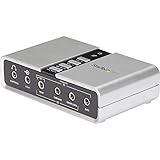
8. StarTech 7.1 USB adapter: best emergency fix
Specs: USB · 7.1 channels · 44.1 and 48 kHz sampling · 3.5 mm outputs · plug-and-play
Generic adapters add a working headphone and microphone jack when your motherboard audio fails or a laptop port breaks. They are not for quality listening.
Best for: repairs, spare ports and office use.
Skip if: you want clear amplification or higher sample rates.
- Pros: entry-level tier, simple, small.
- Cons: basic sample rates, weak amplifier.
All fifteen external options at a glance
The table below combines the original eight with the seven additions. Prices are tiers.
| Model | Category | Standout feature | Mic input | Price tier |
|---|---|---|---|---|
| Sound BlasterX G6 | Gaming DAC | Console friendly, surround | Yes | Mid-range |
| Sound Blaster X5 | Hi-fi DAC | Dual DAC, balanced 4.4 mm | Not specified | Premium |
| Sound Blaster X4 | Compact DAC | Controls, surround | Yes | Mid-range |
| EPOS GSX 300 | Surround adapter | Volume dial, smart button | Headset mic | Entry-level |
| EPOS GSX 1000 2nd Edition | Audio station | Sidetone, volume wheel | Headset mic | Mid-range |
| Focusrite Scarlett Solo | Interface | One XLR, one instrument | XLR | Mid-range |
| Audient EVO 4 | Interface | Two inputs, smart gain | XLR | Entry-level to mid-range |
| StarTech 7.1 USB adapter | Basic adapter | Multi-jack outputs | 3.5 mm | Entry-level |
| Sound Blaster Play! 3 | Dongle | 24-bit/96 kHz plug-and-play | 3.5 mm | Entry-level |
| Cubilux 7.1 USB | Surround adapter | Line-in plus mic, metal body | Stereo mic | Entry-level |
| Fosi Audio K5 Pro | Desktop DAC/amp | 1000 mW, tone knobs | Yes | Entry-level |
| FiiO K11 | Desktop DAC/amp | 1400 mW, balanced out | No | Mid-range |
| Fosi Audio Q4 | Desktop DAC | RCA outputs | No | Entry-level |
| Audient iD4 MKII | Interface | Class A preamp | XLR | Mid-range |
| Focusrite Scarlett 2i2 (4th Gen) | Interface | Two preamps | XLR x2 | Mid-range to premium |
Decision matrix: which external card for which job
| Your job | Key requirement | Pick |
|---|---|---|
| Gaming on PC and console | Console support, optical | Sound BlasterX G6 |
| Balanced hi-fi headphones | 4.4 mm output, strong amp | Sound Blaster X5 |
| Small desk, knob control | USB-C, volume knob | Sound Blaster X4 |
| Headset with sidetone | Sidetone, wheel | EPOS GSX 1000 2nd Edition |
| Cheap surround headset upgrade | Simple plug-in | EPOS GSX 300 |
| One XLR mic or guitar | Mic preamp | Focusrite Scarlett Solo |
| Two mics or mic plus instrument | Two preamps | Audient EVO 4 |
| Quick repair, no quality need | Plug-and-play | StarTech 7.1 USB adapter |
Concrete thresholds for choosing an external unit
- Headphones at or below 32 ohm and no recording: a Play! 3 class dongle is enough.
- Headphones between 33 and 150 ohm: choose a box with a headphone amplifier, such as the K5 Pro or X4 class.
- Headphones from 150 to 300 ohm or balanced cables: choose the X5 or K11 class.
- One XLR mic: Scarlett Solo, EVO 4 or iD4 MKII class. Two mics or a mic plus guitar: 2i2 class.
- Console use: pick a unit that lists console support, such as the G6 or X4, and avoid pure interfaces.
- Laptop with one port: confirm a USB-C or USB-A cable fits before you order.
- If you need surround on a budget, remember that virtual 7.1 is a software mix to stereo.
Choose by input and output count first, then by amplifier class, and only then by brand.
External versus internal: when does each win?
An internal PCIe card is generally cheaper for a given amplifier and leaves the desk clear, but it needs a free slot and works only with that one PC. An external unit costs a bit more for the same specs because it needs a case, a power path and often a control panel, but it avoids case noise and travels with you. Choose external if you use a laptop, switch between a PC and a console, use a small-form-factor build with covered slots, or want physical controls within reach. Choose internal if you have a roomy desktop and want the lowest cost per spec.
Setup and troubleshooting tips
- Plug the device directly into a USB port on the motherboard or laptop, not an unpowered hub, to avoid dropouts.
- Install the maker’s driver or app before setting the device as default playback in Windows sound settings.
- If audio crackles, change the USB port, update the driver and lower the sample rate in the sound properties.
- For recording interfaces, enable direct monitoring and set the input gain so peaks reach about two-thirds of the meter, leaving headroom.
- For console use, set the console to output audio over USB and confirm the connected device is recognized before launching a game.
- Keep USB cables short and use the original cable when possible.
Safety and care
Lower the volume before plugging in headphones, particularly with a strong amplifier. High-power outputs can reach levels that are loud enough to hurt hearing quickly. Raise volume slowly, and use the unit’s knob rather than maxing the software slider. Keep the unit away from liquids and heat sources.
More external sound cards, DACs and interfaces to consider
The first eight picks lean on Creative, EPOS and two recording interfaces. These seven additions cover the cheapest plug-in fix, a surround-capable adapter from a smaller brand, three desktop DAC and amplifier boxes, and two more interfaces for people who record voice or instruments.
9. Creative Sound Blaster Play! 3: best low-cost headset upgrade
Specs: external USB adapter · 24-bit/96 kHz · plug-and-play · works with PC and Mac · 3.5 mm headphone and mic jacks
The Play! 3 is the simplest way to replace a failed or noisy motherboard jack. It adds no amplifier worth the name and no surround processing, so treat it as a clean, small converter that works on both Windows and macOS without a setup routine.
Best for: headset users on a laptop or a PC with a bad front-panel jack who want the cheapest working fix.
Skip if: your headphones are above 80 ohm or you want physical volume controls.
Pros: tiny, driver-free for basic use, entry-level tier.
Cons: no real amplifier power, no controls, stereo only.
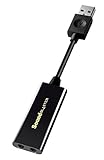
10. Cubilux 7.1 USB Surround Sound Card: best budget surround adapter
Specs: external USB-A · aluminum body · 48 kHz to 384 kHz sample-rate class · line-in · stereo mic input · 7.1 virtual surround
This small adapter is for people who want a line-in and a mic jack beside the headphone output, in a metal body that sheds heat better than the cheapest plastic dongles. The 7.1 mode is virtual, meaning software mixes channels down to two ear cups rather than driving separate speakers.
Best for: desk users who want line-in plus mic and a sturdier build than generic dongles.
Skip if: you need real multichannel speaker outputs or strong amplification.
Pros: line-in and mic jacks, metal shell, wide sample-rate class.
Cons: virtual surround only, limited amplifier power, little software.

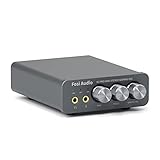
11. Fosi Audio K5 Pro: best budget DAC with a mic jack
Specs: USB-C, optical and coaxial inputs · RCA and 3.5 mm outputs · 1000 mW stated headphone power · mic input · bass and treble knobs · 24-bit/192 kHz
The K5 Pro is a desktop box, not a dongle. It gives mid-impedance headphones more voltage than a motherboard output and keeps a microphone input for headset use, while the RCA outputs drive powered speakers.
Best for: gamers and music listeners with 80 to 250 ohm headphones who want knobs and a mic jack.
Skip if: you want multichannel surround processing or a fully balanced signal path.
Pros: mic input, RCA outputs, entry-level tier.
Cons: no surround software, no balanced output.
12. FiiO K11: best for balanced headphone cables
Specs: USB, optical and coaxial inputs · 6.35 mm and balanced 4.4 mm outputs · RCA out · 1400 mW stated power · 384 kHz/24-bit with DSD256
The K11 is a pure listening box with high stated output power and both single-ended and balanced headphone jacks. It does not include a microphone path, so pair it with a separate microphone for calls and streams.
Best for: owners of 250 ohm and balanced-cable headphones who play stereo audio and music.
Skip if: you want a headset mic input or surround processing.
Pros: strong output power, balanced 4.4 mm jack, multiple inputs.
Cons: no mic, mid-range tier, no surround processing.

13. Fosi Audio Q4: best simple USB DAC for powered speakers
Specs: USB, optical and coaxial inputs · 3.5 mm headphone output · RCA outputs for powered speakers or a stereo amplifier
The Q4 treats the external card as a source selector: the PC feeds it over USB and the speakers hang off the RCA outputs. It is not intended for gaming headsets with microphones.
Best for: music listeners who want a small DAC between a PC and powered speakers.
Skip if: you need a mic jack, surround modes or strong high-impedance drive.
Pros: multiple inputs, RCA outputs, entry-level tier.
Cons: no mic, modest headphone amplifier class, no software.

14. Audient iD4 MKII: best for a clean single-mic voice chain
Specs: USB-C interface · Class A console microphone preamp · monitor mix and panning · two headphone outputs · works with Mac, PC and iOS
The iD4 MKII fits streamers and podcasters who want a quiet XLR preamp and a monitor mix that can send a game sound blend to headphones. It is overkill for headset-only users, but it fixes the usual weak link: a poor microphone input.
Best for: voice recording, streaming and podcasting with a single XLR microphone.
Skip if: you only game with a headset and never record a real microphone.
Pros: quality preamp, two headphone outputs, monitor controls.
Cons: mid-range tier, fewer extras than a gaming DAC, needs a microphone.

15. Focusrite Scarlett 2i2 (4th Gen): best for two mics or a mic plus guitar
Specs: USB-C interface · two mic preamps · two Hi-Z instrument inputs · 24-bit/192 kHz · 120 dB dynamic range class · Auto Gain, Clip Safe and Air modes
The 2i2 doubles the input count of the Scarlett Solo, so two guests or a voice plus a guitar can record at once. It is a recording tool first, and the headphone output is secondary to its inputs.
Best for: two-person podcasts, duos, and creators who record a mic and an instrument at once.
Skip if: you only need to listen, or one mic input is enough.
Pros: two preamps, simple setup features, widely supported.
Cons: premium tier among these, no surround processing.

Frequently asked questions
What is an external sound card?
It is a separate box that connects to a computer by USB and provides its own audio conversion, headphone amplifier and often microphone input.
It bypasses the motherboard audio and works with laptops and desktops.
Is an external sound card better than an internal one?
Not always. External units are isolated from case noise and portable, while internal cards cost less per spec and need no desk space.
Choose by whether you have a free slot and whether you need portability.
Can I use an external sound card on a console?
Only some can. The Sound BlasterX G6 is designed to work with PC and consoles, but many interfaces and desktop units are PC and Mac only.
Check the maker’s compatibility list for your console first.
Do I need an audio interface instead of a sound card?
If you record an XLR microphone or an instrument, yes. Interfaces such as the Focusrite Scarlett Solo and Audient EVO 4 provide microphone preamps.
Gaming sound cards do not provide XLR inputs or phantom power.
Will an external sound card make my headphones sound better?
It can, especially for headphones of 80 ohm or more, where a stronger amplifier improves volume and control.
For easy-to-drive headsets, the difference is small.
Does an external sound card work on Mac?
Class-compliant devices, which include most recording interfaces, work on Mac without special drivers. Creative units rely on a Windows-centered control app, so check Mac support on the maker page.
Check the maker’s operating system list before buying.
Is USB-C better than micro USB?
For convenience, yes. USB-C is reversible, widely supported and cables are easy to replace.
Micro USB units still work well but may feel dated.
What is balanced output and do I need it?
Balanced output uses a separate connection for each channel, often a 4.4 mm plug, which reduces interference and can deliver more voltage.
You only need it if your headphones have a balanced cable and you want the extra power.
Bottom line
Pick by job. The Sound BlasterX G6 is the safest external card for gaming and consoles. The Sound Blaster X5 serves headphone enthusiasts with a balanced output, and the X4 suits a small desk with knobs. Headset users who want a simple plug-in should buy the EPOS GSX 300 or the GSX 1000 2nd Edition. If you record a voice or an instrument, skip gaming cards and buy a Focusrite Scarlett Solo or an Audient EVO 4, after confirming the maker’s current specs.
More from Amazon
Programs that pair well with the guide above. Offers and eligibility are set by Amazon and may change.
Free shipping on eligible items, Prime Video and more. Eligible new members can start with a free trial.
Start a Prime free trialAd-free music streaming. Eligible new subscribers can start with a free trial.
Try Music Unlimited freeA Prime membership for ages 18-24 with a trial period. Eligibility is set by Amazon.
See Prime for Young AdultsAudiobooks and podcasts to listen to on the go. Eligible new members can start with a free trial.
Try Audible freeAs an Amazon Associate we earn from qualifying purchases.




Write Your Review
No reviews yet. Be the first to share your experience!