

Our Short List of 3

- Best for: Series S owners who game at a desk or in a small room and want the most complete gaming feature set in a compact TV.
- Best for: Living room Series S gaming where brightness and a big screen matter more than perfect viewing angles.

- Best for: Smaller rooms that need a bright, anti-glare screen and plenty of HDMI 2.1 ports for multiple consoles.
All 5 Picks at a Glance
| Product | Specs | Action |
|---|---|---|
| LG C5 OLED evo 42-inch (OLED42C5PUA) |
| Check price on Amazon |
| Hisense U7N 55-inch (55U7N) |
| Check price on Amazon |
| Samsung QN90D 43-inch (QN43QN90DAFXZA) |
| Check price on Amazon |
 Sony X90L 55-inch (XR55X90L) |
| Check price on Amazon |
 TCL QM7 55-inch (55QM751G) |
| Check price on Amazon |
Key takeaways
- Compare the best TVs for Xbox Series S: 4K picks with HDMI 2.1, 120Hz panels, VRR and ALLM for smooth low-lag gaming, plus Dolby Vision support for every room.
As an Amazon Associate, we earn from qualifying purchases made through links on this page.
The Xbox Series S is a small console with specific display needs. It renders most games at 1440p or below, supports frame rates up to 120Hz in compatible titles, and can output a 4K signal with upscaling for the dashboard, streaming apps and supported games. That means the best TV for a Series S is not automatically the biggest flagship on the wall. What matters most is a panel that accepts a 120Hz signal, variable refresh rate support to smooth out frame drops, auto low latency mode so the TV switches into game mode on its own, and low input lag so your inputs feel connected to the action.
This guide collects five TVs that meet those requirements at different sizes and panel types: a compact OLED for desk and bedroom setups, two bright Mini LED models for living rooms, a big-screen value pick with a native 144Hz panel, and a full array LED model with strong processing. Every pick below has at least one full-bandwidth HDMI 2.1 port, supports VRR and ALLM, and handles the Series S at 120Hz. Where a TV has a real limitation for Xbox gaming, such as a missing HDR format or gaming ports that are shared with eARC, that limitation is stated plainly in its section.
What to look for in a TV for Xbox Series S
120Hz support at 1440p or 4K. The Series S targets 1440p in most performance modes and can send a 120Hz signal. A TV with a native 120Hz (or higher) panel and HDMI 2.1 bandwidth can accept 4K at 120Hz or 1440p at 120Hz, which covers everything the console can output. A 60Hz TV still works, but it caps performance-mode games at 60 frames per second.
Variable refresh rate (VRR). VRR lets the TV match its refresh rate to the game’s frame rate, which reduces screen tearing and stutter when a game cannot hold a locked frame rate. The Series S supports HDMI Forum VRR and AMD FreeSync, so look for at least one of those on the spec sheet.
Auto low latency mode (ALLM). ALLM tells the TV to switch into its low-lag game mode automatically when the console turns on, so you do not have to dig through picture menus every time you play.
Input lag in game mode. Manufacturers rarely publish a single official figure, but game modes on the TVs below are designed to keep lag low at 60Hz and lower still at 120Hz. If you play competitive shooters or fighting games, this matters more than peak brightness.
HDR format support. The Series S supports HDR10 and Dolby Vision for gaming. Most TVs handle HDR10; Dolby Vision gaming is a bonus that only some brands support. Samsung TVs are the notable exception, as Samsung uses HDR10+ instead and does not license Dolby Vision.
HDMI 2.1 port count and eARC placement. One HDMI 2.1 port is enough for the console alone. If you also run a soundbar through eARC, check whether the eARC port is one of the HDMI 2.1 ports, because on some models connecting both can force compromises.
Size and panel type. OLED gives perfect blacks and near-instant pixel response but costs more per inch and is not the brightest choice for sunlit rooms. Mini LED and full array LED sets get brighter and come in larger sizes, with some blooming around bright objects as the trade-off.
LG C5 OLED evo 42-inch (OLED42C5PUA)
- Best for: Series S owners who game at a desk or in a small room and want the most complete gaming feature set in a compact TV.
Series S owners who game at a desk or in a small room and want the most complete gaming feature set in a compact TV.
Check the LG C5 42-inch on Amazon
The 42-inch LG C5 is the pick that fits where other gaming TVs cannot: on a desk, in a bedroom, or in a small gaming corner. Its OLED panel delivers perfect black levels because every pixel produces its own light, and pixel response is effectively instant by TV standards, so fast camera pans in shooters and racers stay clean without ghosting. For a Series S, the C5 covers the full feature checklist. All four HDMI ports are HDMI 2.1 with full bandwidth, the panel runs at 120Hz natively from consoles (and higher with a PC), and it supports HDMI Forum VRR, AMD FreeSync Premium and NVIDIA G-Sync, plus ALLM and Dolby Vision gaming.
Key specifications from LG: 4K OLED evo panel, alpha 9 AI Processor Gen 8, webOS 25, Dolby Vision and Dolby Atmos support, Filmmaker Mode, and a game optimizer dashboard that gathers VRR, ALLM and black stabilizer settings in one menu. The 42-inch size tops out at lower peak brightness than the larger C5 models, which is the main spec-based limitation: in a bright room, reflections and modest HDR highlights are the compromise you accept for the compact footprint. OLED also carries the standing caution about static elements over very long sessions, though the panel includes logo dimming and pixel care routines.
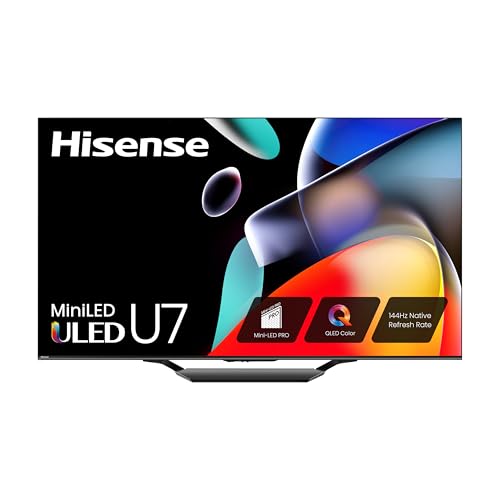
Hisense U7N 55-inch (55U7N)
- Best for: Living room Series S gaming where brightness and a big screen matter more than perfect viewing angles.
Living room Series S gaming where brightness and a big screen matter more than perfect viewing angles.
Check the Hisense U7N 55-inch on Amazon
The Hisense U7N is the brightness-first option in this group. Its Mini LED backlight with Full Array Local Dimming Pro reaches high peak brightness for an LED TV in this class, which makes HDR highlights in games like open-world adventures stand out even in a living room with the lights on. The panel is natively 144Hz, and Hisense’s Game Mode Pro supports 4K at 144Hz input, VRR, ALLM and AMD FreeSync Premium Pro, so the Series S can run at 120Hz with headroom to spare. Dolby Vision IQ and Dolby Atmos are both supported, which means the U7N is one of the few LED sets here that can use the console’s Dolby Vision gaming output.
Key specifications from Hisense: 55-inch 4K Mini LED ULED panel with quantum dot color, native 144Hz refresh rate, two HDMI 2.1 ports, Google TV, and a built-in subwoofer as part of its 2.1 channel audio system. The limitations are practical ones. Only two of the four HDMI ports are HDMI 2.1, and one of those carries eARC, so a Series S plus a soundbar plus a second console can exhaust the fast ports quickly. Viewing angles are narrower than the OLED above, as expected from a VA-type panel, so picture quality drops for viewers seated far to the side.
Samsung QN90D 43-inch (QN43QN90DAFXZA)
- Best for: Smaller rooms that need a bright, anti-glare screen and plenty of HDMI 2.1 ports for multiple consoles.
Smaller rooms that need a bright, anti-glare screen and plenty of HDMI 2.1 ports for multiple consoles.
Check the Samsung QN90D 43-inch on Amazon
The Samsung QN90D brings Neo QLED Mini LED performance down to a 43-inch size that suits smaller rooms and desk-adjacent setups. Samsung rates the set with Motion Xcelerator 144Hz, and the panel accepts 4K gaming at up to 144Hz from a PC and 120Hz from the Series S. All four HDMI ports are version 2.1, which is the most flexible port layout in this guide, and the TV supports ALLM, HDMI Forum VRR and AMD FreeSync Premium Pro. Samsung’s Gaming Hub also puts cloud gaming apps, including the Xbox app for Game Pass streaming, on the home screen alongside the console input.
Key specifications from Samsung: 43-inch 4K Neo QLED panel with Quantum Matrix Mini LEDs, NQ4 AI Gen2 processor, Neo Quantum HDR+, Object Tracking Sound+, Tizen smart platform, and an anti-glare coating that helps in bright rooms. The headline limitation for Xbox owners is HDR format support: Samsung does not offer Dolby Vision on any of its TVs, so Series S games fall back to HDR10 or HDR10+ rather than Dolby Vision. If Dolby Vision gaming is a priority, choose one of the other models in this guide. The built-in sound is stronger than most thin TVs, but like all of these sets it still benefits from a soundbar for movies.
Sony X90L 55-inch (XR55X90L)
- Best for: Series S owners who also watch a lot of film and TV, and who value motion handling and upscaling over raw gaming extras.
Series S owners who also watch a lot of film and TV, and who value motion handling and upscaling over raw gaming extras.
Check the Sony X90L 55-inch on Amazon
The Sony X90L is the processing pick. Its Cognitive Processor XR and Full Array LED backlight with local dimming produce natural motion handling and upscaling, which suits the Series S well because the console renders many games below 4K and the TV does the rest of the work. Gaming support is complete on the essentials: a native 120Hz panel, two HDMI 2.1 ports that accept 4K at 120Hz, VRR, ALLM and Dolby Vision. Sony markets this TV around PlayStation features, but nothing about the gaming hardware is console-locked; the HDMI 2.1 ports, VRR and ALLM work with the Series S exactly as specified.
Key specifications from Sony: 55-inch 4K Full Array LED panel, Cognitive Processor XR, XR Triluminos Pro color, Google TV, Dolby Vision and Dolby Atmos, and Acoustic Multi-Audio speaker positioning. The limitations are in the details. Only HDMI ports 3 and 4 are HDMI 2.1, and port 3 doubles as the eARC connection, so a soundbar and the Series S together use up both fast ports. Local dimming zone counts on full array sets like this are lower than on Mini LED rivals, so blooming around bright objects on dark backgrounds is more visible than on the Hisense or Samsung above.
TCL QM7 55-inch (55QM751G)
- Best for: Buyers who want a 55-inch Mini LED gaming TV with Dolby Vision and a native high-refresh panel, in rooms where most seating faces the screen.
Buyers who want a 55-inch Mini LED gaming TV with Dolby Vision and a native high-refresh panel, in rooms where most seating faces the screen.
Check the TCL QM7 55-inch on Amazon
The TCL QM7 is the big-screen Mini LED option built around TCL’s Game Accelerator features. The QD-Mini LED panel is natively 120Hz, and TCL rates the set for variable refresh rate up to 144Hz, with a Game Accelerator mode that can take 1080p input at higher rates for PC use. For the Series S, the relevant numbers are simpler: the QM7 accepts the console’s 1440p and 4K signals at 120Hz, supports VRR and ALLM, and includes Dolby Vision IQ for both games and streaming. TCL’s Halo Control local dimming is designed to keep blooming tighter than earlier generations of the company’s Mini LED sets.
Key specifications from TCL: 55-inch 4K QD-Mini LED panel with quantum dot color, up to 1,500 nits peak brightness class performance, two HDMI 2.1 ports, Google TV, Dolby Vision IQ and Dolby Atmos, and a Game Master menu that surfaces ALLM, VRR and input settings. The limitations mirror the Hisense: two HDMI 2.1 ports with eARC on one of them, and VA-panel viewing angles that fade off-axis. TCL’s motion processing also trails Sony’s, so sports and films rely more on the panel’s native response than on processing polish.
Comparison table
| TV | Size | Panel | Max console refresh | HDMI 2.1 ports | VRR / ALLM | Dolby Vision |
|---|---|---|---|---|---|---|
| LG C5 (OLED42C5PUA) | 42-inch | OLED evo | 120Hz | 4 | Yes / Yes | Yes |
| Hisense U7N (55U7N) | 55-inch | Mini LED | 144Hz | 2 | Yes / Yes | Yes |
| Samsung QN90D (QN43QN90D) | 43-inch | Neo QLED Mini LED | 120Hz | 4 | Yes / Yes | No (HDR10+) |
| Sony X90L (XR55X90L) | 55-inch | Full Array LED | 120Hz | 2 | Yes / Yes | Yes |
| TCL QM7 (55QM751G) | 55-inch | QD-Mini LED | 120Hz (144Hz VRR) | 2 | Yes / Yes | Yes |
Frequently asked questions
Does the Xbox Series S need a 4K TV?
No. The Series S renders most games at 1440p or 1080p and upscales the output. A good 4K TV still helps because its upscaling, HDR handling and 120Hz support improve the final image, and streaming apps can play native 4K content. But panel features such as VRR, ALLM and low input lag matter more than resolution alone.
Is 120Hz worth it on a Series S?
Yes, for the games that support it. A growing list of titles offer 120 frames per second performance modes on Series S, and a 120Hz TV is required to see them. Even at 60 frames per second, a 120Hz panel usually runs with lower input lag than a 60Hz panel in game mode.
What should I set on the Xbox for these TVs?
Set the console resolution to 4K UHD (or 1440p if you prefer native rendering), enable 120Hz in the TV and display options, turn on variable refresh rate and auto low latency mode, and allow Dolby Vision for gaming on the models that support it. The Xbox setup screens detect most capabilities automatically once the TV’s game mode and enhanced HDMI format are switched on.
Why does the Samsung not support Dolby Vision gaming?
Samsung does not license Dolby Vision for its TVs and uses the HDR10+ format instead. The Series S detects this and outputs HDR10 or HDR10+, so games still play in HDR; you simply do not get the Dolby Vision mode that the LG, Hisense, Sony and TCL in this guide can use.
Can I use one of these TVs as a PC monitor too?
The two smaller sets, the LG C5 42-inch and the Samsung QN90D 43-inch, are the natural desk candidates, and both accept high refresh rates from a PC over HDMI 2.1. The 55-inch models work better as living room TVs, though nothing stops you connecting a PC to them as well.
Conclusion
For most Xbox Series S owners, the decision comes down to room and screen size. The LG C5 42-inch is the most complete gaming TV here, with four HDMI 2.1 ports, Dolby Vision gaming and OLED response, in a size that fits desks and small rooms. The Samsung QN90D matches it on ports and brightness at 43 inches, as long as you can live without Dolby Vision. At 55 inches, the Hisense U7N is the bright, high-refresh living room choice, the TCL QM7 covers the same size with strong local dimming and Dolby Vision IQ, and the Sony X90L trades some gaming extras for the best motion processing and upscaling of the group. Whichever you choose, confirm the TV’s enhanced HDMI format is enabled on the port your Series S uses, and every feature in this guide will be available to the console.
More from Amazon
Programs that pair well with the guide above. Offers and eligibility are set by Amazon and may change.
Free shipping on eligible items, Prime Video and more. Eligible new members can start with a free trial.
Start a Prime free trialAd-free music streaming. Eligible new subscribers can start with a free trial.
Try Music Unlimited freeA Prime membership for ages 18-24 with a trial period. Eligibility is set by Amazon.
See Prime for Young AdultsAudiobooks and podcasts to listen to on the go. Eligible new members can start with a free trial.
Try Audible freeAs an Amazon Associate we earn from qualifying purchases.










Write Your Review
No reviews yet. Be the first to share your experience!