

Key takeaways
- Compare the best NAS hard drives for home servers: six WD Red Plus and Red Pro CMR drives from 2TB to 24TB, with RAID and capacity tips.
For most home servers, the WD Red Plus 12TB is the best NAS hard drive in this group: it pairs 7200 RPM spindle speed and a 512 MB cache with conventional CMR recording, and it lands at a capacity that fits a four-bay box without making rebuilds unmanageable. NAS drives are built for always-on use in a shared enclosure, with firmware tuned for RAID and low vibration tolerance. If you only need a small media or backup box, the 2TB and 4TB Red Plus models are enough, while the 20TB and 24TB Red Pro drives suit large, busy arrays.
Quick List
- WD Red Plus 4TB – best for a first home NAS or a small photo and document archive
- WD Red Plus 12TB – best for the all-round home server with room for a growing media library
- WD Red Plus 10TB – best for large capacity at a more modest step up from 8TB class drives
- WD Red Plus 2TB – best for a lightweight backup target or a starter two-bay unit
- WD Red Pro 24TB – best for maximum capacity per bay in a heavily used server
- WD Red Pro 20TB – best for large arrays that need Pro-class endurance with slightly less capacity
Which One Is Right for You?
| If you… | Choose |
|---|---|
| want one balanced drive size for a four-bay home server | WD Red Plus 12TB |
| are starting a first NAS for photos, documents and phone backups | WD Red Plus 4TB |
| want 7200 RPM speed and big capacity with the Plus tier | WD Red Plus 10TB |
| need a small backup target and do not want to overbuy | WD Red Plus 2TB |
| run many users, virtual machines or large file transfers every day | WD Red Pro 24TB |
| want Pro-class endurance and a five-year-class warranty at slightly lower capacity than the top model | WD Red Pro 20TB |
The simplest rule is to buy the Red Plus line for enclosures of up to eight bays and normal home use, and move to the Red Pro when the server works hard all day or holds a very large array. Do not buy a drive larger than you can back up, and avoid mixing very different models in one pool unless your NAS software explicitly supports it.
All 6 Picks in Detail
1. WD Red Plus 4TB – Best for a first home NAS
As an Amazon Associate we earn from qualifying purchases at no extra cost to you.

The 4TB Red Plus is the entry point for many first-time NAS builders. The listing describes a 3.5 inch internal drive running at 5400 RPM with a SATA 6 Gb/s interface, CMR recording and a 128 MB cache, sold under model number WD40EFZZ. The slower spindle speed means lower noise, less heat and lower power draw, which is exactly what you want in a living room or home office.
Build fit: pair two of these in a mirrored two-bay enclosure for a quiet home archive, or use four in RAID 5 for about 12TB of usable space with single-drive protection. Because the capacity is modest, it also works well as a secondary target for scheduled backups from the main NAS. Check the product page for the exact warranty length and the rated annual workload before you commit.
At this size, a two-bay mirror gives you 4TB of protected storage, enough for years of documents, photos and family video unless you record a lot of 4K footage. Because capacity is modest, rebuilds after a failure are quick, which lowers the window of risk.
- 4TB capacity, 3.5 inch form factor
- 5400 RPM with SATA 6 Gb/s interface
- CMR recording technology
- 128 MB cache per the listing
- Model WD40EFZZ; confirm warranty and workload rating on the product page
Pros
- Quiet, cool and energy-efficient
- CMR recording suits RAID rebuilds
Cons
- Slower than 7200 RPM models for heavy transfers
- Limited capacity for large media libraries
Compared with the 2TB model, it doubles the space for a modest step, which makes it the more sensible starting size for most families.
2. WD Red Plus 12TB – Best all-round home server drive

The 12TB Red Plus is our default recommendation for a home server. According to the listing it spins at 7200 RPM, uses a SATA 6 Gb/s interface, CMR recording and a 512 MB cache, in the 3.5 inch format with model number WD120EFGX. The larger cache and faster spindle improve responsiveness for multi-user access, media streaming and large file copies, while the capacity is large enough that a four-bay NAS gives you tens of terabytes of usable space.
Build fit: this is the drive for a four-bay unit that serves a family, streams to several televisions and receives nightly computer backups. Leave a gap of airflow around the enclosure, enable drive temperature alerts in your NAS software and consider RAID 6 if you fill every bay, since a rebuild on a twelve-terabyte member takes many hours and a second failure during that window would be costly.
It is not the quietest option, because 7200 RPM drives generate more vibration and heat than 5400 RPM ones. Ventilation matters, so place the NAS in a spot with airflow.
- 12TB capacity, 3.5 inch form factor
- 7200 RPM, SATA 6 Gb/s
- CMR recording
- 512 MB cache
- Model WD120EFGX; confirm warranty details on the listing
Pros
- Good balance of speed and capacity
- Large cache for busy shares
Cons
- More heat and noise than 5400 RPM models
- Longer rebuilds than smaller drives
Against the 10TB version it offers two extra terabytes per bay, which adds up across a full enclosure of four or more drives.
3. WD Red Plus 10TB – Best for large capacity without the very top size

The 10TB Red Plus shares the same platform traits as the 12TB: 7200 RPM, SATA 6 Gb/s, CMR recording, a 512 MB cache and a 3.5 inch body, with model number WD100EFGX in the listing. The reason to pick this size is practical. A 10TB pool still gives you lots of room, rebuilds complete a little faster, and in a four-bay system you can reach about 30TB of usable space in RAID 5 without stepping up to the biggest drives.
Build fit: a smart middle step for people who currently use 4TB or 6TB drives and want a large jump without stretching to the biggest size. Start with two or three drives, keep a bay free for expansion, and match every member of a pool to the same capacity and spindle speed so the array behaves predictably. Confirm the warranty on the listing, as terms vary by model and region.
It is a sensible choice if your enclosure is not full yet and you plan to add drives gradually. You can start with two and expand later if your NAS software supports it.
- 10TB capacity, 3.5 inch internal drive
- 7200 RPM with SATA 6 Gb/s
- CMR recording
- 512 MB cache
- Model WD100EFGX; confirm warranty on the product page
Pros
- Large capacity with a Plus-tier design
- Slightly shorter rebuilds than larger drives
Cons
- Warmer and louder than 5400 RPM drives
- The 12TB version gives more space in the same bay
It sits just below the 12TB model, so choose it when you want to hold back on per-bay capacity or when the listing for the 10TB is the one that is in stock.
4. WD Red Plus 2TB – Best for small backup targets

The 2TB Red Plus is the smallest drive in this group. It runs at 5400 RPM, uses SATA 6 Gb/s and CMR recording, and includes a 64 MB cache in a 3.5 inch form factor, listed as model WD20EFPX. It is a good match for a minimal NAS used to back up a few laptops, store scanned documents or host a small family photo library.
Build fit: works well in a compact two-bay enclosure that mirrors a small set of important files, or as the dedicated drive inside a tiny media box that mostly plays music and a few shows. If you already know your data will exceed 2TB within a year, skip this size and start with the 4TB, because replacing a whole array later is far more disruptive than buying a larger drive now.
Maximum capacity is not the point here. The advantage is an inexpensive way to start with a proper NAS-class drive rather than a desktop model, and the low rebuild time means the array is vulnerable for a shorter period if one drive fails.
- 2TB capacity, 3.5 inch drive
- 5400 RPM, SATA 6 Gb/s
- CMR recording
- 64 MB cache
- Model WD20EFPX; confirm warranty and workload rating on the listing
Pros
- Cool and quiet for small enclosures
- Fast rebuilds because of low capacity
Cons
- Fills up quickly if you store video
- Smaller cache than larger models
Compared with the 4TB, it is smaller but also gentler on the budget, so it fits only if your data truly stays small.
5. WD Red Pro 24TB – Best for maximum capacity in a busy server
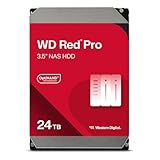
The 24TB Red Pro is the capacity leader here. The listing describes a 7200 RPM SATA 6 Gb/s drive with CMR recording and a 512 MB cache in a 3.5 inch form factor, model WD241KFGX. The Red Pro family is aimed at larger, more demanding NAS systems, with higher rated workloads and a longer warranty than the Red Plus line, but check the datasheet for the exact figures for this model.
Build fit: best suited to a six- to eight-bay or larger enclosure in a rack, closet or office where airflow is planned and the NAS is under steady load. Because a single drive holds so much data, plan for RAID 6 or a mirrored layout and maintain a second copy elsewhere. Confirm the workload rating and warranty on the datasheet before you decide, since those are the reasons to step up from the Plus line.
A drive this large makes sense when bays are limited. Two of them in a mirror give 24TB of protected space, and a four-bay RAID 6 array gives 48TB. The trade-off is time: a rebuild after a failure can run for a day or longer, so you want RAID 6 or a good backup plan.
- 24TB capacity in a 3.5 inch form factor
- 7200 RPM with SATA 6 Gb/s
- CMR recording
- 512 MB cache
- Model WD241KFGX; confirm warranty and workload rating on the product page
Pros
- Highest capacity per bay in this guide
- Pro-tier design for heavier use
Cons
- Long rebuilds and a large amount of data at risk per drive
- Overkill for light home use
Choose it over the 20TB when your enclosure is small and each bay has to carry as much data as possible.
6. WD Red Pro 20TB – Best for large arrays with Pro-class endurance

The 20TB Red Pro offers the same Pro-line design as the 24TB, with 7200 RPM, SATA 6 Gb/s, CMR recording and a 512 MB cache in a 3.5 inch drive, model WD202KFGX. At 20TB per bay it still gives enormous capacity, and it is a more measured step for builders who want Pro-tier endurance without maximum drive size.
Build fit: a good choice for creators who store raw video, photographers with large archives and small teams who share a project drive. It also suits anyone who wants the Pro-line warranty and endurance but does not need the very largest drive. As with every large drive, schedule regular health checks and scrubs in your NAS software so developing problems show up early.
As with other large-capacity drives, a single failure puts a lot of data in play. Use a redundant layout and keep an independent backup. Place the NAS where airflow can carry away the heat of several fast-spinning drives.
- 20TB capacity, 3.5 inch drive
- 7200 RPM, SATA 6 Gb/s
- CMR recording
- 512 MB cache
- Model WD202KFGX; confirm warranty and workload rating on the listing
Pros
- Pro-class design with very high capacity
- Rebuilds slightly faster than the 24TB
Cons
- Considerable heat and noise in a small enclosure
- More capacity than most homes need
Next to the 24TB, it trades four terabytes of space for a somewhat more manageable rebuild and a smaller data footprint per drive.
Specs Compared
| Model | Capacity | Series | Speed | Cache | Recording | Interface |
|---|---|---|---|---|---|---|
| WD Red Plus WD40EFZZ | 4TB | Red Plus | 5400 RPM | 128 MB | CMR | SATA 6 Gb/s, 3.5 inch |
| WD Red Plus WD120EFGX | 12TB | Red Plus | 7200 RPM | 512 MB | CMR | SATA 6 Gb/s, 3.5 inch |
| WD Red Plus WD100EFGX | 10TB | Red Plus | 7200 RPM | 512 MB | CMR | SATA 6 Gb/s, 3.5 inch |
| WD Red Plus WD20EFPX | 2TB | Red Plus | 5400 RPM | 64 MB | CMR | SATA 6 Gb/s, 3.5 inch |
| WD Red Pro WD241KFGX | 24TB | Red Pro | 7200 RPM | 512 MB | CMR | SATA 6 Gb/s, 3.5 inch |
| WD Red Pro WD202KFGX | 20TB | Red Pro | 7200 RPM | 512 MB | CMR | SATA 6 Gb/s, 3.5 inch |
How We Chose These
We began with the listing fields for each drive and checked them against Western Digital's published descriptions of the Red Plus and Red Pro families. Our criteria were NAS-specific: CMR recording rather than shingled recording, a spindle speed that matches the intended workload, cache size, capacity steps that make sense for common two-bay to eight-bay home servers, and the fit of each series to the number of bays it targets. We also considered how rebuild time, heat and noise scale with capacity. Where the listing did not state a workload rating or warranty term, we say to confirm it rather than assume a figure.
What to Look For
CMR versus SMR recording
Conventional magnetic recording writes tracks that do not overlap, which gives steady write performance. Shingled recording overlaps tracks to squeeze in more capacity, but long sustained writes, such as a RAID rebuild, can slow dramatically. Western Digital's Red Plus and Red Pro lines use CMR, which is why they are the safe choices for RAID. Whatever brand you buy, confirm the recording method in the model's datasheet, and be wary of unlabeled drives sold for NAS use.
Red Plus versus Red Pro
The Red Plus line is intended for home and small-office NAS systems of up to eight bays, with a rated workload of up to 180 TB per year and a three-year warranty. Red Pro drives are meant for larger systems and busier use, with a higher workload rating and a five-year warranty according to most published sources, though you should confirm the figures for your exact model on the datasheet. If your NAS mostly streams media and backs up a few computers, the Plus line is plenty. For VMs, many simultaneous users or very large arrays, the Pro line is the safer match.
Capacity, RAID and rebuild time
Usable capacity depends on the layout. RAID 1 mirrors two drives and gives you the capacity of one. RAID 5 gives you the capacity of all drives minus one, and RAID 6 gives you all minus two. Large drives take a long time to rebuild: at an average sustained 250 MB/s, a 20TB drive needs about 22 hours just to be rewritten, and real-world rebuilds on a busy NAS are slower. That long window is why RAID 6 or a mirror with a separate backup is advisable for drives above roughly 12TB.
Heat, noise and power
Seven-thousand-two-hundred RPM drives are faster but louder and hotter than 5400 RPM models. In a closet with poor airflow, several fast drives can raise enclosure temperatures well above comfortable levels, which shortens life. Aim to keep drive temperatures in the range the datasheet recommends, and check that your NAS fans actually move air across the drive bays.
Power is a smaller concern than heat, but it adds up in a server that never sleeps. A typical 3.5 inch drive draws several watts when spinning and less when idle, so a four-bay NAS may use a few tens of watts overall. Enable drive hibernation only if your usage allows it, because frequent spin-ups add wear. Placing the NAS on a stable shelf, away from foot traffic and desk vibration, also reduces noise and helps drives last longer.
Finally, think about network speed. A single hard drive reads sequentially at a couple of hundred megabytes per second, and a standard gigabit Ethernet link tops out at roughly 110 MB/s in practice. That means the network, not the drive, is the limit for most home use, so a faster spindle rarely changes how quickly a file opens on a laptop. Spend on capacity, warranty and cooling before you spend on speed, unless your NAS has a 2.5 gigabit or faster connection and several users working at once.
Worked example
Suppose you have a four-bay NAS and want protected space for a growing media library. With four 12TB drives in RAID 5, you get 36TB of usable space, about 32.7 TiB as your operating system will show it. In RAID 6, you get 24TB. If you can only afford two drives now, run them as a mirror for 12TB and add drives later if your NAS software supports expansion. Whatever you choose, RAID is not a backup, so copy important files to a separate drive or an off-site service.
Questions
Do I need a NAS drive, or will a regular desktop drive work?
A regular drive may work, but NAS drives are built for continuous operation, multi-drive vibration and RAID error handling. They are the better choice for any always-on server.
Is 7200 RPM better than 5400 RPM for a NAS?
It is faster for random access, but for home streaming and backup you will often be limited by the network instead. The slower drives run cooler and quieter, so 5400 RPM is an excellent choice for small home servers.
Can I mix different sizes of drive in one NAS?
Some systems, such as those with hybrid RAID, can use mixed sizes efficiently, while classic RAID uses the smallest drive as the limit for each member. Check how your NAS software handles it before buying different sizes.
How many drives should I start with?
Two drives in a mirror is the simplest protected setup, and three or four drives in RAID 5 or RAID 6 give more space for the same bay count. Start with the number of drives you can also back up.
Is RAID the same as a backup?
No. RAID protects against a drive failure, but it does not protect against deletion, ransomware, fire or theft. Keep a second copy on a separate device or off site.
How long do NAS hard drives last?
Many last five years or longer in a ventilated enclosure, but any drive can fail. Monitor drive health reports, replace aging drives proactively and keep backups.
Update History
- October 21, 2026 – Initial publication; product set drawn from current catalog listings.
- Check the product page for current specifications and availability before buying.
Sources
- Manufacturer product and specification pages for Western Digital WD Red Plus and WD Red Pro drives
- Retailer listing titles and specification fields for each model
- Published comparisons of Red Plus and Red Pro bay counts, workload ratings and warranty terms
More from Amazon
Programs that pair well with the guide above. Offers and eligibility are set by Amazon and may change.
Free shipping on eligible items, Prime Video and more. Eligible new members can start with a free trial.
Start a Prime free trialAd-free music streaming. Eligible new subscribers can start with a free trial.
Try Music Unlimited freeA Prime membership for ages 18-24 with a trial period. Eligibility is set by Amazon.
See Prime for Young AdultsAudiobooks and podcasts to listen to on the go. Eligible new members can start with a free trial.
Try Audible freeAs an Amazon Associate we earn from qualifying purchases.




Write Your Review
No reviews yet. Be the first to share your experience!