
Our Short List of 3

- Best for: Base PS4 players who want one screen with sound, two HDMI inputs, and headroom for a future PC.
- Screen: 23.8-inch Full HD (1920 x 1080) IPS panel
- Refresh rate: 165Hz (overclockable), 144Hz over HDMI
- Response time: 1ms MPRT with ASUS Extreme Low Motion Blur
- Adaptive sync: FreeSync Premium over DisplayPort and HDMI

- Best for: Players who sit for long sessions and want the screen positioned exactly right without buying a monitor arm.
- Screen: 24-inch FHD (1920 x 1080) VA panel
- Refresh rate: 144Hz
- Response time: 1ms (MPRT)
- Adaptive sync: AMD FreeSync Premium

- Best for: Casual PS4 players who want a bigger picture for single-player games and video, and who already own a headset or speakers.
- Screen: 27-inch FHD (1920 x 1080) panel
- Refresh rate: 75Hz
- Adaptive sync: AMD FreeSync
- Eye comfort: ComfortView (TÜV certified), anti-glare screen with 3H hardness
All 4 Picks at a Glance
| Product | Specs | Action |
|---|---|---|
| ASUS TUF Gaming VG249Q1R |
| Check price on Amazon |
| Samsung Odyssey G3 (LS24AG302NNXZA) |
| Check price on Amazon |
| Dell SE2722HX |
| Check price on Amazon |
 LG 27US500-W |
| Check price on Amazon |
Our Top Picks
- LG 27US500-W 27-inch UltraFine IPS 4K UHD 60Hz8.46 x 24.15 x 17.87 inches12.13 poundsCheck on Amazon
Buying a monitor for a PS4 is really a decision about limits, not about chasing the biggest spec sheet. The original PS4 tops out at 1080p and 60 frames per second, and the PS4 Pro adds a 4K output mode for supported games, but neither console can send a 1440p signal or push past 60Hz. Money spent on a high-refresh esports panel or a 1440p screen is money spent on headroom your console physically cannot use, unless a PC or a newer console shares the same desk.
This guide is for three kinds of buyers: base PS4 owners moving from a TV to a desk setup, PS4 Pro owners who want a screen that actually accepts the console’s 4K output, and players whose monitor also handles everyday PC or work duty. Every pick below was chosen from the specifications on its Amazon product page, with weight given to native resolution, HDMI inputs, panel type, and how you will hear game audio.
Quick Picks
As an Amazon Associate we earn from qualifying purchases.
| Product | Best for | Key spec from title |
|---|---|---|
| ASUS TUF Gaming VG249Q1R | Base PS4 at a desk, with sound included | 23.8-inch 1080p IPS, 165Hz |
| Samsung Odyssey G3 (LS24AG302NNXZA) | Players who need a fully adjustable stand | 24-inch 1080p, 144Hz |
| Dell SE2722HX | Bigger-screen casual play and movies | 27-inch 1080p, 75Hz |
| LG 27UL500-W | PS4 Pro owners ready for 4K | 27-inch 4K UHD IPS, HDR10 |
| LG 27US500-W | PS4 Pro owners who want the newer design | 27-inch 4K UHD IPS, HDR10 |
How to Choose
Match the Resolution to Your Console
Resolution is the one choice you cannot undo later, so start with the console you own. A base PS4 renders and outputs at 1920 x 1080, so a native 1080p monitor shows every pixel exactly as the console sends it. The PS4 Pro can output 3840 x 2160 in supported titles, which makes a 4K panel a genuine upgrade rather than a luxury. The trap in the middle is 1440p: no PS4 model outputs it, so the console sends 1080p and the monitor stretches that signal across more pixels, producing a softer picture than a cheaper native 1080p screen would give you.
Understand the 60Hz Ceiling Before Paying for Speed
Both PS4 models cap their video output at 60Hz, and most PS4 games run at 30 or 60 frames per second. A 144Hz or 165Hz monitor will work perfectly with the console, but it will simply run at 60Hz while the PS4 is connected. That extra refresh rate only earns its keep if a gaming PC or a newer console also plugs into the same screen. What does matter on any panel is response time and input lag: a monitor rated at 1ms to 5ms keeps motion clean at 60 frames per second, which is where the PS4 actually lives.
Count HDMI Ports and Plan Your Audio
The PS4 connects over HDMI only, so DisplayPort on a monitor is a bonus for a PC, never a substitute for an HDMI input. Check how many HDMI ports you get if a second console, a streaming stick, or a work laptop shares the screen. Audio is the detail buyers forget most often. Some monitors include built-in speakers, some offer only a headphone jack, and some, like the Dell below, have neither speakers nor a headphone output. With no audio path on the monitor, your sound has to come from a headset plugged into the DualShock 4 controller or from separate speakers.
Pick a Panel Type and Size That Suit Your Desk
IPS panels hold their color and brightness when you view them slightly off angle, which helps when a second person watches from the side of a desk. VA panels trade a little of that angle stability for deeper contrast, so dark scenes in story-driven games look richer in a dim room. Size interacts with resolution: 1080p stays crisp at 24 inches, looks noticeably softer at 27 inches from desk distance, and 4K stays sharp at 27 inches. Also check the stand. Height adjustment and VESA mounting decide whether the screen sits at eye level or stays wherever the fixed base leaves it.
The 5 Best Options
ASUS TUF Gaming VG249Q1R
- Best for: Base PS4 players who want one screen with sound, two HDMI inputs, and headroom for a future PC.
- Screen: 23.8-inch Full HD (1920 x 1080) IPS panel
- Refresh rate: 165Hz (overclockable), 144Hz over HDMI
- Response time: 1ms MPRT with ASUS Extreme Low Motion Blur
- Adaptive sync: FreeSync Premium over DisplayPort and HDMI
Base PS4 players who want one screen with sound, two HDMI inputs, and headroom for a future PC.
The stand offers tilt only, so plan on a VESA mount or a riser if you need height adjustment.
For a base PS4 on a desk, this is the most complete package in the guide. The 23.8-inch IPS panel is native 1080p, exactly what the console outputs, and it is one of the few picks here with built-in speakers, so audio works the moment you plug in the HDMI cable. Two HDMI ports leave room for a second device, and the 165Hz refresh rate is wasted on the PS4 itself but becomes useful headroom the day a PC or newer console joins the desk.
Samsung Odyssey G3 (LS24AG302NNXZA)
- Best for: Players who sit for long sessions and want the screen positioned exactly right without buying a monitor arm.
- Screen: 24-inch FHD (1920 x 1080) VA panel
- Refresh rate: 144Hz
- Response time: 1ms (MPRT)
- Adaptive sync: AMD FreeSync Premium
Players who sit for long sessions and want the screen positioned exactly right without buying a monitor arm.
There are no built-in speakers and only one HDMI port, so audio and a second console both need a workaround.
The Odyssey G3 answers a different problem: comfort over long sessions. Its stand adjusts for height, tilt, swivel, and pivot, which almost no other monitor at this level offers, so the screen meets your eyes instead of the other way around. The 24-inch VA panel runs at the PS4’s native 1080p, and its deeper contrast flatters darker games. The 144Hz rating again exceeds anything the console can send, but the 1ms MPRT response keeps fast motion tidy at the 60Hz the PS4 actually delivers.
Dell SE2722HX
- Best for: Casual PS4 players who want a bigger picture for single-player games and video, and who already own a headset or speakers.
- Screen: 27-inch FHD (1920 x 1080) panel
- Refresh rate: 75Hz
- Adaptive sync: AMD FreeSync
- Eye comfort: ComfortView (TÜV certified), anti-glare screen with 3H hardness
Casual PS4 players who want a bigger picture for single-player games and video, and who already own a headset or speakers.
There are no built-in speakers and no headphone jack listed, and 1080p at 27 inches looks soft up close, so keep a normal desk viewing distance.
Some PS4 setups are really living-room desks: story games, sports titles, and streamed movies on the same screen. The SE2722HX serves that buyer with a larger 27-inch panel, a 75Hz refresh rate that comfortably covers the console’s 60Hz output, and ComfortView low-blue-light tuning for long evening sessions. AMD FreeSync is listed for tear-free leisure gameplay, and the built-in power supply plus cable holder keep a small desk tidy. It is a general-purpose monitor first and a gaming monitor second, and it is honest about that trade.
LG 27UL500-W
PS4 Pro owners are the one group who should skip 1080p entirely, and the 27UL500-W is the established route into 4K. Its 27-inch IPS panel accepts the Pro’s 3840 x 2160 output natively, adds HDR10 support for the games that use it, and keeps two HDMI ports plus a DisplayPort free for a PC alongside the console. The 60Hz refresh rate matches the ceiling of the Pro’s output exactly, so nothing is wasted. Wide 178-degree viewing angles and 98 percent sRGB coverage also make it a credible everyday work screen between sessions.
Specs
- Screen: 27-inch 4K UHD (3840 x 2160) IPS panel
- Refresh rate: 60Hz
- HDR: HDR10 compatible
- Color: sRGB 98% color gamut
- Adaptive sync: AMD FreeSync
- Brightness: 300 cd/m², 178° viewing angles
- Ports: 2 x HDMI, 1 x DisplayPort
- Extras: Black Stabilizer, OnScreen Control
Best for: PS4 Pro owners who want native 4K and HDR, plus a sharp second screen for a PC.
Watch out for: On a base PS4 this monitor only ever receives 1080p, so the 4K panel earns nothing until a Pro or newer console is connected.
ASIN: B07PGL2WVS
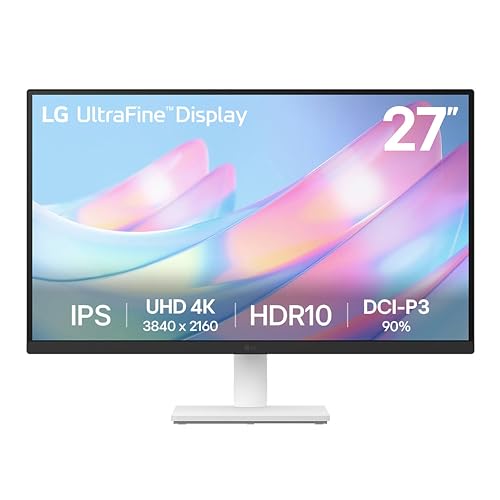
LG 27US500-W
- Best for: PS4 Pro owners who want 4K with wider color and a cleaner, modern bezel-free look.
- Screen: 27-inch 4K UHD (3840 x 2160) IPS panel, borderless design
- Refresh rate: 60Hz
- Response time: 5ms
- HDR: HDR10 with up to 90% DCI-P3 color gamut
PS4 Pro owners who want 4K with wider color and a cleaner, modern bezel-free look.
The stand is tilt-only and there are no built-in speakers, so budget for a headset and possibly a mount for longer sessions.
The 27US500-W is LG’s newer take on the same job, aimed at Pro owners who care how the desk looks as much as how the game looks. The borderless 27-inch IPS panel is again native 4K at 60Hz, with HDR10 and a wider DCI-P3 color gamut rated at up to 90 percent, which gives supported games and streamed video richer color than the older model. Reader Mode and Flicker Safe features suit long mixed-use days, and an HDMI cable is included in the box, so a PS4 Pro can be connected the moment it arrives.
Which One Fits Your Situation
You Play a Base PS4 at a Desk
Start with the ASUS TUF Gaming VG249Q1R. It matches the console’s 1080p output pixel for pixel, includes speakers so there is nothing else to buy, and keeps a second HDMI port free. If your chair and desk make you hunch over a fixed stand, take the Samsung Odyssey G3 instead and use its height adjustment to fix your posture.
You Own a PS4 Pro and Want the Upgrade to Feel Real
Choose between the two LG 4K models, because they are the only picks here that accept everything the Pro can send. The 27UL500-W adds FreeSync and a second HDMI port for a mixed desk, while the 27US500-W brings the wider DCI-P3 color and the cleaner borderless frame. Either way, set the Pro’s video output to 2160p so games render at the panel’s native resolution.
The Screen Also Handles Movies and Everyday Use
The Dell SE2722HX fits a shared, relaxed setup: the 27-inch picture is forgiving for films and slow-paced games, and ComfortView helps during long evenings. Just solve audio before it arrives, because there are no speakers and no headphone jack. A headset in the controller or a small soundbar under the screen covers it.
A PC or Newer Console Will Join the Desk Later
Buy the headroom only when a second machine is genuinely planned. The ASUS VG249Q1R’s 165Hz panel and DisplayPort input wake up fully with a gaming PC, and the LG 27UL500-W’s 4K panel suits a newer console that outputs 4K. If no second device is coming, the same money is better spent on the stand, size, or audio you will use every day with the PS4.
Common Mistakes
- Buying a 1440p monitor for a PS4: the console cannot output 1440p, so it sends 1080p and the monitor upscales it into a softer image than a native 1080p screen.
- Paying extra for 240Hz or a 1ms esports spec expecting the PS4 to use it, when both consoles cap output at 60Hz.
- Assuming every monitor has speakers, then discovering on delivery day that game audio needs a headset, a headphone jack, or an extractor you did not budget for.
- Leaving the PS4 Pro’s video output on automatic and never confirming it is actually sending 2160p to a 4K monitor.
- Choosing screen size by price alone: 1080p stretched across 27 inches looks grainy at desk distance, while 24 inches stays sharp for the same signal.
Frequently Asked Questions
Will a PS4 work with a 144Hz or 165Hz monitor?
Yes. The console connects over HDMI and simply runs the panel at 60Hz, which is the maximum the PS4 and PS4 Pro can output. The monitor works normally with no compatibility problem. The higher refresh rate only becomes useful if you later connect a gaming PC or a newer console that can actually send more than 60 frames per second to the same screen.
Is a 4K monitor worth it for a PS4?
Only if you own a PS4 Pro. The Pro can output 3840 x 2160 in supported games, and a 4K monitor like the LG models above displays that signal natively. The original PS4 is limited to 1080p, so on a 4K screen it is upscaled and looks no sharper than on a good 1080p monitor. Base PS4 owners get better value from a native 1080p panel.
Can I use an ultrawide monitor with a PS4?
You can connect one, but the experience is compromised. The PS4 only outputs a 16:9 picture, so an ultrawide screen shows black bars on both sides or stretches the image if you force it to fill. None of the picks in this guide are ultrawide for that reason. A standard 16:9 monitor in 1080p or 4K uses every pixel the console sends and is the safer purchase.
How do I get game sound if my monitor has no speakers?
The simplest route is a headset or earbuds plugged into the 3.5mm jack on the DualShock 4 controller, which carries full game audio. If the monitor has a headphone output, like the ASUS pick, speakers can connect there instead. For a monitor with neither speakers nor a jack, such as the Dell, an HDMI audio extractor or a USB headset fills the gap.
More from Amazon
Programs that pair well with the guide above. Offers and eligibility are set by Amazon and may change.
Free shipping on eligible items, Prime Video and more. Eligible new members can start with a free trial.
Start a Prime free trialAd-free music streaming. Eligible new subscribers can start with a free trial.
Try Music Unlimited freeA Prime membership for ages 18-24 with a trial period. Eligibility is set by Amazon.
See Prime for Young AdultsAudiobooks and podcasts to listen to on the go. Eligible new members can start with a free trial.
Try Audible freeAs an Amazon Associate we earn from qualifying purchases.










Write Your Review
No reviews yet. Be the first to share your experience!