
Our Short List of 3
All 4 Picks at a Glance
| Product | Specs | Action |
|---|---|---|
 Eyoyo Security Camera Monitor 22-Inch EM21A | Check price on Amazon | |
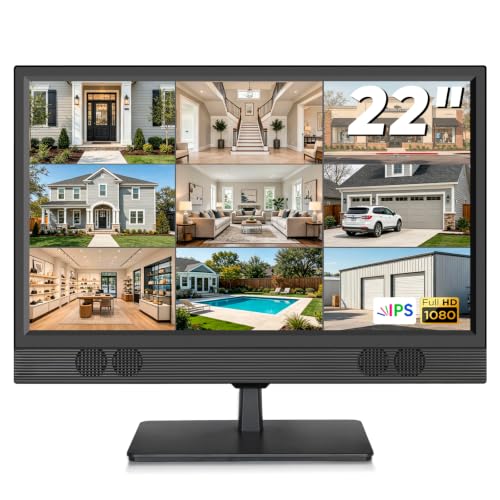 othoig 22 Inch Security Camera Monitor OT-22inch | Check price on Amazon | |
 JINSWY 10.1-Inch Security Monitor 1026H | Check price on Amazon | |
 Real HD Security Camera Monitor Screen 22-Inch LED-24A | Check price on Amazon |
Key takeaways
- Find the best monitor for security cameras with 1080p clarity, HDMI and BNC inputs, and always-on viewing for home and small-business camera setups.
A monitor for security cameras is a screen that sits beside a recorder and shows live camera feeds all day. It sounds simple, and the job is simple, yet the wrong screen creates daily friction: a missing input means an adapter hunt, a narrow viewing angle means a washed-out picture from the side, and a screen that was never meant for long hours means a dim panel after months of constant use.
This guide covers five monitors that listings describe for camera duty. Four are 22-inch full HD screens and one is a compact 10.1-inch screen for tight spots. Every pick connects to a DVR or NVR, and every pick is a monitor only — none of them records footage, stores clips, or runs camera software. Recording, motion alerts, and multi-view layouts come from the recorder, not the screen. What the monitor controls is how clearly you see the feed, how many inputs it accepts, and how well it holds up when it stays on for long stretches.
What to Look For in a Monitor for Security Cameras
Inputs come first
A monitor is only useful if it accepts what the recorder sends. Most modern NVR units send video over HDMI. Older DVR units may use VGA, and analog camera systems use BNC, the round coaxial connector that carries one camera feed per cable. Before buying, look at the back of the recorder and count its outputs, then match them to the monitor. A monitor with HDMI, VGA, and BNC covers the widest range of recorders. A monitor with HDMI and VGA only works well with a modern NVR, but it cannot take a direct BNC feed without an extra converter. RCA and AV inputs matter for the oldest gear, and a USB port on these screens is for power or media, not for video from a recorder.
Size and resolution
A 22-inch screen at 1920 x 1080 is the common size for a camera wall or a desk beside a recorder. It is large enough to read a four-way split without leaning in, and small enough to fit on a standard desk. A 10-inch screen suits a single feed in a tight spot, such as a counter, a shelf, or inside a cabinet, but small text gets hard to read when the feed splits into many windows. Resolution matters more than size for detail: 1080p shows faces and plates more clearly than 720p, and 1024 x 600 on a 10-inch screen is enough for one or two feeds, not for a full grid.
Viewing angle and panel type
Camera monitors often sit on a wall or a high shelf, viewed from the side or from below. An IPS panel keeps colors and brightness steady at wide angles, and a 178-degree viewing angle in both directions is the figure to look for. A narrow-angle panel washes out when viewed off-center, which is a daily annoyance in a room where people walk past the screen.
Round-the-clock use
A camera monitor stays on for long stretches, sometimes all day and night. Some listings describe a design for round-the-clock use, and those are the safer picks for a screen that never sleeps. Where a listing says nothing about long hours, treat it as a standard screen and expect shorter panel life under constant use.
Sound
Built-in speakers let the monitor play audio from a camera with a microphone, or a chime from the recorder when motion is detected. A headphone jack helps in a shared room. None of the screens here is a sound system, and a small built-in speaker is enough for alerts and voice, not for music.
Mounting and placement
A VESA mount pattern lets the screen hang on a wall arm or sit on a rack shelf. A 100 x 100 mm pattern is the common size for 22-inch screens, while the compact 10-inch screen uses a 75 mm pattern. Check the mount before buying, and leave room behind the screen for cables, since BNC and VGA connectors need more depth than HDMI.
Motion smoothness
Camera feeds move slowly most of the time, so a 60 Hz or 75 Hz refresh is plenty, and a 4 to 6.5 ms response is fine for watching people walk. High refresh figures belong to gaming screens and add nothing here.
Brightness and glare
A brightness of 250 to 300 cd/m² is enough for an indoor room, and a glossy finish looks vivid but reflects windows and lamps. If the screen faces a window, a matte finish or a shaded spot helps more than extra brightness.
What the monitor does not do
A monitor shows video; it does not record it. Storage, motion alerts, multi-view layouts, and remote viewing all come from the recorder or the camera system. If a listing promises recording or alerts, that is the recorder doing the work, not the screen.
Eyoyo Security Camera Monitor 22-Inch EM21A
The Eyoyo EM21A is the most complete screen in this guide, and it leads several camera-monitor roundups. It is a 22-inch full HD screen at 1920 x 1080 with a 75 Hz refresh, a 5 ms response, and a brightness of 300 cd/m². The listing states full sRGB coverage, which helps camera feeds look natural rather than washed out or oversaturated.
Its input set is the widest here: HDMI, VGA, AV, BNC, and USB, so it connects to a modern NVR over HDMI, an older DVR over VGA, or an analog system over BNC without a converter. Built-in speakers carry audio from a camera with a microphone, and the box includes HDMI, VGA, and BNC cables plus a remote, so the screen is ready to connect on arrival. A VESA 100 x 100 mm pattern lets it hang on a wall arm.
The 75 Hz refresh keeps motion smooth when a person crosses the frame, and the 5 ms response avoids smearing on fast movement. The included BNC cable matters because BNC cables are easy to forget when buying, and the remote lets you switch inputs and adjust volume without reaching behind the screen.
Keep in mind: the listing does not describe round-the-clock duty, so it is best treated as a screen for long viewing sessions rather than a panel built for constant use. The 22-inch size also needs a real desk or wall spot, not a counter corner.
othoig 22 Inch Security Camera Monitor OT-22inch
The othoig OT-22inch is a 22-inch IPS screen at 1920 x 1080, and the IPS panel is its main strength: colors and brightness hold up at wide angles, which matters when the screen sits on a wall and people view it from the side. The listing states a 178-degree viewing angle in both directions.
Inputs cover HDMI, VGA, BNC, and RCA, so it takes a modern NVR, an older DVR, or an analog feed. Built-in speakers handle audio from the recorder, and a remote is included, along with a user manual. The box holds the monitor, the remote, and the manual. A VESA mount pattern is listed, so it can hang on a wall arm or sit on a desk stand.
The RCA input is a bonus for the oldest analog gear, and the IPS panel also helps in a bright room where the screen is viewed from below. The 22-inch size suits a desk beside a recorder or a wall above a counter.
This listing first appeared on June 18, 2026, so it is newer than the other 22-inch screens here, and its track record is shorter. The listing does not describe round-the-clock use, so treat it as a screen for long viewing sessions. If wide-angle viewing is the priority, the IPS panel earns this screen its place.
JINSWY 10.1-Inch Security Monitor 1026H
The JINSWY 1026H is the compact pick: a 10.1-inch screen at 1024 x 600 with a 16:9 shape, a brightness of 300 cd/m², and a 500:1 contrast. It suits a single feed in a tight spot — a counter, a shelf, a desk corner, or a small room where a 22-inch screen would crowd the space.
Inputs are generous for the size: HDMI, VGA, BNC, AV, and USB, plus built-in speakers and a remote. The screen mounts on a wall with a standard VESA 75 pattern or sits on its included adjustable stand, and the remote works from up to 10 meters away. At 9.92 x 6.5 x 1.34 inches and 2.02 pounds, it is light enough to move between rooms.
The BNC input is the reason this small screen earns a place here: many compact screens skip BNC, which forces a converter for analog feeds. The adjustable stand tilts, so the screen can sit low on a counter and still face up toward the viewer.
Keep in mind: 1024 x 600 is enough for one or two feeds, but a full grid of many cameras turns small on a 10-inch screen, and small text gets hard to read. This is a second screen or a single-feed screen, not a replacement for a 22-inch wall display. The listing first appeared on April 28, 2025.
Real HD Security Camera Monitor Screen 22-Inch LED-24A
The Real HD LED-24A is a 22-inch full HD screen at 1920 x 1080 with a 75 Hz refresh, a 4 ms response, a brightness of 250 cd/m², and a 3000:1 contrast. The listing describes a design for round-the-clock use with W-LED backlighting and 16.7M colors, and it states a 178-degree viewing angle. The screen has an ultra-slim, edgeless design with a glossy finish, which suits a multi-screen wall where thin bezels keep the picture continuous.
Inputs are HDMI and VGA only, with a headphone jack and a built-in speaker. There is no BNC input, so an analog feed needs a converter or a recorder with HDMI out. There is also no Bluetooth and no WiFi, which the listing states plainly — this screen cannot work with wireless cameras on its own, and it needs a wired connection from a recorder.
Keep in mind: the model number is LED-24A on a 22-inch screen, which is confusing, and one mirror page mentions BNC in its highlights while the connectivity list shows HDMI and VGA only. Plan for HDMI and VGA. The glossy finish looks vivid but reflects windows and lamps, so a shaded spot helps.
Amcrest 24/7 Security Camera Monitor Screen 22-Inch AM-LM22
The Amcrest AM-LM22 is the only screen here from a well-known camera brand, and the listing describes it for round-the-clock use: a 22-inch full HD screen at 1920 x 1080 with a 60 Hz refresh, a 6.5 ms response, a brightness of 250 cd/m², a 3000:1 contrast, and a 178-degree viewing angle. W-LED backlighting and 16.7M colors are stated, along with a thin micro bezel and built-in dual speakers.
Inputs are HDMI and VGA only, so it pairs with a modern NVR or a DVR with HDMI or VGA out, but it cannot take a direct BNC feed. The screen is light at 4.63 pounds and slim at 19.4 x 1.5 x 11.2 inches, which helps on a wall arm. The listing first appeared on January 25, 2023, so it is the oldest screen here.
Keep in mind: stock signals conflict. Two recent mirror pages show this listing out of stock, while an older mirror shows it in stock and the maker’s own store lists the model as new. Check the live listing before buying, and have a backup pick ready. The Amcrest name is a plus for support, but the live listing is what matters.
Comparison Table
| Monitor | Size | Resolution | Inputs | Built-in Speakers | VESA |
|---|---|---|---|---|---|
| Eyoyo EM21A | 22-inch | 1920 x 1080 | HDMI, VGA, AV, BNC, USB | Yes | 100 x 100 mm |
| othoig OT-22inch | 22-inch | 1920 x 1080 | HDMI, VGA, BNC, RCA | Yes | Yes |
| JINSWY 1026H | 10.1-inch | 1024 x 600 | HDMI, VGA, BNC, AV, USB | Yes | 75 mm |
| Real HD LED-24A | 22-inch | 1920 x 1080 | HDMI, VGA | Yes | Not stated |
| Amcrest AM-LM22 | 22-inch | 1920 x 1080 | HDMI, VGA | Yes, dual | Not stated |
Frequently Asked Questions
Can I use a regular computer monitor for security cameras?
Yes, if it has the right input. A modern NVR sends video over HDMI, so any screen with HDMI works. An older DVR may need VGA, and an analog system needs BNC or a converter. A regular office screen often has HDMI and VGA, so it works with a modern recorder. A dedicated camera monitor adds BNC inputs, speakers, and a design for long hours, which is why the screens in this guide are built for camera duty.
Do I need a special monitor for round-the-clock viewing?
It helps. Screens built for camera duty often describe round-the-clock use in the listing, and that design choice matters when a screen stays on for months at a time. A standard office screen can show camera feeds, but it was built for a workday, not for constant use. If the screen will stay on all day and night, pick one whose listing describes round-the-clock use, such as the Real HD or the Amcrest here.
How many camera feeds can one monitor show at once?
That depends on the recorder, not the monitor. The DVR or NVR splits the feed into a grid — two, four, nine, or sixteen windows — and the monitor shows whatever the recorder sends. A larger screen and a higher resolution make a crowded grid easier to read, but the number of feeds is the recorder’s job. Check the recorder’s multi-view options before choosing a screen size.
How to Choose the Best Monitor for Security Cameras
Begin with the recorder: look at its outputs and pick a screen that accepts them. HDMI covers a modern NVR, VGA covers an older DVR, and BNC covers an analog system — a screen with all three, like the Eyoyo EM21A, fits the widest range of recorders. Next, pick a size: a 22-inch full HD screen suits a desk or a wall, while the 10.1-inch JINSWY suits a single feed in a tight spot. Then check the listing for round-the-clock use if the screen will stay on all day and night, and confirm the VESA pattern if the screen will hang on a wall. Finally, confirm the live listing before buying, since stock on these screens changes, and keep a second pick in mind in case the first is gone.
Disclosure: As an Amazon Associate, we may earn a commission from qualifying purchases made through links in this article, at no additional cost to you.
More from Amazon
Programs that pair well with the guide above. Offers and eligibility are set by Amazon and may change.
Free shipping on eligible items, Prime Video and more. Eligible new members can start with a free trial.
Start a Prime free trialAd-free music streaming. Eligible new subscribers can start with a free trial.
Try Music Unlimited freeA Prime membership for ages 18-24 with a trial period. Eligibility is set by Amazon.
See Prime for Young AdultsAudiobooks and podcasts to listen to on the go. Eligible new members can start with a free trial.
Try Audible freeAs an Amazon Associate we earn from qualifying purchases.










Write Your Review
No reviews yet. Be the first to share your experience!