
Our Short List of 3
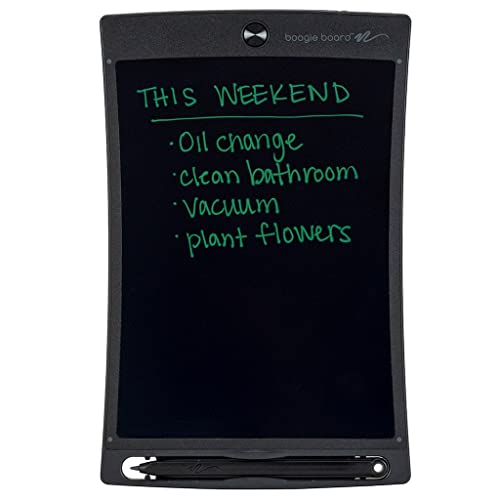
- Screen: 8.5-inch pressure-sensitive LCD
- Erase: Instant erase button, full-screen clear
- Stylus: Included stylus pen
- Product type: Reusable LCD writing tablet

- Screen: Letter-size LCD writing surface, 8.5 x 11 inches
- Display type: LCD
- Erase: One-button full-screen clear
- Stylus: Included stylus

- Screen: LCD writing pad surface
- Model: PT01085
- Erase: Instant erase, full-screen clear
- Stylus: Included stylus pen
All 5 Picks at a Glance
| Product | Specs | Action |
|---|---|---|
| 1. Boogie Board Jot 8.5 — Best for Everyday Adult Notes |
| Check price on Amazon |
| 2. Boogie Board Blackboard Smart Scan — Best for Longer Writing |
| Check price on Amazon |
| 3. Boogie Board Basics Reusable Writing Pad — Best Simple Desk Pad |
| Check price on Amazon |
 4. KOKODI LCD Writing Tablet 10 Inch — Best for Young Children |
| Check price on Amazon |
 5. TEKFUN LCD Writing Tablet 10 Inch — Best for Travel and School Bags |
| Check price on Amazon |
Key takeaways
- Compare the best LCD writing tablets, from the Boogie Board Jot and Blackboard to KOKODI and TEKFUN doodle boards, by screen size, erase lock and stylus.
As an Amazon Associate we earn from qualifying purchases.
An LCD writing tablet is one of the simplest pieces of technology you can own. It is a thin, pressure-sensitive board that darkens wherever the stylus presses, holds the image without a backlight, and clears the whole surface with a single button press. There is no operating system to update, no ink to replace, and no stack of half-used sticky notes building up on a desk or a fridge door.
That simplicity is also what makes choosing one confusing. Listings look almost identical, yet the details decide whether a board gets used daily or ends up in a drawer. Screen size changes what the board is for: a small board suits lists and phone messages, a mid-size board suits homework and kitchen notes, and a letter-size board suits longer writing and office work. The erase system matters too, because a board without a lock switch can lose a page when the erase button is knocked in a bag. Line style matters as well: some boards draw in a single pale colour, while boards for children draw in rainbow bands.
This guide compares five real LCD writing tablets sold on Amazon US, all the same product type: a reusable LCD e-writing board with a stylus and one-button erase. None is an Android tablet, an iPad, or an e-ink notebook. The picks are organised by use case, because the right board for a child’s car journey is rarely the right board for an adult’s desk.
Disclosure: This article contains affiliate links. If you buy through a link on this page, the site may earn a commission at no additional cost to you.
Our top picks
Best for: Everyday Adult Notes
Check price on AmazonBest for: Longer Writing
Check price on AmazonBest for: Young Children
Check price on AmazonBest for: Travel and School Bags
Check price on AmazonQuick Picks
- Best for everyday adult notes: Boogie Board Jot 8.5 — the classic reusable tablet for lists, messages, and quick sketches, with instant erase and a stored stylus.
- Best for longer writing: Boogie Board Blackboard Smart Scan — a letter-size surface for fuller pages of notes, with a Smart Scan design for saving a copy of a page.
- Best simple desk pad: Boogie Board Basics Reusable Writing Pad — a no-frills LCD pad with instant erase and an included stylus pen.
- Best for young children: KOKODI LCD Writing Tablet 10 Inch — a colourful 10-inch doodle board with an erase lock and a tethered stylus.
- Best for travel and school bags: TEKFUN LCD Writing Tablet 10 Inch — a lightweight 10-inch doodle board for mess-free drawing and writing practice on the move.
1. Boogie Board Jot 8.5 — Best for Everyday Adult Notes
- Screen: 8.5-inch pressure-sensitive LCD
- Erase: Instant erase button, full-screen clear
- Stylus: Included stylus pen
- Product type: Reusable LCD writing tablet
The Boogie Board Jot is the product that defined this category, and the 8.5-inch version remains the reference point for an adult note-taking board. The surface fits a shopping list, a phone message, a to-do list, or a quick diagram, while the board stays slim enough to live on a fridge door, a kitchen counter, or the edge of a desk.
Writing on the Jot uses a pressure-sensitive LCD. Press harder and the line appears bolder, press lightly and the line stays fine, which makes handwriting feel closer to pen on paper than a uniform digital line would. The included stylus stores with the board, and one press of the erase button clears the surface instantly.
The honest limitation of the Jot, and of every basic board here, is that erasing is all or nothing. There is no partial eraser for fixing one word, and a basic board does not store pages internally. If a note matters, copy it elsewhere or photograph it before clearing the screen. Buyers who accept that trade-off tend to be happy with the Jot for years, because everything else is frictionless: no pairing, no charging cable, and nothing to configure.
Specifications
Pros
Cons
View the Boogie Board Jot 8.5 on Amazon
2. Boogie Board Blackboard Smart Scan — Best for Longer Writing
- Screen: Letter-size LCD writing surface, 8.5 x 11 inches
- Display type: LCD
- Erase: One-button full-screen clear
- Stylus: Included stylus
Most LCD writing tablets are list-sized. The Blackboard Smart Scan is the option here for people whose notes run longer than a list. Its letter-size format, at 8.5 by 11 inches, gives a full page of writing room: lesson notes, meeting notes, worked problems, and multi-step plans all fit without shrinking handwriting into the corners.
The Blackboard line is also the more writing-focused end of the range. The surface is designed so templates and guides can sit behind the board, which suits tracing, ruled practice, and structured worksheets. The Smart Scan name reflects a companion saving workflow aimed at capturing a copy of a finished page with a phone rather than treating every page as disposable. That makes the Blackboard the natural pick for students and office users who want a route to keep selected pages.
The trade-offs follow from the size. A letter-size board is a desk or classroom tool, not a pocket tool, and it takes up real space in a school bag. For the right user, though, it is the only pick here that genuinely replaces a paper notepad page for page, rather than replacing sticky notes and scrap paper.
Specifications
Pros
Cons
View the Boogie Board Blackboard Smart Scan on Amazon
3. Boogie Board Basics Reusable Writing Pad — Best Simple Desk Pad
- Screen: LCD writing pad surface
- Model: PT01085
- Erase: Instant erase, full-screen clear
- Stylus: Included stylus pen
The Boogie Board Basics Reusable Writing Pad strips the format back to its essentials: an LCD writing pad with instant erase and an included stylus pen, for writing, drawing, and note-taking without any extra system layered on top. For a buyer who has read about app scanning and templates and decided they want none of it, this is the straightforward option.
That simplicity has practical value in shared spaces. A Basics pad on a family desk, a workshop bench, or a reception counter can be picked up by anyone, written on, and cleared, with nothing to log into and nothing to explain. It suits the constant small traffic of everyday writing: measurements, names, reminders, card game scores, or a quick sketch.
As with the Jot, the limits are the format’s limits. Erasing clears the whole surface, the board does not file pages away, and the writing is about quick, legible marks rather than fine art detail. Choosing between the Basics and the Jot is mostly about presentation and listing options, since both cover the same core job.
Specifications
Pros
Cons
View the Boogie Board Basics on Amazon
4. KOKODI LCD Writing Tablet 10 Inch — Best for Young Children
- Screen: 10-inch colourful LCD
- Model: LCD01
- Erase: One-button clear with erase lock switch
- Stylus: Included stylus with tether and holder
The KOKODI takes the same write-and-erase idea and aims it squarely at children. The 10-inch screen is a comfortable middle size for small hands: big enough for a full drawing, letter practice, or simple sums, and small enough to hold on a lap in a car seat or carry in a backpack. The board draws in colourful lines, which makes a page of doodles feel rewarding to a young child in a way a single pale line often does not.
Two details make the KOKODI especially practical. The first is the erase lock: a switch prevents the screen from being cleared, so a drawing survives being carried across a room or packed into a bag. The second is the stylus arrangement: the stylus is tethered and held with the board, which addresses the most predictable problem with any child’s drawing tool, the pen disappearing within a day. The battery compartment is screw-secured, a sensible touch for younger children.
Parents should still set expectations correctly. Colour appears in bands across the screen rather than giving a chosen colour for each line, and there is no way to save a drawing inside the board. A photograph is the archive. Within those limits, the KOKODI covers the category’s core promise for children very well: endless drawing and writing practice with no paper and no mess.
Specifications
Pros
Cons
View the KOKODI LCD Writing Tablet 10 Inch on Amazon
5. TEKFUN LCD Writing Tablet 10 Inch — Best for Travel and School Bags
- Screen: 10-inch colourful LCD
- Model: LCD01
- Erase: One-button full-screen clear
- Stylus: Included stylus
The TEKFUN is another 10-inch colourful doodle board, and its strengths show most clearly away from home. It is light and flat, so it slides into a school bag, a carry-on, or the pocket behind a car seat, and gives a child a self-contained activity for journeys, waiting rooms, and restaurants without loose paper, crayons, or apps competing for attention.
In daily use the TEKFUN covers the standard jobs of the category: drawing, doodling, handwriting practice, spelling, and games such as tic-tac-toe that two children can play on one surface and clear between rounds. The one-button erase is simple enough for a young child to manage alone, a large part of the appeal on a long journey.
Choosing between the TEKFUN and the KOKODI comes down to small practical preferences. Both are 10-inch colourful boards for children. Check the current listing for the colour option in the exact variant, the stylus storage, and whether an erase lock is present, because multi-variant listings can differ in details.
Specifications
Pros
Cons
View the TEKFUN LCD Writing Tablet 10 Inch on Amazon
How to Choose an LCD Writing Tablet
Start with screen size. Size decides the job. A board around 8.5 inches suits lists, messages, and quick sketches, and is the easiest size to keep on a fridge or a desk. A 10-inch or 12-inch board is the comfortable zone for children, fitting a whole drawing or a page of practice writing. A letter-size board is the choice for students and office users who write full pages. Bigger is not automatically better: an oversized board that stays at home loses to a smaller board that actually travels.
Decide whether an erase lock matters. Every board here clears with one button press, which is the point of the format and also its main risk. If the board will live in a bag, be carried by a child, or hold a note that must survive the day, an erase lock is close to essential. If it lives flat on a desk holding only disposable notes, a lock matters far less.
Be clear about saving. Basic LCD boards do not store pages. Erasing is permanent, and the standard way to keep anything is to photograph it first. Some boards, such as the Blackboard line, are designed around a phone capture workflow. If keeping an archive of notes is a core requirement rather than an occasional need, that points away from a basic doodle board altogether, so decide honestly before buying.
Check the stylus and how it is stored. A loose stylus gets lost, especially in cars and classrooms. Tethers, holders, and storage slots decide how usable a board stays after the first month. A board that also responds to a fingertip or a spare blunt tool is more forgiving when the original pen goes missing.
Understand colour before expecting it. Boards described as colourful usually show several colours in bands across the screen. The writer does not pick a colour per line the way they would with pens. That is fine for children’s drawing and legible for notes, but buyers expecting full colour control will be disappointed. Single-colour boards often give a cleaner, higher-contrast page for adult handwriting.
Look at power and build. These boards sip power and typically run on a small replaceable battery rather than needing regular charging. For children, check for rounded corners, a light body, and a screw-secured battery compartment. For adult desk use, a slim body and neat stylus storage matter more.
Frequently Asked Questions
Is an LCD writing tablet the same as a tablet computer?
No. It is a single-purpose writing surface with no app store, no browser, and no general-purpose screen. You write with a stylus, and one button clears the page. That limitation is the appeal: it is instant, distraction-free, and simple enough for a young child to use without instruction.
Can you save notes from an LCD writing tablet?
On a basic board, no. The page exists only on the surface until it is erased, so the practical method is to photograph it before clearing it. Boards designed with a capture workflow make that step more deliberate, but a buyer who needs searchable, stored notes as the main function should look at a different category of device.
Can you erase just part of a page?
On the boards in this guide, erasing clears the whole screen at once. There is no partial eraser. In practice, writers treat each screen as one page: finish the list or drawing, copy or photograph anything worth keeping, then clear and start again.
Do LCD writing tablets need charging?
Basic boards use very little power because the screen is not backlit, and they typically run on a small replaceable battery rather than a daily charging routine. Exact arrangements vary by model, so check the listing, and for children’s boards prefer a screw-secured battery compartment.
Are LCD writing tablets good for children?
Yes, for drawing, letter and number practice, spelling, and simple games. They remove paper waste and ink mess, the erase button is easy for small children to operate, and an erase lock helps finished work survive the trip home. Choose a size the child can hold comfortably, and a tethered stylus if the board will travel.
What size should an adult buy for kitchen or desk notes?
An 8.5-inch board such as the Jot covers lists and messages comfortably and takes up little space. Adults who write longer notes or worked problems should move up to a letter-size board, where handwriting stays at a natural size across a full page.
Conclusion
The best LCD writing tablet is the one matched to the writing it will actually hold. Choose the Jot 8.5 for adult lists and messages, the Blackboard Smart Scan for full pages of student or office writing, and the Basics for a simple shared desk pad. For children, the KOKODI adds an erase lock and tethered stylus, while the TEKFUN is the natural travel pick. Keep the format’s two honest limits in mind — erasing clears everything, and basic boards do not store pages — and any of these five will replace much paper.
More from Amazon
Programs that pair well with the guide above. Offers and eligibility are set by Amazon and may change.
Free shipping on eligible items, Prime Video and more. Eligible new members can start with a free trial.
Start a Prime free trialAd-free music streaming. Eligible new subscribers can start with a free trial.
Try Music Unlimited freeA Prime membership for ages 18-24 with a trial period. Eligibility is set by Amazon.
See Prime for Young AdultsAudiobooks and podcasts to listen to on the go. Eligible new members can start with a free trial.
Try Audible freeAs an Amazon Associate we earn from qualifying purchases.




Write Your Review
No reviews yet. Be the first to share your experience!