

Our Short List of 3
All 5 Picks at a Glance
| Product | Specs | Action |
|---|---|---|
 ASUS TUF Gaming VG249Q1A | Check price on Amazon | |
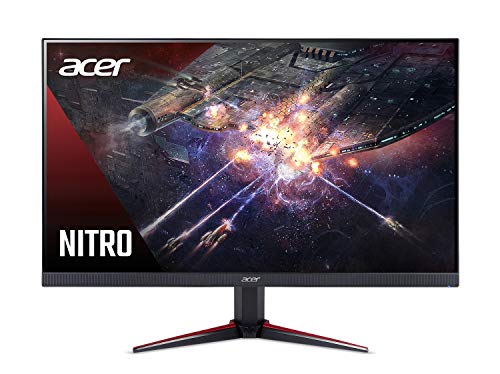 Acer Nitro VG240Y Pbiip | Check price on Amazon | |
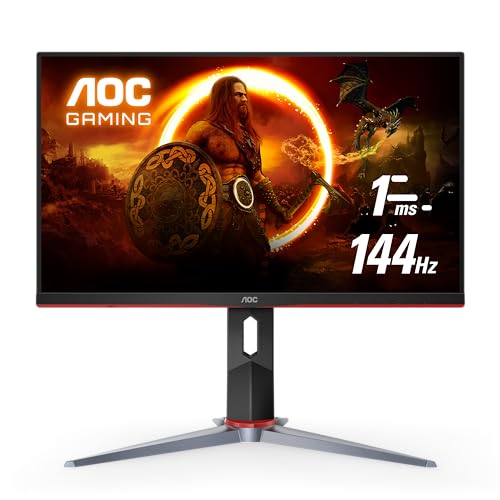 AOC 24G2 | Check price on Amazon | |
 AOC 24G2SE | Check price on Amazon | |
 ASUS VG248QE | Check price on Amazon |
Key takeaways
- Find the best gaming monitors for xbox one with sharp 1080p panels, low input lag, and FreeSync support, plus what to check before you buy.
The best gaming monitors for xbox one are built around what the console can actually output. The original Xbox One tops out at 1080p and 60 frames per second, while the Xbox One S adds HDR support and the Xbox One X can push higher resolutions. That means a monitor with a huge refresh rate or a 4K panel does not automatically make games look better on this console. What matters most is a sharp 1080p image, low input lag, and a panel that handles fast motion cleanly.
A good monitor also makes a real difference compared with a living room television. Monitors sit closer to your eyes, so a 24-inch screen fills your field of view in a way a distant TV does not, and gaming monitors are built for low input lag, which shortens the delay between pressing a button and seeing the result on screen. This guide covers five monitors that suit the Xbox One, from a feature-rich IPS pick to a long-running budget classic, and explains what to look for before you buy.
How to Choose
Resolution
The Xbox One renders games at up to 1080p, so a 1920 x 1080 monitor matches the console output exactly and gives you a one-to-one pixel image with no scaling. The Xbox One X can output at higher resolutions, but most games still target 1080p, and a 1440p monitor will scale the signal. A 4K monitor works with an Xbox One X, yet it adds cost without improving the image on a standard Xbox One. For most Xbox One owners, a 1080p monitor is the right match, and the money saved is better spent on a better panel or a lower input lag.
Refresh Rate
The Xbox One outputs at 60 frames per second in most games, and a later system update added 120Hz support at 1080p and 1440p on the Xbox One S and Xbox One X for a small number of games. A 144Hz or 165Hz monitor will still run at 60Hz or 120Hz from the console, so the extra headroom is only useful if you also connect a PC. What matters more for console play is that the monitor accepts the console signal cleanly over HDMI and does not add processing delay. A 60Hz monitor with low input lag can feel more responsive than a high refresh rate monitor with heavy image processing.
Input Lag
Input lag is the delay between your controller input and the picture changing on screen, and it is the single most important gaming specification for a console monitor. Televisions often add significant lag through image processing, while gaming monitors are designed to keep it low. Look for monitors marketed for gaming with a fast response time, and use the monitor game mode if it has one, because game mode switches off extra processing that adds delay. A monitor with low input lag makes aiming, timing, and reactions feel direct, especially in shooters and racing games.
FreeSync Support
The Xbox One supports AMD FreeSync, which matches the monitor refresh rate to the console output and reduces screen tearing. For FreeSync to work over HDMI, the monitor must support FreeSync through its HDMI port, not only through DisplayPort. Check the specifications for HDMI FreeSync support before buying. FreeSync matters most in games where the frame rate varies, because it smooths out the moments when the console drops below its target frame rate instead of showing a torn image.
Panel Type
IPS panels offer wide viewing angles and accurate colours, which makes them a good all-round choice for a desk setup where you sit directly in front of the screen. VA panels give deeper blacks and stronger contrast, which suits dark games and movie watching, but they can show more motion blur in fast scenes. TN panels are the fastest and cheapest, yet their colours shift when viewed from an angle. For an Xbox One setup where you sit in one position, any of the three can work, but IPS is the safest choice if you also use the monitor for browsing or watching video.
Screen Size
A 24-inch monitor is the sweet spot for 1080p gaming at desk distance, because the pixels stay dense enough to look sharp. A 27-inch 1080p monitor is usable but the image looks softer, since the same number of pixels is spread over a larger area. Larger screens also push you further back to see the whole image, which is not ideal on a small desk. If your desk is deep and you sit further away, a 27-inch screen can work, but for most Xbox One setups a 23.8-inch or 24-inch monitor is the better fit.
Connectivity and Audio
The Xbox One connects to a monitor through HDMI, so the monitor needs at least one HDMI port, and two ports are useful if you also connect a second console or a streaming stick. Built-in speakers are convenient if you do not have a headset or separate speakers, though they are rarely powerful. A headphone jack on the monitor is useful for wired headsets. Also check that the monitor stand adjusts for tilt and height, because a screen set at the wrong angle causes neck strain during long sessions.
Top Picks
ASUS TUF Gaming VG249Q1A
The ASUS TUF Gaming VG249Q1A is a 23.8-inch IPS monitor with a 1920 x 1080 resolution, a refresh rate of up to 165Hz over DisplayPort and 144Hz over HDMI, a 1ms MPRT response time, and AMD FreeSync Premium. It has two HDMI 1.4 ports, one DisplayPort 1.2 port, built-in speakers, and a 3.5 mm audio jack. ASUS ELMB motion blur reduction and Shadow Boost help in dark scenes, and the stand tilts and supports VESA mounting.
Who it is for: Xbox One owners who want a modern IPS panel with strong colours, FreeSync over HDMI, and built-in speakers, and who may also connect a PC to the same monitor later.
Caveats: the 165Hz refresh rate is only available over DisplayPort, so the console connection over HDMI runs at 144Hz at most, and the Xbox One itself will use 60Hz or 120Hz. The stand adjusts for tilt only, with no height adjustment. The panel is a good all-rounder rather than a specialist for deep blacks, so very dark games look better on a VA panel.
Acer Nitro VG240Y Pbiip
The Acer Nitro VG240Y Pbiip is a 23.8-inch IPS monitor with a 1920 x 1080 resolution, a 144Hz refresh rate, a 1ms VRB response time, and AMD FreeSync. It has two HDMI 2.0 ports and one DisplayPort, a zero-frame design with thin bezels, and a tilt-adjustable stand. The IPS panel gives wide viewing angles and consistent colours, and the two HDMI ports make it easy to keep a second console or streaming device connected at the same time.
Who it is for: players who want a clean IPS image, two HDMI ports, and FreeSync at a sensible size for desk gaming, and anyone who likes a near-borderless look for a multi-monitor setup.
Caveats: there are no built-in speakers, so you will need a headset or external speakers for audio. The stand tilts but does not adjust for height. The 144Hz headroom is only usable with a PC, since the Xbox One outputs at 60Hz or 120Hz.
AOC 24G2
The AOC 24G2 is a 24-inch IPS monitor with a 1920 x 1080 resolution, a 144Hz refresh rate, a 1ms response time, and FreeSync. It has HDMI, DisplayPort, and VGA inputs, a height-adjustable stand that also tilts, swivels, and pivots, and a three-year zero dead pixel guarantee. The frameless design keeps the bezels thin, and the stand is one of the most adjustable in this price range, which makes it easy to set the screen at a comfortable height.
Who it is for: players who want a fully adjustable stand, a sharp IPS image, and a monitor that can also serve as a work display, plus anyone who values a long pixel guarantee.
Caveats: this is an older model and availability can vary, so confirm the listing before ordering. It has no built-in speakers. Like other 144Hz monitors here, the extra refresh rate only benefits a PC connection, while the Xbox One will run at 60Hz or 120Hz.
AOC 24G2SE
The AOC 24G2SE is a 23.8-inch VA monitor with a 1920 x 1080 resolution, a 165Hz refresh rate, a 1ms response time, and AMD FreeSync Premium. Its listing notes compatibility with Xbox, PlayStation, and Switch, and it carries a three-year zero-bright-dot guarantee. The VA panel gives deeper blacks and stronger contrast than an IPS panel, which suits dark games and horror titles, and the 165Hz refresh rate gives headroom for a future PC connection.
Who it is for: players who favour dark, atmospheric games and want stronger contrast, and anyone who wants a console-friendly monitor with a clear console compatibility note in the listing.
Caveats: VA panels can show more motion smearing than IPS panels in fast scenes, so competitive shooter players may prefer an IPS pick. Viewing angles are narrower than IPS, so the image shifts if you watch from the side. Check the HDMI FreeSync behaviour with your console on arrival, since VA panels vary in how they handle variable refresh over HDMI.
ASUS VG248QE
The ASUS VG248QE is a long-running 24-inch monitor with a 1920 x 1080 resolution, a 144Hz refresh rate, and a 1ms response time. It has HDMI, DisplayPort, and dual-link DVI inputs, built-in stereo speakers, and ASUS GamePlus features such as a crosshair overlay and timer. The TN panel is fast and responsive, and the monitor has been a popular gaming choice for many years.
Who it is for: players who want a proven, responsive monitor with built-in speakers, and anyone who values a fast TN panel for competitive play.
Caveats: this is a 2013 model, so it lacks modern features such as FreeSync and HDR, and its TN panel has narrower viewing angles and less accurate colours than the IPS picks above. The 144Hz refresh rate is only available over DisplayPort or DVI, while HDMI is limited to 60Hz, which matches the Xbox One output but leaves no headroom. Consider the IPS picks first unless you specifically want a TN panel or built-in speakers.
Comparison Table
| Monitor | Panel and size | Resolution | Refresh rate | Sync | HDMI ports | Speakers |
|---|---|---|---|---|---|---|
| ASUS TUF Gaming VG249Q1A | 23.8-inch IPS | 1920 x 1080 | Up to 165Hz | FreeSync Premium | 2 | Yes |
| Acer Nitro VG240Y Pbiip | 23.8-inch IPS | 1920 x 1080 | 144Hz | FreeSync | 2 | No |
| AOC 24G2 | 24-inch IPS | 1920 x 1080 | 144Hz | FreeSync | 1 | No |
| AOC 24G2SE | 23.8-inch VA | 1920 x 1080 | 165Hz | FreeSync Premium | 2 | No |
| ASUS VG248QE | 24-inch TN | 1920 x 1080 | 144Hz | None | 1 | Yes |
Which One Is Right for You?
If you want the best all-round monitor for an Xbox One, the ASUS TUF Gaming VG249Q1A is the strongest pick: an IPS panel, FreeSync Premium, two HDMI ports, and built-in speakers cover every console need in one package. If you do not need speakers and prefer a cleaner look, the Acer Nitro VG240Y Pbiip offers the same IPS quality with two HDMI ports and a near-borderless design.
Players who want a fully adjustable stand should look at the AOC 24G2, which tilts, swivels, pivots, and adjusts for height, making it easy to find a comfortable position for long sessions. If you play a lot of dark games and want deeper blacks, the AOC 24G2SE is the VA option, with stronger contrast than the IPS picks. The ASUS VG248QE is the budget classic: fast and proven, with built-in speakers, but it lacks FreeSync and modern panel quality, so it suits players who prioritise response time and speakers over colour accuracy.
Remember that the Xbox One outputs at 60Hz in most games, with 120Hz available in a small number of titles on the Xbox One S and Xbox One X. A 144Hz or 165Hz monitor will not make the console output faster, so choose on panel quality, input lag, FreeSync over HDMI, and ergonomics rather than chasing the highest refresh rate number.
Frequently Asked Questions
Do I need a 144Hz monitor for Xbox One?
No. Most Xbox One games run at 60 frames per second, and only a small number of titles support 120Hz on the Xbox One S and Xbox One X. A 60Hz monitor with low input lag can feel just as responsive. A 144Hz or 165Hz monitor is still worth considering if you also connect a PC, because the extra refresh rate will benefit PC games, but it does not change what the console outputs.
Does FreeSync work on Xbox One?
Yes. The Xbox One supports AMD FreeSync, and it works over HDMI when the monitor supports FreeSync through its HDMI port. Check the monitor specifications for HDMI FreeSync support, because some monitors only support FreeSync over DisplayPort. When it works, FreeSync reduces screen tearing in games where the frame rate varies.
Is a 4K monitor worth it for Xbox One?
For the original Xbox One and Xbox One S, a 4K monitor adds little, because games render at 1080p and the console upscales the image. The Xbox One X can output at higher resolutions, but most of its games still target 1080p or use dynamic resolution. A sharp 1080p monitor with low input lag is a better match for this console, and it costs less than a 4K equivalent.
What size monitor is best for Xbox One?
A 23.8-inch or 24-inch monitor is the best fit for most desk setups, because 1080p stays sharp at that size and the screen fills your view at arm’s length. A 27-inch 1080p monitor looks softer, since the same pixels are spread over a larger area. If you sit further back or have a deep desk, a 27-inch screen can work, but for most players a 24-inch monitor is the right choice.
Disclosure: As an Amazon Associate, we may earn from qualifying purchases.
More from Amazon
Programs that pair well with the guide above. Offers and eligibility are set by Amazon and may change.
Free shipping on eligible items, Prime Video and more. Eligible new members can start with a free trial.
Start a Prime free trialAd-free music streaming. Eligible new subscribers can start with a free trial.
Try Music Unlimited freeA Prime membership for ages 18-24 with a trial period. Eligibility is set by Amazon.
See Prime for Young AdultsAudiobooks and podcasts to listen to on the go. Eligible new members can start with a free trial.
Try Audible freeAs an Amazon Associate we earn from qualifying purchases.










Write Your Review
No reviews yet. Be the first to share your experience!