
Our Short List of 3
All 3 Picks at a Glance
| Product | Specs | Action |
|---|---|---|
 Samsung 43-Inch Crystal UHD CU7000 Series, UN43CU7000 | Check price on Amazon | |
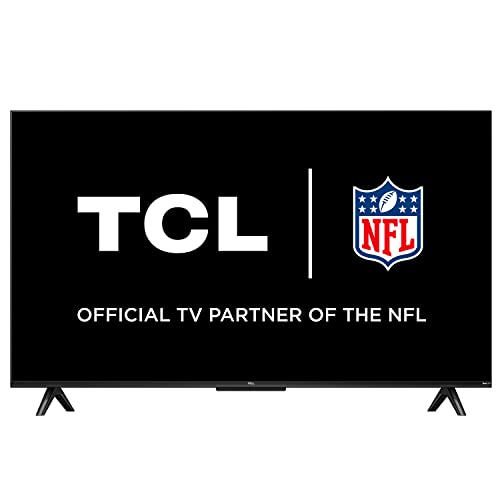 TCL 43-Inch S455 Series 4K TV, 43S455 | Check price on Amazon | |
 LG 43-Inch UQ7590 Series 4K TV, 43UQ7590PUB | Check price on Amazon |
Key takeaways
- Best 4K TVs for Xbox One S: 43-inch HDR televisions with low input lag, game mode and smart platforms matched to the console.
The best 4K TVs for Xbox One S are the ones that match what the console can actually do, rather than the ones with the longest specification sheet. The Xbox One S outputs 4K video for streaming and Blu-ray, upscales games to 4K and supports HDR10, but it does not play games natively at 4K the way later consoles do, and it tops out at 60 Hz. That shapes the buying decision: you need a television with a true 4K panel, solid HDR handling, low input lag and a good game mode, and you do not need the 120 Hz panels or HDMI 2.1 features that later consoles demand. The four televisions in this guide are all 43-inch 4K models, a size that suits a bedroom or a small living room where an Xbox One S usually lives, and each one covers HDR10 with a dedicated game mode. A caution that applies to every pick here: all four models are from earlier model years, and several carry third-party signals that they are discontinued or hard to find new. Each pick is flagged as the highest live-check priority in this guide, and you should confirm new-condition availability on the live listing before buying. If a listing has gone stale, the buying criteria in this guide still tell you exactly what to look for in a current equivalent.
How to Choose
True 4K panel
Confirm the panel is a native 3840 by 2160 display. Some budget televisions use upscaling tricks or lower-resolution panels, which waste the Xbox One S upscaling and 4K streaming.
HDR10 support
The Xbox One S supports HDR10, so a television that handles HDR10 well makes games and films look noticeably richer. Check HDR brightness and tone mapping rather than the HDR badge alone.
Input lag and game mode
Low input lag matters more than refresh rate for this console. Look for a game mode that drops lag well below 20 milliseconds, and confirm the mode works at 4K with HDR enabled.
Screen size and viewing distance
A 43-inch screen suits viewing distances of roughly one and a half to two and a half metres. Larger screens need more distance, and a screen that is too large for the room makes low-resolution upscaled content look worse, not better.
Ports and connections
The Xbox One S needs one HDMI port, but a television with three or four ports leaves room for a streaming stick, a soundbar and a second console. Check that the game mode applies to the port you use.
Sound
Built-in speakers on budget televisions are adequate for casual play but thin for films. A television with an optical output or HDMI ARC makes adding a soundbar simple later.
Smart platform
The Xbox One S already handles streaming apps, but a good smart platform on the television is a useful backup and keeps the console free for games. Check that the apps you use are available on the television’s platform.
Top Picks
Samsung 43-Inch Crystal UHD CU7000 Series, UN43CU7000
The Samsung CU7000 is a 43-inch 4K television with HDR10 support, a Crystal Processor that upscales lower-resolution content cleanly and a dedicated game mode with low input lag. Its Tizen smart platform covers the major streaming apps, and its slim AirSlim design suits wall mounting in a bedroom. PurColor technology aims for a wider colour range than basic budget panels, which helps HDR films and colourful games look richer on the Xbox One S.
Who it is for: bedroom and small living room setups where the Xbox One S is the main console and the television also handles daily streaming.
Caveats: A third-party retailer lists the 43-inch CU7000 as no longer available, which is a discontinued signal rather than Amazon-page evidence, but it makes this the highest live-check priority in the guide. Confirm new-condition availability on the live listing.
TCL 43-Inch S455 Series 4K TV, 43S455
The TCL 43S455 is a 43-inch 4K television with HDR10 and Dolby Vision support, a Roku smart platform and a game mode tuned for low input lag. Roku’s interface is straightforward and its app coverage is broad, which suits households where different people use the television for different things. The panel handles the Xbox One S upscaled output cleanly, and the television includes three HDMI ports for a console, a streaming device and a soundbar.
Who it is for: households that want the simplest smart television interface alongside a console, and viewers who value Dolby Vision for streaming films.
Caveats: The S455 family shares several ASINs across sizes, so confirm the listing is the 43-inch model before buying. This is a highest live-check priority pick.
LG 43-Inch UQ7590 Series 4K TV, 43UQ7590PUB
The LG UQ7590 is a 43-inch 4K television with HDR10, a wide viewing angle panel and LG’s webOS smart platform with its Magic Remote. Its game optimiser menu puts input lag, picture mode and refresh settings in one place, which makes switching between a game and a film quick. The panel’s wide viewing angles suit rooms where people sit off to the side, and the television includes HDMI ARC for a soundbar.
Who it is for: living rooms where viewers sit at an angle, and players who want quick access to game settings without digging through menus.
Caveats: A third-party retailer lists the UQ7590 series as no longer available, a discontinued signal rather than Amazon-page evidence. Confirm new-condition availability on the live listing; this is a highest live-check priority pick.
Hisense 43-Inch A6 Series 4K TV, 43A6H
The Hisense 43A6H is a 43-inch 4K television with HDR10 and Dolby Vision, a Google TV smart platform with voice control and a game mode with low input lag. Google TV brings recommendations and the major streaming apps together in one home screen, and Chromecast built in makes casting from a phone simple. The panel’s motion handling suits sports and action games, and the television includes three HDMI ports.
Who it is for: buyers who live in the Google ecosystem and want voice control, casting and a clean smart platform alongside their console.
Caveats: This ASIN rests on a single source, so it is a highest live-check priority pick. Confirm the listing is the 43-inch A6H model and that it is a new-condition listing.
Comparison Table
| TV | Size and resolution | HDR | Smart platform | Game mode |
|---|---|---|---|---|
| Samsung CU7000 | 43-inch, 4K | HDR10 | Tizen | Yes |
| TCL 43S455 | 43-inch, 4K | HDR10, Dolby Vision | Roku | Yes |
| LG UQ7590 | 43-inch, 4K | HDR10 | webOS | Yes, optimiser |
| Hisense 43A6H | 43-inch, 4K | HDR10, Dolby Vision | Google TV | Yes |
Which One Is Right for You?
If you want the simplest daily experience, the TCL 43S455 with Roku or the Hisense 43A6H with Google TV will feel the most straightforward, and both add Dolby Vision for streaming. The Samsung CU7000 suits a bedroom setup where a slim design and clean upscaling matter, while the LG UQ7590 is the pick for a wide living room where people sit off-centre. Whichever you choose, confirm new-condition availability on the live listing first, because all four models carry discontinuation or single-source flags, and if your preferred model is gone, match its specification sheet against a current equivalent using the criteria in this guide.
Before you buy, measure your room and check the viewing distance, because a 43-inch screen suits a bedroom or a small living room and looks cramped in a large open space. Check the television’s game mode on the exact HDMI port you plan to use, because some televisions apply game mode per port and others apply it globally, and confirm that game mode stays active when HDR content plays. If you use a soundbar, confirm the television has an HDMI ARC port or an optical output, because built-in speakers are the weakest part of most budget televisions. Think about the smart platform too: the Xbox One S already handles streaming, so the television’s apps are a backup rather than a necessity, but a platform you dislike will annoy you every time you turn the set on. Finally, because all four models in this guide are from earlier model years, check the live listing carefully and be ready to apply the criteria in this guide to a current equivalent if your first choice is no longer available new.
Frequently Asked Questions
Does the Xbox One S need a 120 Hz TV?
No. The Xbox One S outputs games at up to 60 Hz, so a 120 Hz panel adds nothing for this console. Spend instead on HDR handling, low input lag and panel quality.
What is the best TV size for an Xbox One S?
A 43-inch screen suits most bedrooms and small living rooms at typical viewing distances. Go larger only if you sit further back, because a very large screen makes upscaled content look softer.
Does HDR work on the Xbox One S?
Yes, the console supports HDR10 for games and video that carry HDR metadata. You need a television that supports HDR10 and a game or film that was mastered with it.
Should I use game mode on my TV?
Yes. Game mode reduces input lag by turning off extra picture processing, which makes controls feel responsive. Switch back to a cinema or standard mode for films to get the best picture.
Can I use a 4K TV with an Xbox One S for streaming?
Yes. The console streams 4K video from the major services, and a 4K television shows that content at full resolution. You need a fast enough internet connection for smooth 4K streaming.
Is HDR noticeable on a budget TV?
Yes, though less dramatic than on a premium set. HDR on a budget television adds richer colour and better contrast in bright highlights, even if peak brightness is modest.
Do I need a special HDMI cable for 4K and HDR?
A high-speed HDMI cable is enough for the Xbox One S at 4K and 60 Hz with HDR. The cable supplied with the console works, and any certified high-speed cable of reasonable length will do the same job.
Why does my Xbox One S look blurry on a 4K TV?
The console upscales games rather than rendering them natively at 4K, so fast-moving scenes can look softer than native 4K content. Streaming video and Blu-ray discs, which are mastered at 4K, will look sharper than upscaled games.
Disclosure: As an Amazon Associate, we may earn from qualifying purchases.
More from Amazon
Programs that pair well with the guide above. Offers and eligibility are set by Amazon and may change.
Free shipping on eligible items, Prime Video and more. Eligible new members can start with a free trial.
Start a Prime free trialAd-free music streaming. Eligible new subscribers can start with a free trial.
Try Music Unlimited freeA Prime membership for ages 18-24 with a trial period. Eligibility is set by Amazon.
See Prime for Young AdultsAudiobooks and podcasts to listen to on the go. Eligible new members can start with a free trial.
Try Audible freeAs an Amazon Associate we earn from qualifying purchases.





Write Your Review
No reviews yet. Be the first to share your experience!