

Key takeaways
- Zen 3 cores give strong gaming performance for its tier, well past what this graphics card needs.
- Ships with a basic cooler in many retail boxes, saving money.
- Cheap, mature B450, B550 and A520 boards plus inexpensive DDR4 memory keep total platform cost low.
- Plenty of headroom for a later graphics card upgrade.
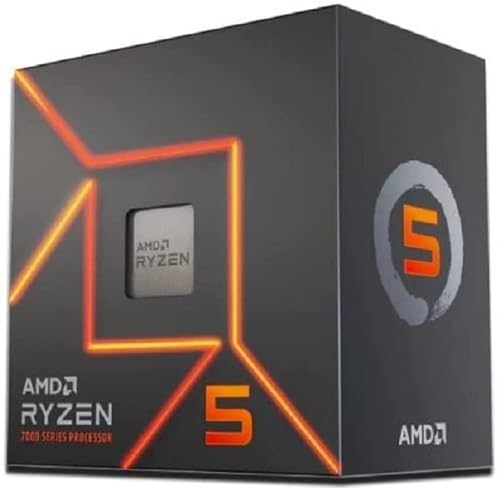
The best CPU for the Radeon RX 5500 XT in 2026 is the Ryzen 5 5600 for most buyers, because it has six cores, twelve threads and a PCIe 4.0 connection that this card’s narrow x8 link actually uses. If you already own a Ryzen 5 3600 or a Core i5-12400F, keep it: the RX 5500 XT is the limiting part in nearly every game, so a bigger processor will not raise frame rates much.
Our top picks


As an Amazon Associate we earn from qualifying purchases at no extra cost to you.
Quick Comparison of CPUs for the RX 5500 XT
| CPU | Best for | Cores / threads | Boost clock | PCIe to GPU | Socket | Price tier |
|---|---|---|---|---|---|---|
| Ryzen 5 5600 | Best overall | 6 / 12 | 4.4 GHz | 4.0 | AM4 | Budget |
| Core i5-12400F | Best Intel | 6 / 12 | 4.4 GHz | 5.0 (card runs 4.0) | LGA 1700 | Budget to mid-range |
| Ryzen 5 3600 | Best existing-owner keep | 6 / 12 | 4.2 GHz | 4.0 | AM4 | Budget (often used) |
| Core i3-12100F | Cheapest modern entry | 4 / 8 | 4.3 GHz | 5.0 (card runs 4.0) | LGA 1700 | Budget |
| Ryzen 5 5500 | Lowest-cost AM4 six-core | 6 / 12 | 4.2 GHz | 3.0 | AM4 | Budget |
| Ryzen 7 5700X3D | Best AM4 upgrade ceiling | 8 / 16 | 4.1 GHz | 4.0 | AM4 | Mid-range |
| Ryzen 5 7500F | New AM5 platform | 6 / 12 | 5.0 GHz | 5.0 (card runs 4.0) | AM5 | Mid-range |
Core counts, clocks and PCIe generations follow AMD and Intel specification pages. Price tiers are general market positions, not quotes.
Understanding the RX 5500 XT Before Choosing a CPU
The Radeon RX 5500 XT launched in late 2019 as an entry-level 1080p card based on the RDNA 1 architecture. It has 1,408 stream processors, a 128-bit memory bus and either 4 GB or 8 GB of GDDR6, with a total board power around 130 W. Most important for pairing is its PCIe 4.0 x8 interface: the card uses only eight lanes of the slot.
Why the PCIe link matters
On a PCIe 4.0 motherboard and CPU, eight lanes provide roughly the same bandwidth as sixteen PCIe 3.0 lanes. On a PCIe 3.0 system, the card falls back to 3.0 x8, which halves the link bandwidth. For the 8 GB model the penalty is usually small, because textures stay in video memory. For the 4 GB model it can be dramatic in modern games, since data that spills out of VRAM crosses the slow link constantly. This is the single most useful fact when choosing a processor for this card.
What the card can realistically do
The RX 5500 XT is a 1080p card for medium to high settings in esports titles and older or lightly demanding games. It will not hold high settings in the newest releases at 60 frames per second. Because the graphics card does the heavy lifting, even a six-core processor from several generations ago keeps it fed. That changes the shopping question from “what is the fastest CPU” to “what is the cheapest CPU that does not hurt, and keeps a sensible upgrade path”.
How to spot a CPU bottleneck
If GPU utilization sits at 95 to 100 percent while playing, the graphics card is the limit and the processor is fine. If the GPU sits at 60 to 70 percent while one or two CPU threads hit 100 percent, the processor is the limit. With an RX 5500 XT, the first pattern is by far the normal one.
Best Overall: Ryzen 5 5600
The Ryzen 5 5600 is a six-core, twelve-thread Zen 3 processor with a 3.5 GHz base clock, 4.4 GHz boost, 32 MB of L3 cache and a 65 W TDP. It supports PCIe 4.0 on the right motherboard and drops into any AM4 board with a current BIOS.
Who it is for: anyone building or upgrading a budget gaming machine around an RX 5500 XT, especially if the card is the 4 GB version where PCIe 4.0 helps most.
Pros
- Zen 3 cores give strong gaming performance for its tier, well past what this graphics card needs.
- Ships with a basic cooler in many retail boxes, saving money.
- Cheap, mature B450, B550 and A520 boards plus inexpensive DDR4 memory keep total platform cost low.
- Plenty of headroom for a later graphics card upgrade.
Cons
- AM4 is an end-of-life socket, so there is no new-generation upgrade path.
- Pick a B550 board; some A520 boards limit PCIe versions or lack features.
Best Intel Pick: Core i5-12400F
Intel’s Core i5-12400F has six performance cores with twelve threads, a 2.5 GHz base clock and a 4.4 GHz boost, 18 MB of cache and a 65 W base power. The F suffix means no integrated graphics, which is fine because the RX 5500 XT handles display output.
Who it is for: builders who prefer Intel or can find a low-cost LGA 1700 board, and who may later move up to a faster 12th, 13th or 14th generation chip.
Pros
- Excellent per-core gaming speed for the cost tier.
- Runs cool and quiet with a bundled or small tower cooler.
- Works with DDR4 boards, keeping costs down.
- Upgrade room within the LGA 1700 family.
Cons
- No integrated graphics means you cannot troubleshoot without a discrete card.
- Budget H610 boards limit memory speed and expansion; B660 or B760 boards are a better match.
Best to Keep If You Already Own It: Ryzen 5 3600
The Ryzen 5 3600 was the budget gaming favorite for years. It has six cores, twelve threads, 3.6 GHz base, 4.2 GHz boost, 32 MB of L3 and PCIe 4.0 support. It is the processor most commonly seen paired with the RX 5500 XT in real systems.
Who it is for: existing owners with an AM4 board and builders using a used processor to save money.
Pros
- Still enough to feed an RX 5500 XT at 1080p without holding it back.
- Very low second-hand cost.
- Bundled Wraith Stealth cooler on many retail units.
Cons
- Older Zen 2 cores trail newer chips if you later upgrade the GPU.
- Used units carry no warranty and should be checked for bent pins or damage.
Cheapest Modern Entry: Core i3-12100F
The Core i3-12100F has four performance cores and eight threads, a 3.3 GHz base clock and a 4.3 GHz boost, 12 MB of cache and a 58 W base power. Its per-core speed is similar to six-core chips from the previous generation, so it drives an RX 5500 XT well in most games.
Who it is for: tight-budget buyers building a first gaming PC who want a new, warrantied processor.
Pros
- Very low entry cost and low power draw.
- Strong single-thread speed for esports titles.
- Bundled cooler is adequate.
Cons
- Four cores can limit frame consistency in newer, heavily threaded games, and when background apps such as a browser, voice chat and a launcher run at the same time.
- Less headroom if you plan to buy a stronger graphics card soon.
Lowest-Cost AM4 Six-Core: Ryzen 5 5500
The Ryzen 5 5500 offers six Zen 3 cores and twelve threads, with a 3.6 GHz base and 4.2 GHz boost, but only 16 MB of L3 cache and PCIe 3.0. It is one of the cheapest six-core processors with modern cores.
Who it is for: buyers who want the lowest possible bill and are pairing it with the 8 GB version of the RX 5500 XT.
Pros: low cost, six cores, low power, simple AM4 compatibility.
Cons: PCIe 3.0 only, which halves the link bandwidth for this x8 card and hurts the 4 GB model most. The smaller cache also reduces gaming speed compared with the 5600. For a small difference in cost, the 5600 is usually the wiser buy.
Best AM4 Upgrade Ceiling: Ryzen 7 5700X3D
The Ryzen 7 5700X3D has eight cores, sixteen threads, a 3.0 GHz base, 4.1 GHz boost and 96 MB of stacked L3 cache. It is the top gaming processor many AM4 owners can drop in without changing boards.
Who it is for: someone who wants an RX 5500 XT now but plans to move to a much stronger graphics card within a year or two and wants the CPU to be ready.
Pros
- Large cache gives big gains in CPU-limited games once a faster GPU is installed.
- Eight cores handle streaming and background apps comfortably.
- Same AM4 socket, so no board swap if you already have one.
Cons
- Overkill for an RX 5500 XT alone; the card will be the limit in every game.
- Needs a board with a BIOS that supports it, and an aftermarket cooler is recommended.
Best for a Fresh Platform: Ryzen 5 7500F
The Ryzen 5 7500F is a six-core, twelve-thread Zen 4 processor with a 3.7 GHz base clock and up to 5.0 GHz boost on the AM5 socket. It has no integrated graphics, so it needs a discrete card, and it only works with DDR5 memory.
Who it is for: builders who want a modern platform with an upgrade path and plan to buy a stronger graphics card later.
Pros: fast cores, long socket lifespan, PCIe 5.0 on supporting boards.
Cons: DDR5 and AM5 boards raise total cost, and an RX 5500 XT cannot use most of the performance. Availability varies by region, as the part is sold mainly through certain channels.
4 GB or 8 GB: Pair the CPU to the Memory Version
This card exists in two memory sizes, and the right processor depends on which you own.
| Your card | Priority | Best CPU choices | Reason |
|---|---|---|---|
| RX 5500 XT 4 GB | Needs PCIe 4.0 | Ryzen 5 5600, Core i5-12400F, Ryzen 5 3600 | Full x8 PCIe 4.0 bandwidth reduces stalls when textures spill from VRAM |
| RX 5500 XT 4 GB on PCIe 3.0 board | Upgrade board or card | Consider replacing the card | Link bandwidth is halved and VRAM is already tight |
| RX 5500 XT 8 GB | Cost balance | Any six-core above, including Ryzen 5 5500 | More VRAM means less dependence on the link |
A concrete example of the link math: PCIe 4.0 offers about 2 GB per second per lane in each direction, so x8 gives roughly 16 GB per second. PCIe 3.0 offers about 1 GB per second per lane, so x8 gives about 8 GB per second. System memory itself tops out near 40 to 50 GB per second on dual-channel DDR4, and video memory on this card reaches 224 GB per second. When a game must fetch data over the link, the slower link throttles the whole pipeline.
Worked Example: Cost per Gained Frame
Suppose a game runs at 70 frames per second with an RX 5500 XT and a Ryzen 5 3600, with the graphics card fully loaded. Moving to a Ryzen 5 5600 might raise that to 72 or 73 frames, because the GPU is the limit. The extra platform spending would be better directed at the graphics card.
- Keep the old CPU: no spending, 70 frames per second.
- Replace the CPU only: small spending, a gain of around 3 to 4 percent.
- Replace the graphics card and keep the six-core CPU: moderate spending, a gain that is often 40 to 100 percent depending on the new card.
This is why the answer for many people is not to change the processor at all. The exceptions are the PCIe 3.0 situation with a 4 GB card, and CPU-limited esports titles running at very high frame rates.
What to Buy Alongside the Processor
Motherboard
For AM4 choose a B550 board for PCIe 4.0 support; B450 boards are PCIe 3.0 only for the graphics slot. For LGA 1700 choose a B660 or B760 board with DDR4 support if you want to reuse or buy cheap memory. Confirm the BIOS supports your exact CPU, since some boards need an update first.
Memory
Sixteen gigabytes of DDR4-3200 or DDR4-3600 in two sticks suits AM4 and DDR4 Intel boards. Eight gigabytes is too little for modern games, particularly with the 4 GB card that leans on system memory. Two matched sticks give dual-channel bandwidth, which noticeably helps Ryzen processors.
Power supply
The RX 5500 XT draws around 130 W and needs a single 8-pin power connector on most models. A quality 450 W to 550 W unit is plenty for any CPU listed above. Skip no-name power supplies; a failure can take other parts with it.
Cooler
The 65 W chips here run well on included coolers or an inexpensive tower cooler. The Ryzen 7 5700X3D benefits from a better tower cooler because its stacked cache limits boost behavior at high temperatures.
Common Mistakes with This Card
- Putting the card in a chipset slot. Use the top slot connected directly to the processor so the card gets its lanes.
- Buying a PCIe 3.0 processor for a 4 GB card. Chips like the Ryzen 5 5500 and 5600G fall back to 3.0 and cut the x8 link in half.
- Ignoring single-channel memory. One stick of RAM can cost more frame rate than a CPU downgrade.
- Not enabling XMP or DOCP. Memory runs at a slow default speed until the profile is switched on in BIOS.
- Skipping driver updates. AMD still ships driver updates for RDNA 1 cards, though new features arrive on newer hardware first.
Should You Upgrade the Card Instead?
If you are shopping for a CPU to improve a poor gaming experience, check the graphics card first. The RX 5500 XT is a seven-year-old entry-level design, and newer budget cards offer much more performance and more memory. If your budget allows only one upgrade, a modern 8 GB or 12 GB graphics card paired with the Ryzen 5 5600 or Core i5-12400F you may already own is the better route. A six-core processor of this class will drive a considerably faster card without much loss.
Frequently Asked Questions
Will a Ryzen 5 5600 bottleneck an RX 5500 XT?
No. The graphics card is the limit in almost every game, so the Ryzen 5 5600 spends most of its time waiting. At 1080p you will see the GPU running near full load, which is the sign of a balanced pairing.
Does the RX 5500 XT work on a PCIe 3.0 motherboard?
Yes, it works normally. It runs at PCIe 3.0 x8, which halves the link bandwidth. The 8 GB model barely notices, but the 4 GB model can lose noticeable performance in games that exceed its video memory.
Is a four-core CPU enough for the RX 5500 XT?
A modern four-core such as the Core i3-12100F is enough for most games at 1080p. Older four-core processors may cause stutter. Six cores are safer if you run background apps or play recent titles.
Which is better for the RX 5500 XT, Intel or AMD?
Both work well. The Core i5-12400F has slightly higher per-core gaming speed, while the Ryzen 5 5600 sits on a cheaper, mature platform. Pick the one that gives the lower total platform cost where you live.
Should I buy the 4 GB or 8 GB RX 5500 XT?
The 8 GB version is the safer choice, because many modern games exceed 4 GB at 1080p. If you already own the 4 GB card, pair it with a PCIe 4.0 processor and board so it runs at its full x8 link speed.
Do I need a new CPU to use an RX 5500 XT?
Not usually. Any six-core processor from the last several generations will work, as will many quad-cores with strong per-core speed. Check that the motherboard has a free x16 slot and that your power supply provides the required 8-pin connector.










Write Your Review
No reviews yet. Be the first to share your experience!