

Key takeaways
- Compare five USB audio interfaces for streaming and PC recording, from the Scarlett Solo 4th Gen to the MOTU M2, with specs, inputs and buying advice.
A USB audio interface connects a proper XLR microphone to your PC, and it directly affects how clean your voice sounds on a stream or recording. A dedicated interface gives you a real preamp with gain control, phantom power for condenser microphones, and a headphone output for delay-free monitoring. For streamers, podcasters, and home recorders, it is usually the single biggest audio upgrade you can make.
All five interfaces here are compact two-channel desktop units that run from USB bus power, so none needs a separate power supply. The differences sit in the details: how many mic preamps you get, whether phantom power is switched per channel or shared, which main outputs are fitted, and which software is bundled.
As an Amazon Associate, we earn from qualifying purchases.
Quick answer
For streamers recording one voice at a time, the Focusrite Scarlett Solo 4th Gen is the simplest fit, with one strong mic preamp and Air mode. The MOTU M2 suits two-input recording and loopback streaming, the Volt 2 adds tube-style color, and the AudioBox USB 96 and Komplete Audio 1 cover two-channel setups.
1. Focusrite Scarlett Solo 4th Gen
The Scarlett Solo 4th Gen is the straightforward choice for a single-microphone setup. It is a 2-in/2-out USB-C interface with one XLR mic input and one line/instrument input, so you can record your voice and plug in a guitar without swapping cables. The mic preamp offers 57dB of gain, plenty for typical dynamic and condenser streaming microphones, and the converters run at up to 24-bit/192kHz with a stated 120dB dynamic range.
Focusrite’s Air mode is the Solo’s signature feature: it adds presence and harmonic character to the mic channel, helping a voice cut through game audio on a stream. The unit is bus-powered, provides 48V phantom power, and carries a 3-year warranty, the longest coverage in this roundup. One honest limitation: the Solo does not include Auto Gain or Clip Safe, which sit on the Scarlett 2i2 and above, so you set levels manually and leave headroom yourself.
| Specification | Detail |
|---|---|
| Format | 2-in/2-out, USB-C, bus-powered |
| Inputs | 1 XLR mic, 1 line/instrument |
| Preamp gain | 57dB |
| Conversion | 24-bit/192kHz, 120dB dynamic range |
| Phantom power | 48V |
| Extras | Air mode |
| Warranty | 3 years |


2. PreSonus AudioBox USB 96, 25th Anniversary Edition
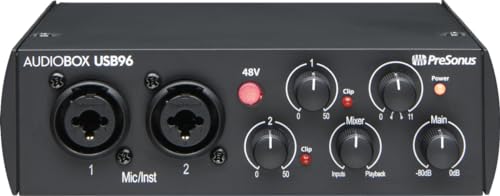
This pick is the standalone AudioBox USB 96 interface in its 25th Anniversary Edition finish, not one of the recording bundles sold under similar names. It gives you two Class-A mic preamps on combo mic/instrument inputs, a better fit than the Solo if you record two microphones, or a mic and an instrument. Conversion runs at 24-bit/96kHz rather than 192kHz, still well beyond what streaming and podcast work requires.
The AudioBox is bus-powered over USB 2.0 and includes MIDI in and out, a feature the Solo lacks, so it can also hub a small MIDI keyboard. A front-panel mixer knob blends the direct input signal with computer playback for latency-free monitoring, and the main outputs are balanced TRS connections, which suit powered studio monitors. PreSonus also bundles Studio One Artist plus the Studio Magic plug-in suite, so you can record and edit straight away. Warranty coverage is 1 year.
| Specification | Detail |
|---|---|
| Format | 2-in/2-out, USB 2.0, bus-powered |
| Inputs | 2 combo mic/instrument, Class-A preamps |
| Conversion | 24-bit/96kHz |
| MIDI | In and out |
| Monitoring | Mixer knob for direct monitoring |
| Outputs | Balanced TRS main outputs |
| Software | Studio One Artist, Studio Magic suite |
| Warranty | 1 year |
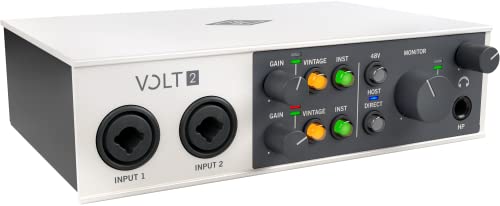
3. Universal Audio Volt 2
The Volt 2 is the pick for streamers who want some analog character in their vocal sound. This is the model from Universal Audio’s original Volt line: a 2-in/2-out USB-C interface with two preamps, each offering a Vintage Mic Preamp mode derived from UA’s 610 tube preamp design. Engaging it adds tube-style warmth and saturation at the recording stage, suiting spoken word and singing alike. It records at up to 24-bit/192kHz and is bus-powered.
Connectivity is broader than most rivals here. The Volt 2 includes MIDI in and out, and it is class-compliant, so it works with Mac, PC, iPad, and iPhone without driver installs. One detail to plan around: phantom power is shared between the two channels rather than switched individually, so both inputs see 48V whenever it is engaged. That is fine for a pair of condensers, but worth knowing if you mix mic types.
| Specification | Detail |
|---|---|
| Format | 2-in/2-out, USB-C, bus-powered |
| Inputs | 2 mic preamps with Vintage Mic Preamp mode |
| Conversion | 24-bit/192kHz |
| MIDI | In and out |
| Compatibility | Mac, PC, iPad, iPhone (class-compliant) |
| Phantom power | 48V, shared across both channels |
4. MOTU M2
The M2 is the most technically ambitious interface in this group, and it is sold here as the standalone unit. Its two combo mic/line/Hi-Z inputs each have individual 48V phantom power switching, giving proper control when pairing different microphones. The output stage uses an ESS Sabre32 Ultra DAC with a stated 120dB dynamic range on the main outputs, and MOTU quotes round-trip latency of about 2.5ms at 96kHz, which matters when monitoring through software effects.
Two features stand out for streamers. First, the full-color LCD meters show input and output levels at a glance, far easier to read mid-stream than small LEDs. Second, the M2 includes loopback, so you can route computer audio into your stream or recording alongside your microphone without extra software plumbing. It records at 24-bit/192kHz, connects over USB-C with bus power, includes MIDI in and out, and comes with Performer Lite and Ableton Live Lite. Warranty coverage is 2 years.
| Specification | Detail |
|---|---|
| Format | 2-in/2-out, USB-C, bus-powered |
| Inputs | 2 combo mic/line/Hi-Z, individual 48V phantom |
| DAC | ESS Sabre32 Ultra, 120dB dynamic range on main outputs |
| Conversion | 24-bit/192kHz |
| Latency | About 2.5ms round-trip at 96kHz (per MOTU) |
| Extras | Full-color LCD meters, loopback, MIDI in/out |
| Software | Performer Lite, Ableton Live Lite |
| Warranty | 2 years |
5. Native Instruments Komplete Audio 1
The Komplete Audio 1 is a simple two-channel interface for one microphone plus one instrument or line source. It pairs a single XLR mic input with 48V phantom power and a separate jack line/instrument input, and each input has its own gain control, making it straightforward to balance a voice against a guitar or keyboard. It connects over USB 2.0, runs from bus power, and records at up to 24-bit/192kHz.
The main outputs are stereo RCA connections rather than balanced TRS, fine for desktop speakers but less ideal for long cable runs to studio monitors. Where the Komplete Audio 1 earns its place is the bundled software: Ableton Live Lite, MASCHINE Essentials, and KOMPLETE START give music makers a working production toolkit out of the box, the most music-focused bundle in this roundup. If your streaming setup doubles as a small music production rig, that software is the reason to pick this interface.
| Specification | Detail |
|---|---|
| Format | 2-in/2-out, USB 2.0, bus-powered |
| Inputs | 1 XLR mic with 48V phantom, 1 jack line/instrument |
| Gain controls | Individual per input |
| Conversion | Up to 24-bit/192kHz |
| Outputs | Stereo RCA |
| Software | Ableton Live Lite, MASCHINE Essentials, KOMPLETE START |
How to Choose
Start with input count. If you only record your own voice, a single mic preamp like the Scarlett Solo’s is enough. If you record a co-host, a guest, or a mic and an instrument together, you need two preamps, which the AudioBox USB 96, Volt 2, and M2 all provide.
Next, check phantom power. Condenser microphones need 48V. All five interfaces supply it, but the switching differs: the M2 switches phantom per input, while the Volt 2 shares it across both channels, which can matter when you mix a condenser with a dynamic mic.
Then look at monitoring and outputs. A direct monitoring control, like the AudioBox’s mixer knob, lets you hear yourself without delay. Balanced TRS outputs suit studio monitors; the Komplete Audio 1’s RCA outputs suit desktop speakers. If you want game or desktop audio inside the recording without extra software, loopback on the M2 solves that directly. Finally, weigh bundled software and warranty: the Komplete Audio 1 and AudioBox include the most complete starter bundles, and the Solo carries the longest warranty at 3 years.
Who Should Skip
Skip all five interfaces if you regularly record three or more microphones at once, such as a four-person podcast panel; every pick here is two-channel, so shop for a larger interface instead. Skip the Scarlett Solo if you want automatic level setting, since Auto Gain and Clip Safe are not included on this model. Skip the Komplete Audio 1 if balanced monitor outputs are a priority, and skip the AudioBox USB 96 if you specifically want 192kHz recording. If you want a microphone, headphones, and interface in one package, note that every pick here is the standalone interface only; you will source the rest separately.
FAQ
Do I need phantom power for a streaming microphone?
Only if your microphone is a condenser model; dynamic microphones do not use it. All five interfaces here provide 48V phantom power. The M2 switches it individually per input, while the Volt 2 shares it across both channels, so check pairing before recording two different mic types at once.
What is loopback, and do streamers need it?
Loopback routes your computer’s playback audio back into the recording or stream mix alongside your microphone. It is useful for capturing game sound, music, or a caller’s voice directly without extra routing software. Of the interfaces in this guide, the MOTU M2 includes loopback as a built-in feature.
Is 96kHz recording enough, or should I insist on 192kHz?
For streaming, podcasting, and voice work, 24-bit/96kHz is more than sufficient, and your streaming platform will resample the audio anyway. The 192kHz support in the other four interfaces is a bonus for music recording, not a requirement for spoken content.
Can any of these interfaces work with an iPad or iPhone?
The Volt 2 is class-compliant and listed as working with Mac, PC, iPad, and iPhone, so it is the natural pick if you also record on mobile devices. The others are aimed at desktop Mac and PC setups over USB.
Final Verdict
For a single-microphone streaming setup, the Focusrite Scarlett Solo 4th Gen is the easiest recommendation: a strong preamp, Air mode, and the longest warranty in the group. If you record two sources or want loopback and detailed metering, the MOTU M2 is the most capable interface here. The Volt 2 is the character pick thanks to its Vintage Mic Preamp mode, the AudioBox USB 96 is the practical two-preamp option with MIDI and bundled software, and the Komplete Audio 1 suits music-focused creators who will use its production software.
More from Amazon
Programs that pair well with the guide above. Offers and eligibility are set by Amazon and may change.
Free shipping on eligible items, Prime Video and more. Eligible new members can start with a free trial.
Start a Prime free trialAd-free music streaming. Eligible new subscribers can start with a free trial.
Try Music Unlimited freeA Prime membership for ages 18-24 with a trial period. Eligibility is set by Amazon.
See Prime for Young AdultsAudiobooks and podcasts to listen to on the go. Eligible new members can start with a free trial.
Try Audible freeAs an Amazon Associate we earn from qualifying purchases.


Write Your Review
No reviews yet. Be the first to share your experience!