
Our Short List of 3
All 4 Picks at a Glance
| Product | Specs | Action |
|---|---|---|
 1. Samsung PRO Plus 256GB — Best Overall | Check price on Amazon | |
 2. SanDisk Extreme 256GB — Fastest Read Speed | Check price on Amazon | |
 3. Samsung EVO Select 256GB — Best Value | Check price on Amazon | |
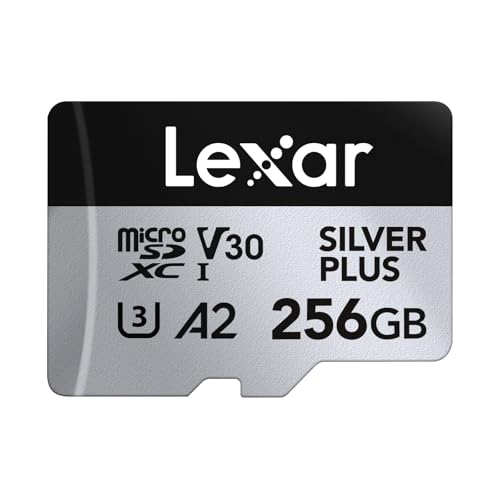 4. Lexar Silver Plus 256GB — Highest Headline Speed | Check price on Amazon |
Key takeaways
- Our guide to the best and fastest microSD card for smartphones in 2026, with top A2-rated 256GB picks, speed classes explained, and tips to avoid fake cards.
Finding the best and fastest microSD card for smartphones is not just about chasing the biggest number on the box. A card that looks fast in a camera or a laptop card reader can feel ordinary inside a phone, because most Android phones use a UHS-I slot, and that slot has a practical ceiling. The good news is that the best cards for phones are affordable, widely available, and easy to tell apart once you know which ratings actually matter. This guide explains those ratings in plain language, compares four strong 256GB picks, and shows how to set a card up properly so you get the speed you paid for.
Before anything else, check whether your phone even has a microSD slot. Many recent flagship phones, including most Google Pixel models and many Samsung Galaxy S models, have dropped expandable storage entirely. Mid-range Samsung Galaxy A phones, Motorola phones, Sony phones, and many other Android models still support it, usually in a hybrid tray shared with a second SIM. Your phone manual or the specifications page on the maker’s website will state the maximum supported capacity, which is often 1TB on newer models. Buying a card larger than your phone supports is a waste, and in some cases the phone will refuse to mount it at all.
How to Choose a Fast microSD Card for a Smartphone
Understand the speed ratings that matter
MicroSD packaging is covered in letters and numbers, and only a few of them decide real phone performance. Start with the bus interface. UHS-I is the interface almost every phone slot uses. UHS-II cards have a second row of pins and can be much faster in a compatible camera or reader, but a phone with a UHS-I slot cannot use that extra speed, so paying for UHS-II for a phone is usually pointless.
Next, look at the speed class markings. U3 means a minimum sustained write speed of 30 megabytes per second, which is the baseline for smooth 4K video recording. V30 is the video speed class equivalent, also guaranteeing at least 30 megabytes per second of sustained writes. Class 10 is the older marking and simply means at least 10 megabytes per second. For a phone, insist on U3 and V30.
The most important rating for phone use is the Application Performance Class, marked A1 or A2. This rating measures random read and write performance with many small files, which is exactly what happens when apps, photos, and system files are read from the card. A2 is the faster rating, requiring at least 4,000 random read operations per second and 2,000 random write operations per second, compared with 1,500 and 500 for A1. If you plan to move apps to the card, or to store a large photo library that your gallery app browses constantly, A2 is worth having. Every card recommended below is A2 rated.
Finally, treat the headline read and write speeds as maximums under ideal conditions, not promises. A card rated at up to 190 megabytes per second for reads will only approach that figure in a fast reader with large sequential files. Inside a phone, real speeds are lower, and they depend on the phone, the file sizes, and how full the card is. What the headline number still tells you is the card’s ceiling and its general class: a 180 or 190 megabyte per second card is built with faster flash than a 100 megabyte per second card, and that difference shows up in large photo and video transfers even when neither card hits its advertised peak.
Pick the right capacity
For most people, 256GB is the sweet spot: it holds tens of thousands of photos, many hours of 4K video, and a large offline media library. A 128GB card suits lighter use, while 512GB or 1TB fits heavy 4K recording. Note that speeds can vary by capacity within the same product line, so check the ratings for the exact size you buy.
Check compatibility and formatting
Most cards of 64GB and above use the exFAT file system, which modern Android phones support out of the box. If a card was previously used in a camera or a dash cam, format it in the phone before first use, after copying anything you need off it, so the phone sets it up cleanly. Android offers two ways to use a card: portable storage, which is the flexible choice and the one most people should pick, and internal or adoptable storage, which merges the card with the phone’s built-in storage. Adoptable storage sounds convenient, but it ties the card to that one phone, makes the card unreadable elsewhere, and can slow the phone down if the card is not fast enough. Portable storage keeps your files movable and your phone’s system on its faster built-in storage, which is the safer default.
Beware of counterfeit cards
Fake microSD cards are a real problem on large marketplaces. A counterfeit card may report 256GB to your phone while only containing a fraction of that storage, and your files will start corrupting once you pass the real capacity. Protect yourself by buying from the brand’s official store on Amazon or from a well-known retailer, and testing a new card before trusting it with irreplaceable photos. Free tools such as H2testw on Windows can verify the true capacity by writing data across the whole card. If a deal looks far cheaper than every other listing for the same card, treat it with suspicion.
Top Picks
1. Samsung PRO Plus 256GB — Best Overall
The Samsung PRO Plus is the best all-round choice for most Android phones, and it is the card to buy if you want one recommendation and no second-guessing. The 256GB model, model number MB-MD256SA/AM, is rated for read speeds of up to 180 megabytes per second and write speeds of up to 130 megabytes per second, with UHS-I, Class 10, U3, V30, and A2 ratings. That puts it right at the practical ceiling of what a phone’s UHS-I slot can use, so you are not paying for speed the phone cannot reach, and you are not leaving performance on the table either. It is built for 4K UHD video, carries a 10-year limited warranty, and includes an SD adapter.
In everyday phone use, the PRO Plus is a strong fit for 4K video recording, large photo libraries, and moving apps and games to the card where the phone allows it. The A2 rating keeps small-file performance respectable, so browsing a large gallery feels responsive. Choose this card first unless you have a specific reason to pick one of the alternatives below.
Samsung PRO Plus 256GB microSDXC, up to 180 MB/s, UHS-I, U3, V30, A2
2. SanDisk Extreme 256GB — Fastest Read Speed
The SanDisk Extreme is the pick for anyone who values the highest headline read speed in this group. The 256GB model, model number SDSQXAV-256G-GN6MA, is rated for read speeds of up to 190 megabytes per second and write speeds of up to 130 megabytes per second, with UHS-I, Class 10, U3, V30, and A2 ratings, plus support for 4K and 5K video. It uses SanDisk QuickFlow technology, which is designed to push sequential reads higher when the host hardware can keep up.
For a phone, the practical difference between 190 and 180 megabytes per second of read speed is small, and you will rarely feel it in normal use. Where the Extreme earns its place is in transferring large batches of photos and video off the phone through a fast reader, and in sustained 4K recording, where its V30 rating and strong write performance keep footage smooth. It also comes with an SD adapter.
If your main use is shooting a lot of high-resolution photos and video and then moving those files to a computer, the Extreme is the best choice in this guide. If you mostly want balanced everyday phone performance, the Samsung PRO Plus is the simpler pick.
SanDisk Extreme 256GB microSDXC, up to 190 MB/s, UHS-I, U3, V30, A2
3. Samsung EVO Select 256GB — Best Value
The Samsung EVO Select is the value pick, and it is the card to choose when you want a fast, reliable card without paying for the top tier. The current 256GB model, model number MB-ME256SA/AM, is rated for read speeds of up to 160 megabytes per second, with UHS-I, Class 10, U3, V30, and A2 ratings, and it is explicitly aimed at mobile phones, tablets, and gaming as well as cameras.
A read speed of up to 160 megabytes per second is still comfortably fast for phone use: 4K video recording, large photo libraries, and offline media all work well, and the A2 rating means app-related small-file work is handled properly. The main thing you give up compared with the PRO Plus is a little headroom on both read and write speeds, which most people will not notice outside of large file transfers. You still get strong durability protection and a 10-year limited warranty, and an SD adapter is included.
Buy the EVO Select if you are expanding a phone on a budget, buying a card mainly for photos, music, and offline video, or fitting out a second phone or tablet. Spend the extra on the PRO Plus if you record a lot of 4K video or move very large files often.
Samsung EVO Select 256GB microSDXC, up to 160 MB/s, UHS-I, U3, V30, A2
4. Lexar Silver Plus 256GB — Highest Headline Speed
The Lexar Silver Plus is the dark horse of this group, and it carries the highest headline read speed here. The 256GB model, model number LMSSIPL256G-BNAAU, is rated for read speeds of up to 205 megabytes per second, with UHS-I, Class 10, U3, V30, and A2 ratings, plus 4K UHD support and an included adapter. On paper it is the fastest card in this guide.
In practice, a phone’s UHS-I slot will not let any of these cards reach its advertised peak, so the Silver Plus will not feel dramatically faster than the SanDisk Extreme or the Samsung PRO Plus inside a phone. Its advantage shows up when you take the card out and use a fast USB reader to move large video files to a computer, and its A2 and V30 ratings mean it is still properly equipped for phone duties such as 4K recording and app storage. It is a good choice for someone who splits a card’s life between a phone and a drone or action camera.
One note: Lexar’s range includes several similar-sounding lines, including UHS-II Professional Gold cards that cost more and cannot deliver their extra speed in a phone. Make sure you are buying the Silver Plus microSDXC with the model number above, not a UHS-II card or a full-size SD card with a similar name.
Lexar Silver Plus 256GB microSDXC, up to 205 MB/s, UHS-I, U3, V30, A2
Comparison Table
| Card | Capacity | Max Read Speed | Max Write Speed | Ratings | Best For |
|---|---|---|---|---|---|
| Samsung PRO Plus | 256GB | Up to 180 MB/s | Up to 130 MB/s | UHS-I, U3, V30, A2 | Best overall for phones |
| SanDisk Extreme | 256GB | Up to 190 MB/s | Up to 130 MB/s | UHS-I, U3, V30, A2 | Photos and 4K video |
| Samsung EVO Select | 256GB | Up to 160 MB/s | Not stated separately | UHS-I, U3, V30, A2 | Best value |
| Lexar Silver Plus | 256GB | Up to 205 MB/s | Not stated separately | UHS-I, U3, V30, A2 | Highest headline speed |
All four cards are microSDXC, include an SD adapter, and are rated for 4K video. Maximum speeds are manufacturer ratings under ideal conditions; real speeds in a phone will be lower and will vary with the phone, the card’s fullness, and the type of files being moved.
How to Set Up Your New Card
Setting a card up correctly takes a few minutes and avoids most of the problems people blame on the card itself. First, back up anything already on the card if it has been used before. Insert the card with the phone powered on, and wait for the notification that a new SD card has been detected. Tap it and choose portable storage unless you have a specific reason to use adoptable storage, then let the phone format the card.
Next, decide what actually lives on the card. Photos and video are the natural choice, and most camera apps let you set the card as the default save location. Offline music, podcasts, maps, and downloaded video also belong on the card. Keep apps and the operating system on the phone’s built-in storage where possible, because that storage is faster and more reliable than any removable card.
Finally, do not treat the card as your only copy of anything important. Cards can fail, phones can be lost, and a card can be damaged by water or heat despite its durability ratings. Back up photos and video to a cloud service or a computer regularly, and replace a card that starts showing errors, disappearing from the phone, or corrupting files, rather than trying to keep using it.
FAQ
What is the fastest microSD card for a smartphone?
On paper, the Lexar Silver Plus in this guide has the highest headline read speed at up to 205 megabytes per second, followed by the SanDisk Extreme at up to 190 and the Samsung PRO Plus at up to 180. In a real phone, the differences are small because most phone slots use the UHS-I interface, which caps practical speeds well below the fastest readers. For balanced phone performance, the Samsung PRO Plus is the best overall choice, while the SanDisk Extreme is the best choice for heavy photo and video work.
Do I need an A2 card for my phone?
You need A2 if you plan to run apps from the card or browse a very large photo library stored on it, because A2 guarantees much faster random read and write performance than A1. If the card will only hold photos, video, and music that you play back sequentially, A1 would work, but A2 cards now cost little extra, so there is no good reason to buy A1 for a phone in 2026.
Will a UHS-II card be faster in my phone?
Almost certainly not. UHS-II cards need a second row of pins and a compatible host to deliver their extra speed, and phone slots are UHS-I. A UHS-II card will still work in a phone, falling back to UHS-I speeds, but you will have paid extra for performance the phone cannot use. Spend that money on a larger capacity or a better UHS-I card instead.
Can I use a 1TB microSD card in my phone?
It depends on the phone. Many newer Android phones support up to 1TB, while older models may top out at 256GB or 512GB. Check the official specifications for your exact model before buying, and remember that a card larger than the supported maximum may not mount at all. All four cards in this guide are also sold in other capacities, so you can size up or down within the same line.
Why is my fast card slow in my phone?
The most common reasons are a nearly full card, small-file workloads that depend on random performance rather than headline sequential speed, a phone with a slower slot, or a card that was formatted with the wrong settings. Try freeing space, formatting the card in the phone, and testing with large files. If the card is still far slower than its rating in a known-good reader, it may be counterfeit or faulty, and you should stop trusting it with important files.
Conclusion
The best and fastest microSD card for smartphones is the one that matches your phone’s UHS-I slot, carries U3, V30, and A2 ratings, and has enough capacity for the way you actually use your phone. For most people that is the Samsung PRO Plus 256GB, which sits at the practical speed ceiling for phones and covers 4K video, apps, and large photo libraries with room to spare. The SanDisk Extreme is the better pick for heavy photo and video shooters, the Samsung EVO Select is the smart value choice, and the Lexar Silver Plus offers the highest headline speed for people who also move large files through a fast reader. Whichever card you choose, buy from a trusted seller, format it in the phone, and keep a backup of anything you cannot afford to lose.
Disclosure: As an Amazon Associate, we earn from qualifying purchases.
More from Amazon
Programs that pair well with the guide above. Offers and eligibility are set by Amazon and may change.
Free shipping on eligible items, Prime Video and more. Eligible new members can start with a free trial.
Start a Prime free trialAd-free music streaming. Eligible new subscribers can start with a free trial.
Try Music Unlimited freeA Prime membership for ages 18-24 with a trial period. Eligibility is set by Amazon.
See Prime for Young AdultsAudiobooks and podcasts to listen to on the go. Eligible new members can start with a free trial.
Try Audible freeAs an Amazon Associate we earn from qualifying purchases.










Write Your Review
No reviews yet. Be the first to share your experience!