

Key takeaways
- Bearings: fluid dynamic bearings, used by every model above, last longer and stay quieter than cheap sleeve bearings. Manufacturers commonly rate quality fans for well over 100,000 hours.
- What wears first: dust buildup on blades and filters shortens cooling performance long before a bearing fails. Clean filters monthly if your room is dusty.
- Cables: daisy-chained RGB fans depend on a single connector; check the seating when a fan stops spinning or lighting.
- Compatibility: 25 mm and 30 mm thick fans do not fit every mount; measure the clearance if the fan is behind a radiator or against a side panel.
- Common mistakes: mounting fans backward (airflow direction is marked on the frame), running all fans at full speed, and buying RGB fans without checking for a compatible controller or header.
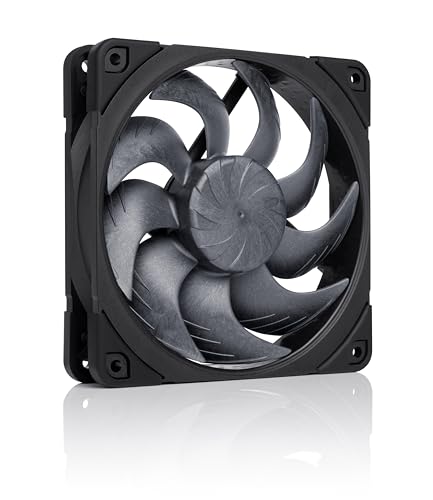
The best PC case fan in 2026 is the Noctua NF-A12x25 G2 PWM if you want the quietest high-performance 120 mm fan, the Arctic P12 Pro if you want strong static pressure at a low price, and the Phanteks T30-120 if raw pressure for radiators and dense filters matters most. For a lit-up build, the Lian Li UNI FAN line is the usual choice, and the Thermalright TL-C12C is the value pick for filling a whole case cheaply.
This guide compares seven fans by the numbers that actually predict results: airflow, static pressure, noise, thickness and connection style. It also shows how to count the fans your case needs, how to set a fan curve, and what wears out first. Specifications are taken from the manufacturers’ spec sheets; noise figures are rated by each brand under its own conditions, so treat them as comparable within a brand and approximate across brands.
Our top picks



As an Amazon Associate we earn from qualifying purchases at no extra cost to you.
Quick comparison of the seven fans
| Fan | Best for | Max speed | Airflow (max) | Static pressure (max) | Noise (rated max) | Thickness | Lighting |
|---|---|---|---|---|---|---|---|
| Noctua NF-A12x25 G2 PWM | Quiet all-rounder | 1,800 rpm | 63.15 CFM | 3.14 mm H2O | 22.5 dB(A) | 25 mm | None |
| Arctic P12 Pro | Value pressure fan | 3,000 rpm | High (about 77 CFM quoted) | High for the class | Loud at full speed | 25 mm | None |
| Phanteks T30-120 | Radiators and filters | 3,000 rpm | 101 CFM | 7.11 mm H2O | 39.7 dBA | 30 mm | None (RGB version available) |
| be quiet! Silent Wings 4 120 mm PWM High-Speed | Quiet premium | 2,500 rpm | 76.7 CFM | 3.96 mm H2O | 31.2 dBA | 25 mm | None |
| Lian Li UNI FAN TL 120 | RGB and clean cabling | 2,600 rpm | 90.1 CFM | 3.97 mm H2O | 33 dBA | 25 to 28 mm | Addressable RGB |
| Lian Li UNI FAN SL-Infinity 120 | Infinity-mirror RGB | Controller dependent | 61.3 CFM | Moderate | Moderate | About 25 mm | Addressable RGB |
| Thermalright TL-C12C X3 | Cheap multi-pack | 1,550 rpm | 66.17 CFM | 1.53 mm H2O | 25.6 dBA | 25 mm | None (ARGB version) |
Where a figure is shown as general (such as “high” or “moderate”), the manufacturer publishes the number in a form that is not directly comparable, or sources disagree, so the table avoids a precise claim.
Noctua NF-A12x25 G2 PWM: best for quiet performance
The second-generation NF-A12x25 is the benchmark for a quiet, high-end 120 mm fan. Noctua’s spec sheet lists a speed range up to 1,800 rpm, a maximum airflow of 107.3 cubic meters per hour (63.15 CFM), a maximum static pressure of 3.14 mm H2O and a rated noise of 22.5 dB(A). With the included low-noise adapter, the figures drop to 87.2 cubic meters per hour, 1.71 mm H2O and 18.1 dB(A), which makes it one of the quieter options at a usable airflow. The fan carries a six-year warranty.
It is the right pick for silent builds, for a case with a dust filter in front of the intake, and for a radiator in a quiet system. The trade-offs are price, which is the highest here per fan, no lighting, and conventional cabling that you must manage yourself. Independent measurements sometimes come out slightly below the rated airflow and above the rated noise, which is normal for any manufacturer’s claims, but the ranking still holds.
Arctic P12 Pro: best value for static pressure
Arctic’s P12 Pro is the fan to buy if you need pressure on a budget. The listing describes a 120 mm PWM fan running from about 600 to 3,000 rpm with a fluid dynamic bearing and a 4-pin connector. Its static pressure at high speed is close to that of far more expensive fans, which helps push air through a dense front filter, a mesh panel or a radiator.
The trade-off is noise. At 3,000 rpm the fan is clearly audible, and some reviewers have noted a low-frequency vibration at high speeds in the broader Arctic P12 family. In practice, you set a fan curve so that the fan idles near 800 rpm and ramps only under load. At those speeds it is a strong fan for a small fraction of the price of a premium model. It is also available in multi-packs, which keeps a full case affordable.
Phanteks T30-120: best for radiators and maximum pressure
The T30-120 is a thicker 30 mm fan with three speed modes. Phanteks lists 1,200, 2,000 and 3,000 rpm settings, with airflow of 39.1, 67.0 and 101 CFM, noise of 11.1, 27.3 and 39.7 dBA and static pressure of 1.27, 3.30 and 7.11 mm H2O at those settings. It ships set to the 2,000 rpm mode, and a switch on the back selects the 3,000 rpm advanced mode. The blades use liquid crystal polymer, a stiff plastic that keeps tight clearances against the frame.
It is the choice for a thick radiator, a dust-filtered intake or any setup where pressure matters more than silence. The trade-offs are that it is louder at full speed than the Noctua, and its 30 mm thickness does not fit every case or mount, so check clearance before buying. If you run it at the 2,000 rpm mode, it is a capable and moderately quiet fan.
be quiet! Silent Wings 4 120 mm PWM High-Speed: best premium quiet fan with real airflow
The Silent Wings 4 is a well-balanced premium fan with a fluid dynamic bearing and a six-pole motor. The high-speed version is specified at up to 2,500 rpm, 76.7 CFM, 3.96 mm H2O and 31.2 dBA, per the manufacturer’s data. A standard version runs up to 1,600 rpm with about 48.7 CFM and lower noise, and a Pro 4 version reaches 3,000 rpm for builds that need even more airflow.
It suits builders who want a quiet fan with more airflow than the standard Noctua and who prefer a neutral, non-RGB look. The trade-offs are price in the premium tier and a more conservative design than the pressure-focused fans above. Note that vendors measure noise under different conditions, so a number like 31.2 dBA is a useful rating for comparing be quiet! models to each other, not a perfect comparison against Noctua or Phanteks.
Lian Li UNI FAN TL 120: best for clean cabling and RGB
The UNI FAN TL series is the reason Lian Li is so common in showcase builds. Spec sheets for the 120 mm version list a maximum speed of 2,600 rpm, 90.1 CFM of airflow, 3.97 mm H2O static pressure and 33 dBA noise, with fluid dynamic bearings and 26 addressable LEDs with dual-zone lighting. Fans interlock and daisy-chain through a single connector, which removes most of the cable clutter in a three-fan front stack. A reverse-blade version exists for rear-facing intake and for glass-panel layouts.
It is the best choice if you want a tidy build with lighting and good airflow. The trade-offs are higher cost per fan, a fan-hub and controller ecosystem to understand, and noise at full speed that is not as low as the Noctua or be quiet! models. Different revisions are listed at 25 or 28 mm thick, so confirm the model for your case.
Lian Li UNI FAN SL-Infinity 120: best for infinity-mirror lighting
The SL-Infinity is an earlier Lian Li design that still has fans for lighting-focused builds. It has addressable RGB with an infinity-mirror effect and the same interlocking daisy-chain mounting as other UNI FAN models. Airflow is listed at about 61.3 CFM maximum, which is lower than the TL model, so it is better suited to a case with a lot of open intake area than a dense filter.
Choose it for the look and for easy installation, not for pressure. If you want better cooling in the same ecosystem, step up to the TL series.
Thermalright TL-C12C X3: best value for a full set of fans
The TL-C12C comes in packs of three, which makes it the cheapest way to fill the front and top of a case. Thermalright lists 1,550 rpm maximum (plus or minus 10 percent), 66.17 CFM, 1.53 mm H2O and 25.6 dBA on a 25 mm frame with a 4-pin PWM connector and an S-FDB bearing. An ARGB version has similar airflow and noise ratings.
The pressure is modest, so it works best with an open mesh front rather than a dense filter or radiator. For a standard airflow case, three of them offer very good airflow per cost. If you later need pressure for a radiator, mix in a few T30 or P12 Pro fans.
How to choose: a decision matrix
| Your situation | Choose | Reason |
|---|---|---|
| Silent workstation or living-room PC | Noctua NF-A12x25 G2 or Silent Wings 4 | Low noise at usable airflow |
| Dense dust filter or thick radiator | Phanteks T30-120 or Arctic P12 Pro | High static pressure |
| Tight budget, mesh-front case | Thermalright TL-C12C X3 | Three-pack, decent airflow, low noise |
| Showcase build with lighting | Lian Li UNI FAN TL 120 | Clean cabling, addressable RGB |
| Balanced premium, no lighting | be quiet! Silent Wings 4 | Good airflow, solid build, low noise |
Airflow versus static pressure explained
Airflow, measured in cubic feet per minute (CFM) or cubic meters per hour, tells you how much air a fan moves in open space. Static pressure, measured in millimeters of water, tells you how well it pushes air against resistance, such as a dust filter, a radiator or a grille. For an open mesh case front, airflow matters more. For a radiator or filter, pressure matters more. That is why a high-airflow, low-pressure fan can feel excellent on a bench and disappointing behind a radiator. Match the fan to the obstacle in front of it, not just to the headline CFM.
How many fans does your case need?
A simple rule is to aim for slightly more intake than exhaust, so the case runs under mild positive pressure and dust enters through filtered intakes rather than gaps. Most mid-tower gaming PCs run well with two or three intake fans in front and one exhaust at the rear, with an optional top exhaust. For a worked example: two fans at 60 CFM in front and one at 55 CFM at the rear is 120 CFM in and 55 CFM out, a strongly positive balance that keeps dust low but may trap some heat. Adding a top exhaust of 55 CFM brings it to 120 in and 110 out, which is closer to balanced and generally the better arrangement for a hot graphics card.
Setting a fan curve
- Connect fans to PWM headers. A 4-pin connection lets the board control speed. A hub can power several fans from one header.
- Choose a temperature source. Intake fans respond best to CPU or system temperature; exhaust fans are often tied to the same source.
- Set a low floor. Idle near 25 to 35 percent so the fans stay almost silent when the machine is not working.
- Add a gentle ramp. Reach about 60 percent at 70 degrees Celsius and full speed only at the top of the range.
- Smooth the response. Use the board’s step-up and step-down delay so the fans do not pulse for short load spikes.
Why speed and noise are not a straight line
Fan noise rises steeply with speed. As a rough guide, doubling a fan’s rotational speed raises its airflow about twofold but raises its sound output far more, which is why the Phanteks T30 is rated near 11 dBA at 1,200 rpm yet close to 40 dBA at 3,000 rpm. The practical lesson is to buy a fan with headroom and run it slowly. A fan capable of 3,000 rpm running at 1,200 rpm is often quieter and moves more air than a lower-grade fan running flat out. The same logic explains why a premium quiet fan can cost several times as much as a budget fan and still be good value: it keeps useful airflow at speeds where the budget fan is already irritating.
A worked example with real numbers
Suppose a case needs about 150 CFM of total intake to hold a graphics card steady under load. Three Thermalright TL-C12C fans at their rated maximum would supply roughly 3 x 66 = 198 CFM, which is enough, but only at 1,550 rpm. Running them at 70 percent speed gives roughly 140 CFM in practice and a sharply lower noise level. Two Noctua NF-A12x25 G2 fans at 63 CFM provide about 126 CFM at full speed and therefore suit a lighter build or a case with a third fan in the top position. This kind of arithmetic is more useful than comparing single-fan headline numbers.
Using fans on radiators and behind filters
Radiators and filters add resistance, and resistance is where static pressure pays off. A typical 240 or 360 mm radiator has narrow fin spacing that chokes a low-pressure fan, so airflow collapses compared with the open-air rating. For liquid cooling, pick fans specified for pressure such as the T30-120 or P12 Pro, mount them in push configuration, and keep the fan speed linked to coolant or CPU temperature. For a dust filter in front of an intake, a moderate-pressure quiet fan like the Silent Wings 4 or NF-A12x25 G2 holds up well, whereas a low-pressure budget fan may move noticeably less air once the filter is installed.
120 mm versus 140 mm in practice
A 140 mm fan covers a larger area and can spin slower for the same airflow, which is why many premium cases ship with 140 mm intake fans. If your case has dedicated 140 mm mounts, use them in the front and top. Many cases also accept 120 mm fans in the same slots through offset screw holes, but you lose some coverage and gain some noise. Radiator compatibility is the other consideration: 120 mm radiators accept 120 mm fans only, so match the fan size to the radiator before you buy.
Durability and ownership realities
- Bearings: fluid dynamic bearings, used by every model above, last longer and stay quieter than cheap sleeve bearings. Manufacturers commonly rate quality fans for well over 100,000 hours.
- What wears first: dust buildup on blades and filters shortens cooling performance long before a bearing fails. Clean filters monthly if your room is dusty.
- Cables: daisy-chained RGB fans depend on a single connector; check the seating when a fan stops spinning or lighting.
- Compatibility: 25 mm and 30 mm thick fans do not fit every mount; measure the clearance if the fan is behind a radiator or against a side panel.
- Common mistakes: mounting fans backward (airflow direction is marked on the frame), running all fans at full speed, and buying RGB fans without checking for a compatible controller or header.
Frequently Asked Questions
What size case fan is best, 120 mm or 140 mm?
A 140 mm fan moves more air at a lower speed, so it is often quieter at the same airflow. Choose it if your case supports it; otherwise 120 mm fans are the most widely supported size.
Are more fans always better?
No. After about three intake and two exhaust fans, extra fans add noise and cost with little temperature improvement. Good placement and filter cleaning matter more.
Should front fans be intake or exhaust?
For most cases the front fans should pull air in, with the rear and top fans exhausting. This pushes cool air across the graphics card and processor, and out the back.
Do RGB fans cool worse than plain fans?
No. Lighting does not change airflow. The difference comes from the blade design. Some RGB fans are optimized for looks, so compare CFM and pressure figures, not lighting.
PWM or DC fans: which should I buy?
PWM fans, with a 4-pin connector, offer finer speed control and a very low idle speed. DC fans use a 3-pin connector and vary voltage instead. Use PWM whenever your board has the headers.
How often should I replace case fans?
Replace a fan when it becomes noisy, wobbles or stops spinning, not on a schedule. Quality fans with fluid dynamic bearings often last many years if you keep them clean.







Write Your Review
No reviews yet. Be the first to share your experience!