
Our Short List of 3

- Best for: Retail counters, reception desks and installers who need a compact test and viewing screen with a direct BNC input.
- Screen size: 12 inches
- Resolution: 1366 x 768
- Aspect ratio: 16:9
- Inputs: HDMI, VGA, AV, BNC, USB 2.0
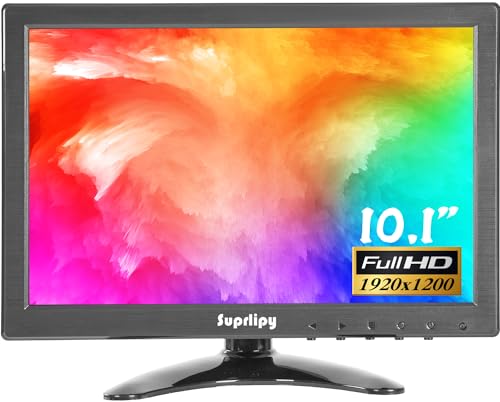
- Best for: Tight monitoring spots such as rack shelves, small offices and vehicles where a tiny screen still has to show fine detail.
- Screen size: 10.1 inches
- Resolution: 1920 x 1200
- Panel: IPS with 178-degree viewing angle
- Brightness: 600 cd/m2

- Best for: Home and small-office setups that want a mid-size dedicated screen for a DVR without moving up to a desktop monitor.
- Screen size: 14 inches
- Resolution: 1366 x 768
- Display technology: LED
- Inputs: HDMI, VGA, BNC, AV
All 4 Picks at a Glance
| Product | Specs | Action |
|---|---|---|
| Eyoyo 12 Inch Small CCTV Monitor |
| Check price on Amazon |
| Suprlipy 10 Inch FHD Small IPS Monitor |
| Check price on Amazon |
| Haiway 14 Inch Security Monitor |
| Check price on Amazon |
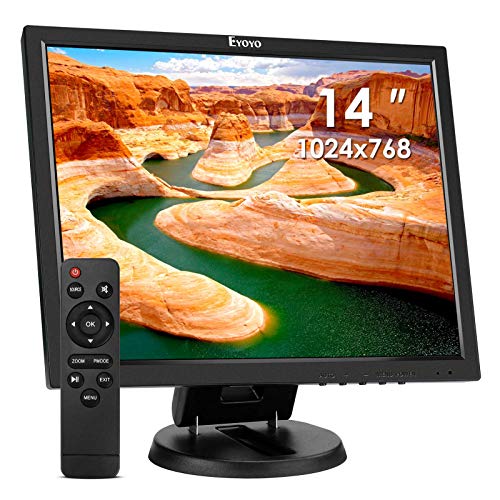 Eyoyo 14 Inch LCD HDMI Monitor EM14A |
| Check price on Amazon |
Key takeaways
- The best CCTV monitors pair BNC, HDMI and VGA inputs with screens sized for the job, from a compact 10-inch IPS panel to a 15.6-inch Full HD display.
A CCTV monitor is not just a spare computer screen. The real decision is whether the display accepts the signals your recorder and cameras actually output, because an analog camera needs a BNC input, an older DVR may only offer VGA, and a current NVR expects HDMI. Pick the wrong panel and you end up with adapters, a downscaled picture, or a screen that was never meant to show a live feed all day.
This guide is for home users adding a dedicated screen to a DVR or NVR, shop owners who want a counter display, and installers replacing aging analog monitors. The picks run from the Haiway 15.6-inch Full HD panel for modern recorders to the compact Suprlipy 10-inch IPS screen for tight shelves and the Eyoyo 14-inch 4:3 model that still suits legacy analog cameras.
Quick Picks
As an Amazon Associate we earn from qualifying purchases
| Product | Best for | Key spec from title |
|---|---|---|
| Haiway 15.6 Inch Small Computer Monitor | Full HD DVR and NVR viewing | 1920 x 1080 panel with BNC input |
| Eyoyo 12 Inch Small CCTV Monitor | Wall-mounted counters and benches | 1366 x 768 screen with BNC and AV |
| Suprlipy 10 Inch FHD Small IPS Monitor | Small spaces that still need detail | 1920 x 1200 IPS panel |
| Haiway 14 Inch Security Monitor | Mid-size desk monitoring stations | 1366 x 768 with built-in speakers |
| Eyoyo 14 Inch LCD HDMI Monitor EM14A | Legacy analog 4:3 camera systems | 1024 x 768 4:3 panel with BNC |
How to Choose
Match the inputs to your recorder and cameras
Start at the back panel, because the input list decides whether the monitor works with your system at all. A BNC input lets an analog camera or DVR connect directly, HDMI suits current NVRs and recorders, VGA covers older DVRs and PCs, and AV handles composite sources. One warning matters: on many small CCTV monitors the BNC port accepts CVBS signals only, so HD-TVI, HD-CVI and AHD cameras need a recorder or a converter between the camera and the screen rather than a direct cable run.
Pick size and resolution for your viewing distance
Screen size and resolution should follow how many cameras you watch and from how far away. A single feed or a four-way split looks fine on a compact 10- to 12-inch screen at arm’s length, while an eight- or sixteen-camera grid needs a larger panel so each tile stays readable. Resolution matters just as much: a 1024 x 600 or 1024 x 768 panel downscales a 1080p recorder output, which is acceptable for spotting movement but soft for reading faces, plates or small text in a menu.
Check mounting before you buy
A security monitor usually lives in one spot for years, so confirm how it mounts before ordering. Most small CCTV monitors use a VESA 75 pattern, larger desktop models may use VESA 100, and some include a wall bracket while others sell it separately. Decide whether the screen will sit on the included stand, hang on a wall behind a counter, or mount on an arm in a rack room, then check that the bracket pattern and any included hardware match that plan.
Look for surveillance-friendly extras
Small features make a monitor easier to live with as a dedicated security display. A remote control helps when the screen hangs out of reach, built-in speakers carry audio from cameras or a recorder without extra wiring, and a USB port lets you play back clips or photos from a flash drive without a computer. A mirror or flip function helps with unusual mounting positions, and a simple on-screen menu matters because you may adjust brightness and input selection only once, then leave the monitor alone for months.
The 5 Best Options
Haiway 15.6 Inch Small Computer Monitor
Most home and small-business recorders now output 1080p, and this Haiway is the pick that shows that feed at full resolution on a screen that still fits a crowded desk or counter. Its 15.6-inch panel runs at 1920 x 1080, so a four-camera grid stays legible and recorder menus remain sharp. The input set covers the whole life of a typical system: BNC and AV for an older analog DVR, HDMI and VGA for current recorders and PCs, plus USB for media. Built-in speakers handle camera audio, the remote suits wall placement, and the adjustable stand or a VESA 75 mount gives two ways to position it.
Specs
- Screen size: 15.6 inches
- Resolution: 1920 x 1080 Full HD
- Aspect ratio: 16:9
- Inputs: HDMI, VGA, BNC, AV, USB
- Built-in speakers and remote control
- Mounting: VESA 75 x 75 wall mount (not included) or included adjustable stand
- Model number: HW-15.6moni-1920
Best for: Homes and small businesses running a 1080p DVR or NVR that need one screen for live viewing and menu work.
Watch out for: The VESA wall mount is not included, so wall installs need a separate bracket.
Eyoyo 12 Inch Small CCTV Monitor
- Best for: Retail counters, reception desks and installers who need a compact test and viewing screen with a direct BNC input.
- Screen size: 12 inches
- Resolution: 1366 x 768
- Aspect ratio: 16:9
- Inputs: HDMI, VGA, AV, BNC, USB 2.0
Retail counters, reception desks and installers who need a compact test and viewing screen with a direct BNC input.
The BNC input accepts CVBS only, so HD analog cameras need a recorder or converter in between.
A 12-inch screen is the size that fits where security viewing actually happens: on a shop counter, under a shelf, or on a workbench next to a recorder. This Eyoyo runs at 1366 x 768, which is noticeably crisper than the 1024 x 600 panels on smaller budget monitors, and its input set of HDMI, VGA, AV and BNC connects everything from a current NVR to an analog camera. The BNC port takes CVBS signals, USB 2.0 plays media from a flash drive, and the included remote and stand make setup simple. A mirror flip function helps when the screen mounts in an awkward orientation.
Watch out for: The BNC input accepts CVBS only, so HD analog cameras need a recorder or converter in between.
Suprlipy 10 Inch FHD Small IPS Monitor
- Best for: Tight monitoring spots such as rack shelves, small offices and vehicles where a tiny screen still has to show fine detail.
- Screen size: 10.1 inches
- Resolution: 1920 x 1200
- Panel: IPS with 178-degree viewing angle
- Brightness: 600 cd/m2
Tight monitoring spots such as rack shelves, small offices and vehicles where a tiny screen still has to show fine detail.
Even at this resolution, a many-camera grid gets cramped on a 10.1-inch screen, and the VESA mount is sold separately.
The Suprlipy solves the usual small-monitor compromise, because its 10.1-inch IPS panel packs a 1920 x 1200 resolution into a footprint that fits a rack shelf, a van dash or the corner of a desk. That pixel density keeps a single camera feed or a small split view sharper than the low-resolution panels most compact monitors use, and the 178-degree viewing angle means the picture holds up when you glance at it from the side. Brightness is rated at 600 cd/m2, the input set covers HDMI, VGA, BNC, AV and USB, and built-in speakers are included. It mounts on the supplied adjustable stand or a VESA 75 bracket.
Watch out for: Even at this resolution, a many-camera grid gets cramped on a 10.1-inch screen, and the VESA mount is sold separately.
Haiway 14 Inch Security Monitor
- Best for: Home and small-office setups that want a mid-size dedicated screen for a DVR without moving up to a desktop monitor.
- Screen size: 14 inches
- Resolution: 1366 x 768
- Display technology: LED
- Inputs: HDMI, VGA, BNC, AV
Home and small-office setups that want a mid-size dedicated screen for a DVR without moving up to a desktop monitor.
A 1080p recorder feed is downscaled to the 1366 x 768 panel, so fine detail is softer than on the Full HD Haiway above.
The Haiway 14-inch sits between the compact screens and the full-size desktop models, which makes it a sensible default for a home office or back-room monitoring desk. Its 1366 x 768 LED panel is a clear step up from 1024 x 600 for recorder menus and split views, and the port selection covers HDMI and VGA for recorders and PCs plus BNC and AV for analog cameras and DVRs. Built-in speakers remove the need for separate audio, a remote control is included for changing inputs from a distance, and the 5 millisecond response time keeps live motion looking clean on camera feeds.
Watch out for: A 1080p recorder feed is downscaled to the 1366 x 768 panel, so fine detail is softer than on the Full HD Haiway above.
Eyoyo 14 Inch LCD HDMI Monitor EM14A
- Best for: Owners of legacy analog DVR systems who want a drop-in replacement screen that matches the 4:3 camera picture.
- Screen size: 14 inches
- Resolution: 1024 x 768
- Aspect ratio: 4:3
- Inputs: HDMI, VGA, AV, BNC, USB
Owners of legacy analog DVR systems who want a drop-in replacement screen that matches the 4:3 camera picture.
Widescreen HDMI feeds from a modern NVR are letterboxed on the 4:3 panel, and the resolution is low by current standards.
Many analog CCTV systems still in service output a 4:3 picture, and this Eyoyo is shaped for them. Its 14-inch panel runs at 1024 x 768 in a 4:3 aspect ratio, so an analog DVR fills the screen without black bars or a stretched image. Inputs cover AV, VGA, HDMI, BNC and USB, the video system handles both PAL and NTSC sources, and power comes from a DC 12V adapter. A built-in speaker and remote are included, and the package even bundles a wall mount and an HDMI cable, which makes it an easy like-for-like replacement for an old CRT or early LCD security monitor.
Watch out for: Widescreen HDMI feeds from a modern NVR are letterboxed on the 4:3 panel, and the resolution is low by current standards.
Which One Fits Your Situation
You run a modern 1080p DVR or NVR at a desk
Choose the Haiway 15.6-inch monitor. It is the only pick here that displays a 1920 x 1080 recorder output at native resolution, so multi-camera grids and on-screen menus stay sharp at normal desk distance. Its BNC and AV inputs also mean the same screen keeps working if part of your system is still analog, and the included stand suits a desk without extra hardware.
You need a screen on a shop counter or wall
Choose the Eyoyo 12-inch monitor. The compact panel leaves counter space free, the 1366 x 768 resolution is enough for a live feed customers or staff glance at, and the remote makes input changes easy once the screen is mounted. Its BNC input also accepts a direct analog camera feed for a simple one-camera entrance display.
Your monitoring spot has almost no room
Choose the Suprlipy 10-inch monitor. It fits on a rack shelf, a narrow ledge or a vehicle dash where nothing larger works, yet its 1920 x 1200 IPS panel shows a single feed in more detail than bigger low-resolution screens. Wide viewing angles help when the screen sits off to one side, and the adjustable stand covers most placements without a bracket.
Your cameras and DVR are older analog gear
Choose the Eyoyo 14-inch EM14A. Its 4:3 panel matches the shape of analog camera output, the BNC and AV inputs connect the way your existing DVR expects, and PAL and NTSC support covers mixed older equipment. The bundled wall mount and HDMI cable also make it the easiest straight swap for a failing CRT or early flat security monitor.
Common Mistakes
- Buying a regular PC monitor for an analog system, then discovering there is no BNC or AV input for the cameras or DVR.
- Assuming every BNC input accepts HD-TVI, HD-CVI or AHD cameras directly, when many CCTV monitors take CVBS signals only.
- Choosing a low-resolution panel for a large multi-camera grid, which makes each tile too soft to identify people or read text.
- Forgetting to check the VESA pattern and whether a wall mount is included, which turns a simple install into a second order.
- Ignoring audio: VGA and AV connections carry no sound, so camera audio needs built-in speakers or a separate speaker path.
Frequently Asked Questions
Can a CCTV monitor connect directly to an analog camera without a DVR?
Yes, if the monitor has a BNC input and the camera outputs a matching signal. Several picks here accept a CVBS analog feed straight into the BNC port, which suits a single entrance or counter camera. You lose recording, playback and remote viewing, because those jobs belong to the DVR, so direct connection works best as a simple live display.
Does a BNC input work with HD-TVI, HD-CVI and AHD cameras?
Usually not directly. On most small CCTV monitors, including the Eyoyo models in this guide, the BNC port is specified for CVBS composite signals only. HD analog formats such as HD-TVI, HD-CVI and AHD normally reach the screen through a compatible DVR, or through a separate converter box, so check the signal type in the listing before planning a direct camera connection.
What size CCTV monitor works best for a multi-camera grid?
Match the screen to the grid and the viewing distance. A 10- to 12-inch monitor handles one to four cameras at arm’s length, a 14- to 16-inch screen is comfortable for four to nine tiles at a desk, and larger grids viewed from across a room call for a bigger panel than any pick here. Resolution matters as much as size for keeping tiles readable.
Can I use a regular computer monitor instead of a CCTV monitor?
For an NVR or DVR with HDMI or VGA output, yes, and many people do. The trade-offs are practical: a computer monitor has no BNC or AV input for analog gear, its stand and mounting are designed for a desk rather than a wall or counter, and it is built for daily office hours instead of living beside a recorder as a permanent live-view screen.
More from Amazon
Programs that pair well with the guide above. Offers and eligibility are set by Amazon and may change.
Free shipping on eligible items, Prime Video and more. Eligible new members can start with a free trial.
Start a Prime free trialAd-free music streaming. Eligible new subscribers can start with a free trial.
Try Music Unlimited freeA Prime membership for ages 18-24 with a trial period. Eligibility is set by Amazon.
See Prime for Young AdultsAudiobooks and podcasts to listen to on the go. Eligible new members can start with a free trial.
Try Audible freeAs an Amazon Associate we earn from qualifying purchases.









Write Your Review
No reviews yet. Be the first to share your experience!