
Our Short List of 3
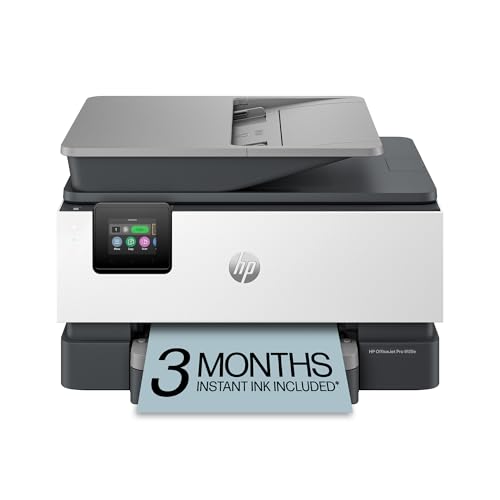
- Best for: Home offices that scan two-sided documents and want one fast color inkjet for a Mac desk.
- Brand: HP
- Model number: 403X0A#B1H
- Printer type: Inkjet, color output
- Functions: Print, scan, copy, fax

- Best for: Families and home offices printing steady color volume from a Mac who want bottled ink instead of cartridges.
- Brand: HP
- Model number: 7301 (28B70A)
- Printer type: Ink tank, cartridge-free refillable
- Functions: Print, scan, copy

- Best for: Small teams on Macs that print color documents daily and want laser consistency with fax included.
- Brand: HP
- Model number: 499Q5F#BGJ
- Printer type: Color laser
- Functions: Print, scan, copy, fax
All 3 Picks at a Glance
| Product | Specs | Action |
|---|---|---|
| HP OfficeJet Pro 9125e |
| Check price on Amazon |
| HP Smart Tank 7301 |
| Check price on Amazon |
| HP Color LaserJet Pro MFP 3301fdw |
| Check price on Amazon |
Key takeaways
- Three HP printers that work with a Mac compared: a fast OfficeJet Pro inkjet, a refillable Smart Tank model, and a color LaserJet Pro with fax.
Buying an HP printer for a Mac is really a decision about the connection path, not the badge on the front. A model that reaches your Mac through AirPrint or a current HP app behaves very differently from one that depends on an older driver package, and that difference decides whether setup takes minutes or an afternoon of hunting through support pages.
This guide is for Mac owners who have already settled on HP and now need to choose between cartridge inkjet, refillable tank inkjet, and color laser. Every pick below is an HP model whose Amazon listing names Mac or macOS support, and the specifications are taken from those listings rather than from roundups or retailer summaries. The three picks also span three different supply systems, so the running-cost trade-offs stay visible instead of hiding behind headline speeds.
Quick Picks
As an Amazon Associate we earn from qualifying purchases.
| Product | Best for | Key spec from title |
|---|---|---|
| HP OfficeJet Pro 9125e | Busy home offices that scan and fax | Wireless all-in-one color inkjet with ADF and duplex printing |
| HP Smart Tank 7301 | High-volume color printing at home | Wireless all-in-one ink tank printer with two years of ink included |
| HP Color LaserJet Pro MFP 3301fdw | Small teams printing color documents | Wireless all-in-one color laser with ADF, duplex and fax |
How to Choose
Start With AirPrint and the Mac Connection Path
For a Mac buyer, the first filter is how the printer talks to macOS. AirPrint lets the Mac discover and print to the machine over your network without a traditional driver install, and it also covers printing from an iPhone or iPad on the same network. Check that the listing names Apple AirPrint or lists macOS among its supported operating systems, because a printer can be an excellent Windows machine and still be a poor Mac purchase. Also decide whether you want a wired fallback. Ethernet and USB connections, both present on the models in this guide, give you a second route when Wi-Fi setup stalls.
Cartridge Inkjet, Tank Inkjet, or Laser
The three HP families here solve different running-cost problems. A cartridge inkjet such as the OfficeJet Pro 9125e suits mixed documents with occasional color and keeps the hardware compact for its speed. A refillable tank model such as the Smart Tank 7301 trades a larger upfront commitment for bottled ink and far fewer supply swaps, which matters when a household prints schoolwork, forms, and color pages every week. A color laser such as the LaserJet Pro MFP 3301fdw fits shared document work where crisp text and steady throughput matter more than photo output. Match the engine to your page mix before comparing speeds.
Paper Handling Decides Daily Convenience
Tray capacity and the document feeder shape your week more than headline speed does. A 250-sheet tray, shared by all three picks here, means plain paper refills stay occasional instead of constant. An automatic document feeder matters if you scan contracts, receipts, or multi-page forms from your Mac, and two-sided scanning saves real time on double-sided originals. The OfficeJet Pro 9125e uses a dual-pass feeder that flips each sheet, while a single-pass design scans both sides at once. Automatic two-sided printing is worth insisting on for long PDFs, drafts, and anything you print from a browser or a document app daily.
Check the Supply Model Before You Commit
HP printers tie you to a specific cartridge or toner family, so read that part of the listing carefully. The OfficeJet Pro 9125e uses HP 936 cartridges, the Smart Tank 7301 refills from HP 31 and 32XL bottles, and the LaserJet Pro MFP 3301fdw takes its own toner line for the 3301 series. Confirm the exact supply name in the listing, note what is included in the box, and think about how the printer handles firmware and cartridge recognition. A household that prints in bursts may prefer a tank or laser, since liquid ink sitting unused in a lightly used cartridge machine can be wasted on cleaning cycles.
The 3 Best Options
HP OfficeJet Pro 9125e
- Best for: Home offices that scan two-sided documents and want one fast color inkjet for a Mac desk.
- Brand: HP
- Model number: 403X0A#B1H
- Printer type: Inkjet, color output
- Functions: Print, scan, copy, fax
Home offices that scan two-sided documents and want one fast color inkjet for a Mac desk.
It runs on HP 936 cartridges, so confirm that cartridge family and the HP+ setup terms in the listing before ordering spare ink.
The OfficeJet Pro 9125e is the all-rounder of this group, aimed at a Mac home office that prints, scans, copies, and occasionally faxes from one desk. Its listing pairs a 250-sheet tray with a dual-pass two-sided document feeder, so stacks of signed forms move through without manual flipping. Rated speeds of 22 pages per minute in black and 18 in color keep shared queues short, while Ethernet gives a stable wired option beside Wi-Fi. For a household mixing invoices, school documents, and color handouts, it covers the widest range of daily jobs in a single inkjet body.
HP Smart Tank 7301
- Best for: Families and home offices printing steady color volume from a Mac who want bottled ink instead of cartridges.
- Brand: HP
- Model number: 7301 (28B70A)
- Printer type: Ink tank, cartridge-free refillable
- Functions: Print, scan, copy
Families and home offices printing steady color volume from a Mac who want bottled ink instead of cartridges.
The operating system field on the listing names older macOS releases, so check the current HP app requirements against your exact macOS version before setup.
The Smart Tank 7301 suits a Mac household that prints enough color to resent cartridge swaps. Instead of cartridges, it refills from bottles, and the listing states that the included ink covers up to two years of printing for typical use, with the black bottle rated around 6,000 pages and the color bottles around 8,000 pages in the compatible supply details. You still get a 250-sheet tray, a flatbed plus an automatic document feeder for scanning, and Ethernet alongside Wi-Fi. Its Amazon listing names macOS versions directly in the operating system field, which makes the Mac fit easy to verify before buying.
HP Color LaserJet Pro MFP 3301fdw
- Best for: Small teams on Macs that print color documents daily and want laser consistency with fax included.
- Brand: HP
- Model number: 499Q5F#BGJ
- Printer type: Color laser
- Functions: Print, scan, copy, fax
Small teams on Macs that print color documents daily and want laser consistency with fax included.
Color resolution tops out at 600 x 600 dpi in the listing, so choose it for office documents rather than detailed photo work.
The Color LaserJet Pro MFP 3301fdw is the laser option for a small team whose Macs produce color documents all day: proposals, worksheets, and reports that need sharp text and consistent color rather than photo gloss. The listing describes a wireless all-in-one with an automatic document feeder, duplex printing, and fax, and it supports media up to legal size for offices that still handle long forms. Laser output also sidesteps the dried-ink problem entirely, which suits an office printer that may sit idle over a holiday week and then face a heavy Monday. It is the most office-weighted machine here, in features and in footprint.
Which One Fits Your Situation
Your Mac Desk Handles a Bit of Everything
Choose the OfficeJet Pro 9125e when one printer has to cover invoices, scanned contracts, copies, and the occasional fax without taking over the room. Its feeder scans both sides of a page, the tray holds a full ream-sized stack in practice, and Ethernet keeps it reachable when Wi-Fi is crowded. It is the safest single purchase for a mixed home office.
Your Household Prints Color Every Week
Pick the Smart Tank 7301 when the printer serves the whole family and color pages are routine rather than occasional. Bottled refills mean fewer interruptions and less packaging in the bin, and the included ink stretches a long way for school projects, forms, and everyday documents. The flatbed plus feeder combination handles both bound items and loose stacks from your Mac.
A Small Team Shares One Printer
Take the Color LaserJet Pro MFP 3301fdw when several people print from their Macs throughout the day and documents matter more than photos. Laser output stays consistent across long runs, fax is built in for the offices that still need it, and legal-size support covers formal paperwork. Measure your surface first, because this is a substantial desk-side machine.
The Printer Sits Idle, Then Works Hard
If your printing comes in bursts, with quiet weeks between busy ones, lean toward the LaserJet Pro MFP 3301fdw. Toner does not dry out during the gaps, so the first page after a break looks like the last page before it. The Smart Tank 7301 is the inkjet alternative here, since its sealed bottles and tank system handle intermittent use better than small cartridges do.
Common Mistakes
- Assuming every HP printer works equally well with a Mac, without checking that the listing names AirPrint or macOS support for the exact model.
- Comparing print speeds while ignoring the document feeder, then discovering that scanning two-sided originals takes twice as long as expected.
- Ordering spare ink or toner from memory instead of matching the supply family printed in the listing, such as HP 936 cartridges or HP 31 and 32XL bottles.
- Placing a color laser on a small desk without checking its dimensions and media path, especially when legal-size paper is part of the plan.
- Setting up over Wi-Fi only and skipping the Ethernet or USB fallback that would have made troubleshooting a network change far simpler.
Frequently Asked Questions
Do these HP printers need drivers on a Mac?
Most current HP models in this guide are built around AirPrint and the HP app, so a Mac can usually add the printer over the network without a traditional driver package. The exact route depends on your macOS version, which is why the listings name supported systems. Add the printer from Printers and Scanners settings first, and use the HP app when you need scanning features.
Is a tank printer or a cartridge printer better for a Mac home office?
It depends on volume rather than on the Mac itself. The Smart Tank 7301 fits households printing color every week, because bottled ink lowers the friction of frequent refills. The OfficeJet Pro 9125e suits lighter, more varied work where fax and faster document speeds matter more. Both connect to a Mac the same way, so choose by page count and supply style.
Can a color laser printer handle photos from a Mac?
The Color LaserJet Pro MFP 3301fdw is designed for office color, and its listing caps color resolution at 600 x 600 dpi, which is fine for charts, letterheads, and handouts. For borderless photos and glossy paper, an inkjet such as the OfficeJet Pro 9125e or the Smart Tank 7301 is the better tool. Match the printer to the output you actually produce most weeks.
What should I check before ordering an HP printer for an older Mac?
Read the operating system field in the listing and compare it with the macOS version on your machine, since some listings name older releases such as Mojave, Catalina, or Big Sur. Then confirm the connection you plan to use, because USB and Ethernet remain dependable fallbacks when a newer macOS release changes wireless behavior. Checking both points takes minutes and prevents a return.
More from Amazon
Programs that pair well with the guide above. Offers and eligibility are set by Amazon and may change.
Free shipping on eligible items, Prime Video and more. Eligible new members can start with a free trial.
Start a Prime free trialAd-free music streaming. Eligible new subscribers can start with a free trial.
Try Music Unlimited freeA Prime membership for ages 18-24 with a trial period. Eligibility is set by Amazon.
See Prime for Young AdultsAudiobooks and podcasts to listen to on the go. Eligible new members can start with a free trial.
Try Audible freeAs an Amazon Associate we earn from qualifying purchases.










Write Your Review
No reviews yet. Be the first to share your experience!