
Our Short List of 3

- Best for: PS3 owners who want the cleanest, simplest match for the console in a smaller room.
- Screen size: 32 inches, 31.5 inches measured diagonally
- Resolution: Full HD 1080p, 1920 by 1080
- Refresh rate: 60Hz
- HDMI: 2 HDMI inputs, one with eARC, plus HDMI-CEC
- Best for: Anyone who wants a simple Roku television for PS3 gaming and everyday streaming.
- Screen size: 32 inches
- Resolution: Full HD 1080p, 1920 by 1080
- Refresh rate: 60Hz
- Display: LED panel with Roku TV smart platform
- Best for: PS3 owners who already use Fire TV and Alexa and want a straightforward 1080p streaming hub.
- Screen size: 32 inches
- Resolution: Full HD 1080p, 1920 by 1080
- Refresh rate: 60Hz
- Display: LED panel with Fire TV smart platform
All 4 Picks at a Glance
| Product | Specs | Action |
|---|---|---|
| 1. Samsung 32-Inch Class Full HD F6000 Smart TV (2025 Model) — Best Overall for PS3 |
| Check price on Amazon |
| 2. TCL 32-Inch Class S3 1080p LED Smart TV with Roku TV (32S350R, 2023 Model) — Best Roku Option |
| Check price on Amazon |
| 3. INSIGNIA 32-Inch Class F20 Series Smart Full HD 1080p Fire TV (NS-32F202NA22, 2021 Model) — Best Fire TV Option |
| Check price on Amazon |
 4. VIZIO 32-Inch Full HD 1080p Smart TV (VFD32M-08) — Best for Late-Night Play |
| Check price on Amazon |
Key takeaways
- Looking for the best TVs for PS3? Compare 5 HDMI-ready TVs with native 1080p, low-lag game modes and the right size for classic PlayStation 3 gaming today.
The PlayStation 3 still deserves a good screen, and the best TVs for PS3 are not the biggest or most expensive models available. They are the sets that match what the console can actually output: a clean 1080p picture over HDMI, responsive controls, and colours that stay rich in dark scenes. Most PS3 games were designed around 720p and 1080p, and the console outputs up to 1080p over HDMI. Connect it to the right television and those games look sharp and surprisingly modern.
This guide covers televisions still listed on Amazon US that make sense for a PS3 today. Every pick connects over HDMI and supports 1080p input. Three are native 1080p sets, the sweet spot for this console, and the other two are 4K models that upscale a 1080p signal well and add a dedicated game mode. No pick needs a component cable, a converter box, or an exotic adapter. A standard HDMI cable is all you need.
Disclosure: As an Amazon Associate, we earn from qualifying purchases.
How to Choose a TV for PS3
Resolution: native 1080p is the sweet spot
The PS3 outputs up to 1080p over HDMI, so a native 1080p television displays that signal without scaling it up to a much higher resolution. Edges stay clean, and menus, subtitles, and distant scenery stay easy to read. That is why a 32-inch Full HD set is often the best match for a PS3 in a smaller room. A 4K television can still work well if the same screen will also serve a newer console or a Blu-ray player, but a 4K label on its own does not make PS3 games look better. What matters is how good the upscaling is, and whether the set lets you turn off extra processing that adds delay.
Input lag and Game Mode
Input lag is the delay between pressing a button and seeing the result on screen, and for a PS3 it is the most important gaming specification. High lag makes driving games feel loose, fighting games feel unresponsive, and shooters feel as if your aim is always behind your hands. Every television in this guide should be used with Game Mode switched on when you play. Game Mode turns off much of the extra picture processing that causes delay, and it is the simplest upgrade you can make to any PS3 setup. On most sets you can enable it from the picture menu, or the television switches to it automatically when it detects a console.
HDMI ports and screen size
The PS3 connects through HDMI, which carries picture and sound on one cable. Every set here has HDMI inputs, and most have at least two, so you can leave the PS3 plugged in alongside a streaming device or a newer console. A 32-inch television fits a bedroom, dorm room, or desk setup, and it is the size where native 1080p looks sharpest at four to six feet away. A 43-inch set suits a small to medium living room at six to nine feet, and gives split-screen multiplayer more breathing room. Going larger than 43 inches for a PS3-only setup is rarely the best use of money, because the console cannot fill a very large 4K screen with native detail.
Panel, sound, and smart features
Most affordable PS3 televisions use an LED-backlit LCD panel. A set with good contrast keeps shadows detailed instead of crushing them into black, which matters in horror games, stealth games, and night driving stages. A set with decent brightness holds up in a bright room, so daytime play does not look washed out. Built-in speakers will never match a dedicated sound system, but clear dialogue, a virtual surround mode, and a Bluetooth headphone option all add real value, especially late at night. Smart features are a bonus rather than a requirement, since the console has its own apps, but a built-in streaming platform is convenient.
Top Picks: The Best TVs for PS3
1. Samsung 32-Inch Class Full HD F6000 Smart TV (2025 Model) — Best Overall for PS3
- Best for: PS3 owners who want the cleanest, simplest match for the console in a smaller room.
- Screen size: 32 inches, 31.5 inches measured diagonally
- Resolution: Full HD 1080p, 1920 by 1080
- Refresh rate: 60Hz
- HDMI: 2 HDMI inputs, one with eARC, plus HDMI-CEC
PS3 owners who want the cleanest, simplest match for the console in a smaller room.
The Samsung F6000 is the most natural fit for a PS3 in this guide, because it gives the console exactly what it needs. The 32-inch screen is a native 1080p panel, so a PS3 running at its maximum output is displayed pixel for pixel, with no upscaling in between. At a normal bedroom viewing distance the image looks crisp and stable, and menus, subtitles, and on-screen prompts stay easy to read.
The panel runs at a 60Hz refresh rate, which matches the PS3, and the set has two HDMI inputs, one USB port, and an Ethernet port. One HDMI input supports enhanced audio return, which is useful if you add a soundbar later. The picture engine is Samsung’s HyperReal engine, with HDR support and PurColor for richer colour, and the sound system uses Object Tracking Sound Lite with a 10-watt output.
Key specifications:
Pros:
Cons:
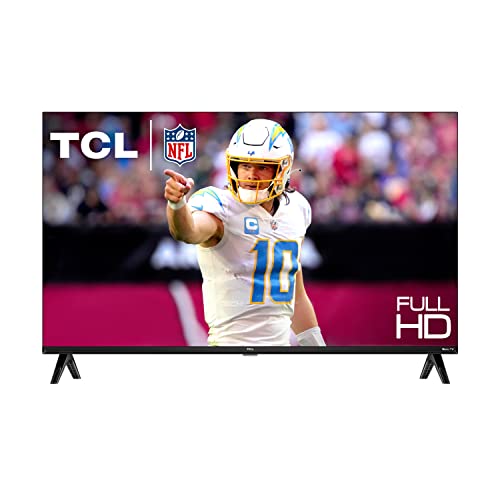
2. TCL 32-Inch Class S3 1080p LED Smart TV with Roku TV (32S350R, 2023 Model) — Best Roku Option
- Best for: Anyone who wants a simple Roku television for PS3 gaming and everyday streaming.
- Screen size: 32 inches
- Resolution: Full HD 1080p, 1920 by 1080
- Refresh rate: 60Hz
- Display: LED panel with Roku TV smart platform
Anyone who wants a simple Roku television for PS3 gaming and everyday streaming.
The TCL S3 is a strong alternative to the Samsung for anyone who prefers the Roku platform. It is also a 32-inch native 1080p set, so it presents the PS3 signal without upscaling, and it pairs that panel with the Roku interface, which many people find the easiest smart system to use. The home screen is a simple grid of apps and inputs, the remote is uncluttered, and switching to the PS3 input takes a single press.
The S3 is built around an LED panel with Full HD resolution and a 60Hz refresh rate, which lines up well with the PS3. It works with Alexa, Google Assistant, and Apple HomeKit, and it supports Apple AirPlay, so streaming from a phone or tablet is straightforward.
Key specifications:
Pros:
Cons:
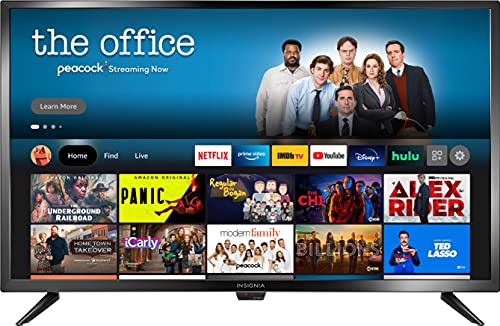
3. INSIGNIA 32-Inch Class F20 Series Smart Full HD 1080p Fire TV (NS-32F202NA22, 2021 Model) — Best Fire TV Option
- Best for: PS3 owners who already use Fire TV and Alexa and want a straightforward 1080p streaming hub.
- Screen size: 32 inches
- Resolution: Full HD 1080p, 1920 by 1080
- Refresh rate: 60Hz
- Display: LED panel with Fire TV smart platform
PS3 owners who already use Fire TV and Alexa and want a straightforward 1080p streaming hub.
The Insignia F20 is the pick for households that already live in the Amazon ecosystem. It is a 32-inch Full HD Fire TV, so it combines a native 1080p panel for the PS3 with the Fire TV interface, Alexa voice control, and direct access to Prime Video and the wider Fire TV app library.
The panel is a 32-inch LED display with 1920 by 1080 resolution and a 60Hz refresh rate, which is the right specification for PS3 play. The included Alexa Voice Remote lets you search for shows, change inputs, and control playback by voice, and the Fire TV home screen puts live television, streaming apps, and recent content in one place. This is a 2021 design, so it does not have the newest smart features or the slimmest frame of the 2025 sets in this guide, but the picture is still a good match for the PS3.
Key specifications:
Pros:
Cons:
4. VIZIO 32-Inch Full HD 1080p Smart TV (VFD32M-08) — Best for Late-Night Play
- Best for: PS3 players who game late at night or in a shared room and want private listening.
- Screen size: 32 inches
- Resolution: Full HD 1080p, 1920 by 1080
- Refresh rate: 60Hz
- Display: Full HD LED panel with ThinFrame design
PS3 players who game late at night or in a shared room and want private listening.
The VIZIO 32-inch Full HD set, model VFD32M-08, earns its place through a feature that matters more than it sounds: Bluetooth headphone support. It is a 32-inch native 1080p television with DTS Virtual:X audio, Google Cast built in, Alexa compatibility, and a ThinFrame design, and it lets you pair wireless headphones directly to the television. For late-night PS3 sessions in a shared home, that single feature can be the deciding factor.
The panel is a straightforward match for the console. Full HD resolution means the PS3 signal is shown without upscaling, and the 60Hz refresh rate lines up with the console output. The smart platform is VIZIO’s own system, with WatchFree+ and the popular streaming apps.
Key specifications:
Pros:
Cons:
5. Hisense 43-Inch Class A6 Series 4K UHD Smart Google TV (43A6H) — Best Larger Screen
The Hisense A6 is the pick for anyone who wants a bigger screen for the PS3 without moving to a premium price tier. It is a 43-inch 4K television, so it upscales the console’s 1080p output to fill the larger panel, and it adds a dedicated Game Mode, Dolby Vision HDR, and the Google TV platform. It suits a small living room where the same screen will also show films, sport, and streaming, and where a 32-inch set would feel too small.
The panel is a 43-inch LED display with 3840 by 2160 resolution, and the set supports Dolby Vision HDR, DTS Virtual:X audio, and Chromecast built in. The Google TV interface brings together streaming apps, live television, and recommendations in one home screen, and the included voice remote uses Google Assistant. Switch on Game Mode for the PS3 input, and sit six to nine feet away: at that distance the upscaled picture holds together well, but much closer and the limits of an upscaled older signal become easier to see.
Key specifications:
- Screen size: 43 inches
- Resolution: 4K UHD, 3840 by 2160, with upscaling for 1080p input
- Refresh rate: 60Hz
- Display: LED panel with Dolby Vision HDR
- Smart platform: Google TV, with Chromecast built in and Google Assistant voice remote
- Audio: DTS Virtual:X
- Gaming: Dedicated Game Mode and Sports Mode
- Model: 43A6H
- View on Amazon
Pros:
- Larger 43-inch screen suits living rooms and split-screen play
- Dedicated Game Mode helps keep controls responsive
- Dolby Vision HDR and Google TV add value beyond PS3 gaming
Cons:
- 4K panel upscales the PS3 signal rather than showing it natively
- Needs a wider stand and a sensible viewing distance to look its best
- Picture quality depends more on processing than on the 32-inch 1080p picks
Best for: Living-room PS3 setups where a larger screen is wanted and the television will also serve streaming and films.
Comparison Table
| TV | Size | Resolution | Refresh Rate | Smart Platform | Standout Feature |
|---|---|---|---|---|---|
| Samsung F6000 | 32 inches | 1080p Full HD | 60Hz | Tizen | Native 1080p, best overall match |
| TCL S3 32S350R | 32 inches | 1080p Full HD | 60Hz | Roku TV | Simplest smart interface |
| INSIGNIA F20 | 32 inches | 1080p Full HD | 60Hz | Fire TV | Alexa voice remote |
| VIZIO VFD32M-08 | 32 inches | 1080p Full HD | 60Hz | VIZIO | Bluetooth headphone pairing |
| Hisense A6 43A6H | 43 inches | 4K UHD | 60Hz | Google TV | Larger screen with Game Mode |
How to Set Up a PS3 on a New TV
Connect the console with a standard HDMI cable, using a port you can remember, and select the correct input on the television. On the PS3, open the display settings and confirm the console is outputting over HDMI at 1080p. The console will usually detect the television automatically, but it is worth checking, and you should also confirm that audio is routed over HDMI. On the television, open the picture settings for the PS3 input and switch on Game Mode. Turn off motion smoothing and extra noise reduction for that input, since those features add delay and can make games look artificial. Set the picture mode to Game or Standard rather than Vivid, which often pushes colours too far and crushes shadow detail.
FAQ
Does the PS3 work with a modern 4K TV?
Yes, the PS3 works with a modern 4K television over HDMI, and most 4K sets accept a 1080p signal without difficulty. The television upscales the picture to fill its 4K panel, and the result is usually clean at a normal viewing distance.
Is 1080p or 4K better for PS3 gaming?
For PS3 gaming alone, 1080p is the better match, because it is the highest resolution the console outputs and a native 1080p panel displays it directly.
What is input lag, and why does it matter for PS3 games?
Input lag is the delay between pressing a button and seeing the action happen on screen. Even a small delay can make a game feel unresponsive, especially in driving, fighting, and shooting games. Game Mode reduces lag by turning off extra picture processing, so it should be switched on for the HDMI input connected to the PS3.
Do I need a special HDMI cable for a PS3?
No, a standard HDMI cable is enough for a PS3. The console outputs up to 1080p, which a regular HDMI cable handles easily. What matters more is that the cable is in good condition and firmly seated at both ends, and that the television is set to the correct input.
What screen size is best for PS3 gaming?
A 32-inch screen is the best size for most PS3 setups, especially in a bedroom, dorm, or desk area, because native 1080p looks dense and sharp at that size. A 43-inch screen is a better choice for a small living room, where viewers sit further back and want a larger picture for films as well as games.
Conclusion
The best TVs for PS3 are the ones that respect what the console can do. A native 1080p panel, a responsive Game Mode, and a straightforward HDMI connection matter far more than a long list of features built for newer hardware. That is why the Samsung F6000 leads this guide: its 32-inch Full HD screen matches the PS3 output directly, and it is easy to place, easy to set up, and easy to live with as an everyday television. Whichever set you choose, connect over HDMI, confirm 1080p output on the console, switch on Game Mode for the PS3 input, and turn off motion smoothing. Those steps make a bigger difference to how PS3 games feel than any single specification on the box.
More from Amazon
Programs that pair well with the guide above. Offers and eligibility are set by Amazon and may change.
Free shipping on eligible items, Prime Video and more. Eligible new members can start with a free trial.
Start a Prime free trialAd-free music streaming. Eligible new subscribers can start with a free trial.
Try Music Unlimited freeA Prime membership for ages 18-24 with a trial period. Eligibility is set by Amazon.
See Prime for Young AdultsAudiobooks and podcasts to listen to on the go. Eligible new members can start with a free trial.
Try Audible freeAs an Amazon Associate we earn from qualifying purchases.










Write Your Review
No reviews yet. Be the first to share your experience!