
Our Short List of 3


All 5 Picks at a Glance
| Product | Specs | Action |
|---|---|---|
| ViewSonic VA2456A-MHD_H2 24 Inch 1080p IPS Monitor, 120Hz, Dual Pack | Check price on Amazon | |
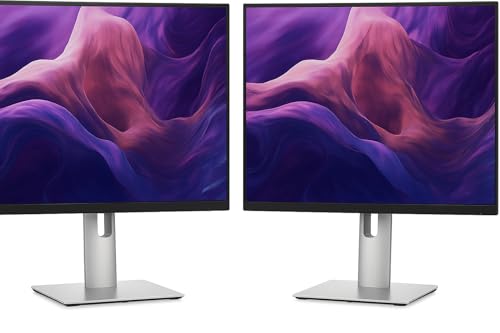 Dell P2425H 24 Inch FHD 100Hz Monitor Bundle, 2 Pack | Check price on Amazon | |
| Kado Dual Monitor Setup, 2-Pack 24 Inch Curved 1500R Computer Monitor, 75Hz, C24X Dual Series | Check price on Amazon | |
 Kado Dual Monitor Setup, 2-Pack 27 Inch Curved 1500R Computer Monitor, 75Hz, C27 Dual Series | Check price on Amazon | |
 Philips 241V8LB 24 Inch Frameless Full HD 100Hz Monitor | Check price on Amazon |
Key takeaways
- Best dual computer monitors for a two-screen desk: matched 24-inch and 27-inch pairs compared on panel, refresh, ports, and mounts so both screens sit even.
Two screens change how a desk works. One screen holds the main task while the second holds chat, email, reference material, or a second document, and the mouse moves between them without minimizing anything. That is the whole point of a dual setup, and it is also the reason the two screens should match: when the panels, colors, and heights line up, the eye crosses the seam without adjusting, and the pair reads as one wide workspace instead of two separate monitors that happen to sit next to each other.
This guide reads “dual computer monitors” in the plainest sense: two computer monitors used side by side as one workspace. Four of the five picks below are sold as a pair in a single package, two screens in one box, matched from the same batch. The fifth pick, the Philips 241V8LB, is a single monitor, and this guide recommends buying two of the same model; that entry says so plainly, and the comparison table marks it as a single sold twice. No pick here is a television, a portable display, or a single ultrawide pretending to be two screens.
What to look for
Matched panels first. A dual setup lives or dies on whether the two screens look like one surface. Same model, same panel type, same size, same resolution. IPS panels keep color steady when viewed from an angle, which matters here because each screen in a pair is viewed slightly off-center. VA panels give deeper blacks and stronger contrast, which suits long document sessions and video, but their color shifts a little more at an angle.
Size and desk width. Twenty-four inches is the practical size for most desks: two of them fit side by side on a standard desk, text stays crisp at full HD, and the outer edges stay within easy eye movement. Twenty-seven inches gives more room per screen, but at full HD the same 1920 x 1080 pixels spread over a wider panel, so text looks softer than on a 24-inch screen at the same resolution.
Refresh rate. Three refresh rates appear in this guide: 75Hz on the two Kado pairs, 100Hz on the Dell pair and the Philips single, and 120Hz on the ViewSonic pair. A higher refresh rate makes scrolling and window movement look smoother, and it matters most for fast motion. For documents, spreadsheets, and video calls, 75Hz is fine. For a desk that doubles as a casual gaming desk, the 100Hz and 120Hz picks give the smoother motion.
Ports and the hub question. Count the video inputs on each screen and match them to the outputs on the computer. HDMI is the common link; DisplayPort is the second link on most desktops; VGA is an older analog link that still appears on budget screens and looks softer than a digital link, so prefer HDMI or DisplayPort on both screens when the computer allows it. The Dell pair adds a USB hub with a USB-C port that charges accessories and carries data, which is a desk-clutter feature rather than a video input: the screens themselves still connect over HDMI, DisplayPort, or VGA.
Stands, arms, and the head-only pack. The ViewSonic pair ships head-only, with no stands in the box, so it needs a VESA mount or monitor arms before it can stand on a desk. The Dell pair carries the most adjustable stands in this guide, with height, tilt, swivel, and pivot on each screen. The Kado pairs ship on their own stands and name VESA mounting for arms, but their listings do not name height adjustment, so confirm the stand on the listing if height adjustment matters.
Speakers and eye comfort. Only the two Kado pairs name built-in speakers on their listings, so a desk built around any other pick here needs separate audio. Eye comfort features are named on most listings: the ViewSonic pair names Flicker-Free technology and a Blue Light Filter, the Philips single names LowBlue mode and Flicker-Free, and the Dell pair names ComfortView Plus. The Kado listings do not name an eye comfort feature, so do not assume one is present.
ViewSonic VA2456A-MHD_H2 24 Inch 1080p IPS Monitor, 120Hz, Dual Pack
The ViewSonic VA2456A-MHD_H2 is the only pick in this guide that ships as two head-only screens in one package: two 24-inch full HD IPS monitors, sold as a dual pack without monitor stands, with VESA mounting for arms or a wall mount. It is also the only pick with a 120Hz refresh rate, the highest in this guide, and the only IPS pair, which makes it the natural choice for a desk where color steadiness across two angled screens matters most. The listing names SuperClear IPS technology, thin bezels, Flicker-Free technology, and a Blue Light Filter, with HDMI, DisplayPort, and VGA inputs on each screen.
The package contents are stated plainly on the maker’s page: two LCD displays, two power cables, one HDMI cable, one DisplayPort cable, and two setup guides. That cable count is the practical detail to plan around. Two screens need two video cables, and the box carries one HDMI cable and one DisplayPort cable, so a setup with two identical connections needs a second cable of the same type.
Color is where this pair earns its place. IPS panels hold their color when viewed from an angle, and a dual desk always views each screen at a slight angle from the center seating position. The two screens come from the same batch in the same package, so panel matching is as close as a bundle can give. The 120Hz refresh rate makes scrolling through long documents and dragging windows between screens look smoother than on the 75Hz picks, and the thin bezels keep the seam between the two screens narrow.
Dell P2425H 24 Inch FHD 100Hz Monitor Bundle, 2 Pack
The Dell P2425H bundle is two 23.8-inch full HD IPS monitors in one value pack, and it is the most complete desk package in this guide: each screen carries its own height, tilt, swivel, and pivot stand, and each screen carries a USB hub. The listing names a 100Hz refresh rate, ComfortView Plus, HDMI, DisplayPort, and VGA inputs, a 1500:1 contrast figure, 99 percent sRGB coverage, and 250 nits of brightness. The hub on each screen holds one USB-B upstream port, three USB-A downstream ports, and one USB-C port that provides up to 15W of power for accessories.
The stands are the reason to choose this pair over the others. Height, tilt, swivel, and pivot on both screens means the two panels can be lined up exactly, and one screen can turn to portrait for a long document or a code file while the other stays in landscape. That flexibility is something the Kado pairs and the Philips single do not name on their listings. The trade is desk depth: two full stands take more room front to back than a single dual arm, so a shallow desk may feel crowded.
One listing detail deserves a plain note. A mirror table for this bundle lists an aspect ratio of 4:3 in one place, while the listing itself clarifies full HD 1920 x 1080 resolution, which is a 16:9 widescreen image. This guide follows the listing: two 16:9 widescreen screens. The 100Hz refresh rate sits in the middle of this guide, smoother than the 75Hz Kado pairs and below the 120Hz ViewSonic pair, and it is a good match for a work desk that sometimes plays video or a casual game on the second screen.
Kado Dual Monitor Setup, 2-Pack 24 Inch Curved 1500R Computer Monitor, 75Hz, C24X Dual Series
The Kado C24X is the curved pick in this guide: two 24-inch full HD monitors with a 1500R curve, a 75Hz refresh rate, and built-in speakers, sold together as a dual setup. The listing names a VA panel, 98 percent sRGB coverage, a 2000:1 contrast figure, a 3 millisecond response time, a matte screen finish, HDMI input, and VESA mounting. The model code is KADO-C24-DUAL, and the two screens ship together, so the panels are matched from the same batch.
A curved pair behaves differently from a flat pair on the desk. The 1500R curve wraps each screen gently around the seating position, so the outer edges angle back toward the viewer instead of sitting flat. With two curved screens side by side, the inner edges meet at a slight angle, and the curve makes the seam feel narrower than on two flat screens. The trade is that the pair needs the angle set with care: push the inner edges too close and the curve fights the alignment; leave them too far apart and the gap shows.
Availability needs a plain note. The freshest mirror check for this listing showed only a small number of units left, fulfilled by a third-party seller rather than by the maker directly, so confirm the seller line and a new-unit buying option live before ordering. The listing names no eye comfort feature, so do not assume one is present, and it names no height adjustment for the stands, so confirm the stand on the listing if height adjustment matters. The model code matters too: Kado sells a flat 24-inch dual pack under a different code, and the curved 24-inch pair here is the C24X Dual Series, so confirm KADO-C24-DUAL on the listing rather than trusting the size and curve alone.
Kado Dual Monitor Setup, 2-Pack 27 Inch Curved 1500R Computer Monitor, 75Hz, C27 Dual Series
The Kado C27 is the largest pair in this guide: two 27-inch full HD monitors with a 1500R curve, a 75Hz refresh rate, and built-in speakers, sold together as a dual setup. The listing names a 1920 x 1080 resolution, a 16:9 aspect ratio, a matte screen finish, 98 percent sRGB coverage, a 3 millisecond response time, HDMI input, VESA mounting, and built-in speakers. The model code is KADO-C27-DUAL, and the listing dimensions name 2.83 x 24.46 x 14.56 inches per screen.
Size is the whole story with this pair. Two 27-inch screens give the most room per window in this guide, and the curve wraps them around the seating position the same way the 24-inch curved pair does. But the same 1920 x 1080 pixels that look crisp on a 24-inch screen spread wider here, so text looks softer than on any other pick in this guide. That is a real trade, not a small one: a desk built mostly for reading, writing, and spreadsheets will look sharper on the 24-inch pairs, while a desk that wants large windows and a wide view will feel roomier on this pair.
Two cautions belong with this pick. First, Kado sells a near-identical 27-inch curved dual pack under the model code KADO-C27X-DUAL, called the C27X Dual Series, and the two listings look alike at a glance. Confirm KADO-C27-DUAL on the listing before ordering, since the two codes are different products. Second, this pair carries the thinnest availability evidence in this guide: the freshest direct listing crawl is months old, and the recent signals are mirrors and roundups rather than a days-old stock flag. Confirm a new-unit buying option live before ordering, and if the listing shows no new units, the curved 24-inch pair covers the same curved dual reading on a smaller desk.
Philips 241V8LB 24 Inch Frameless Full HD 100Hz Monitor
The Philips 241V8LB is the only single-monitor pick in this guide, and its dual reading is stated plainly: the listing sells one 23.8-inch screen, and the dual setup is two of the same model bought together. Order both at once from the same listing so they ship from the same batch, and the pair will match as closely as two singles can. The listing names full HD 1920 x 1080 resolution, a 100Hz refresh rate, a VA panel, a frameless design on three sides, one HDMI port, one VGA port, VESA mounting, LowBlue mode, Flicker-Free technology, and a four-year advance replacement warranty.
This is the simplest dual path in the guide, and the warranty is the reason to consider it. A four-year advance replacement warranty is the longest warranty named on any listing here, and it covers the pair for longer than the one-year manufacturer warranty named on the Kado listings. The frameless design on three sides keeps the seam narrow when the two screens sit side by side, and the VA panel gives the deep blacks and strong contrast that suit long document sessions. The 100Hz refresh rate matches the Dell pair and sits above the two Kado pairs, so scrolling and window movement look smoother than on the curved picks.
The ports are the limit to plan around. Each screen carries one HDMI port and one VGA port, with no DisplayPort named on the listing. A two-screen setup therefore runs on two HDMI outputs, or on one HDMI and one VGA, and VGA is an analog link that looks softer than a digital link. If the computer carries two HDMI outputs or a dock with two HDMI outputs, this pair connects cleanly. If the computer carries one HDMI and one DisplayPort, the second screen needs an adapter, or the DisplayPort output goes unused.
Frequently asked questions
Do the two monitors have to be the same model?
They do not have to be, but the pair works better when they are. Two screens of the same model share the same panel type, the same color behavior, the same brightness, and the same stand height, so a window dragged across the seam keeps its look and its position. A sold-as-a-pair bundle removes that mismatch entirely, since both screens come from the same batch. Buying two singles of the same model comes close, and ordering both at once from the same listing is the way to keep them from the same batch.
What if the computer has only one video output?
Most desktop graphics cards carry at least two outputs, often a mix of HDMI and DisplayPort, so two monitors connect directly with one cable each. Many laptops carry one HDMI port and a USB-C port that carries video, and a USB-C dock or hub with a video output adds the second screen. None of the five picks in this guide names daisy-chain support, so each screen needs its own cable to the computer or to a dock; one cable cannot pass through the first screen to the second. The Dell pair’s USB hub does not change this: its USB-C port charges accessories and carries data, and it is not named as a video input, so the screens still connect over HDMI, DisplayPort, or VGA.
Do I need a monitor arm for the ViewSonic dual pack?
Yes, unless the screens will mount on a wall. The ViewSonic VA2456A-MHD_H2 ships head-only, with no stands in the box, so the two screens cannot stand on a desk on their own. The listing names VESA mounting, so a dual monitor arm with two VESA heads holds both screens on one base, lines their heights up exactly, and frees the desk surface underneath. Confirm the VESA pattern on the listing before ordering an arm, and confirm that the arm carries two 24-inch screens. The other four picks in this guide ship on their own stands, so they stand on the desk straight out of the box, and an arm is optional for them rather than required.
How to choose
Measure the desk first, then choose the size. Two 24-inch screens fit a standard desk and give the sharpest text at full HD; two 27-inch screens need a wider desk and trade sharpness for room. Then decide how the pair should arrive: a sold-as-a-pair bundle guarantees matched panels from the same batch, while two singles of the same model come close when ordered together. Then count the video outputs on the computer and match them to the ports on the screens, preferring HDMI or DisplayPort on both screens over VGA.
Disclosure: As an Amazon Associate, we may earn a commission from qualifying purchases made through links in this article, at no additional cost to you.
More from Amazon
Programs that pair well with the guide above. Offers and eligibility are set by Amazon and may change.
Free shipping on eligible items, Prime Video and more. Eligible new members can start with a free trial.
Start a Prime free trialAd-free music streaming. Eligible new subscribers can start with a free trial.
Try Music Unlimited freeA Prime membership for ages 18-24 with a trial period. Eligibility is set by Amazon.
See Prime for Young AdultsAudiobooks and podcasts to listen to on the go. Eligible new members can start with a free trial.
Try Audible freeAs an Amazon Associate we earn from qualifying purchases.










Write Your Review
No reviews yet. Be the first to share your experience!