
Key takeaways
- Three gaming monitors under 250 compared on panel, refresh and HDR: a 1440p LG at 200Hz, a Mini-LED AOC, and a curved Samsung Odyssey for your desk.
Under 250, the real decision is no longer whether a gaming monitor is fast, because nearly every screen in this tier clears 165Hz. The decision is where the money went instead: a sharper 1440p panel, a backlight that can do HDR properly, a curve that wraps the game around you, or a stand you can adjust. It also depends on your graphics card, since 1440p asks far more of it than 1080p, and a monitor your PC cannot feed feels slower than a cheaper screen it can.

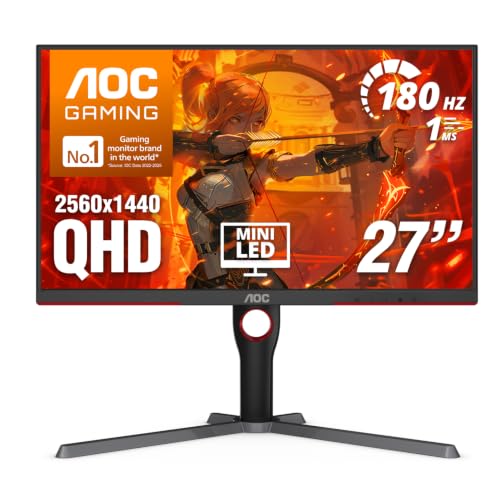
This guide is for PC players upgrading from an old 60Hz office screen, console owners who want a proper gaming display, and anyone building a battlestation on a budget. Every pick below was chosen from what its Amazon listing states about panel type, refresh rate, sync support and stand, and every one sits in the under 250 tier in current deal coverage. The three split by panel: a fast flat IPS, a Mini-LED VA built for HDR, and a curved VA for immersion.
Quick Picks
As an Amazon Associate we earn from qualifying purchases
| Product | Best for | Key spec from title |
|---|---|---|
| LG UltraGear 27GS75Q-B | The fastest 1440p motion | 27 inch QHD IPS, 180Hz native, 200Hz overclock |
| AOC Q27G3XMN | HDR and dark scenes | Mini-LED backlight, 336 dimming zones, HDR 1000 |
| Samsung Odyssey G55C 27 | Curved immersion | 1000R curved VA panel, 165Hz, 1ms MPRT |
How to Choose
Resolution Versus Refresh Rate
At this tier the headline trade is sharpness against speed. A 27 inch 1440p screen packs far more detail than 1080p, which helps in open-world games, strategy titles and any desktop work between sessions, but your graphics card has to render every one of those pixels. A mid-range card that holds 180 frames per second at 1080p may only manage half that at 1440p. Match the panel to the card first: strong recent hardware earns a 1440p screen, while an older card is happier feeding a fast 1080p display.
Panel Type: IPS or VA
IPS and VA panels fail in opposite ways, so pick the weakness you mind least. IPS keeps colors consistent at wide viewing angles and usually answers inputs quickly, which suits shared desks and fast shooters, but its blacks look gray in a dark room. VA delivers much deeper contrast, so night scenes and horror games hold their mood, yet dark transitions can smear during rapid movement. All three picks here are 1440p, but the LG uses IPS while the AOC and Samsung use VA, and that single line on the listing changes how games feel after dark.
Sync, Ports and the Cable in the Box
Adaptive sync is what keeps motion smooth when your frame rate dips, so confirm the listing names FreeSync, G-SYNC Compatible or Adaptive Sync rather than assuming it. Then check the port list against your machine. Some screens in this tier only reach their full refresh rate over DisplayPort, while the HDMI input tops out lower, and consoles lean on HDMI for their 120Hz modes. The cable bundled in the box matters too: if a DisplayPort cable is missing, budget for one, because the wrong cable quietly caps the refresh rate you paid for.
Stand Adjustment and Desk Fit
A tilt-only stand locks your neck into whatever angle the factory chose, and at this tier that is still the most common quiet compromise. Height adjustment lets the screen meet your eye line, pivot helps if you read documents or code beside your games, and a VESA mount pattern lets you move the panel onto an arm later. Check the stand line on the listing before the panel line, honestly: an uncomfortable screen gets replaced sooner than a slightly slower one, and two of the three picks here adjust far more than the third.
The 3 Best Options
LG UltraGear 27GS75Q-B
This is the pick for players who measure a monitor by how clean motion looks at speed. The listing pairs a 27 inch QHD IPS panel with a 180Hz native refresh rate that overclocks to 200Hz, a 1ms GtG response time, and both NVIDIA G-SYNC Compatible and AMD FreeSync support, so it plays nicely with either graphics card family. The stand is the other half of the appeal: tilt, height and pivot adjustment are rare at this level, and they make the screen easy to live with for work hours as well as ranked nights.
Specs
- Screen size: 27 inches
- Resolution: 2560 x 1440 (QHD)
- Panel type: IPS
- Refresh rate: 180Hz native, 200Hz overclocked
- Response time: 1ms GtG
- Sync: NVIDIA G-SYNC Compatible, AMD FreeSync
- HDR and color: HDR10, 99% sRGB
- Stand: tilt, height and pivot adjustment
- Ports: 2x HDMI, DisplayPort
Best for: PC players who want the fastest 1440p motion in this tier plus a stand that adjusts properly.
Watch out for: The 200Hz figure is an overclock you switch on in the on-screen menu rather than the default, and the 99% sRGB gamut means wide-gamut color work belongs on a different screen.
AOC Q27G3XMN
Most screens under 250 accept an HDR signal and then do very little with it. This AOC is the exception in the group: its listing puts a Mini-LED backlight with 336 dimming zones behind a 27 inch QHD VA panel and rates the screen for HDR 1000, so bright highlights and dark corners can share the same frame in story games and films. It still runs at 180Hz with a 1ms GtG response time and Adaptive Sync, so it is not slow, and the three-year warranty on the listing is longer than this tier usually offers.
Specs
- Screen size: 27 inches
- Resolution: 2560 x 1440 (QHD)
- Panel type: VA with Mini-LED backlight, 336 dimming zones
- HDR: HDR 1000
- Refresh rate: 180Hz over DisplayPort 1.4
- Response time: 1ms GtG
- Color: sRGB 137.5% as printed on the listing
- Sync: Adaptive Sync
- Ports: HDMI 2.0, DisplayPort 1.4
- Warranty: 3 years
Best for: Story-driven and HDR gaming where contrast and highlight punch matter more than the last few hertz.
Watch out for: The listing describes a glossy screen finish, so a bright window behind your seat can throw reflections, and the full 180Hz runs over DisplayPort rather than HDMI.
Samsung Odyssey G55C 27
The G55C is built around one idea: wrap the game around your peripheral vision. Its 1000R curved VA panel is the deepest curve in this group, and Samsung rates it at 165Hz with a 1ms MPRT response time, HDR10 and AMD FreeSync. The VA panel’s 2500:1 contrast ratio gives racing games and open-world nights more depth than a basic IPS screen manages, and the matte finish keeps ceiling lights from glaring across the curve. If you play from one centered seat and like feeling inside the cockpit or the driver’s chair, this is the shape to buy.
Specs
- Screen size: 27 inches
- Resolution: 2560 x 1440 (QHD)
- Panel type: VA, 1000R curved
- Refresh rate: 165Hz
- Response time: 1ms (MPRT)
- Contrast ratio: 2500:1
- Brightness: 300 cd/m2
- Sync and HDR: AMD FreeSync, HDR10
- Finish: matte, flicker-free Eye Care
Best for: Players who want a curved, wrap-around 1440p screen for racing, flight and open-world games.
Watch out for: The headline 1ms figure is an MPRT number rather than GtG, so compare it carefully against the other two, and the deep curve suits one centered seat better than two people sharing the screen.
Which One Fits Your Situation
You Play Competitive Shooters on PC
Take the LG UltraGear 27GS75Q-B. The 200Hz overclock mode, 1ms GtG response and dual sync support give you the cleanest motion of the three, and the height and pivot stand lets you pull the screen close and square for long sessions. Your graphics card works harder at 1440p, but for shooters the extra clarity helps you pick out movement at range.
You Mostly Play Story Games and Watch Films
Take the AOC Q27G3XMN. The Mini-LED backlight with 336 zones and HDR 1000 spec is the only setup here that does HDR justice, and the VA panel’s contrast suits dark, cinematic scenes. It still refreshes at 180Hz over DisplayPort, so action games stay smooth; you are trading the LG’s last slice of speed for a picture with real depth.
You Want the Screen to Wrap Around You
Take the Samsung Odyssey G55C. The 1000R curve fills your peripheral vision in racing games, flight sims and open-world exploring in a way a flat panel cannot, and 165Hz with FreeSync keeps motion tidy. Sit centered, give the curve a few days, and flat screens will feel oddly distant when you go back to them.
Your Desk Doubles as Your Office
Take the LG UltraGear 27GS75Q-B again. The adjustable stand matters more across a full workday than any panel figure, the IPS panel holds colors steady when you lean back or share the screen, and 1440p gives documents and spreadsheets welcome room. It games hard after hours, but it earns its place during the day first.
Common Mistakes
- Buying a 1440p monitor for a graphics card that can only drive high frame rates at 1080p, then blaming the screen for soft, slow gameplay.
- Leaving the display set to 60Hz in your system settings after plugging it in, which wastes the refresh rate the whole purchase was about.
- Connecting over the wrong port or cable and never seeing the full refresh rate, since some inputs on some models cap out lower than DisplayPort.
- Judging HDR by the badge alone: accepting an HDR signal is not the same as a Mini-LED backlight with local dimming that can actually show it.
- Ignoring the stand line on the listing, then paying again for a monitor arm because the bundled tilt-only base hurts your neck.
Frequently Asked Questions
Is 1440p worth it over 1080p in this tier?
Yes, if your graphics card can feed it. At 27 inches, 1440p looks visibly sharper than 1080p for games, text and desktop work, and every pick here pairs that resolution with at least 165Hz. With an older or entry-level card, a fast 1080p screen you can drive properly will feel smoother than a 1440p panel running far below its refresh rate.
Can a PlayStation 5 or Xbox use these monitors?
Yes. All three are 1440p screens with HDMI inputs and adaptive sync, and current consoles support 1440p output with high-refresh modes in many games. Connect over HDMI, enable the console’s 120Hz and variable refresh settings, and confirm the monitor’s on-screen menu shows the higher rate, since the exact ceiling depends on the port and the game.
Do I need DisplayPort to get the full refresh rate?
On some of these picks, yes. The AOC lists its 180Hz over DisplayPort 1.4, and overclock modes like the LG’s 200Hz are usually a DisplayPort path as well. HDMI still works for everyday play, but if your screen arrives set lower than expected, switch to a DisplayPort cable before assuming anything is faulty.
What does an overclocked refresh rate actually mean?
It means the panel’s guaranteed native rate is lower than the headline number, and the higher figure is a mode you enable yourself in the on-screen menu. The LG runs 180Hz natively and 200Hz overclocked; the AOC reaches 180Hz the same way over DisplayPort. The mode is a normal, supported setting, but the native figure is the safer one to plan around.
More from Amazon
Programs that pair well with the guide above. Offers and eligibility are set by Amazon and may change.
Free shipping on eligible items, Prime Video and more. Eligible new members can start with a free trial.
Start a Prime free trialAd-free music streaming. Eligible new subscribers can start with a free trial.
Try Music Unlimited freeA Prime membership for ages 18-24 with a trial period. Eligibility is set by Amazon.
See Prime for Young AdultsAudiobooks and podcasts to listen to on the go. Eligible new members can start with a free trial.
Try Audible freeAs an Amazon Associate we earn from qualifying purchases.









Write Your Review
No reviews yet. Be the first to share your experience!