
Our Short List of 3

- Best for: Podcasters who want an interchangeable-lens body and a working kit lens in the same box.
- Type: vlog camera with 16-50mm kit lens per title
- Model: ILCZV-E10L/B per title
- Colour: Black per title

- Best for: New podcasters who prefer Canon’s system and want sensor, 4K video and kit lens stated in one listing.
- Sensor: 24.2MP APS-C per title
- Video: 4K per title
- Lens: RF-S 18-45mm kit lens per title
- Positioning: titled for vlogging and content creators per title
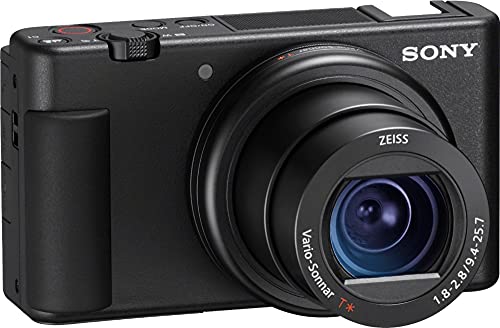
- Best for: Solo and duo podcasters who want one compact camera for recorded episodes and live streams.
- Video: 4K HDR per title
- Screen: flip screen, touchscreen display per title
- Audio: built-in microphone per title
- Functions: live video streaming, webcam per title
All 5 Picks at a Glance
| Product | Specs | Action |
|---|---|---|
| Sony ZV-E10 with 16-50mm Kit Lens |
| Check price on Amazon |
| Canon EOS R50 with RF-S 18-45mm Kit |
| Check price on Amazon |
| Sony ZV-1 |
| Check price on Amazon |
 Panasonic LUMIX G100 with 12-32mm Lens |
| Check price on Amazon |
 Logitech MX Brio |
| Check price on Amazon |
Key takeaways
- Five cameras for video podcasting compared on listing specs: 4K video, kit lenses, built-in microphones, flip screens, streaming and webcam modes.
A video podcast camera works a different job from a travel camera: it sits on a desk or tripod a metre from your face, records long sessions, and has to keep your voice and face presentable the whole time. The listings that serve it state the relevant facts directly – vlogging and content-creator positioning, built-in microphones, flip screens, live streaming and webcam functions – and those stated facts are the admission rule for this guide.
The five cameras below serve solo podcasters recording at a desk, pairs who want an interchangeable-lens setup to grow into, and streamers who split time between podcast episodes and live shows. Each was chosen from the names and specifications on its Amazon product page, including the kit contents and colourway details the listings state.
Quick Picks
As an Amazon Associate we earn from qualifying purchases.
| Product | Best for | Key spec from title |
|---|---|---|
| Sony ZV-E10 with 16-50mm Kit Lens | Podcasters who want an interchangeable-lens body and a working kit lens in the same box. | Vlog camera, 16-50mm kit lens, Black |
| Canon EOS R50 with RF-S 18-45mm Kit | New podcasters who prefer Canon’s system and want sensor, 4K video and kit lens stated in one listing. | 24.2MP APS-C, 4K video, RF-S 18-45mm kit |
| Sony ZV-1 | Solo and duo podcasters who want one compact camera for recorded episodes and live streams. | 4K HDR video, flip screen, live streaming, webcam |
| Panasonic LUMIX G100 with 12-32mm Lens | Hosts who move while they talk and want the stated microphone tracking in a compact mirrorless kit. | 4K mirrorless, microphone with tracking, 12-32mm |
| Logitech MX Brio | Podcasters whose show is recorded over Teams, Zoom or Meet and who want a 4K webcam instead of a camera rig. | Ultra HD 4K webcam, 1080p 60 FPS, Show Mode |
How to Choose
Match the camera to how the show is recorded
A solo desk recording, a two-host room show and a remote-guest podcast are three different camera jobs. The fixed-lens compact and the webcam serve the first and third with the least friction; the interchangeable-lens kits serve the second and reward growth. Decide the show’s actual format before comparing specifications, because the best sensor in this guide is wasted on a workflow it does not fit, and the simplest webcam is the right answer for a call-based show.
Stated video functions beat assumed ones
The listings here state their desk-video credentials in plain words: live video streaming and webcam mode on the ZV-1, collaboration and streaming on the MX Brio, vlogging and creator positioning on the kits. Those stated functions are what you can rely on at setup time. A camera whose listing never mentions streaming or webcam use may still be excellent glass, but the podcast-specific behaviour is then your research project, not a listed fact. Buy the claim that is printed.
The built-in microphone is a starting point
Two listings headline their microphones: the ZV-1’s built-in mic and the G100’s mic with tracking. For a first season recorded close to the camera, a stated built-in microphone is a legitimate starting point and one less purchase. Most growing shows later add a dedicated microphone, at which point the camera’s job narrows to picture only. Knowing which season you are in keeps you from overweighting – or underweighting – the audio facts in these titles.
Kit identity decides what arrives
Every interchangeable-lens pick here is a specific kit: a named lens, a colour, a model number. The same camera names circulate as body-only listings, bundles and Renewed versions under different codes, and the G100’s variant family is especially wide. The recording package you planned around exists only inside the exact listing. Match the model number and kit contents on the live page to the pick you chose before ordering, every time. A minute spent matching numbers at checkout saves the return, the re-order and the missed recording day.
The 5 Best Options
Sony ZV-E10 with 16-50mm Kit Lens
- Best for: Podcasters who want an interchangeable-lens body and a working kit lens in the same box.
- Type: vlog camera with 16-50mm kit lens per title
- Model: ILCZV-E10L/B per title
- Colour: Black per title
Podcasters who want an interchangeable-lens body and a working kit lens in the same box.
Bundle and Renewed versions of this camera circulate under their own codes; confirm the live page is the new kit listing, not a bundle variant.
The ZV-E10 is the interchangeable-lens starting point of this group. Its title states a vlog camera sold with the 16-50mm kit lens, model ILCZV-E10L/B, in black – a complete recording package in one box, with the lens mount left open for a dedicated podcast lens later. That growth path is its argument: the kit lens covers the first season at a desk, and the body stays when the optics improve. Bundle and colourway versions of this camera circulate widely, so the kit identity matters at checkout.
Watch out for: Bundle and Renewed versions of this camera circulate under their own codes; confirm the live page is the new kit listing, not a bundle variant.
Canon EOS R50 with RF-S 18-45mm Kit
- Best for: New podcasters who prefer Canon’s system and want sensor, 4K video and kit lens stated in one listing.
- Sensor: 24.2MP APS-C per title
- Video: 4K per title
- Lens: RF-S 18-45mm kit lens per title
- Positioning: titled for vlogging and content creators per title
New podcasters who prefer Canon’s system and want sensor, 4K video and kit lens stated in one listing.
The body-only version is a separate listing; confirm the live page includes the RF-S 18-45mm lens before ordering.
The EOS R50 is the Canon route into the same job. Its title states a 24.2MP APS-C sensor, 4K video and the RF-S 18-45mm kit lens, model 5811C012, and titles the camera for vlogging and content creators. The kit lens’s range covers a desk framing and a wider room shot without a second purchase. A body-only sibling listing exists separately; this pick is the kit, because a podcast desk needs a lens on the camera from the first recording day.
Watch out for: The body-only version is a separate listing; confirm the live page includes the RF-S 18-45mm lens before ordering.
Sony ZV-1
- Best for: Solo and duo podcasters who want one compact camera for recorded episodes and live streams.
- Video: 4K HDR per title
- Screen: flip screen, touchscreen display per title
- Audio: built-in microphone per title
- Functions: live video streaming, webcam per title
Solo and duo podcasters who want one compact camera for recorded episodes and live streams.
The lens is fixed, so the framing the built-in zoom gives you at your desk distance is the framing you keep; check it suits your setup.
The ZV-1 states its podcasting case more directly than any camera here. Its title lists a flip screen, a built-in microphone, 4K HDR video and a touchscreen, and then adds the two functions a desk podcaster actually uses: live video streaming and webcam mode, model DCZV1/B. A fixed-lens compact removes the lens decision entirely, which suits a creator whose show is two people at a table. The same body covers recorded episodes and live appearances without a second camera.
Watch out for: The lens is fixed, so the framing the built-in zoom gives you at your desk distance is the framing you keep; check it suits your setup.
Panasonic LUMIX G100 with 12-32mm Lens
- Best for: Hosts who move while they talk and want the stated microphone tracking in a compact mirrorless kit.
- Video: 4K per title
- System: Micro Four Thirds interchangeable lens system per title
- Lens: 12-32mm included per title
- Audio: built-in microphone with tracking per title
Hosts who move while they talk and want the stated microphone tracking in a compact mirrorless kit.
Variant and Renewed versions of the G100 circulate under many codes; confirm the live page is the DC-G100KK kit before ordering.
The LUMIX G100 brings a microphone idea the others do not state: its title lists a built-in microphone with tracking, inside a 4K mirrorless camera on the Micro Four Thirds interchangeable lens system, sold with the 12-32mm lens, model DC-G100KK, with 5-axis hybrid image stabilization. Mic tracking aims the audio pickup at the subject, a genuinely podcast-shaped feature for a host who moves while talking. This camera’s variant family is sprawling, so the exact kit identity needs care at checkout.
Watch out for: Variant and Renewed versions of the G100 circulate under many codes; confirm the live page is the DC-G100KK kit before ordering.
Logitech MX Brio
- Best for: Podcasters whose show is recorded over Teams, Zoom or Meet and who want a 4K webcam instead of a camera rig.
- Type: Ultra HD 4K webcam for collaboration and streaming per title
- Video: 1080p 60 FPS per title
- Feature: Show Mode per title
- Works with: Microsoft Teams, Zoom, Google Meet per listing
Podcasters whose show is recorded over Teams, Zoom or Meet and who want a 4K webcam instead of a camera rig.
A second MX Brio record with a different model number circulates under a similar title; match the live page to model 960-001545.
The MX Brio is the webcam of the group, and for a remote-guest podcast it may be the most practical camera here. Its title states an Ultra HD 4K webcam for collaboration and streaming, 1080p at 60 FPS and a Show Mode, in Graphite, model 960-001545, and the listing names Microsoft Teams, Zoom and Google Meet as its working ground. A podcast recorded over calls lives inside exactly those apps. A second MX Brio record circulates under a near-identical title; this pick is the code below.
Watch out for: A second MX Brio record with a different model number circulates under a similar title; match the live page to model 960-001545.
Which One Fits Your Situation
A solo podcaster recording at a desk
Take the Sony ZV-1. Its title states the whole solo workflow – flip screen, built-in microphone, 4K HDR video, live streaming and webcam mode – in a fixed-lens body that asks for no further decisions before the first episode. It is the pick for a creator who would rather record this week than research lenses for a month.
A show recorded over video calls
Take the Logitech MX Brio. The listing names Teams, Zoom and Google Meet as its ground, with 4K capture and a Show Mode for holding objects to the camera, which is the daily reality of a remote-guest podcast. No rig, no lens and no second device enter the workflow, which is why call-based shows stay with webcams for years.
A two-host show planning to grow
Take the Canon EOS R50 kit or the Sony ZV-E10 kit. Both state creator positioning and arrive with a working lens; the interchangeable mount is the growth path when a dedicated podcast lens joins the setup later. Either body also leaves the door open to a second angle later, when the show outgrows a single camera.
A host who talks with their hands
Take the Panasonic LUMIX G100. The stated microphone with tracking is the feature aimed at a presenter who moves, and the compact 12-32mm kit keeps the desk footprint small while it follows. For a one-person show recorded in a lively room, that audio behaviour is worth more than a larger sensor.
Common Mistakes
- Buying a body-only listing of a camera you chose as a kit, then discovering the lens is a second order and the first recording day has no glass.
- Assuming every camera streams or works as a webcam, when only some listings here state those functions in their titles.
- Letting a Renewed version of the same camera name into the order, since renewed listings circulate beside the new kits under different codes.
- Choosing on sensor size alone for a desk show, when the stated microphone, screen and streaming facts shape the recorded episode more.
- Skipping the model-number check on wide variant families like the G100, where suffix variants and kit variants share near-identical titles.
Frequently Asked Questions
Which camera here works as a webcam most directly?
Two listings state it outright: the Sony ZV-1, whose title lists webcam function alongside live video streaming, and the Logitech MX Brio, which is a webcam by design and names Teams, Zoom and Google Meet. The mirrorless kits make no such title claim in this guide.
Do I need a separate microphone with these cameras?
Not for a first season at a desk. The ZV-1 states a built-in microphone and the G100 states one with tracking, and both are legitimate starting points at close range. Most shows add a dedicated microphone later; the camera choice here does not prevent that.
Kit lens or body only for a first podcast camera?
The kits, as listed here. Each interchangeable-lens pick arrives with a stated lens – 16-50mm, 18-45mm or 12-32mm – so the camera records on day one. Body-only listings of the same cameras exist separately and suit buyers who already own a lens.
Why is a webcam in a camera roundup?
Because the listing states the podcast’s actual working ground: the MX Brio is titled for collaboration and streaming and names the meeting apps remote podcasts are recorded in. For a call-based show, it is not a compromise pick; it is the native tool.
More from Amazon
Programs that pair well with the guide above. Offers and eligibility are set by Amazon and may change.
Free shipping on eligible items, Prime Video and more. Eligible new members can start with a free trial.
Start a Prime free trialAd-free music streaming. Eligible new subscribers can start with a free trial.
Try Music Unlimited freeA Prime membership for ages 18-24 with a trial period. Eligibility is set by Amazon.
See Prime for Young AdultsAudiobooks and podcasts to listen to on the go. Eligible new members can start with a free trial.
Try Audible freeAs an Amazon Associate we earn from qualifying purchases.










Write Your Review
No reviews yet. Be the first to share your experience!