

Our Short List of 3

- Print technology: Monochrome laser, print only
- Print speed: Up to 34 ppm
- Resolution: Up to 1200 × 1200 dpi
- Connectivity: Ethernet, Hi-Speed USB 2.0, dual-band Wi-Fi

- Print technology: Colour laser (LED), print / scan / copy / fax
- Print speed: Up to 31 ppm colour and monochrome
- Resolution: Up to 2400 × 600 dpi
- Connectivity: Gigabit Ethernet, Hi-Speed USB 2.0, dual-band Wi-Fi, NFC

- Print technology: Colour laser, print / scan / copy / fax
- Print speed: Up to 22 ppm colour and monochrome
- Resolution: Up to 1200 × 1200 dpi
- Connectivity: Gigabit Ethernet (10/100/1000Base-T), USB 2.0, Wi-Fi, Wi-Fi Direct
All 5 Picks at a Glance
| Product | Specs | Action |
|---|---|---|
| 1. Brother HL-L2460DW — Compact Mono Laser With Ethernet and USB |
| Check price on Amazon |
| 2. Brother MFC-L3780CDW — Colour Laser All-in-One With Gigabit Ethernet |
| Check price on Amazon |
| 3. Canon imageCLASS MF656Cdw — Colour Laser With Gigabit Ethernet and USB |
| Check price on Amazon |
 4. Epson EcoTank ET-4850 — Refillable Tank All-in-One With Ethernet |
| Check price on Amazon |
 5. Canon PIXMA G7020 — MegaTank All-in-One With Ethernet and Fax |
| Check price on Amazon |
Key takeaways
- Compare the best wired printers with Ethernet and USB ports, from a compact mono laser to colour all-in-ones and refillable tank models for busy desks.
A wired printer connects to a computer or a network with a physical cable, and that simple fact solves most of the everyday friction people have with printing. There is no wireless signal to drop halfway through a long document, no router password to re-enter after a network change, and no hunting through a list of nearby devices to find the right machine. Plug in a USB cable for a single desk, or an Ethernet cable for a whole office, and the printer stays exactly where the operating system expects it to be, day after day.
Every model in this roundup publishes wired connectivity in its maker specifications — that is the filter the list is built on. Each of the five offers a Hi-Speed USB port, an Ethernet port, or both, and each one adds wireless networking on top rather than instead of the cable. The set spans the main printer families: a compact monochrome laser for fast text, two colour laser all-in-ones for shared office work, and two refillable ink tank all-in-ones for high-volume colour printing at home or in a small team.
Disclosure: As an Amazon Associate, we earn from qualifying purchases made through links on this page, at no extra cost to you.
USB and Ethernet: The Two Wired Routes
The two wired connections do different jobs, and most buyers end up using both at different times. A USB connection links one printer to one computer. It needs no network at all, it works the moment the driver is installed, and it is the natural choice for a personal desk printer that only ever serves the machine sitting next to it. USB is also the fallback that keeps working when the office network is down, being reconfigured, or simply out of reach of the room the printer lives in.
Ethernet plugs the printer into the local network itself, through a router or a wall port. Once connected, every computer on that network can print to it and, on an all-in-one, scan from it, without any single PC needing to stay switched on as a host. Ethernet is also steady in the way wireless is not: a cable does not care about thick walls, neighbouring networks, or a microwave running in the kitchen. Offices that share one printer between several desks, and anyone who prints long documents where a dropped connection wastes paper, generally get the most from the Ethernet route.
How to Choose a Wired Printer
Start with the connection you will actually use. If the printer will sit beside one computer for its whole life, USB alone is enough, and every pick here has it. If more than one person prints, or the printer will live in a different room from the router-facing desk, insist on Ethernet — four of the five models below publish it, and the laser all-in-ones publish the gigabit version.
Match the engine to the workload. Laser printers suit text-heavy work: contracts, invoices, shipping labels, and reports come out fast, sharp, and dry, and toner does not dry out during quiet weeks. Refillable ink tank models suit mixed colour work — charts, school projects, handouts, and photos — and carry far more ink in the box. The two tank models here hold thousands of pages of ink per fill, while the lasers trade that for speed.
Check the paper path, not just the speed. A 250-sheet tray is the working minimum for an office machine. An automatic document feeder matters if you scan or copy stacks of pages, and single-pass duplex scanning — fitted to the two colour lasers here — captures both sides of a sheet in one pass. Automatic two-sided printing appears on all five models and halves paper use on long documents.
Confirm the wired port on the exact model. Makers sell near-identical printers in wired and wireless-only variants, and the model suffix is often the only difference. Before ordering, check that the listing names the USB or Ethernet port for the precise model number — every pick below was chosen because its maker publishes the wired interface for that exact model.
The Best Wired Printers
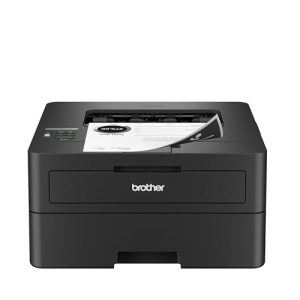
1. Brother HL-L2460DW — Compact Mono Laser With Ethernet and USB
- Print technology: Monochrome laser, print only
- Print speed: Up to 34 ppm
- Resolution: Up to 1200 × 1200 dpi
- Connectivity: Ethernet, Hi-Speed USB 2.0, dual-band Wi-Fi
The HL-L2460DW is the straightforward desk laser of the group: a single-function monochrome printer that connects three ways and concentrates on turning out text quickly. Brother publishes print speeds of up to 34 pages per minute with resolution up to 1200 × 1200 dpi, which covers the sharp end of office documents, and automatic duplex printing is standard, so two-sided reports need no manual turning of pages.
The wired side is complete for a machine of this size. A built-in Ethernet interface lets a small office share it over the network, the Hi-Speed USB 2.0 port covers the single-desk setup, and dual-band wireless sits alongside both for laptops and phones. The 250-sheet tray matches the work rate, a single-sheet manual feed slot handles envelopes and labels, and the printer uses Brother TN-830 or high-capacity TN-830XL toner cartridges. Pick this one when the job is fast, reliable black-and-white output on a cable, with no scanning or colour requirements attached.
2. Brother MFC-L3780CDW — Colour Laser All-in-One With Gigabit Ethernet
- Print technology: Colour laser (LED), print / scan / copy / fax
- Print speed: Up to 31 ppm colour and monochrome
- Resolution: Up to 2400 × 600 dpi
- Connectivity: Gigabit Ethernet, Hi-Speed USB 2.0, dual-band Wi-Fi, NFC
The MFC-L3780CDW is Brother’s full-featured colour laser for small offices that want one machine to print, scan, copy, and fax from a wired network connection. Print speeds reach up to 31 pages per minute in both colour and monochrome, and the scanner is the productivity highlight: the 50-sheet automatic document feeder scans both sides of a page in a single pass, so a double-sided contract becomes a file or a copy without being fed twice.
Connectivity is the broadest in this roundup. Gigabit Ethernet anchors it to the office network at full wired speed, Hi-Speed USB 2.0 covers a direct computer link, and dual-band Wi-Fi plus NFC touch-to-connect handle laptops and phones. A 250-sheet tray and a single-sheet manual feed slot manage paper, a 3.5-inch colour touchscreen runs the machine from the front panel, and the printer uses Brother TN-229 toner cartridges. Choose it for a shared office that prints colour documents daily and scans multi-page paperwork as a routine.
3. Canon imageCLASS MF656Cdw — Colour Laser With Gigabit Ethernet and USB
- Print technology: Colour laser, print / scan / copy / fax
- Print speed: Up to 22 ppm colour and monochrome
- Resolution: Up to 1200 × 1200 dpi
- Connectivity: Gigabit Ethernet (10/100/1000Base-T), USB 2.0, Wi-Fi, Wi-Fi Direct
Canon’s imageCLASS MF656Cdw takes the same colour laser all-in-one brief as the Brother above and answers it with Canon’s own mix: print, copy, scan, and fax at up to 22 pages per minute, with output at up to 1200 × 1200 dpi. The 50-sheet automatic document feeder scans double-sided originals in a single pass, and paper handling totals 251 sheets across a 250-sheet cassette and a single-sheet multipurpose tray for envelopes and heavier media.
The wired specification is explicit in Canon’s documentation: a 10/100/1000Base-T Ethernet port for the network and USB 2.0 ports for a direct connection, with Wi-Fi and Wi-Fi Direct published alongside. A 5-inch colour touchscreen — the largest front panel in this roundup — keeps walk-up copying and scanning simple for a shared machine, and the printer runs on Canon Genuine Toner 067 cartridges, with high-capacity 067 H versions available. It suits a small or medium office that wants a colour laser anchored to the network by cable, with a long three-year limited warranty published by Canon for the model.
4. Epson EcoTank ET-4850 — Refillable Tank All-in-One With Ethernet
- Print technology: Inkjet refillable tank, print / scan / copy / fax
- Print speed: 15.5 ISO ppm black, 8.5 ISO ppm colour
- Resolution: Up to 4800 × 1200 dpi
- Connectivity: Ethernet, Hi-Speed USB, Wi-Fi
The ET-4850 brings the wired brief to Epson’s cartridge-free EcoTank line. Instead of cartridges, it refills from ink bottles into front-facing tanks, and Epson publishes print speeds of 15.5 ISO pages per minute in black and 8.5 ISO pages per minute in colour, at up to 4800 × 1200 dpi. It prints, scans, copies, and faxes, with a 30-sheet automatic document feeder, a 250-sheet front tray, and automatic two-sided printing.
The connection panel is what earns it a place here: alongside Wi-Fi, the ET-4850 publishes both an Ethernet port for a shared network and a Hi-Speed USB port for a direct link, a combination many tank printers leave out. A 2.4-inch colour touchscreen and voice-activated printing round out the controls, and the printer uses Epson 502 ink bottles. Pick the ET-4850 for a home office or family desk that prints plenty of colour — homework, charts, flyers, photographs — and wants the network stability of a cable with the running economy of bottled ink.
5. Canon PIXMA G7020 — MegaTank All-in-One With Ethernet and Fax
- Print technology: Inkjet MegaTank, print / scan / copy / fax
- Print speed: 13.0 ipm black, 6.8 ipm colour
- Resolution: Up to 4800 × 1200 dpi
- Connectivity: Ethernet, Hi-Speed USB, Wi-Fi
Canon’s PIXMA G7020 is the high-capacity tank option, built around page yield. Canon publishes yields of up to 6,000 black pages or 7,700 colour pages from a full set of GI-20 ink bottles, with two extra black bottles included in the box, and print speeds of 13.0 images per minute in black and 6.8 in colour at up to 4800 × 1200 dpi. It is a full all-in-one — print, scan, copy, and fax — with a 35-sheet automatic document feeder.
Paper capacity leads this group at 350 sheets split between a 250-sheet front cassette and a 100-sheet rear tray, which makes it easier to keep plain paper loaded in one source and photo or specialty paper in the other. Automatic two-sided printing is standard. For connections, Canon publishes Ethernet for the wired network, Hi-Speed USB for a single computer, and Wi-Fi for everything else — the full set, in a tank printer aimed at serious home-office volume. Choose the G7020 when colour page counts run high month after month and the printer needs to sit on the network, on a cable, within reach of several computers.
Which Wired Printer Fits Your Desk?
For a single desk printing text all day, the Brother HL-L2460DW is the lean answer — mono laser speed, both wired ports, and nothing extra to maintain. Shared offices that live on colour documents split between the Brother MFC-L3780CDW, the faster machine with the stronger scanner, and the Canon imageCLASS MF656Cdw, which counters with a bigger touchscreen and gigabit networking of its own. Where colour volume is the story, the two tank models take over: the Epson EcoTank ET-4850 for a balanced home office, and the Canon PIXMA G7020 when page counts and paper capacity matter most. In every case, the wired port is the point — run the cable, and the connection stops being a variable.
Frequently Asked Questions
Is a wired printer connection more reliable than Wi-Fi?
Yes, in the ways that matter day to day. A USB or Ethernet cable is a fixed physical link, so it is not affected by signal strength, wall thickness, or other networks nearby, and the printer keeps the same network identity instead of dropping and rejoining. Wireless remains convenient for phones and laptops, which is why every model here offers both — the cable simply removes the connection as a source of failed print jobs.
What cables do I need for a wired printer?
A direct setup uses a standard USB printer cable, the type with a flat USB-A or USB-C plug for the computer and a square USB-B plug for the printer. A network setup uses an ordinary Ethernet cable, Cat5e or better, running from the printer to a router, switch, or wall port. Printer makers frequently sell these cables separately, so check the box contents for the model you choose and order the cable you need alongside it.
Can several computers share one wired printer?
Over Ethernet, yes — that is exactly what the connection is for. Once the printer is on the network, every authorised computer on the same network can print and, on the all-in-ones here, scan, with no host PC required. A USB-connected printer is tied to its one computer by default; that computer can share it onward through the operating system, but it has to stay on for others to print.
Do these wired printers also work wirelessly?
All five do. Each model publishes Wi-Fi alongside its wired ports, and several add conveniences such as Wi-Fi Direct or NFC. The wired connection is an addition, not a trade: you can run the printer on Ethernet for the office desktops, keep USB as a direct fallback, and still print from a phone over the wireless network at the same time.
More from Amazon
Programs that pair well with the guide above. Offers and eligibility are set by Amazon and may change.
Free shipping on eligible items, Prime Video and more. Eligible new members can start with a free trial.
Start a Prime free trialAd-free music streaming. Eligible new subscribers can start with a free trial.
Try Music Unlimited freeA Prime membership for ages 18-24 with a trial period. Eligibility is set by Amazon.
See Prime for Young AdultsAudiobooks and podcasts to listen to on the go. Eligible new members can start with a free trial.
Try Audible freeAs an Amazon Associate we earn from qualifying purchases.
Write Your Review
No reviews yet. Be the first to share your experience!