

Key takeaways
- Compare the 2 best 3D printers for business use — a fast enclosed CoreXY machine and a dual-extruder workhorse — on build volume, materials, and reliability.
Buying a 3D printer for a business is a different decision from buying one for a hobby bench. A failed print at home wastes an evening; a failed print at work delays a prototype, a client part, or a production fixture, and the cost lands on a deadline. The machine has to run long jobs unattended, repeat the same result part after part, and survive being used by more than one person. That is why this shortlist is so small: only two printers on Amazon US met the bar for business use, and this guide compares them.

This guide is written for small businesses, workshops, and design teams that need printed parts — prototypes, jigs, fixtures, brackets, and replacement components. Both printers below were picked from their Amazon listings on build volume, speed, materials, and reliability features. One is a fast enclosed CoreXY machine built for long, demanding jobs; the other is a dual-extruder classic that trades raw speed for the ability to print two materials at once.
Quick Picks
As an Amazon Associate we earn from qualifying purchases
| Product | Best for | Key spec |
|---|---|---|
| QIDI MAX3 | Large functional parts on tight deadlines | 325 × 325 × 315 mm build volume, 600 mm/s |
| FlashForge Creator Pro | Two-material prints and soluble supports | Dual extruder, 227 × 148 × 150 mm build volume |
How to Choose
Match the Build Volume to Your Largest Part
Build volume decides what you can print in one piece, and that matters more for a business than for a hobby bench. Measure the largest part your team prints regularly — the longest bracket, the tallest housing, the widest fixture — and compare it with the build volume on the listing before ordering. A printer that is slightly too small forces you to split parts and glue them, which adds labour and weakens the result. The two printers in this guide sit far apart here: one offers 325 × 325 × 315 mm, while the other gives 227 × 148 × 150 mm. If your parts are small, the smaller machine is fine; if not, buy the volume first.
Speed Matters When the Printer Runs All Day
A business printer earns its keep by finishing jobs while the team does other work, so print speed and acceleration are real buying criteria, not bragging numbers. The faster machine in this guide lists a top speed of 600 mm/s with acceleration up to 20,000 mm/s², which shortens long jobs noticeably against a slower machine running the same file. Top speed is not the whole story, though: large parts still take hours, and a machine that prints fast but fails often is slower in practice than a steady one. Ask how many jobs the printer can finish in a working day, how often it needs attention mid-print, and whether the next job can be queued without watching the current one.
Enclosure and Chamber Heat for Tougher Materials
An enclosed printer with a heated chamber holds its temperature steady while a part cools, and that changes which materials you can trust. The QIDI MAX3 in this guide lists a chamber temperature of up to 65°C, which helps with materials that warp or crack when they cool unevenly — the classic problem with ABS parts printed in a draughty room. An open-frame machine can still print PLA well, and the FlashForge below is built around ABS and PLA, but it has no heated chamber to lean on. Think about where the printer will live: a cold workshop, a shared office, or a corner near a door all push you toward an enclosed machine with chamber heat.
Dual Extrusion, Levelling, and Who Maintains the Machine
The last decision is about how the printer fits the people who will use it. Dual extrusion lets one machine print two materials in a single job — a rigid part with flexible sections, or a part with soluble supports that wash away instead of being snapped off by hand. Fully automatic bed levelling, listed for the QIDI MAX3, removes one of the most common setup chores and helps when several people share one machine. Before ordering, decide who will load filament, clear failed prints, and keep the machine clean, because a printer that depends on one expert becomes a bottleneck the week that person is away.
The 2 Best Options
QIDI MAX3
The QIDI MAX3 is the fast enclosed workhorse of this pair, and it suits teams printing large functional parts on a schedule. Its CoreXY motion system with Klipper firmware lists 600 mm/s top speed and acceleration up to 20,000 mm/s², so long jobs finish sooner and it keeps up with a queue of prototypes. The 325 × 325 × 315 mm build volume takes parts the smaller printer cannot, the chamber heats to 65°C for steady cooling, and fully automatic bed levelling removes a fiddly chore for the operator. The listing calls it industrial grade, matching how it is meant to be used: long jobs, repeated parts, shared workshops.
Specs
- Print speed: up to 600 mm/s
- Acceleration: up to 20,000 mm/s²
- Build volume: 325 × 325 × 315 mm
- Chamber temperature: up to 65°C
- Motion system: CoreXY with Klipper firmware
- Bed levelling: fully automatic
- Design: enclosed, industrial-grade frame
Best for: teams printing large functional parts on tight deadlines, especially prototypes and fixtures that must fit in one piece.
Watch out for: measure the footprint and the chamber space before ordering, and confirm the listing shows the printer in stock on the day you buy. The enclosed chamber also needs clearance around it for the door and for warm air.
ASIN: B0BXWF1HCY
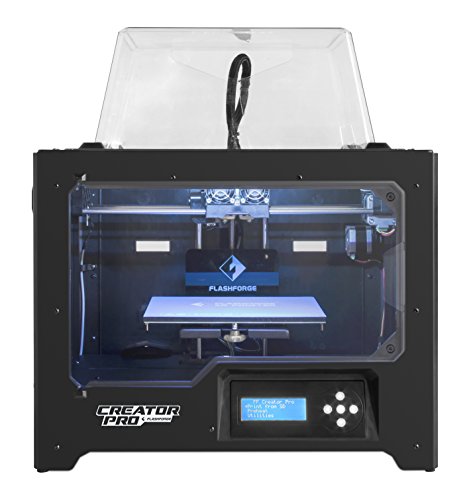
FlashForge Creator Pro
The FlashForge Creator Pro is this pair’s dual-extruder classic, and it earns its place by printing two materials in one job, which the faster machine does not. Its metal frame gives it a solid base, and the dual extruder lets a team print one material with supports in another, including soluble supports that wash away. The 227 × 148 × 150 mm (8.9 × 5.8 × 5.9 in) build volume is much smaller than the QIDI, so it suits brackets, small housings, and fixtures, not large single-piece prototypes. It prints FFF with ABS and PLA, and its 100–500 micron layer resolution covers quick drafts and finer finished pieces.
Specs
- Extruders: dual extruder for two materials or soluble supports
- Frame: metal frame
- Build volume: 227 × 148 × 150 mm (8.9 × 5.8 × 5.9 in)
- Print technology: FFF (fused filament fabrication)
- Materials: ABS and PLA
- Layer resolution: 100–500 microns
Best for: small teams that need two-material prints or soluble support structures, especially parts with overhangs or internal channels.
Watch out for: the build volume is much smaller than the QIDI MAX3, so measure your largest part before you order. Also confirm the 100–500 micron layer range covers the finish your parts need.
ASIN: B00I8NM6JO
Which One Fits Your Situation
Your Team Prints Large Prototypes Most Days
Pick the QIDI MAX3. Its 325 × 325 × 315 mm build volume takes large housings and brackets in one piece, so the team stops splitting models and gluing. The 600 mm/s top speed and enclosed, heated chamber keep long jobs moving through the day, and fully automatic bed levelling lets anyone on the team start a print without a setup ritual. This is the machine for a workshop where the printer is a shared tool.
You Need Two Materials or Soluble Supports
Pick the FlashForge Creator Pro. Its dual extruder is the only way here to print a part in one material and its supports in another, and soluble supports save finishing time on parts with overhangs or internal channels. The metal frame keeps the machine steady through long jobs, and the 100–500 micron layer range lets the team choose fast drafts or finer finished parts. Check first that your parts fit the 227 × 148 × 150 mm build volume.
One Machine Will Serve a Whole Workshop
Pick the QIDI MAX3. A shared workshop printer needs to be fast, forgiving, and easy for different people to start, and this machine covers all three: high print speed, automatic bed levelling, and an enclosed chamber that holds temperature steady between jobs. The large build volume also means fewer arguments about whose part fits and whose does not. Put it somewhere with room around it for the chamber and for filament storage, and agree on who clears failed prints.
You Print Mostly ABS Parts
Pick the QIDI MAX3. ABS warps when it cools unevenly, and the enclosed chamber heated to 65°C is the listing feature that directly addresses that problem. An open machine can print ABS, but in a draughty workshop the failure rate climbs and the team loses time to reprints. The FlashForge lists ABS among its materials, so it is not ruled out for small ABS parts, but for ABS as the everyday material, the heated chamber is the safer choice.
Common Mistakes
- Buying on build volume alone without measuring the largest part your team actually prints, then discovering the printer cannot take it in one piece — the two printers here differ by a wide margin, so the check matters.
- Ignoring chamber heat when printing ABS, then losing parts to warping and cracked corners because the room cools the print unevenly. A cold workshop makes this worse, so check the room before blaming the filament.
- Assuming dual extruders mean twice the speed — they mean two materials in one job, not a faster machine, so do not pick the FlashForge for throughput. Speed comes from the motion system and the print settings, not from a second nozzle.
- Forgetting who maintains the machine: a printer that depends on one expert becomes a bottleneck the week that person is away, so train a second operator early. Write down the filament-loading and bed-cleaning routine so anyone can follow it.
- Ordering before checking the workspace: measure the footprint, the clearance around the chamber, and where filament will be stored, or the printer ends up blocking a bench. An enclosed machine also needs room for the door to open fully and for warm air to escape.
Frequently Asked Questions
Can a 3D printer really handle business production work?
Yes, for the right work. These printers suit prototypes, jigs, fixtures, brackets, and low-volume spares — jobs where a printed part beats machining or ordering one. They do not replace injection moulding for thousands of identical parts, and they need someone who checks the first layer and clears failed prints. Pick the machine for the parts you print every week, not for a job you might do once.
Which printer is better for large parts?
The QIDI MAX3, by a wide margin. Its build volume is 325 × 325 × 315 mm, against 227 × 148 × 150 mm for the FlashForge, so it takes housings, brackets, and fixtures the smaller machine cannot print whole. If your largest regular part fits only in the QIDI, that settles the choice. Measure the part first, then compare the numbers on the listings.
Do I need dual extruders?
Only if your parts need two materials in a single print. Dual extruders let you print one material with supports in another, including soluble supports that wash away and save finishing time on complex shapes. If your team prints single-material parts, the second extruder adds complexity without benefit, and the QIDI MAX3 is the better fit. Do not pay for a feature your workflow never uses.
What materials can these printers handle?
The FlashForge listing names ABS and PLA, so those two are confirmed. The QIDI MAX3 listing describes an enclosed, industrial-grade machine with a chamber heated to 65°C, which suits tougher materials that warp in open air, but it names no material list — read the listing’s material guidance before ordering. Either way, buy filament your team has printed with successfully rather than experimenting on a deadline job.
More from Amazon
Programs that pair well with the guide above. Offers and eligibility are set by Amazon and may change.
Free shipping on eligible items, Prime Video and more. Eligible new members can start with a free trial.
Start a Prime free trialAd-free music streaming. Eligible new subscribers can start with a free trial.
Try Music Unlimited freeA Prime membership for ages 18-24 with a trial period. Eligibility is set by Amazon.
See Prime for Young AdultsAudiobooks and podcasts to listen to on the go. Eligible new members can start with a free trial.
Try Audible freeAs an Amazon Associate we earn from qualifying purchases.

Write Your Review
No reviews yet. Be the first to share your experience!