
Our Short List of 3
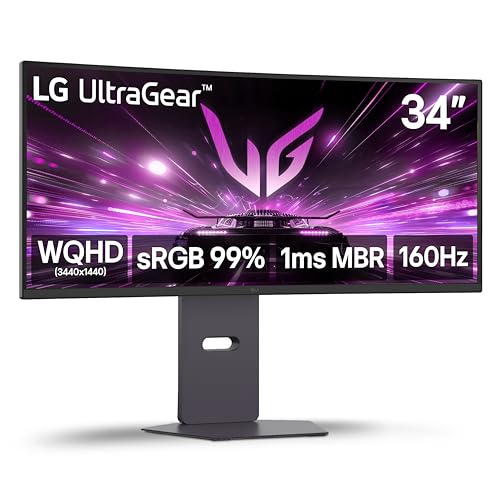
- Best for: A wide curved screen for immersive single player games.
- 34 inch curved QHD display
- VA panel
- 160Hz refresh rate
- HDR10 compatibility

- Best for: A 32 inch curved panel with strong colour coverage for PS5 games.
- 32 inch 165Hz 1440P curved display
- VA 1500R panel
- 1ms MPRT response time
- VESA Display HDR400
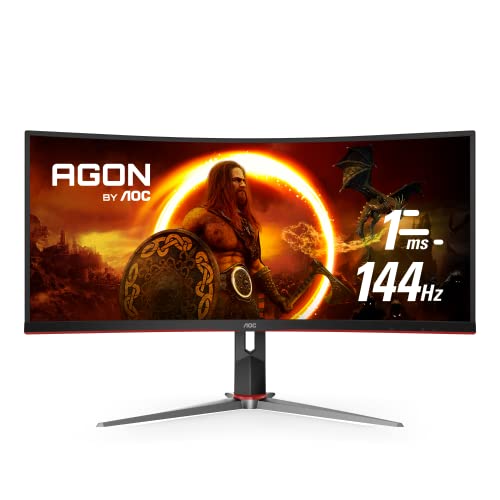
- Best for: A 34 inch ultrawide with a height adjustable stand for PS5 and desk use.
- 34 inch curved ultrawide display
- 3440 x 1440 resolution
- VA panel
- 1ms response time
All 3 Picks at a Glance
| Product | Specs | Action |
|---|---|---|
| LG UltraGear 34GP63A-B |
| Check price on Amazon |
| GIGABYTE G32QC A |
| Check price on Amazon |
| AOC CU34G2X |
| Check price on Amazon |
Key takeaways
- Looking for the best curved monitors for ps5? Compare four curved monitors for PlayStation 5, from 32 inch QHD panels to 34 inch ultrawide screens today.
A curved monitor changes how a PlayStation 5 game feels, because the edges of the screen wrap toward you instead of falling away. The real decision is not the curve alone. It is the resolution the PS5 can actually drive, the refresh rate over HDMI, and whether the panel size fits your desk. A 34 inch ultrawide looks dramatic, but the PS5 does not support the 21:9 aspect ratio natively, so it shows a 16:9 image with dark bars at the sides.
This guide is for PS5 owners who want a curved screen for couch or desk play, and for buyers weighing a 32 inch QHD panel against a 34 inch ultrawide. The four monitors below were chosen from the names and specifications shown on their Amazon pages, with a focus on screen size, resolution, refresh rate and curve. A wider panel also suits desk work, so one screen can serve both the console and the computer.
Quick Picks
As an Amazon Associate we earn from qualifying purchases
| Product | Best for | Key spec from title |
|---|---|---|
| Samsung Odyssey G5 G55C | A 32 inch curved QHD screen for PS5 | 32 inch, QHD, 1000R, 165Hz |
| LG UltraGear 34GP63A-B | A wide curved screen for immersive single player games | 34 inch, QHD, 160Hz |
| GIGABYTE G32QC A | A 32 inch curved panel with strong colour coverage | 32 inch, 165Hz, 1440P, 1500R |
| AOC CU34G2X | A 34 inch ultrawide with a height adjustable stand | 34 inch, 3440×1440, 144Hz |
How to Choose
Resolution and what the PS5 outputs
The PS5 outputs up to 4K and supports 1440p output, so a QHD monitor matches the console well without wasting pixels it cannot drive. A 2560 x 1440 panel shows a sharp image at 32 inches, while a 3440 x 1440 ultrawide panel is wider than the console uses. Check the resolution in the listing and match it to your viewing distance, because a larger panel at the same resolution looks softer up close than a smaller one does. Sit at your usual distance and picture the panel there before you buy.
Refresh rate over HDMI
Refresh rate decides how smooth fast games feel, and the PS5 supports up to 120Hz output on supported titles. A 144Hz or 165Hz monitor covers that range with room to spare, but the console still caps the frame rate per game, so a higher number does not add frames the game never sends. Check the refresh rate in the listing, and remember that the HDMI connection sets the limit for what the console can deliver to the panel. A monitor that lists 120Hz or above covers every frame rate the PS5 sends on supported titles.
Curve radius and viewing distance
Curve radius decides how strongly the screen wraps around you, and the right radius depends on how far you sit. A tight 1000R curve suits a desk setup where you sit close, while a gentler 1500R curve suits a longer viewing distance from a couch or a deeper desk. Sit too far from a tight curve and the edges look bent; sit too close to a gentle curve and the wrap effect fades. Measure your seating distance before choosing. A monitor arm can help when the desk is shallow, because it moves the screen closer without taking desk space.
Panel type and HDR
Most curved gaming monitors use VA panels, which give deep blacks and strong contrast for dark game scenes. HDR support varies, with basic HDR10 giving a modest lift and DisplayHDR 400 adding a brightness standard the listing can state. Check whether the listing names HDR10 or DisplayHDR 400, and treat a panel with no HDR claim as a standard dynamic range screen. Colour coverage figures such as DCI-P3 tell you how wide the colour range runs. VA panels also show deeper blacks than IPS panels, which suits horror games and dark scenes after sunset.
The 4 Best Options
Samsung Odyssey G5 G55C
The Samsung Odyssey G5 G55C is the straightforward curved pick for PS5 play at a desk. Its 32 inch QHD panel pairs a tight 1000R curve with a 165Hz refresh rate and a 1ms response time, so fast games stay smooth and the edges of the screen wrap toward you. HDR10 support lifts bright scenes, and FreeSync keeps the frame pacing steady when the console output varies. The glare free coating helps in a bright room, and the eye care features suit long evening sessions. The height adjustable stand sets the screen at eye level for desk play.
Specs
- 32 inch QHD display
- 1000R curved panel
- 165Hz refresh rate
- 1ms MPRT response time
- HDR10
- AMD FreeSync
Best for: A 32 inch curved QHD screen for PS5 play at a desk.
Watch out for: The tight 1000R curve suits close seating best, so it feels strongest at a desk rather than from a couch.
LG UltraGear 34GP63A-B
- Best for: A wide curved screen for immersive single player games.
- 34 inch curved QHD display
- VA panel
- 160Hz refresh rate
- HDR10 compatibility
A wide curved screen for immersive single player games.
The PS5 shows a 16:9 image with side bars on this 21:9 panel, so part of the screen stays dark.
The LG UltraGear 34GP63A-B is the wide curved pick for single player games where the view matters more than the frame rate. Its 34 inch QHD panel stretches the picture across a 21:9 canvas, and the 160Hz refresh rate keeps motion smooth. HDR10 compatibility and FreeSync Premium round out the gaming features, and the VA panel gives deep blacks for dark scenes. Note plainly that the PS5 does not support the 21:9 aspect ratio natively, so it shows a 16:9 image with dark bars at the sides rather than filling the whole panel. The tilt and height adjustable stand helps you set a comfortable viewing angle.
Watch out for: The PS5 shows a 16:9 image with side bars on this 21:9 panel, so part of the screen stays dark.
GIGABYTE G32QC A
- Best for: A 32 inch curved panel with strong colour coverage for PS5 games.
- 32 inch 165Hz 1440P curved display
- VA 1500R panel
- 1ms MPRT response time
- VESA Display HDR400
A 32 inch curved panel with strong colour coverage for PS5 games.
Variant codes for this model vary across sellers, so confirm the listing names the G32QC A before ordering.
The GIGABYTE G32QC A is the colour focused pick for PS5 owners who want a curved 32 inch panel with wide colour coverage. Its 165Hz refresh rate and 1ms response time keep fast games smooth, while the 1500R curve wraps the image gently at a desk or a longer viewing distance. The VA panel carries DisplayHDR 400 certification, and the wide DCI-P3 colour coverage makes game worlds look richer than a basic sRGB panel. FreeSync Premium Pro keeps the frame pacing steady when the console output varies. The frameless design suits a clean desk, and the stand tilts for a comfortable view.
Watch out for: Variant codes for this model vary across sellers, so confirm the listing names the G32QC A before ordering.
AOC CU34G2X
- Best for: A 34 inch ultrawide with a height adjustable stand for PS5 and desk use.
- 34 inch curved ultrawide display
- 3440 x 1440 resolution
- VA panel
- 1ms response time
A 34 inch ultrawide with a height adjustable stand for PS5 and desk use.
The PS5 shows a 16:9 image with side bars on this 21:9 panel, so part of the screen stays dark.
The AOC CU34G2X is the adjustable ultrawide pick for PS5 owners who want a big curved screen with a stand that moves. Its 34 inch 3440 x 1440 VA panel runs at 144Hz with a 1ms response time, and the 1500R curve wraps the image around the viewer. Adaptive-Sync keeps the picture steady, and the height adjustable stand lets you set the screen at eye level instead of accepting a fixed height. The three sided frameless design suits a clean desk setup. As with the other ultrawide here, the PS5 shows a 16:9 image with side bars rather than filling the full width. The USB hub adds desk ports.
Watch out for: The PS5 shows a 16:9 image with side bars on this 21:9 panel, so part of the screen stays dark.
Which One Fits Your Situation
You play at a desk and want a tight curve
Pick the Samsung Odyssey G5 G55C. Its 32 inch QHD panel and 1000R curve wrap the screen toward you at close range, and the 165Hz refresh rate covers the fastest PS5 output. The glare free coating helps when the desk sits near a window.
You play slow single player games and want width
Pick the LG UltraGear 34GP63A-B. The 34 inch curved panel gives a wide view for story driven games, and the 160Hz refresh rate keeps motion smooth. Remember the PS5 shows a 16:9 image with side bars, so the width benefits PC use more than console play.
You want the richest colours on a 32 inch panel
Pick the GIGABYTE G32QC A. Its wide DCI-P3 colour coverage and DisplayHDR 400 certification make game worlds look richer than a basic panel, and the 1500R curve suits a longer viewing distance. Confirm the listing names the G32QC A before ordering.
You want a big screen with a stand that adjusts
Pick the AOC CU34G2X. The height adjustable stand sets the screen at eye level, and the 144Hz ultrawide panel suits both PS5 play and desk work. The PS5 shows a 16:9 image with side bars on this panel, so keep that in mind.
Common Mistakes
- Buying a 21:9 ultrawide for PS5 only, then finding the console shows a 16:9 image with dark bars at the sides.
- Choosing a monitor by its headline refresh rate and ignoring whether the HDMI connection can carry it from the console.
- Sitting too far from a tight 1000R curve, where the edges look bent instead of wrapping around you.
- Ignoring the stand adjustment, then living with a screen that sits too low or too high for your chair.
- Assuming every curved monitor has HDR, when some listings name no HDR standard at all.
Frequently Asked Questions
Does the PS5 work with a curved monitor?
Yes, the PS5 works with a curved monitor over HDMI just like a flat one, and the curve does not change the signal. The console outputs up to 4K and supports 1440p, so a QHD curved panel matches it well. The curve only changes how the image wraps around you at your seating distance. Check the resolution first.
Does the PS5 support ultrawide monitors?
The PS5 does not support the 21:9 aspect ratio natively, so an ultrawide monitor shows a 16:9 image with dark bars at the sides. The game still plays normally, but part of the panel stays dark. Buy an ultrawide for PS5 only if you also use it with a PC that can fill the width. The side bars stay dark during play.
What refresh rate should a PS5 monitor have?
A monitor rated at 120Hz or above covers the fastest output the PS5 sends on supported console titles. Monitors in this guide run at 144Hz to 165Hz, which leaves room to spare. The game itself sets the frame rate, so a higher number does not add frames the game never sends. Higher numbers add no extra frames from the console.
Is a 32 inch or 34 inch curved monitor better for PS5?
A 32 inch 16:9 panel uses its full width with the PS5, while a 34 inch ultrawide shows side bars because the console does not support 21:9. If the monitor is for PS5 only, the 32 inch panel gives a fuller picture. If you also use a PC, the 34 inch ultrawide earns its width there.
More from Amazon
Programs that pair well with the guide above. Offers and eligibility are set by Amazon and may change.
Free shipping on eligible items, Prime Video and more. Eligible new members can start with a free trial.
Start a Prime free trialAd-free music streaming. Eligible new subscribers can start with a free trial.
Try Music Unlimited freeA Prime membership for ages 18-24 with a trial period. Eligibility is set by Amazon.
See Prime for Young AdultsAudiobooks and podcasts to listen to on the go. Eligible new members can start with a free trial.
Try Audible freeAs an Amazon Associate we earn from qualifying purchases.









Write Your Review
No reviews yet. Be the first to share your experience!