

Our Short List of 3

- Size and resolution: 27 inches, 2560×1440 (QHD)
- Panel: Fast IPS, flat
- Refresh rate: 165Hz
- Response time: 1ms (fastest mode, per listing)

- Size and resolution: 27 inches, 2560×1440 (QHD)
- Panel: IPS, flat
- Refresh rate: 165Hz via DisplayPort, 144Hz via HDMI
- Response time: 1ms (per listing)

- Size and resolution: 26.7 inches, 2560×1440 (QHD)
- Panel: QD-OLED, flat
- Refresh rate: 360Hz
- Response time: 0.03ms (per listing)
All 5 Picks at a Glance
| Product | Specs | Action |
|---|---|---|
| 1. Dell G2724D — Best Value 1440p Pick |
| Check price on Amazon |
| 2. Dell S2721DGF — Best 1440p IPS Alternative |
| Check price on Amazon |
| 3. Alienware AW2725DF — Best for Competitive Play |
| Check price on Amazon |
 4. Alienware AW3423DWF — Best Ultrawide |
| Check price on Amazon |
 5. Alienware AW3225QF — Best 4K Gaming Monitor |
| Check price on Amazon |
Key takeaways
- The best Dell monitors for gaming compared: the G2724D and S2721DGF for 1440p value, plus Alienware QD-OLED picks at 360Hz, ultrawide and 4K 240Hz.
Dell builds gaming monitors under two badges: the Dell G and S series, which focus on fast IPS panels and sensible ergonomics, and Alienware, Dell’s gaming brand, which leads the QD-OLED market. Staying inside one brand has practical advantages. The on-screen menus work the same way, the stands share the same height, tilt, swivel and pivot adjustments, and Dell’s panel warranty and support process is consistent across the range. What changes from model to model is the panel technology, and that is what should drive your choice.
This guide covers five Dell gaming monitors that between them answer most buying questions. Two are 27-inch 1440p IPS screens for players who want high refresh rates without an OLED budget. The other three are Alienware QD-OLED models: a 27-inch 360Hz screen for competitive play, a 34-inch curved ultrawide, and a 32-inch 4K model at 240Hz. Every pick below is a genuine Dell or Dell Alienware monitor, matched to its Amazon US listing so you can confirm the exact model before ordering.
Disclosure: As an Amazon Associate, we earn from qualifying purchases made through links on this page, at no extra cost to you.
Our top picks
Best for: Competitive Play
Check price on AmazonQuick Picks
- Best value 1440p pick: Dell G2724D — 27-inch Fast IPS, 2560×1440, 165Hz, with a fully adjustable stand.
- Best 1440p IPS alternative: Dell S2721DGF — 27-inch IPS, 165Hz over DisplayPort, wide DCI-P3 colour and HDR400.
- Best for competitive play: Alienware AW2725DF — 26.7-inch QD-OLED, 2560×1440, 360Hz, 0.03ms response.
- Best ultrawide: Alienware AW3423DWF — 34-inch curved QD-OLED, 3440×1440, 165Hz.
- Best 4K gaming monitor: Alienware AW3225QF — 31.6-inch curved QD-OLED, 3840×2160, 240Hz, HDMI 2.1.
1. Dell G2724D — Best Value 1440p Pick
- Size and resolution: 27 inches, 2560×1440 (QHD)
- Panel: Fast IPS, flat
- Refresh rate: 165Hz
- Response time: 1ms (fastest mode, per listing)
The G2724D is the straightforward recommendation for most PC gamers. Its 27-inch Fast IPS panel runs at 2560×1440 with a 165Hz refresh rate and a 1ms response time figure in its fastest mode, a combination that suits shooters, racing games and everyday desktop use equally well. The listing confirms support for both AMD FreeSync Premium and NVIDIA G-SYNC Compatible modes, so variable refresh works with graphics cards from either camp and screen tearing stays under control when frame rates fluctuate.
Colour coverage is listed at 99% sRGB with VESA DisplayHDR 400 certification, which is enough for accurate-looking games and general content work. Connectivity covers two DisplayPort inputs and one HDMI input, and the stand is a strong point at this level: height, pivot, swivel and tilt adjustment are all included, so the screen can be set up properly rather than propped on books. For a single-monitor desk built around 1440p gaming, this is the Dell to start with.
Key specs
Pros
Cons
Check the Dell G2724D on Amazon
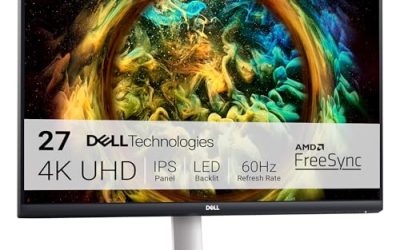
2. Dell S2721DGF — Best 1440p IPS Alternative
- Size and resolution: 27 inches, 2560×1440 (QHD)
- Panel: IPS, flat
- Refresh rate: 165Hz via DisplayPort, 144Hz via HDMI
- Response time: 1ms (per listing)
The S2721DGF is Dell’s other long-running 27-inch 1440p gaming monitor, built on an IPS panel with a 165Hz refresh rate over DisplayPort and 144Hz over HDMI. The listing rates response time at 1ms and confirms AMD FreeSync Premium Pro together with NVIDIA G-SYNC Compatible support, so it covers the same adaptive-sync ground as the G2724D while adding a wider colour gamut: 98% DCI-P3 coverage and 400 nits of brightness with HDR support.
That wider gamut makes the S2721DGF the better choice of the two IPS models if the same screen also handles photo work, video editing or HDR video alongside gaming. The stand again offers height, tilt, swivel and pivot adjustment, and the port selection includes HDMI 2.0 and DisplayPort 1.2 inputs plus USB downstream ports for peripherals. Choose it over the G2724D if colour range matters to you; choose the G2724D if you simply want the newer value pick.
Key specs
Pros
Cons
Check the Dell S2721DGF on Amazon
3. Alienware AW2725DF — Best for Competitive Play
- Size and resolution: 26.7 inches, 2560×1440 (QHD)
- Panel: QD-OLED, flat
- Refresh rate: 360Hz
- Response time: 0.03ms (per listing)
Alienware is Dell’s gaming brand, and the AW2725DF is its esports-focused QD-OLED. The 26.7-inch panel pairs 2560×1440 resolution with a 360Hz refresh rate and a 0.03ms response time, figures no IPS panel in this guide can match. Motion clarity is the whole point here: at 360Hz, fast pans and tracking targets stay readable in a way that makes the screen well suited to ranked shooters and other reaction-driven games, provided your PC can feed it high frame rates.
Because it is QD-OLED, contrast and colour are in a different class from the IPS models: the listing cites 99.3% DCI-P3 coverage and VESA DisplayHDR True Black 400 certification, with AMD FreeSync Premium Pro for tear-free variable refresh. Connectivity includes DisplayPort, two HDMI inputs and USB ports, and the stand adjusts for height, tilt, swivel and pivot. The trade-offs are the usual OLED ones: it is a premium panel aimed at one job, and text rendering and long static desktop sessions are handled better by IPS, so mixed work-and-play desks should weigh the G2724D or S2721DGF as well.
Key specs
Pros
Cons
Check the Alienware AW2725DF on Amazon
4. Alienware AW3423DWF — Best Ultrawide
- Size and resolution: 34 inches, 3440×1440, 21:9 ultrawide
- Panel: QD-OLED, 1800R curved
- Refresh rate: 165Hz
- Response time: 0.1ms (per listing)
The AW3423DWF stretches the QD-OLED formula into a 34-inch curved ultrawide with a 3440×1440 resolution in a 21:9 aspect ratio and an 1800R curve. Refresh rate is 165Hz with a 0.1ms response time, and the listing confirms AMD FreeSync Premium Pro, 99.3% DCI-P3 colour and VESA DisplayHDR True Black 400. In practice, this is the pick for players who want one screen to replace a dual-monitor setup: racing and flight sims fill your peripheral vision, strategy and RPG titles gain map space, and desktop work gets genuine side-by-side room.
The ultrawide format does ask more of your graphics card than standard 1440p, and not every game supports 21:9 equally well, so check your main titles first. Console play is also a compromise, since consoles output 16:9 and leave black bars at the sides. For PC-first players who want immersion first and esports speed second, though, this is the most distinctive monitor Dell sells for gaming.
Key specs
Pros
Cons
Check the Alienware AW3423DWF on Amazon
5. Alienware AW3225QF — Best 4K Gaming Monitor
- Size and resolution: 31.6 inches, 3840×2160 (4K UHD)
- Panel: QD-OLED, curved
- Refresh rate: 240Hz
- Response time: 0.03ms (per listing)
The AW3225QF is Dell’s flagship gaming specification: a 31.6-inch curved QD-OLED panel at 3840×2160 with a 240Hz refresh rate and 0.03ms response time. That combination — full 4K detail with esports-grade speed — is what separates it from older 4K monitors that topped out at 144Hz. The listing and Dell’s product material cite Dolby Vision support, 99% DCI-P3 colour and HDMI 2.1 inputs, which also makes it the strongest console pick in this guide: a PlayStation 5 or Xbox Series X can run at 4K 120Hz with variable refresh over HDMI 2.1.
Driving 4K at high frame rates on PC takes a powerful graphics card, and the gentle curve will not suit everyone for long text-heavy work sessions. But as a single screen for high-end PC gaming plus console play, nothing else in Dell’s gaming range covers as much ground at once.
Key specs
Pros
Cons
Check the Alienware AW3225QF on Amazon
How to Choose a Dell Gaming Monitor
Start with resolution and graphics card. Match the panel to the frame rates your PC can actually produce. A mid-range card is happiest at 2560×1440, which is why the G2724D and S2721DGF are the sensible defaults. Ultrawide 3440×1440 sits a step above that, and 4K only makes sense with a high-end card behind it.
Pick the panel for your games. Fast IPS is the all-rounder: bright, colour-accurate and free of OLED care considerations, which suits mixed gaming and desktop work. QD-OLED delivers the fastest pixel response and the strongest HDR contrast, and it is the better choice for dark-room gaming, HDR titles and competitive play where motion clarity decides rounds.
Check the refresh rate against your genre. For single-player and casual multiplayer, 165Hz is already a large step up from 60Hz office screens. Competitive players are the ones who gain from 240Hz and 360Hz panels such as the AW3225QF and AW2725DF, and only when their system can sustain those frame rates.
Confirm adaptive sync and ports. Every monitor here supports variable refresh, but check the details: full refresh rates sometimes require DisplayPort, while console players should look for HDMI 2.1, which only the AW3225QF offers in this line-up. Count your inputs too — the G2724D’s dual DisplayPort inputs help if a work laptop shares the desk.
Do not skip the stand. All five picks adjust for height at minimum, and the flat 27-inch models add pivot for a vertical second screen. A monitor you can position properly matters more over long sessions than a small spec difference on paper.
FAQs
Are Alienware monitors made by Dell?
Yes. Alienware is Dell’s gaming brand, and its monitors are Dell products — the Amazon listings for the AW2725DF and AW3225QF record Dell as the manufacturer. That is why Alienware models belong in a Dell gaming monitor round-up.
Is 1440p or 4K better for gaming?
For most PCs, 1440p is the balanced choice: it looks sharp at 27 inches and lets mid-range graphics cards reach high refresh rates. 4K, as on the AW3225QF, adds detail but needs a much stronger card to stay smooth, so buy it when your hardware can feed it.
Can these Dell monitors be used with a PS5 or Xbox Series X?
Yes, over HDMI. The AW3225QF is the best fit because its HDMI 2.1 ports support 4K at 120Hz with variable refresh. The 1440p models accept console signals at lower resolutions, and the ultrawide AW3423DWF displays console output in 16:9 with black bars at the sides.
What is the difference between the G2724D and the S2721DGF?
Both are 27-inch 1440p 165Hz IPS monitors with fully adjustable stands. The G2724D is the value-focused model with FreeSync Premium and 99% sRGB coverage, while the S2721DGF adds FreeSync Premium Pro, a wider 98% DCI-P3 gamut and USB downstream ports, suiting players who also do colour-sensitive work.
Do QD-OLED gaming monitors need special care?
OLED panels can retain static images left on screen unchanged for very long periods, so use the panel maintenance features built into these Alienware monitors, let the screen sleep when idle and vary on-screen content during long desktop sessions. For mixed office use with static windows all day, the IPS picks are the lower-maintenance option.
Conclusion
Dell’s gaming range splits cleanly. If you want a dependable 1440p screen, the G2724D is the value pick and the S2721DGF is the wider-colour alternative. If you are buying for image quality and speed above all, the Alienware QD-OLED models take over: the AW2725DF for 360Hz competitive play, the AW3423DWF for ultrawide immersion, and the AW3225QF for 4K at 240Hz with proper console support. Pick by the games you play and the graphics card you own, confirm the model number on the Amazon listing, and any of the five will serve a gaming desk well.
More from Amazon
Programs that pair well with the guide above. Offers and eligibility are set by Amazon and may change.
Free shipping on eligible items, Prime Video and more. Eligible new members can start with a free trial.
Start a Prime free trialAd-free music streaming. Eligible new subscribers can start with a free trial.
Try Music Unlimited freeA Prime membership for ages 18-24 with a trial period. Eligibility is set by Amazon.
See Prime for Young AdultsAudiobooks and podcasts to listen to on the go. Eligible new members can start with a free trial.
Try Audible freeAs an Amazon Associate we earn from qualifying purchases.
Write Your Review
No reviews yet. Be the first to share your experience!