

Our Short List of 3
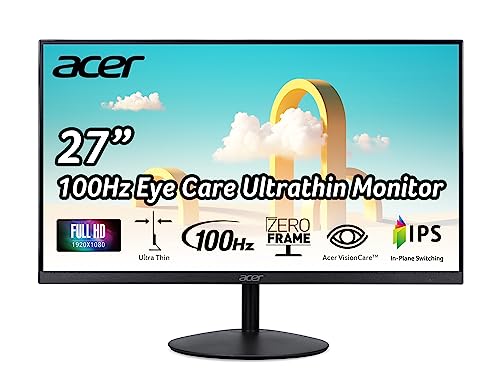
- Best for: Everyday home and office work with smooth scrolling and a slim frame.
- 27-inch Full HD 1920×1080 IPS panel
- 100Hz refresh rate using HDMI
- 1ms VRB response time
- 250 nits brightness
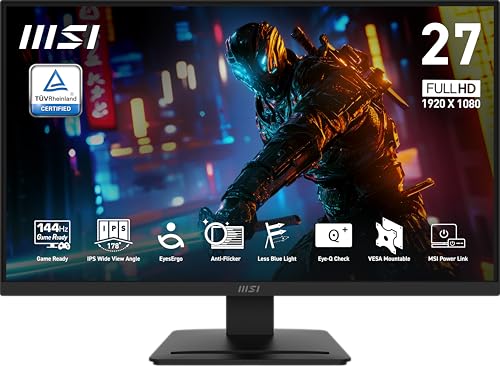
- Best for: Mixed work and gaming where smooth motion matters every day.
- 27-inch Full HD 1920×1080 IPS panel
- 144Hz refresh rate
- 1ms MPRT response time
- 1500:1 contrast ratio
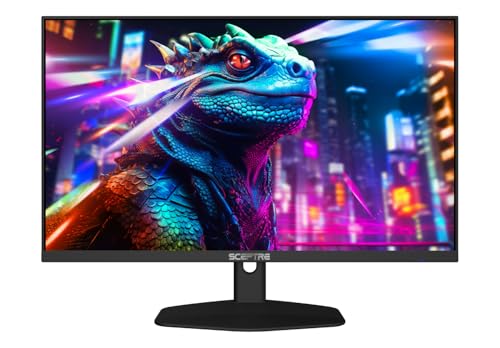
- Best for: A shared desk where USB-C, speakers, and several inputs all matter.
- 27-inch IPS panel with 1920×1080 resolution
- 100Hz refresh rate
- 1ms Blur Reduction response time
- Wide sRGB color gamut
All 4 Picks at a Glance
| Product | Specs | Action |
|---|---|---|
| Acer SB272 Ebi |
| Check price on Amazon |
| MSI PRO MP273L E14 |
| Check price on Amazon |
| Sceptre E275W-FP100T |
| Check price on Amazon |
 Amazon Basics 27E2UA |
| Check price on Amazon |
Key takeaways
- Compare five sharp 27-inch IPS monitors for work, study, and play, with smooth motion, clear text, vivid color, and simple connections for home.
A monitor shapes every hour spent at a desk, so choosing one deserves more attention than size alone. A dim panel makes long documents hard to read, a slow panel smears motion in games and video, and a narrow set of ports can leave a laptop or console with nowhere to plug in. The right pick balances a clear image, comfortable motion, and connections that fit the devices already on the desk.
This guide covers five 27-inch monitors for home offices, classrooms, dorm rooms, and shared family desks. Each one uses an IPS panel for wide viewing angles and steady color, and each one comes from a name found on Amazon pages with a live listing. Shoppers who want a calm work display, a lively gaming screen, or a simple second monitor will find a match below.
Quick Picks
As an Amazon Associate we earn from qualifying purchases
| Product | Best for | Key spec from title |
|---|---|---|
| Acer SB272 Ebi | Everyday home and office use | 27-inch FHD IPS, 100Hz |
| MSI PRO MP273L E14 | Work plus smooth gaming | 27-inch FHD IPS, 144Hz |
| Sceptre E275W-FP100T | Built-in speakers and USB-C | 27-inch IPS, 100Hz, USB-C |
| Amazon Basics 27E2UA | A simple desk with many ports | 27-inch IPS, 75Hz, speakers |
| LG 27MK600M-B | A clean borderless work display | 27-inch FHD IPS, 75Hz |
How to Choose
Match the panel to daily use
An IPS panel suits most buyers because color stays steady when viewed from an angle, which helps when two people share a screen or when a monitor sits beside a laptop. Full HD resolution on a 27-inch panel keeps text large and easy to read, while a higher refresh rate makes scrolling and motion look smoother. Gamers gain more from 144Hz, while readers and office workers gain little from chasing numbers beyond 100Hz. Pick the panel that fits the main job, then let extra speed act as a bonus rather than the deciding factor.
Check the ports before ordering
A monitor can look ideal on paper and still fail at the desk when its ports do not match the computer. HDMI suits most laptops, consoles, and desktop PCs, while DisplayPort suits many desktop graphics cards and gives a direct path to higher refresh rates. VGA remains useful for older office hardware, and USB-C can carry video while keeping a cable count low. Count the devices that need a permanent connection, then choose a monitor with one spare input for a guest laptop or a future upgrade.
Think about comfort over long sessions
Comfort comes from more than a pretty image, so look at tilt range, VESA mounting, and eye-care features together. A tilt stand lets the screen angle toward the eyes instead of forcing the neck to bend, and a VESA mount opens the door to an arm that frees desk space. Flicker-free lighting and a low blue light mode can ease eye strain during evening work, though neither replaces regular breaks. A monitor that adjusts to the person using it will feel better after eight hours than a rigid screen with a sharper image.
Weigh speakers, size, and desk space
Built-in speakers save desk space and keep a simple setup tidy, yet they seldom match a separate soundbar or a pair of headphones for depth and clarity. A 27-inch screen fills a standard desk nicely and pairs well with a laptop, while a smaller room may call for careful measurement before the box arrives. Leave room for a keyboard, a notebook, and a lamp, because a crowded desk turns even a fine monitor into a daily annoyance. Choose speakers as a convenience, not as the main reason to buy.
The 5 Best Options
Acer SB272 Ebi
- Best for: Everyday home and office work with smooth scrolling and a slim frame.
- 27-inch Full HD 1920×1080 IPS panel
- 100Hz refresh rate using HDMI
- 1ms VRB response time
- 250 nits brightness
Everyday home and office work with smooth scrolling and a slim frame.
The 100Hz refresh rate applies through HDMI, so check the connection used.
The Acer SB272 Ebi brings a calm, uncluttered design to a home office or study corner. Its slim frame leaves more room for the image itself, and the IPS panel keeps text and photos looking steady from the side. Motion at 100Hz feels smoother than a basic 60Hz screen when scrolling through long pages or watching video, and FreeSync helps keep fast scenes free from tearing. Setup stays simple, with familiar HDMI and VGA inputs and a tilt stand that angles the screen toward the viewer.
MSI PRO MP273L E14
- Best for: Mixed work and gaming where smooth motion matters every day.
- 27-inch Full HD 1920×1080 IPS panel
- 144Hz refresh rate
- 1ms MPRT response time
- 1500:1 contrast ratio
Mixed work and gaming where smooth motion matters every day.
Full HD on a 27-inch panel shows larger pixels than a sharper resolution would.
The MSI PRO MP273L E14 suits a desk that shifts between spreadsheets in the morning and games in the evening. Its 144Hz refresh rate gives motion a fluid feel, while the IPS panel keeps color steady across wide viewing angles. Adaptive-Sync helps smooth out uneven frame delivery, and the slim bezel on four sides keeps the focus on the image. HDMI and VGA inputs cover a wide range of laptops and desktops, and the tilt stand plus VESA mounting give two ways to find a comfortable angle.
Sceptre E275W-FP100T
- Best for: A shared desk where USB-C, speakers, and several inputs all matter.
- 27-inch IPS panel with 1920×1080 resolution
- 100Hz refresh rate
- 1ms Blur Reduction response time
- Wide sRGB color gamut
A shared desk where USB-C, speakers, and several inputs all matter.
Built-in speakers suit casual listening, not deep or room-filling sound.
The Sceptre E275W-FP100T packs the most connection variety into this group, which makes it a strong pick for a shared desk. USB-C joins DisplayPort and HDMI, so a modern laptop can connect with a single cable, while built-in speakers keep audio close at hand. Its IPS panel covers a wide sRGB gamut, and the 100Hz refresh rate keeps everyday motion smooth. Blur Reduction shortens the response time for fast scenes, and the frameless design looks tidy beside a laptop or a second monitor.
Amazon Basics 27E2UA
- Best for: A simple first monitor with plenty of ports and built-in sound.
- 27-inch IPS panel with 1920×1080 resolution
- 75Hz refresh rate
- 1500:1 contrast ratio
- HDMI 1.4, DisplayPort 1.2, and VGA ports
A simple first monitor with plenty of ports and built-in sound.
A 75Hz panel feels calmer than a 144Hz panel during fast gaming.
The Amazon Basics 27E2UA keeps things plain and practical, which suits a first monitor or a spare desk. Its IPS panel delivers a clear Full HD image with wide viewing angles, and the 75Hz refresh rate keeps ordinary scrolling steady. A generous set of ports covers HDMI, DisplayPort, and VGA, while USB ports add room for a keyboard receiver or a flash drive. Built-in speakers handle video calls and casual clips, and the adjustable stand tilts to a comfortable angle for long sessions.
LG 27MK600M-B
The LG 27MK600M-B offers a tidy borderless look that fits a bright office or a quiet study. Its IPS panel shows Full HD images with steady color from wide angles, and dual HDMI ports make it easy to switch between a computer and another device. FreeSync helps keep motion smooth, while Smart Energy Saving adjusts the display to use less power during lighter work. The slim frame keeps the desk looking open, and the simple stand tilts to match the height of the chair.
Specs
- 27-inch Full HD 1920×1080 IPS panel
- 75Hz refresh rate
- Virtually borderless frame
- Dual HDMI ports
- AMD FreeSync technology
- Smart Energy Saving
- Model 27MK600M-B
Best for: A clean office display with easy switching between two HDMI devices.
Watch out for: The stand adjusts tilt only, so an arm may suit a taller desk setup.
ASIN: B07FFC14SZ
Which One Fits Your Situation
A home office that runs all day
Choose the Amazon Basics 27E2UA when the desk needs many ports and steady all-day use. Its USB ports, built-in speakers, and wide tilt range cover video calls, documents, and casual media without extra boxes. The LG 27MK600M-B also fits well here, with a borderless frame and dual HDMI ports for a desktop and a laptop side by side.
A desk shared by work and games
Choose the MSI PRO MP273L E14 when evenings bring games after a day of documents. Its 144Hz refresh rate and Adaptive-Sync keep motion fluid, while the IPS panel holds color steady for daytime work. The Acer SB272 Ebi works as a lighter alternative when gaming stays casual and a slim frame matters more than extra speed.
A small room or a first setup
Choose the Acer SB272 Ebi when space is tight and the setup must stay simple. Its slim frame and familiar HDMI and VGA ports suit a dorm room, a bedroom desk, or a first home office. The Sceptre E275W-FP100T also fits a small room, since USB-C and built-in speakers reduce cable clutter and free up desk space.
A laptop-first desk with one cable in mind
Choose the Sceptre E275W-FP100T when a modern laptop sits at the center of the desk. Its USB-C port, DisplayPort, and HDMI inputs cover most laptops and desktops, while built-in speakers keep the setup tidy. The LG 27MK600M-B serves as a simpler backup here, with dual HDMI ports for a laptop dock and a second device.
Common Mistakes
- Buying a 27-inch screen without measuring the desk, then finding no room for a keyboard and a lamp.
- Picking a monitor for its refresh rate alone while ignoring ports, tilt range, and panel type.
- Using a cable that cannot carry the monitor’s full refresh rate, then wondering why motion looks ordinary.
- Placing the screen too high or too low, which strains the neck during long work sessions.
- Assuming built-in speakers will match headphones or a separate soundbar for music and films.
Frequently Asked Questions
Is a 27-inch monitor too large for a small desk?
A 27-inch monitor fits many small desks, yet measurement matters more than hope. Leave room for a keyboard, a mouse, and a notebook, and check the depth of the stand. A VESA arm can free up space under the screen, while a slim frame helps the monitor feel less bulky in a tight corner.
Does a higher refresh rate help with office work?
A higher refresh rate makes scrolling and cursor movement look smoother, which many office workers notice at once. The gain stays modest for documents and email, so a 100Hz panel often feels fine. Gamers notice the difference far more, since fast scenes depend on fluid motion.
Can one monitor serve both a laptop and a desktop?
Yes, when the monitor has enough inputs for both devices. Dual HDMI ports cover a laptop dock and a desktop, while a mix of HDMI, DisplayPort, and USB-C covers even more combinations. Switch inputs through the on-screen menu, and keep a spare port free for a guest device.
Do I need built-in speakers in a monitor?
Built-in speakers suit video calls, short clips, and casual listening without extra gear on the desk. They seldom match headphones or a separate soundbar for depth, clarity, and volume. Choose them for convenience, then add headphones or external speakers when sound quality matters most.
More from Amazon
Programs that pair well with the guide above. Offers and eligibility are set by Amazon and may change.
Free shipping on eligible items, Prime Video and more. Eligible new members can start with a free trial.
Start a Prime free trialAd-free music streaming. Eligible new subscribers can start with a free trial.
Try Music Unlimited freeA Prime membership for ages 18-24 with a trial period. Eligibility is set by Amazon.
See Prime for Young AdultsAudiobooks and podcasts to listen to on the go. Eligible new members can start with a free trial.
Try Audible freeAs an Amazon Associate we earn from qualifying purchases.
Write Your Review
No reviews yet. Be the first to share your experience!