
Our Short List of 3
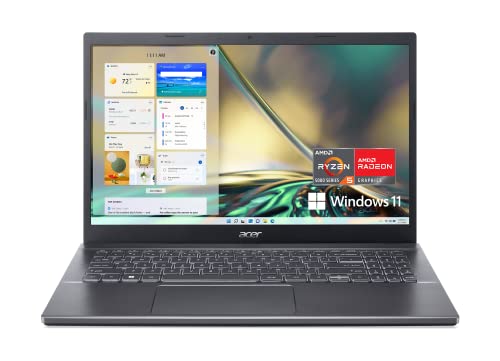
- Processor: AMD Ryzen 5 5625U hexa-core mobile processor
- Graphics: Integrated AMD Radeon graphics
- Memory: 8GB DDR4
- Storage: 512GB NVMe SSD

- Processor: AMD Ryzen 5 7520U
- Graphics: Integrated AMD Radeon graphics
- Memory: 8GB
- Storage: 256GB

- Processor: Intel Core i5-1335U
- Graphics: Intel Iris Xe graphics
- Memory: 16GB DDR4
- Storage: 512GB SSD
All 4 Picks at a Glance
| Product | Specs | Action |
|---|---|---|
| 1. Acer Aspire 5 A515-47-R3Y6 — Best Overall Balance |
| Check price on Amazon |
| 2. Lenovo IdeaPad Slim 3 with Ryzen 5 7520U — Best for Everyday Value |
| Check price on Amazon |
| 4. Dell Inspiron 15 3530 — Best with Touch and More Memory |
| Check price on Amazon |
 5. ASUS VivoBook 15 — Best for Memory-Heavy Multitasking |
| Check price on Amazon |
Key takeaways
- Compare the best laptops under 700 for work, study and home use, with Acer, Lenovo, Dell and ASUS picks compared on processor, memory, storage, display and ports.
As an Amazon Associate we earn from qualifying purchases.
Disclosure: This article contains affiliate links. If you buy through a link on this page, we may earn a commission at no extra cost to you.
Shopping in this part of the laptop market is about balance. You are not looking for a gaming rig or a premium ultrabook. You are looking for a machine that handles documents, spreadsheets, video calls, browser tabs, streaming, light photo work and everyday multitasking without feeling slow after the first year. This is where mainstream makers compete hardest, so a careful choice can get you a modern multi-core processor, a Full HD screen, fast solid-state storage and enough memory for real work.
The five laptops here were chosen for that balance. Every pick is a conventional Windows laptop from a major brand, positioned by its maker and sellers in this segment. There are no tablets, no detachables presented as laptops, and no Chromebooks, so every pick runs full Windows software. The differences are practical: touch support, memory and storage in the listed configuration, ports, weight, and whether the keyboard is backlit. Specifications are taken from the product listings, so confirm the exact configuration on the product page before ordering, because the same model name can be sold with different hardware.
Our top picks
Best for: Everyday Value
Check price on AmazonBest for: Memory-Heavy Multitasking
Check price on AmazonQuick Picks
- Best overall balance: Acer Aspire 5 A515-47-R3Y6 — a 15.6-inch Full HD IPS laptop with a six-core AMD Ryzen 5 5625U, 8GB of memory and a roomy 512GB NVMe SSD, plus Wi-Fi 6, a backlit keyboard and USB Type-C.
- Best for everyday value: Lenovo IdeaPad Slim 3 with Ryzen 5 7520U — a lightweight 15.6-inch Full HD Windows 11 laptop with 8GB of memory and 256GB of storage, suited to study, office work and travel between rooms or campuses.
- Best simple starter laptop: Lenovo IdeaPad Slim 3 with Ryzen 3 7320U — the same slim, practical IdeaPad formula with a quad-core Ryzen 3, 8GB of memory and 256GB of storage for lighter workloads such as writing, browsing and video calls.
- Best with touch and more memory: Dell Inspiron 15 3530 — a 15.6-inch Full HD touchscreen configuration listed with an Intel Core i5-1335U, 16GB of memory and a 512GB SSD, aimed at buyers who want touch input and more headroom for multitasking.
- Best for memory-heavy multitasking: ASUS VivoBook 15 — a 15.6-inch Full HD business-style configuration listed with an Intel Core i5-1135G7, 16GB of memory and a 512GB PCIe SSD, with a wide port selection for desk use.
1. Acer Aspire 5 A515-47-R3Y6 — Best Overall Balance
- Processor: AMD Ryzen 5 5625U hexa-core mobile processor
- Graphics: Integrated AMD Radeon graphics
- Memory: 8GB DDR4
- Storage: 512GB NVMe SSD
The Acer Aspire 5 A515-47-R3Y6 is the most rounded pick here. Its AMD Ryzen 5 5625U is a six-core mobile processor that keeps Windows responsive with a document, spreadsheet, video call and many browser tabs open at once. With integrated AMD Radeon graphics it suits office work, study, streaming and basic photo editing. It is not a gaming laptop.
Storage is a strength. The listed 512GB NVMe SSD gives twice the room of 256GB drives, which matters once Windows, Office, cloud folders and a photo library add up. The 8GB of DDR4 memory is adequate for everyday multitasking. The 15.6-inch Full HD IPS display gives sharp text, space for side-by-side windows and good viewing angles. Connectivity includes Wi-Fi 6, USB Type-C and HDMI, and the backlit keyboard helps with evening work.
Key specifications:
Pros:
Cons:
View the Acer Aspire 5 A515-47-R3Y6 on Amazon
2. Lenovo IdeaPad Slim 3 with Ryzen 5 7520U — Best for Everyday Value
- Processor: AMD Ryzen 5 7520U
- Graphics: Integrated AMD Radeon graphics
- Memory: 8GB
- Storage: 256GB
This Lenovo IdeaPad Slim 3 uses the AMD Ryzen 5 7520U, a modern quad-core processor for thin everyday laptops. The listed Abyss Blue configuration has 8GB of memory, 256GB of storage, Windows 11 and a 15.6-inch Full HD display — a combination aimed at writing, email, research, coursework, video calls and entertainment.
As the name suggests, it is slim and relatively light for a 15.6-inch machine, so it is easy to carry between desk, classroom and living room, while still giving a full-size keyboard area and a screen large enough for split-screen work. Full HD keeps text crisp during long sessions.
The trade-offs are expected. The 256GB of storage is fine if files live mainly in the cloud, but large local libraries will fill it faster. The 8GB of memory handles everyday multitasking well, but not large spreadsheets, many apps and heavy browser use all at once.
Key specifications:
Pros:
Cons:
View the Lenovo IdeaPad Slim 3 with Ryzen 5 7520U on Amazon
3. Lenovo IdeaPad Slim 3 with Ryzen 3 7320U — Best Simple Starter Laptop
The second IdeaPad Slim 3 uses the AMD Ryzen 3 7320U, a quad-core processor below the Ryzen 5 version above. The listed Arctic Grey configuration pairs it with 8GB of memory, 256GB of storage, a 15.6-inch Full HD display and Windows 11. Think of it as the starter option: it covers the fundamentals with a modern processor, SSD storage and a sharp screen, rather than cutting corners with a low-resolution display or slow storage.
For a student writing essays, a home user managing email and browsing, or a family buying a shared laptop for homework and video calls, that competence matters most. Windows boots quickly from the SSD, documents feel responsive, and the integrated Radeon 610M graphics in this processor class are fine for video and casual light games at modest settings.
The compromise is headroom. It has less margin than the Ryzen 5 picks, so it suits one main task at a time plus background apps better than constant heavy multitasking. Choose it for light workloads; choose a Ryzen 5 model if the laptop must work harder each day.
Key specifications:
- Processor: AMD Ryzen 3 7320U
- Graphics: Integrated AMD Radeon graphics
- Memory: 8GB
- Storage: 256GB
- Display: 15.6-inch Full HD
- Operating system: Windows 11
- Colour in listed configuration: Arctic Grey
Pros:
- Modern quad-core Ryzen 3 with fast SSD storage
- Full HD display rather than a low-resolution budget panel
- Slim IdeaPad design is easy to move around the home
- Sensible fit for writing, browsing, study and video calls
Cons:
- Less performance headroom than the Ryzen 5 configurations
- 256GB of storage requires cloud or external storage for large libraries
- 8GB of memory is a ceiling for heavier multitasking
View the Lenovo IdeaPad Slim 3 with Ryzen 3 7320U on Amazon
4. Dell Inspiron 15 3530 — Best with Touch and More Memory
- Processor: Intel Core i5-1335U
- Graphics: Intel Iris Xe graphics
- Memory: 16GB DDR4
- Storage: 512GB SSD
The Dell Inspiron 15 3530 listed here stands out for a touchscreen and 16GB of memory. The listing describes a 15.6-inch Full HD touchscreen, an Intel Core i5-1335U, 16GB of DDR4 memory, a 512GB SSD, Intel Iris Xe graphics and Windows 11 Home, in Carbon Black — a strong mix for buyers who keep many applications open or work with larger documents.
The Core i5-1335U is a modern Intel mobile processor with performance and efficiency cores. With 16GB of memory it is well matched to office suites, browser-heavy research, video conferencing and light content creation. Touch helps for scrolling documents and presentations, although this is a conventional clamshell, not a convertible that folds into a tablet.
Ports include HDMI for an external display, and this class of Inspiron offers Wi-Fi 6. The compromise is size: a 15.6-inch touchscreen laptop is a desk-and-bag machine rather than an ultraportable. For multitaskers who value touch and memory, this is the most future-friendly configuration here.
Key specifications:
Pros:
Cons:
View the Dell Inspiron 15 3530 on Amazon
5. ASUS VivoBook 15 — Best for Memory-Heavy Multitasking
- Processor: Intel Core i5-1135G7, up to 4.2GHz in the listing
- Graphics: Intel Iris Xe graphics
- Memory: 16GB DDR4
- Storage: 512GB PCIe SSD
This ASUS VivoBook 15 is presented as a business-style laptop, listed with an Intel Core i5-1135G7, 16GB of DDR4 memory, a 512GB PCIe SSD, a 15.6-inch Full HD display and Windows 11 Pro in the listed bundle. The processor is an earlier generation than the Dell chip above, but the memory and storage are the attraction: they are the two specifications that keep an everyday laptop feeling usable as a workflow grows.
The quad-core Core i5-1135G7 with Iris Xe graphics remains capable for documents, spreadsheets, web apps, video calls and streaming, and the extra memory helps when a browser, Office, messaging and a video call run together. The Full HD display specification, at 60Hz, is aimed at long work sessions rather than gaming or colour-critical work.
Ports are generous for desk use, with the listing noting USB Type-C, USB Type-A, HDMI and a combo audio jack, so a monitor, mouse, headset and external storage connect without a dock. The main compromise is platform age, so buyers who prioritise the latest chip should choose the Acer or Dell, while buyers who prioritise memory and storage will see the appeal.
Key specifications:
Pros:
Cons:
View the ASUS VivoBook 15 on Amazon
How to Choose a Laptop in This Segment
Start with memory and storage, not just the processor. A modern Ryzen 5, Ryzen 3 or Intel Core i5 will all handle everyday work, but 8GB versus 16GB of memory changes how the laptop feels when you multitask, and 256GB versus 512GB of storage changes how soon you need external drives or cloud plans. If you keep many tabs and applications open, favour 16GB. If you store photos, videos or a large work library locally, favour 512GB.
Insist on a Full HD display. At 15.6 inches, a 1920 by 1080 screen gives sharp text and useful workspace. Lower resolutions look soft and fit less on screen. Consider touch only if you know you will use it, since a touchscreen is a convenience feature rather than a performance upgrade, and check whether a design is a normal clamshell or a true convertible before assuming it can be used as a tablet.
Match the processor to your workload. Ryzen 3 and entry Core i5 chips suit writing, browsing and video calls. Ryzen 5 and newer Core i5 chips give more margin for spreadsheets, light photo work and busier multitasking. None of the integrated-graphics laptops in this guide are gaming machines, so serious gaming requires a laptop with a dedicated graphics card, which is a different category.
Check ports against your desk. If you use an external monitor, confirm HDMI or a suitable USB Type-C display option. If you use a wired mouse, external drive and headset at once, count the USB ports. Wi-Fi 6 is worth having for modern home networks, and a backlit keyboard is worth having if you regularly work in dim rooms.
Confirm the exact configuration before ordering. Laptop model names cover many configurations. Check the processor model, memory size, storage size, display resolution and operating system edition on the product page for the specific listing you are buying, and do not assume a feature from a different configuration of the same model is included.
Frequently Asked Questions
Is 8GB of memory enough in a laptop in this segment?
Yes, for writing, browsing, email, video calls and office documents, 8GB remains workable. If you regularly keep many browser tabs, several Office files, a video call and background apps open together, a 16GB configuration such as the Dell or ASUS in this guide will feel more comfortable and will age better.
Is 256GB of storage enough?
It is enough if your documents are modest and your photos and media live mainly in cloud storage or on an external drive. If you install large applications, keep a local photo or video library, or download media for travel, 512GB gives useful breathing room and delays the need to manage space.
Can these laptops handle gaming?
They can handle casual and older light games at modest settings through their integrated graphics, and they are fine for browser games and streaming. They are not designed for demanding modern games, which need a dedicated graphics card and stronger cooling. Buy a gaming laptop category model instead if gaming is a main use.
Should I choose Ryzen or Intel in this segment?
Either can be the right choice. Compare the specific chip, memory and storage in the configuration rather than the brand alone. The Ryzen 5 5625U in the Acer, the Ryzen 5 and Ryzen 3 7000-series chips in the Lenovo models, and the Intel Core i5 chips in the Dell and ASUS all target everyday performance, with differences in core counts, generation and efficiency that matter less than getting the memory and storage you need.
Do any of these laptops run ChromeOS instead of Windows?
No. Every pick in this guide is a Windows laptop. That matters if you need standard Windows desktop applications such as the full Office suite, specialist study or work software, or Windows-only peripherals and drivers.
Conclusion
For most buyers, the Acer Aspire 5 A515-47-R3Y6 is the safest starting point in this guide, with a six-core Ryzen 5, a 512GB SSD, a Full HD IPS display and a backlit keyboard in one balanced configuration. Buyers who want a slimmer everyday machine should look closely at the Lenovo IdeaPad Slim 3 models, choosing the Ryzen 5 version for more performance margin and the Ryzen 3 version for lighter workloads. If memory and touch matter most, the Dell Inspiron 15 3530 configuration offers 16GB of memory, a 512GB SSD and a touchscreen, while the ASUS VivoBook 15 suits desk-based multitaskers who value its 16GB and 512GB combination and wide port selection.
Whichever model you choose, verify the exact configuration on the product page before you order, prioritise the memory and storage you will actually need over the next few years, and you will end up with a laptop in this segment that handles work, study and everyday life without unnecessary compromise.
More from Amazon
Programs that pair well with the guide above. Offers and eligibility are set by Amazon and may change.
Free shipping on eligible items, Prime Video and more. Eligible new members can start with a free trial.
Start a Prime free trialAd-free music streaming. Eligible new subscribers can start with a free trial.
Try Music Unlimited freeA Prime membership for ages 18-24 with a trial period. Eligibility is set by Amazon.
See Prime for Young AdultsAudiobooks and podcasts to listen to on the go. Eligible new members can start with a free trial.
Try Audible freeAs an Amazon Associate we earn from qualifying purchases.










Write Your Review
No reviews yet. Be the first to share your experience!