

Our Short List of 3

- Build volume: 220 x 220 x 250 mm
- Maximum print speed: 250 mm/s listed
- Leveling: CR Touch auto leveling
- Extruder: Sprite direct extruder with auto filament load and unload

- Build volume: 220 x 220 x 240 mm
- Maximum print speed: 500 mm/s listed
- Hotend: Supports 300 degrees Celsius in the listing
- Extruder: Sprite direct extruder
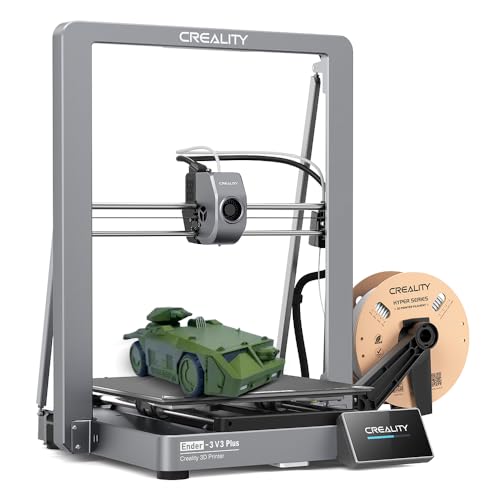
- Build volume: 300 x 300 x 330 mm
- Maximum print speed: 600 mm/s listed
- Motion: CoreXZ structure, dual Y and Z axes
- Extruder: Direct drive, 300 degrees Celsius listed, tri-metal nozzle
All 5 Picks at a Glance
| Product | Specs | Action |
|---|---|---|
| 1. Creality Ender-3 V3 SE — The Straightforward Starting Point |
| Check price on Amazon |
| 2. Creality Ender-3 V3 KE — More Speed and a Hotter Hotend, Still Open Frame |
| Check price on Amazon |
| 3. Creality Ender-3 V3 Plus — The Large Open-Frame Option |
| Check price on Amazon |
 4. Creality K1C — Enclosed CoreXY for Carbon Fiber Blends |
| Check price on Amazon |
 5. Creality Hi Combo — Multicolor Printing With the CFS System |
| Check price on Amazon |
Key takeaways
- Compare the best Creality 3D printers, from the Ender-3 V3 SE and KE to the enclosed K1C and multicolor Hi Combo, by build volume, speed, extruder and materials.
As an Amazon Associate we earn from qualifying purchases.
Creality built its reputation on the Ender line, and that history is exactly why choosing inside this one brand still takes care. The current range covers simple open-frame bedslingers for a first printer, faster open-frame machines with linear rails, enclosed CoreXY models built for carbon fiber blends and other demanding filaments, and a multicolor system that changes filament for you. Two printers can share a similar build volume and still suit completely different work.
This guide compares five Creality filament printers that cover those main use cases: an easy starting point, a faster open-frame step up, a larger open-frame option, an enclosed machine for technical materials, and a multicolor model for prints that need more than one filament in a single job. Every pick below is a Creality 3D printer, so the comparison stays focused on frame type, build volume, hotend temperature, extruder, leveling, and connectivity rather than on brand differences.
Disclosure: This article contains affiliate links. If you buy through links on this page, we may earn a commission at no extra cost to you.
Our top picks
Quick Picks
- Best for getting started: Creality Ender-3 V3 SE — 220 x 220 x 250 mm build volume, CR Touch auto leveling, a Sprite direct extruder, and auto filament loading in a compact open frame.
- Best faster open-frame pick: Creality Ender-3 V3 KE — Up to 500 mm/s listed print speed, a 300 degree Celsius hotend rating, an X-axis linear rail, and the same familiar Ender footprint class.
- Best large open-frame pick: Creality Ender-3 V3 Plus — A much larger 300 x 300 x 330 mm build volume with CoreXZ motion and a tri-metal nozzle for bigger parts in one piece.
- Best for carbon fiber blends: Creality K1C — An enclosed CoreXY printer listed at up to 600 mm/s, with auto calibration and design choices aimed at reliable carbon fiber filament printing.
- Best for multicolor printing: Creality Hi Combo — A 260 x 260 x 300 mm build volume paired with the CFS filament system for multicolor jobs, plus auto leveling and a clog-free extruder design in the listing.
1. Creality Ender-3 V3 SE — The Straightforward Starting Point
- Build volume: 220 x 220 x 250 mm
- Maximum print speed: 250 mm/s listed
- Leveling: CR Touch auto leveling
- Extruder: Sprite direct extruder with auto filament load and unload
The Ender-3 V3 SE is the Creality model that removes the most friction for a first-time owner. Older Ender machines asked the user to level the bed by hand and manage filament changes manually. This version adds CR Touch auto leveling, automatic filament loading and unloading, and a Sprite direct extruder, so the tasks that stop many first prints are handled by the machine instead of by trial and error.
Its 220 x 220 x 250 mm build volume is the long-running Ender standard. That size handles brackets, enclosures for small electronics, desk organizers, game pieces, replacement clips, and most learning projects without splitting models into pieces. The open frame keeps the print visible and easy to reach, which helps when you are learning how first layers, supports, and part cooling behave.
The listed maximum speed is 250 mm/s, with dual Z-axis and dual Y-axis design in the listing for stability. A direct extruder also gives the machine a better path for flexible filament at modest speeds than a long Bowden tube setup, because the drive gears sit close to the hotend and push filament over a short distance.
Key specifications
Pros
Cons
View the Creality Ender-3 V3 SE on Amazon
Choose the V3 SE if you want a Creality printer that teaches the basics without making you fight the bed leveling process, and if most of your work will be PLA, PETG, and occasional flexible filament in a normal room.
2. Creality Ender-3 V3 KE — More Speed and a Hotter Hotend, Still Open Frame
- Build volume: 220 x 220 x 240 mm
- Maximum print speed: 500 mm/s listed
- Hotend: Supports 300 degrees Celsius in the listing
- Extruder: Sprite direct extruder
The Ender-3 V3 KE keeps the open-frame Ender idea and pushes speed and temperature. The listing gives a maximum print speed of 500 mm/s, a Sprite direct extruder rated to support 300 degrees Celsius, dual fans, and an X-axis linear rail. The build volume is 220 x 220 x 240 mm, very close to the SE, so the upgrade here is motion and hotend capability rather than size.
A linear rail on the X axis matters for consistency. It guides the toolhead on a rigid track instead of relying only on wheels in a slot, which helps the machine hold accurate movement as speed rises. Dual fans support part cooling at those higher speeds, which is important for overhangs and bridges in PLA.
Key specifications
Pros
Cons
View the Creality Ender-3 V3 KE on Amazon
Choose the KE if you have outgrown a basic starter pace, want faster iteration on functional parts, and prefer an open frame you can access from every side.
3. Creality Ender-3 V3 Plus — The Large Open-Frame Option
- Build volume: 300 x 300 x 330 mm
- Maximum print speed: 600 mm/s listed
- Motion: CoreXZ structure, dual Y and Z axes
- Extruder: Direct drive, 300 degrees Celsius listed, tri-metal nozzle
Some projects fail on size before they fail on quality. Helmets, large enclosures, architectural models, full-size prototypes, and long brackets often need to be split on a standard Ender bed, and every split adds a joint to align and finish. The Ender-3 V3 Plus addresses that problem directly with a 300 x 300 x 330 mm build volume.
The listing describes a CoreXZ structure, a maximum speed of 600 mm/s, a 300 degree Celsius direct drive extruder, auto leveling, dual Y and Z axes, and a tri-metal nozzle. CoreXZ changes how the X and Z motion is driven compared with a conventional bedslinger layout, and Creality pairs it here with a larger, heavier frame. Plan your space accordingly: a printer with this build volume needs a sturdy surface, room for bed movement, and clearance for tall prints.
Key specifications
Pros
Cons
View the Creality Ender-3 V3 Plus on Amazon
Choose the V3 Plus when build volume is the deciding factor and your materials suit an open frame. Measure the part you actually need to print, including supports and brim, before assuming a standard bed will do.
4. Creality K1C — Enclosed CoreXY for Carbon Fiber Blends
- Build volume: 220 x 220 x 250 mm
- Maximum print speed: 600 mm/s listed
- Frame: Enclosed CoreXY, pre-assembled
- Focus: Reliable carbon fiber filament printing, anti-vibration design
The K1C is the specialist in this lineup. It is an enclosed CoreXY printer, and its listing centers on reliable carbon fiber printing, a maximum speed of 600 mm/s, anti-vibration design, auto calibration for leveling, and a pre-assembled build with a smart operating system. The build volume is 220 x 220 x 250 mm, the same class as the standard Ender models, but the environment around the print is completely different.
An enclosure holds heat around the part, which reduces warping and helps layer bonding for materials that struggle in open air. Carbon fiber filled filaments are also abrasive, so a machine designed with that use in mind is a better starting point than adding hardened parts to a basic printer later and hoping every component in the filament path holds up. The K1C listing also describes a clog-free direct extruder approach and support for 300 degree Celsius printing in related K1C listings, which aligns with the needs of those technical filaments.
Key specifications
Pros
Cons
View the Creality K1C on Amazon
Choose the K1C if your reason for buying is the material, not the size: carbon fiber filled filaments, stronger functional parts, and an enclosed environment come first, and a standard build volume is enough.
5. Creality Hi Combo — Multicolor Printing With the CFS System
- Build volume: 260 x 260 x 300 mm
- Maximum print speed: 500 mm/s listed
- Filament system: CFS included in the Combo for multicolor printing
- Leveling: Auto leveling, automatic filament reading
Most single-extruder printers can only change color when you pause and swap filament by hand. The Hi Combo is built around avoiding that limit. It pairs the Creality Hi printer with the CFS, the Creality Filament System, so a single print can use multiple filaments managed by the system. The listing gives a 260 x 260 x 300 mm build volume, a maximum speed of 500 mm/s, auto leveling, automatic filament reading, and a clog-free extruder, in an all-metal body that arrives mostly pre-assembled.
That build volume is a useful middle ground: larger in every direction than the standard Ender and K1C volume, without moving up to the footprint of the V3 Plus. For multicolor work — labeled organizers, signs, educational models, game pieces, and prototypes where color separates parts of a design — the value is in finishing a print in one run instead of painting or assembling separate pieces afterward.
Key specifications
Pros
Cons
View the Creality Hi Combo on Amazon
Choose the Hi Combo if color is part of the design itself, not an afterthought, and you want a build volume that sits between the standard Ender size and the large Plus.
How to Choose the Right Creality Printer
Start with the material. This single decision separates the lineup fastest. PLA and PETG for everyday parts work on any model here. Flexible filament favors a direct extruder, which all five picks have in some form. Carbon fiber blends and other temperature-sensitive filaments point to the enclosed K1C. If you cannot name a material beyond PLA, do not pay for chamber features you will not use.
Measure your largest realistic part. A 220 mm class bed covers most household and hobby printing. Move to the Hi Combo at 260 x 260 x 300 mm if your models regularly outgrow that, and to the V3 Plus at 300 x 300 x 330 mm if large single-piece parts are the whole point. Remember to leave room for a brim, skirt, or supports around the model, not just the model itself.
Decide how much setup you want. The V3 SE, KE, and Plus are open-frame machines that still involve assembly and learning the machine. The K1C is pre-assembled and enclosed, and the Hi Combo arrives mostly pre-assembled. Auto leveling appears across this lineup, but it does not remove the need to set the first layer correctly, keep the build surface clean, and dry filament that has absorbed moisture.
Treat speed numbers as a ceiling, not a promise. Listed speeds of 250, 500, and 600 mm/s describe maximums under favorable conditions. Real print time depends on layer height, wall count, infill, acceleration, and how much of the model lets the toolhead reach high speed at all. A faster machine helps most on larger, simpler geometry and on repeated prototyping where shaving time off every iteration adds up.
Check the exact listing before ordering. Creality sells several similarly named variants, and bundles change the included contents. Confirm the model name, build volume, and whether a system such as the CFS is included in the specific listing you choose, rather than relying on the family name alone.
Frequently Asked Questions
Which Creality printer is best for a complete beginner?
The Ender-3 V3 SE is the simplest starting point in this guide. CR Touch auto leveling, auto filament loading, and a direct extruder remove the most common early frustrations, while the standard build volume is large enough to stay useful as skills grow.
Is an enclosed Creality printer worth it?
It is worth it when the material needs it. An enclosure such as the one on the K1C helps with carbon fiber blends and other filaments that warp or bond poorly in open air. For PLA models, enclosures add little, and an open-frame Ender is usually the more direct choice.
What is the difference between the Ender-3 V3 SE and KE?
Both share the standard Ender build volume class. The KE lists a higher maximum speed at 500 mm/s, a 300 degree Celsius hotend rating, dual fans, and an X-axis linear rail, while the SE lists 250 mm/s and focuses on easy auto leveling and filament handling. The KE is the performance step up; the SE is the simpler start.
How does multicolor printing work on the Hi Combo?
The Combo includes the CFS filament system, which holds and feeds multiple filaments and switches between them during a print under the printer control. That allows color changes inside one job without manual swaps, at the cost of purge waste and longer print times on color-heavy models.
Do I need to assemble a Creality printer?
It depends on the model. The open-frame Ender models involve assembly, while the K1C is listed as pre-assembled and the Hi Combo as mostly pre-assembled. In every case, leave time for checking fasteners, running the calibration routine, and printing a small first model before starting a long job.
Conclusion
There is no single best Creality 3D printer, because the brand covers four different jobs. The Ender-3 V3 SE is the easy entry point, the Ender-3 V3 KE adds speed and hotend range in the same open format, and the Ender-3 V3 Plus solves the size problem for large single-piece parts. The K1C is the enclosed choice for carbon fiber blends and technical materials, and the Hi Combo is the pick when multicolor printing is the feature that matters most. Match the machine to your material and your largest part first, then let speed and convenience settle the rest.
More from Amazon
Programs that pair well with the guide above. Offers and eligibility are set by Amazon and may change.
Free shipping on eligible items, Prime Video and more. Eligible new members can start with a free trial.
Start a Prime free trialAd-free music streaming. Eligible new subscribers can start with a free trial.
Try Music Unlimited freeA Prime membership for ages 18-24 with a trial period. Eligibility is set by Amazon.
See Prime for Young AdultsAudiobooks and podcasts to listen to on the go. Eligible new members can start with a free trial.
Try Audible freeAs an Amazon Associate we earn from qualifying purchases.










Write Your Review
No reviews yet. Be the first to share your experience!