

Key takeaways
- Five native 144Hz gaming monitors compared, from 24-inch IPS panels to a curved QHD VA display, with honest response-time and cable guidance.
Choosing a 144Hz gaming monitor is really a decision about how smooth motion should feel and how much detail your graphics card can actually push. A 144Hz panel redraws the image more than twice as often as a standard 60Hz screen, so fast camera pans and flick shots look steadier and easier to track. But refresh rate alone does not decide the purchase. Panel type, resolution, response-time honesty, and the cable in the box all shape what you will see every day, and a monitor that looks perfect on paper can disappoint once it sits on your desk.
This guide is for competitive players who want fast 1080p panels, for story-driven gamers who would trade a little speed for a sharper curved screen, and for buyers setting up a first proper gaming desk. Every monitor below was chosen from its Amazon listing title and specifications, and each one runs at a native 144Hz rather than reaching it through overclocking.
Quick Picks
As an Amazon Associate we earn from qualifying purchases
| Product | Best for | Key spec from title |
|---|---|---|
| LG 27GL650F-B | Large-screen 1080p play with a fully adjustable stand | 27-inch FHD IPS, 144Hz, 1ms Motion Blur Reduction, HDR10 |
| Samsung Odyssey G5 C27G55T | Curved QHD immersion on a single screen | 27-inch WQHD 144Hz curved VA, 1ms, FreeSync Premium, HDR10 |
| AOC 24G2 | Compact competitive setup with height adjustment | 24-inch frameless IPS, FHD 1080p, 1ms 144Hz, FreeSync |
| Acer Nitro KG271 P6bip | Big-screen 1080p gaming with built-in speakers | 27-inch FHD IPS 144Hz, 1ms, FreeSync, sRGB 99 percent |
| MSI Optix G241 | Slim-bezel 24-inch play for tight desks | 24-inch FHD 144Hz 1ms IPS, FreeSync, super narrow bezel |
How to Choose
Panel Type and Resolution
Panel type decides viewing angles and contrast before refresh rate ever matters. Four of the five monitors here use IPS panels, which keep colours steady when you lean sideways or share the screen with a friend. The Samsung is the exception: a VA panel with a tight 1000R curve and much deeper contrast, which suits dark game scenes but shifts a little more at extreme angles. Resolution matters just as much. The Samsung is the only QHD display in this group, so its image is noticeably sharper than the four 1080p panels. On a 27-inch 1080p screen, text and fine detail look softer up close because the same pixels stretch over a larger area.
Response Time Honesty
Every monitor in this group advertises a 1ms figure, and none of them means what most buyers assume. That 1ms is always a motion-blur-reduction mode, MPRT, MBR, or VRB, depending on the brand, and it is never the grey-to-grey figure. Where a real GtG number was published, it is slower: the AOC is 4ms GtG and the MSI is 4ms GtG, and both are still quick enough for fast play. Do not rank these monitors by their 1ms headline, because all five carry the same headline for different reasons. Read the GtG figure when the listing gives one, and treat the 1ms label as a blur-reduction feature rather than a speed measurement.
Adaptive Sync and Ports
Adaptive sync is what keeps a 144Hz panel smooth when your frame rate dips below the refresh rate, so check which flavour each monitor supports. The LG works with both NVIDIA G-Sync Compatible and AMD FreeSync, while the Samsung, AOC, Acer, and MSI all support FreeSync, with the Samsung carrying the higher FreeSync Premium tier. Ports decide whether you actually reach 144Hz. At 1080p, an HDMI 1.4 connection carries the full refresh rate, so the AOC, Acer, and MSI work fine over HDMI. At QHD, the Samsung needs DisplayPort or an HDMI 2.0 cable, because the HDMI cable in its box is reported as HDMI 1.4.
Stand Adjustment and Mounting
A stand that only tilts will force you to stack books under the monitor or accept a neck angle you did not choose. Only the LG and the AOC have height-adjustable stands in this group, and the LG also pivots and swivels, which helps if you rotate the screen for portrait work or a second display. The Acer, MSI, and Samsung are tilt-only, so their height is fixed unless you add a separate arm. All five monitors support VESA mounting, which is the practical fix: a basic monitor arm costs far less than replacing a monitor later and gives back the height and swivel adjustment that three of these stands lack.
The 5 Best Options
LG 27GL650F-B 27-Inch UltraGear

The LG is the most flexible 27-inch pick here, and its stand is the reason. Height, pivot, tilt, and swivel adjustment let you set the screen exactly at eye level, which matters during long sessions when a fixed stand would leave you hunching. Its IPS panel covers 99 percent of sRGB, so colours stay accurate for games and for everyday work, and HDR10 support adds a little extra punch in supported titles. NVIDIA G-Sync Compatible support alongside FreeSync makes it the safest choice if you switch graphics card brands later, since either ecosystem can drive its adaptive sync.
Specs
- 27-inch Full HD 1920 x 1080 IPS display
- Native 144Hz refresh rate with 1ms Motion Blur Reduction
- NVIDIA G-Sync Compatible and Adaptive-Sync support
- HDR10 with 99 percent sRGB coverage
- 400 nits brightness
- 1 DisplayPort and 2 HDMI ports
- Height, pivot, tilt, and swivel stand; VESA 100 x 100
Best for: Gamers who want a large 1080p screen with a fully adjustable stand and both major adaptive sync systems.
Watch out for: 1080p stretched across 27 inches looks softer up close than on a 24-inch panel, and one mirror listing showed only a single unit left, so check live availability before ordering. Its 144Hz is native, despite some retailer graphics wrongly calling it an overclock.
Samsung Odyssey G5 C27G55T 27-Inch Curved WQHD
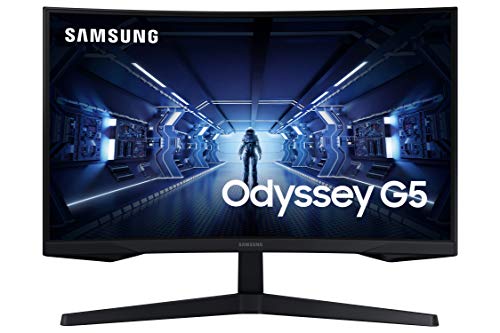
The Samsung is the only curved monitor and the only QHD monitor in this group, and that combination is its whole argument. The 1000R curve wraps the screen around your field of view, the VA panel delivers far deeper blacks than any IPS here, and the 2560 x 1440 resolution keeps text and game detail visibly sharper than the four 1080p picks. FreeSync Premium smooths out frame-rate dips, and the 2500 to 1 static contrast ratio is the highest in this lineup by a wide margin. It is the pick for players who spend as much time in story-driven worlds as in competitive matches.
Specs
- 27-inch WQHD 2560 x 1440 VA display with 1000R curve
- Native 144Hz refresh rate with 1ms MPRT
- AMD FreeSync Premium and HDR10 support
- 2500 to 1 static contrast ratio
- 250 nits brightness
- 1 HDMI 2.0 port and 1 DisplayPort 1.2 port
- 3.5mm headphone output; no built-in speakers; VESA 75 x 75
Best for: Players who want a sharper, curved, high-contrast screen for immersive single-player games.
Watch out for: The HDMI cable in the box is reported as HDMI 1.4, so at QHD you need the DisplayPort cable or an HDMI 2.0 cable to reach 144Hz. Samsung has replaced this model with a newer Odyssey G5, so treat it as a possible end-of-line monitor and confirm live stock before buying.
AOC 24G2 24-Inch Frameless IPS
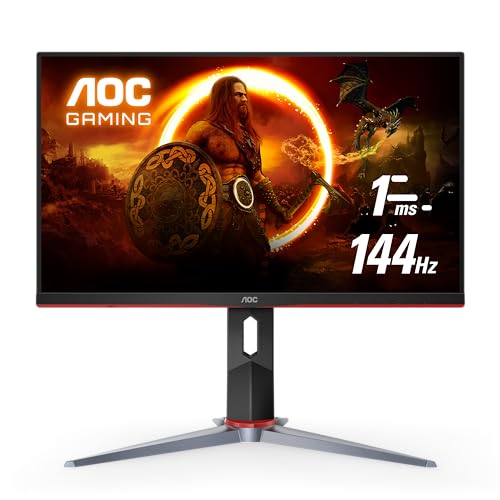
The AOC is the compact competitor in this lineup, and its size is a genuine advantage rather than a compromise. A 24-inch 1080p panel packs its pixels tighter than any 27-inch 1080p screen here, so text stays crisp and fast movement stays easy to follow without turning your head. The frameless design keeps the bezel thin for dual-monitor setups, and the height-adjustable stand is something only the LG shares in this group. It also carries a three-year zero dead pixel guarantee, which is the strongest pixel warranty among these five monitors.
Specs
- 24-inch Full HD 1920 x 1080 IPS display (23.8-inch panel)
- Native 144Hz refresh rate with 1ms MPRT and 4ms GtG
- AMD FreeSync support
- 2 HDMI 1.4 ports, 1 DisplayPort 1.2 port, and VGA
- Height-adjustable stand; VESA 100 x 100
- 3-year zero dead pixel guarantee
Best for: Competitive players who want a tight, sharp 24-inch screen with height adjustment and a strong pixel warranty.
Watch out for: Availability is among the weakest in this group, with no fresh November 2026 stock signal found for the United States listing, so check live availability first. The VGA port is legacy and not a selling point, and 144Hz works over HDMI 1.4 at this resolution, so no DisplayPort cable is required.
Acer Nitro KG271 P6bip 27-Inch IPS

The Acer is the straightforward big-screen value pick, and it stands out by including two built-in speakers, which none of the other four monitors offer. Its 27-inch IPS panel runs at a native 144Hz, covers 99 percent of sRGB, and reaches that full refresh rate over both DisplayPort and HDMI, so you do not need a specific cable to get the most out of it. The three-year warranty matches the best coverage in this group. For a desk where the monitor also handles video calls and media, the speakers and the large screen make it an easy all-rounder.
Specs
- 27-inch Full HD 1920 x 1080 IPS display
- Native 144Hz refresh rate with 1ms VRB
- AMD FreeSync support over DisplayPort
- 99 percent sRGB coverage
- 250 nits brightness
- 1 HDMI 1.4 port and 1 DisplayPort 1.2 port
- 2 x 2W built-in speakers; tilt-only stand; VESA 100 x 100; 3-year warranty
Best for: Buyers who want a large 1080p screen with built-in sound for gaming, media, and everyday use.
Watch out for: Do not confuse this model with the Acer KG271 P, a different monitor with a TN panel, a 165Hz overclock, and a DVI port; none of those specs belong to the P6bip. The stand tilts only, with no height adjustment, so budget for a monitor arm if you need the screen higher.
MSI Optix G241 24-Inch IPS

The MSI is the slimmest-looking monitor here, with a super narrow bezel that suits a tidy desk or a future second screen. Its 23.8-inch IPS panel runs at a native 144Hz, and FreeSync works across a 48 to 144Hz range, so smoother play holds up even when demanding scenes pull the frame rate down. The viewing angles reach 178 degrees in both directions, which helps when the screen is shared or viewed from the side. With DisplayPort and two HDMI ports, it connects to a PC and a console side by side without swapping cables.
Specs
- 23.8-inch Full HD 1920 x 1080 IPS display
- Native 144Hz refresh rate with 1ms MPRT and 4ms GtG
- AMD FreeSync with a 48 to 144Hz range
- 250 nits brightness and 1000 to 1 contrast ratio
- 1 DisplayPort 1.2a port, 2 HDMI 1.4b ports, and earphone output
- 178-degree viewing angles; tilt-only stand; VESA 100 x 100
Best for: Players who want a slim-bezel 24-inch screen for a clean desk and easy dual-monitor expansion later.
Watch out for: One aggregator showed an Amazon seller line out of stock, so this is among the weakest availability signals in the group and needs a live check before ordering. The stand tilts only, with no height adjustment, speakers, or USB ports.
Which One Fits Your Situation
You Play Fast Competitive Games at 1080p
Pick the AOC 24G2 or the MSI Optix G241. Both are 24-inch IPS panels where 1080p stays sharp, and both reach 144Hz over HDMI without any cable fuss. The AOC adds height adjustment and a three-year zero dead pixel guarantee, while the MSI adds the slimmer bezel and a wider FreeSync range. Either one keeps your eyes near the centre of the action instead of scanning a large screen.
You Want the Biggest Screen for Mixed Gaming and Work
Pick the LG 27GL650F-B. Its 27-inch panel gives you room for game interfaces and side-by-side windows, and its fully adjustable stand is the best in this group by a clear margin. Support for both G-Sync Compatible and FreeSync means it stays useful if you change graphics card brands. Just remember that 1080p on 27 inches looks softer up close than on the 24-inch picks.
You Want Sharper Detail and a More Immersive Screen
Pick the Samsung Odyssey G5 C27G55T. It is the only QHD monitor and the only curved panel here, so games look crisper and the 1000R curve pulls the edges of the image into your peripheral vision. The VA panel also delivers the deepest blacks in this lineup. Use the DisplayPort cable or an HDMI 2.0 cable to reach 144Hz at QHD, and confirm live stock, since this model has a successor.
You Need a Monitor That Does Everything on One Desk
Pick the Acer Nitro KG271 P6bip. The large 27-inch screen, built-in speakers, and native 144Hz over both DisplayPort and HDMI make it the most self-contained option here. It handles gaming, video, and calls without extra speakers or cable worries. Add a VESA arm if you need height adjustment, since the included stand only tilts.
Common Mistakes
- Treating the advertised 1ms as a grey-to-grey figure: on every monitor here it is a blur-reduction mode, and the real GtG figure is 4ms where published.
- Using the HDMI cable in the Samsung box for QHD at 144Hz: it is reported as HDMI 1.4, so use DisplayPort or an HDMI 2.0 cable instead.
- Buying the wrong Acer model: the KG271 P is a TN panel with a 165Hz overclock and DVI, not the IPS P6bip covered here.
- Expecting height adjustment on a tilt-only stand: only the LG and AOC adjust in height, so plan for a monitor arm with the Acer, MSI, or Samsung.
- Ordering an older model without checking stock: the MSI, AOC, and Samsung all carry weak or conflicting availability signals, so confirm the listing is live first.
Frequently Asked Questions
Is 144Hz worth it over 60Hz for PC gaming?
Yes, for most players the difference is easy to notice. Motion looks smoother, fast camera movement stays readable, and aiming feels more responsive because the screen updates more than twice as often. The gain is largest in fast-paced games, and smaller in slow strategy titles. Your graphics card must also push frame rates near 144 per second, since a 144Hz panel cannot show frames your hardware never renders.
Can I get 144Hz over HDMI?
At 1080p, yes: HDMI 1.4 carries 144Hz, so the AOC, Acer, and MSI reach full refresh over HDMI. At QHD, the Samsung needs DisplayPort or an HDMI 2.0 cable, because the older HDMI standard lacks the bandwidth for that resolution at 144Hz. Always check which cable came in the box, and use DisplayPort when you are unsure, since it works at full refresh on every monitor here.
What does the advertised 1ms response time actually mean?
It means the monitor has a motion-blur-reduction mode, labelled MPRT, MBR, or VRB depending on the brand, and it is not a grey-to-grey measurement. The grey-to-grey figure is slower: both the AOC and the MSI publish 4ms GtG. A 1ms label does not make one of these monitors faster than another with the same label. Judge response time by the GtG figure when the listing gives one.
Do I need a powerful graphics card for 144Hz at QHD?
You need more power than at 1080p, because QHD has about 78 percent more pixels to render each frame. Competitive titles run fine at QHD on a mid-range card, but demanding games may need lowered settings to stay near 144 frames per second. At 1080p the bar is lower, and even modest hardware hits high frame rates in esports titles. Match the monitor to the card you own.
More from Amazon
Programs that pair well with the guide above. Offers and eligibility are set by Amazon and may change.
Free shipping on eligible items, Prime Video and more. Eligible new members can start with a free trial.
Start a Prime free trialAd-free music streaming. Eligible new subscribers can start with a free trial.
Try Music Unlimited freeA Prime membership for ages 18-24 with a trial period. Eligibility is set by Amazon.
See Prime for Young AdultsAudiobooks and podcasts to listen to on the go. Eligible new members can start with a free trial.
Try Audible freeAs an Amazon Associate we earn from qualifying purchases.



Write Your Review
No reviews yet. Be the first to share your experience!