

Key takeaways
- Compare the best mesh WiFi systems for large homes and offices, from WiFi 6E tri-band kits to dual-band pairs, with coverage and port guidance.
A single router rarely covers a large home or a busy office evenly. Thick walls, long floor plans, and rooms far from the router leave dead zones where video calls freeze and downloads crawl. A mesh WiFi system solves that by spreading several nodes around the building, all broadcasting one network name so devices hand off between nodes as you move, giving consistent coverage from room to room.
The five systems below cover the main buying paths: WiFi 6E kits with a 6 GHz band, tri-band WiFi 6 systems with strong backhaul, and a smaller dual-band option for tighter budgets. Each pick lists the specs that matter — band layout, speed class, stated coverage, pack size, and wired ports — so you can match a kit to your floor plan and internet plan.
As an Amazon Associate, we earn from qualifying purchases.
Quick answer
For most large homes, a tri-band WiFi 6E kit such as the TP-Link Deco XE75 3-pack is the balanced choice, with coverage stated up to 7,200 square feet. The NETGEAR Orbi RBK753 suits the biggest floor plans, the ASUS ZenWiFi XT8 adds a 2.5G port, and the Deco X55 2-pack covers smaller homes.
TP-Link Deco XE75 3-Pack (WiFi 6E)
The Deco XE75 is a WiFi 6E system in the AXE5400 class, and this pick is the 3-pack. Its tri-band layout runs 2.4 GHz, 5 GHz, and the newer 6 GHz band, giving supporting devices a less crowded lane and the mesh more room to pass traffic between nodes. TP-Link states coverage up to 7,200 square feet, suiting multi-storey homes and larger single-floor layouts, and the system uses AI-Driven Mesh to steer connections between nodes automatically.
Wired connections are the one place to check expectations. This standard XE75 version has gigabit LAN ports and no 2.5G port; that faster port belongs to the separate XE75 Pro line, a different product. If your plan and wired gear are gigabit-class, the XE75 3-pack is a straightforward fit. If you need multi-gig wired throughput, look at the ASUS pick below.
| Spec | Detail |
|---|---|
| WiFi standard | WiFi 6E |
| Speed class | AXE5400 |
| Bands | Tri-band (2.4 GHz, 5 GHz, 6 GHz) |
| Pack size | 3-pack |
| Stated coverage | Up to 7,200 sq. ft. |
| Wired ports | Gigabit LAN ports; no 2.5G port on this version |
| Model | Deco XE75(3-pack) |



TP-Link Deco X55 2-Pack (WiFi 6)
The Deco X55 pick here is the 2-pack listing, and that pack size matters: two units with stated coverage up to 4,500 square feet. It is a dual-band WiFi 6 system in the AX3000 class, so there is no 6 GHz band and no dedicated third band for backhaul. In exchange, each unit carries three gigabit ports — generous at this level, and handy when a node sits near a desk, TV, or printer you would rather wire in.
The X55 also supports Ethernet backhaul, so if your home or office has network cabling between rooms, you can link the two units by wire and free the wireless bands for devices. For apartments, smaller houses, and compact offices, this 2-pack is the sensible Deco configuration. Larger homes should step up to a 3-pack rather than stretching two dual-band nodes too far.
| Spec | Detail |
|---|---|
| WiFi standard | WiFi 6 |
| Speed class | AX3000 |
| Bands | Dual-band |
| Pack size | 2-pack |
| Stated coverage | Up to 4,500 sq. ft. |
| Wired ports | 3 gigabit ports per unit |
| Backhaul | Ethernet backhaul supported |
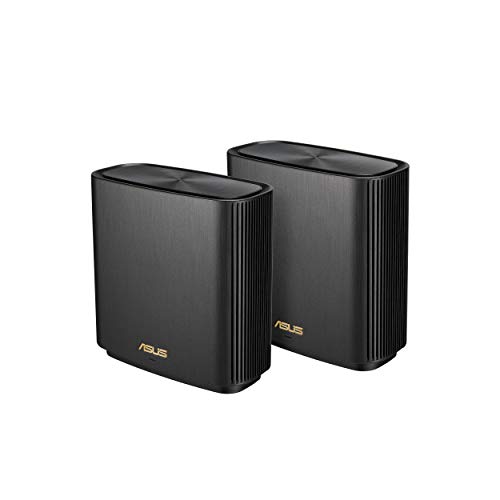
ASUS ZenWiFi XT8 2-Pack, Charcoal (WiFi 6)
The ZenWiFi XT8 is a tri-band WiFi 6 system in the AX6600 class, rated at 6.6 Gbps, and this pick is the 2-pack in Charcoal. ASUS states coverage up to 5,500 square feet, or six or more rooms. The third band gives the mesh a dedicated path for node-to-node traffic, and the system supports 160 MHz channels for wide, high-throughput links to capable devices.
The XT8 stands out on wired and network features. It includes a 2.5G WAN port, suiting faster cable and fiber plans better than a gigabit-only input, and supports three SSIDs if you want to separate main, guest, and smart-home traffic. ASUS includes lifetime network security and parental controls per the listing, and the XT8 works within AiMesh, so compatible ASUS gear can join the same mesh later.
| Spec | Detail |
|---|---|
| WiFi standard | WiFi 6 |
| Speed class | AX6600 (6.6 Gbps) |
| Bands | Tri-band |
| Pack size | 2-pack, Charcoal |
| Stated coverage | Up to 5,500 sq. ft. |
| Wired ports | 2.5G WAN port |
| Extras | AiMesh support, 3 SSIDs, lifetime network security and parental controls per listing, 160 MHz channels |
NETGEAR Orbi RBK753 (WiFi 6)
The Orbi RBK753 pairs one router with two satellite extenders, and NETGEAR states coverage up to 7,500 square feet with support for more than 40 devices — the largest stated footprint in this roundup. It is a tri-band WiFi 6 system in the AX4200 class, up to 4.2 Gbps, with a dedicated backhaul connection between router and satellites, helping the satellites hold speed when many devices are active at once.
Built around three units from the start, it suits sprawling single-storey homes, long ranch layouts, and offices spread across many rooms, where a 2-pack would leave the far ends thin. Check the exact kit code when comparing Orbi models: the RBK753P is a newer, different system in a higher speed class, not this RBK753.
| Spec | Detail |
|---|---|
| WiFi standard | WiFi 6 |
| Speed class | AX4200 (up to 4.2 Gbps) |
| Bands | Tri-band |
| Configuration | 1 router + 2 satellite extenders |
| Stated coverage | Up to 7,500 sq. ft. |
| Device support | 40+ devices |
| Backhaul | Dedicated backhaul |
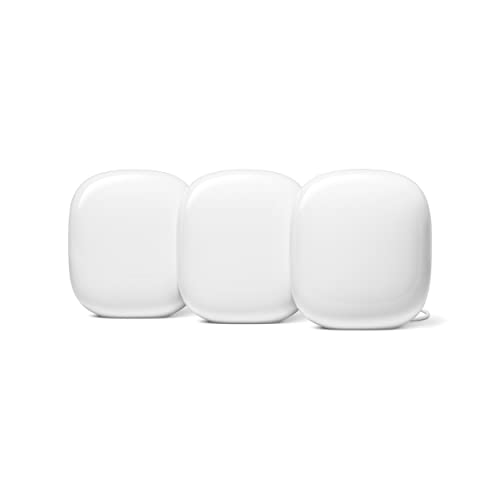
Google Nest Wifi Pro 3-Pack, Snow (WiFi 6E)
The Nest Wifi Pro is Google’s WiFi 6E mesh router, and this pick is the 3-pack in Snow. It is tri-band across 2.4 GHz, 5 GHz, and 6 GHz, and Google states coverage of up to 2,200 square feet per device; the listing does not state a combined total for the 3-pack, so judge the kit by the per-node figure and your layout. A comparison table lists up to 5.4 Gbps combined speed.
The key compatibility note: Nest Wifi Pro is explicitly not compatible with previous Nest Wifi or Google Wifi generations, so existing Google points cannot join this mesh. Plan on the three units being your whole system, or expand later with more Nest Wifi Pro units. For Google households wanting simple setup and WiFi 6E, this is the clean entry point.
| Spec | Detail |
|---|---|
| WiFi standard | WiFi 6E |
| Bands | Tri-band (2.4 GHz, 5 GHz, 6 GHz) |
| Pack size | 3-pack, Snow |
| Stated coverage | Up to 2,200 sq. ft. per device |
| Combined speed | Up to 5.4 Gbps per comparison table |
| Model | G6ZUC |
| Compatibility | Not compatible with previous Nest Wifi or Google Wifi generations |
How to Choose
Start with floor area and layout, not headline speed. Match pack size to the building: a 2-pack fits smaller homes and offices, while large or multi-storey spaces generally need three units. Treat stated coverage as a best-case manufacturer figure; thick masonry, metal framing, and long distances between nodes all reduce real coverage, so place nodes in open spots midway between the router and the rooms they serve.
Next, look at bands. Tri-band systems give the mesh a dedicated path for backhaul traffic, which matters most when many people stream, call, and download at once. WiFi 6E adds the 6 GHz band, useful if your devices support it. A dual-band kit like the Deco X55 2-pack can still suit a smaller space, especially with Ethernet backhaul, which the X55 supports.
Then check the wired side. Count the devices you want plugged in and compare port counts per node. If your internet plan is faster than gigabit, or soon will be, a 2.5G WAN port like the ZenWiFi XT8’s protects that investment; the standard Deco XE75 is gigabit-only. Finally, confirm ecosystem fit: AiMesh for ASUS, the Deco app for TP-Link, and Nest Wifi Pro will not merge with older Google points.
Who Should Skip
Skip mesh entirely if you live in a small apartment where one good router already reaches everywhere; extra nodes add cost and complexity for no gain. Skip the 2-pack kits if your home is large, multi-storey, or built with dense materials — undersized systems are the most common cause of disappointment.
Skip WiFi 6E if no devices support the 6 GHz band and you have no upgrade plans; a WiFi 6 tri-band system serves you just as well. Skip the Nest Wifi Pro if you own Google Wifi or earlier Nest Wifi points you expected to reuse, because they cannot join this mesh. And skip any kit whose exact pack size or color variant you cannot confirm on the listing — a 2-pack is not a substitute for the 3-pack you planned around.
FAQ
How many mesh nodes do I actually need?
Use stated coverage as a rough guide, then adjust for construction. Open-plan spaces need fewer nodes; homes with brick, concrete, or several floors need more. One node per floor is a sensible starting point for larger homes.
Is WiFi 6E worth it over WiFi 6 for a mesh system?
WiFi 6E adds the 6 GHz band, which is less congested and can carry fast links between nodes and to 6 GHz-capable devices. It is worth it if your newer phones and laptops support it. If your devices are all WiFi 6 or older, a tri-band WiFi 6 system such as the Orbi RBK753 or ZenWiFi XT8 is a perfectly good choice.
Can I mix mesh brands or older Google Wifi points?
Generally no. Each mesh ecosystem works within its own product family, and nodes from different brands will not form one seamless mesh. The clearest example is Google: Nest Wifi Pro is not compatible with previous Nest Wifi or Google Wifi generations, so older points cannot be added to it.
Does a faster speed class mean faster internet?
Not directly. Classes such as AX3000 or AX6600 describe the system’s combined wireless capacity across bands, not your internet plan’s speed. Real throughput is limited by your broadband connection, your devices, and building conditions. Buy enough capacity for your household’s simultaneous use rather than chasing the biggest number.
Final Verdict
For a large home wanting current-generation wireless, the TP-Link Deco XE75 3-pack is the default recommendation: WiFi 6E, tri-band, and stated coverage up to 7,200 square feet. The NETGEAR Orbi RBK753 suits the biggest floor plans, with up to 7,500 square feet stated and dedicated backhaul. Choose the ASUS ZenWiFi XT8 2-pack in Charcoal when a 2.5G WAN port and AiMesh matter most. The Deco X55 2-pack is the value route for smaller spaces, and the Nest Wifi Pro 3-pack in Snow is the simple WiFi 6E option for Google households.
More from Amazon
Programs that pair well with the guide above. Offers and eligibility are set by Amazon and may change.
Free shipping on eligible items, Prime Video and more. Eligible new members can start with a free trial.
Start a Prime free trialAd-free music streaming. Eligible new subscribers can start with a free trial.
Try Music Unlimited freeA Prime membership for ages 18-24 with a trial period. Eligibility is set by Amazon.
See Prime for Young AdultsAudiobooks and podcasts to listen to on the go. Eligible new members can start with a free trial.
Try Audible freeAs an Amazon Associate we earn from qualifying purchases.




Write Your Review
No reviews yet. Be the first to share your experience!