

Key takeaways
- A drive docking station is the tool you reach for when a bare SATA drive needs to talk to a computer without opening a case or buying a dedicated enclosure.
A drive docking station is the tool you reach for when a bare SATA drive needs to talk to a computer without opening a case or buying a dedicated enclosure. You drop the drive into a slot, plug in USB, and it appears like any external disk. The keyword hides a quiet split in purpose, though: some buyers want a simple reader for retrieving files from loose drives, while others want a cloning dock that copies one disk to another with no computer involved at all. Picking the wrong type wastes money, so decide what job the dock needs to do before comparing models.
This guide is for IT hobbyists, photographers with drawers of old drives, and anyone moving from a laptop hard drive to an SSD. The docks below are judged on what the titles confirm: bay count, supported drive sizes, interface speed, offline cloning and any extras such as a USB hub or an NVMe slot. Since specs not shown in a title should be confirmed on the listing, use the notes below as a shortlist for 2026 rather than a final verdict, and handle bare drives carefully, because static and drops can damage them.
Quick Picks
Our top picks



As an Amazon Associate we earn from qualifying purchases at no extra cost to you.
| Product | Best for | Key spec from the title |
|---|---|---|
| SABRENT EC-CH2B | Straightforward offline cloning | Dual-bay, USB-C, 5Gbps, 1-to-1 cloner |
| UGREEN Dual-Bay | Large drives and cloning | 2.5 and 3.5 inch, up to 48TB, USB-C |
| WAVLINK Dual Bay | Fixed bezel for secure drives | USB 3.0 to SATA, all generations, offline clone |
| ICY BOX TripleBay | SATA plus NVMe in one dock | M.2 NVMe and SATA, USB-C 10Gbps |
| SUITOK Dual Bay | Large-capacity cloning | USB-C 5Gbps, 2.5 and 3.5 inch, 40TB |
| MAIWO Dual Bay | Dock plus USB hub | 3x USB 3.0 hub, 48TB, 12V 3A |
| ORICO Lay-Flat | Quick single drive reads | UASP support, USB 3.0 to SATA, up to 24TB |
| BENFEI Dual Bay | Tool-free, UASP, clone | USB-C, 5Gbps, offline clone |
How to Choose
Reader or cloner
A basic dock only mounts drives to a computer. A cloner adds a second slot and a standalone copy mode, so you can duplicate one disk to another by pressing a button. Offline cloning is handy when no computer is nearby, but the destination drive must usually be equal or larger. Read the listing for whether the dock copies sector by sector or file by file.
Interface, UASP and speed
USB-C at 5Gbps is common in the dual-bay models here. The ICY BOX lists 10Gbps, which matters for NVMe or fast SATA SSDs. UASP support, named in the ORICO and BENFEI titles, is a protocol that improves transfer efficiency with compatible drives. Hard drives cannot saturate any of these links, so only SSD users need to pay for more speed.
Drive sizes and capacity limits
Every dock here handles 2.5 and 3.5 inch SATA, but the stated capacity ceilings differ: 24TB for the ORICO, 40TB for SUITOK and 48TB for UGREEN and MAIWO. Those limits matter when you own very large drives. Also check for M.2 NVMe support, which only the ICY BOX title mentions.
Power, build and extras
Docks that spin up 3.5 inch drives need an external adapter, such as the 12V 3A supply named in the MAIWO title. A fixed bezel, as on the WAVLINK, helps keep a drive seated. Extras like a USB hub add convenience but also add cost. Cheap docks often cut corners on plastic strength and the quality of the power brick, so handle them gently.
The 8 Best Options
SABRENT Dual-Bay USB-C Docking Station and Cloner (EC-CH2B)
SABRENT’s EC-CH2B is a dual-bay dock that accepts 2.5 and 3.5 inch SATA drives, features an offline one-to-one cloner and includes a USB-C cable, with a 5Gbps link. It is a sensible choice for someone who wants to duplicate a drive without a computer and also use it as a reader afterward.
- Strength: offline one-to-one cloning described in the title.
- Strength: USB-C cable included, so setup is quick.
- Trade-off: 5Gbps limits very fast SATA SSD transfers somewhat compared with 10Gbps options such as the ICY BOX.
Skip it if you need NVMe support or want a built-in USB hub. Check the listing for the largest drive supported before cloning a very big disk, and keep the source drive untouched until you have opened files from the copy to confirm it worked.
UGREEN Dual-Bay Hard Drive Docking Station
UGREEN’s dual-bay dock accepts 2.5 and 3.5 inch SSDs and HDDs, supports up to 48TB by the title, connects through USB-C and includes an offline clone function. It suits a user with large archive drives who wants one dock for both reading and duplicating.
- Strength: a stated 48TB limit covers very large drives.
- Strength: supports all three SATA generations, so older and newer drives both work.
- Trade-off: the visible title is cut off, so the interface speed needs checking on the listing.
Skip it if you want a fast NVMe slot or a hub built in. It also makes less sense if you only ever read a single drive and do not need cloning, because a simpler single-bay reader would cost less and take up less desk space.
WAVLINK Dual Bay Hard Drive Docking Station
WAVLINK’s dock converts USB 3.0 to SATA across all three generations for 2.5 and 3.5 inch HDDs and SSDs, features a fixed bezel and supports an offline clone or duplicator function. The fixed bezel is meant to hold the drive steady during use and transport.
- Strength: the fixed bezel keeps the drive seated during use and moving the dock around.
- Strength: offline clone or duplicator function named in the title.
- Trade-off: USB 3.0 limits the headroom for fast SSDs.
Skip it if you plan to clone NVMe drives or need a larger connector variety. Confirm the maximum capacity on the listing, since the visible title omits it, and check whether the dock ships with its own power adapter for 3.5 inch drives.
ICY BOX TripleBay M.2 NVMe and SATA Dock
The ICY BOX stands out with three bays: an M.2 NVMe slot plus SATA slots for 2.5 and 3.5 inch drives, a USB-C 10Gbps interface and cloner function. It is the only dock here that bridges NVMe, which suits people upgrading laptops with M.2 drives.
- Strength: handles NVMe and SATA in one dock.
- Strength: 10Gbps USB-C link is the fastest listed.
- Trade-off: more complex than a dual-bay dock and likely costs more.
Skip it if you only own SATA drives and want a simple tool. Check the listing for which M.2 lengths and cloning combinations are supported, because copying between an NVMe drive and a SATA drive is not guaranteed by the title alone, and read the instructions before pressing the clone button.
SUITOK Dual Bay SATA Hard Drive Cloner Dock
SUITOK’s dock offers USB-C at 5Gbps, 2.5 and 3.5 inch bays, a 40TB capacity ceiling and an offline duplicator. It is positioned as a dependable cloning tool for home or small office use, with a data reader function on the side.
- Strength: offline duplicator and reader in one dock, covering both common jobs.
- Strength: a stated 40TB capacity ceiling is enough for most large archive drives owned today.
- Trade-off: the listed ceiling is lower than the 48TB models.
Skip it if you own drives above the stated limit or need NVMe. Verify the power adapter details on the listing before relying on it for 3.5 inch drives, and remember that a duplicator copies everything on the source, including any problems already there.
MAIWO Hard Drive Docking Station Cloner
MAIWO combines a dual-bay cloner for 2.5 and 3.5 inch SATA drives with a three-port USB 3.0 hub, 48TB capacity and a 12V 3A power supply. It suits desk setups where a spare hub saves swapping plugs while drives are mounted.
- Strength: three USB 3.0 hub ports built in.
- Strength: 48TB capacity and a stated 12V 3A supply.
- Trade-off: the hub shares one upstream link, so expect shared bandwidth when several devices are active at once.
Skip it if you want the simplest compact dock with a small footprint. Check the listing for the cable type and the port on the host side, since the visible title does not state them, and decide whether a hub is something you will really use.
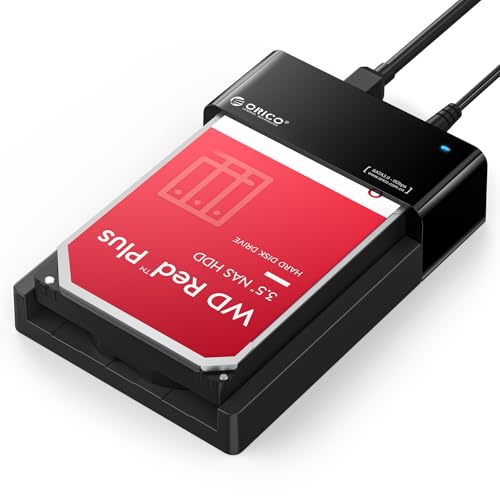
ORICO Hard Drive Lay-Flat Docking Station
ORICO’s lay-flat dock supports UASP, converts USB 3.0 to SATA for 2.5 or 3.5 inch HDDs and SSDs, and lists a 24TB ceiling. Its open design suits quick plug-in reads, such as grabbing files from a retired drive.
- Strength: UASP support named in the title, which can help transfer efficiency with compatible drives.
- Strength: a simple lay-flat format makes swapping drives for quick reads fast and easy.
- Trade-off: the title lists no cloning function and a lower 24TB ceiling.
Skip it if you need to duplicate drives without a computer or own drives above 24TB. Confirm the bay count on the listing before ordering, and be careful with an open design, since the exposed drive should not be bumped or moved while it is powered and mounted.
BENFEI Hard Drive Docking Station
BENFEI’s USB-C dual-bay dock supports UASP, offline cloning and tool-free installation for 2.5 and 3.5 inch HDDs and SSDs, with speeds up to 5Gbps. It is a balanced all-rounder for casual users who want cloning plus easy drive changes.
- Strength: tool-free installation and UASP support named together in the title, which makes drive changes quick.
- Strength: an offline clone function is included, so no computer is needed for a straight copy.
- Trade-off: the capacity ceiling is not shown in the visible title, so large-drive owners must check the listing.
Skip it if you need NVMe support or a built-in hub. Check the listing for the cloning behavior, the largest supported drive and the warranty length, since none of those details appear in the visible part of the title. A tool-free design is convenient, but still power the dock down before changing drives.
Which One Fits Your Situation
Replacing a laptop drive with an SSD
The SABRENT EC-CH2B copies the old disk to the new one without a computer, which is exactly the migration task most buyers face.
Working with NVMe and SATA drives
The ICY BOX TripleBay is the only entry that mounts M.2 NVMe alongside SATA, so it fits mixed collections.
Desk with limited USB ports
The MAIWO dock adds a three-port hub to the cloning bays, reducing cable swapping at a crowded desk.
Occasional file retrieval
The ORICO lay-flat dock keeps things simple for quick reads from old drives without needing cloning.
Common Mistakes
- Cloning onto a smaller drive than the source holds.
- Assuming every dock reads NVMe drives; only the ICY BOX title says so.
- Hot-pulling a drive before the transfer finishes or the volume is ejected.
- Using a dock for long-term storage; bare drives are exposed to dust and static.
- Forgetting to verify the clone by opening files from the new drive.
Related guides
- How To Apply Thermal Paste How Much And Which Pattern
- How To Choose Power Supply Wattage For A Pc Build
- Cpu Coolers For Small Form Factor Cases
Frequently Asked Questions
Does offline cloning need a computer?
No. Docks with an offline clone function copy one drive to another using the buttons on the dock, with both drives inserted and power connected.
Can a dock read both 2.5 and 3.5 inch drives?
Yes for every model here, since the titles list both sizes. Confirm anything unusual, such as very thick drives, on the listing.
Is a docking station good for permanent storage?
It is designed for occasional access. For daily use, an enclosure protects the drive better from dust and knocks.
What does UASP do?
UASP is a USB protocol that can improve transfer efficiency when both the dock and the computer support it.
More from Amazon
Programs that pair well with the guide above. Offers and eligibility are set by Amazon and may change.
Free shipping on eligible items, Prime Video and more. Eligible new members can start with a free trial.
Start a Prime free trialAd-free music streaming. Eligible new subscribers can start with a free trial.
Try Music Unlimited freeA Prime membership for ages 18-24 with a trial period. Eligibility is set by Amazon.
See Prime for Young AdultsAudiobooks and podcasts to listen to on the go. Eligible new members can start with a free trial.
Try Audible freeAs an Amazon Associate we earn from qualifying purchases.
Write Your Review
No reviews yet. Be the first to share your experience!