

Key takeaways
- Working from home turns a laptop into a full-time tool rather than an occasional one. It sits on a kitchen table or spare-room desk for eight hours.
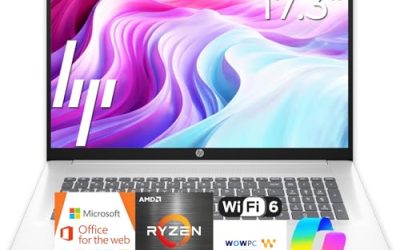
Working from home turns a laptop into a full-time tool rather than an occasional one. It sits on a kitchen table or spare-room desk for eight hours, runs a video call, a chat app, a VPN, and a browser with too many tabs, and then gets plugged into a second monitor. For that routine, a Lenovo laptop makes sense because the brand’s IdeaPad and Essential lines focus on practical keyboards and screens at a sensible spending tier.
This guide is for remote employees, freelancers, and part-time home workers choosing a Lenovo in 2026. The seven models below nearly all pair a 15.6-inch FHD screen with 8GB of DDR5 or LPDDR5 memory, so the real differences are processor family, storage layout, and what comes in the box. Each one is a laptop, so a separate headset or webcam is still worth budgeting for.
Quick Picks
Our top picks






As an Amazon Associate we earn from qualifying purchases at no extra cost to you.
| Product | Best for | Key spec from the title |
|---|---|---|
| Lenovo 15.6″ FHD Business Laptop | General remote office tasks | 8GB DDR5, 128GB storage, 1TB cloud, Office 365 |
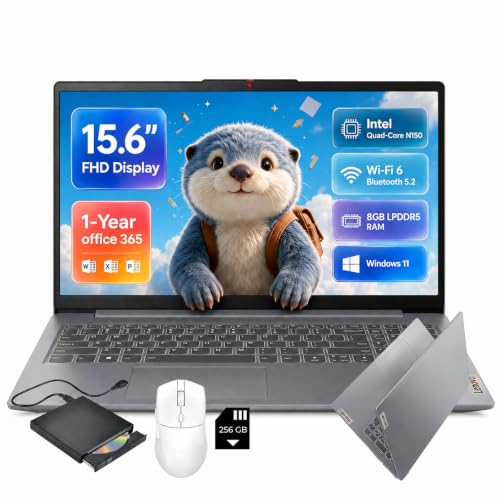
| Lenovo IdeaPad Slim-3i (SD Card) | Extra file space on a budget | N150, 8GB LPDDR5, 128GB UFS + 256GB SD |
| Lenovo IdeaPad Slim 3 (Ryzen 5) | Strongest processor and local SSD | Ryzen 5, 8GB DDR5, 256GB SSD |
| Lenovo IdeaPad Slim 3i (Arctic Grey) | Simple, clean home-office look | N150, 8GB RAM, 128GB SSD, Microsoft 365 |
| Lenovo Essential 15.6″ (Ext HDD) | Backing up documents locally | 8GB DDR5, 128GB storage, 500GB external HDD |
| Lenovo V15 15.6″ FHD | Business-style build with more SSD | 8GB DDR5, 256GB SSD, WiFi 6 |
| Lenovo Essential 15.6″ (Bluetooth 5.2) | Wireless headsets and peripherals | 8GB DDR5, 128GB, Wi-Fi 6, Bluetooth 5.2 |
How to Choose
Video-call comfort comes first
Most remote workdays revolve around meetings, so check Wi-Fi and the webcam before anything else. Wi-Fi 6 is the standard worth requiring, since it copes better with a busy home network. Webcam details are seldom in the title, even though they affect every meeting, so read the listing for a 720p or 1080p camera and a privacy shutter. Pair the laptop with a USB or Bluetooth headset for clear audio rather than relying on built-in speakers.
Memory and storage for a work profile
Eight gigabytes of RAM handles a call plus a browser, but 16GB is better if you also run design tools or heavy spreadsheets. For storage, 256GB or more is more realistic than 128GB once work apps, VPN software, and downloaded reports pile up. Listings that add an SD card, external hard drive, or cloud space do not replace a real SSD, so count only the internal drive as your working space.
Screen and ports for a desk setup
A 15.6-inch FHD display is the sweet spot for a home desk, and an anti-glare finish cuts reflections from windows. Ports matter as much as the panel: USB-C helps with a docking station or external monitor, and USB-A keeps older mice and drives usable. If you plan to run two screens, confirm that the laptop has an HDMI output or USB-C display support. A laptop stand and an external keyboard also protect your neck and wrists on long days.
What to ignore and where budget models cut corners
Disregard vague claims such as long battery life or portable design. Budget Lenovo listings often use UFS or SD-card storage for the top figure, ship with a 1-year Office subscription, and use entry-level processors like the N150 that fit email more than heavy analysis. Check that the version of Windows 11 is not locked in S mode, and make sure the keyboard has the layout you want. A number pad and a comfortable key travel matter when you type for hours at a time.
The 7 Best Options
Lenovo 15.6″ FHD Business Laptop
This listing pairs an Intel processor with 8GB of DDR5 RAM, 128GB of storage, and 1TB of cloud space, along with Copilot AI and Office 365. It is aimed at home workers who handle email, documents, and video meetings and want the software ready on the first day of use.
- Strength: DDR5 memory and a full-size 15.6-inch FHD display suit daily office work.
- Strength: the bundle includes Office and cloud storage, so it works right away.
- Trade-off: only 128GB of local storage fills quickly under a work profile.
Skip it if you store large local files or want the highest performance tier available. The title does not name the exact processor, so read the full listing before comparing it with the Ryzen model.
Lenovo IdeaPad Slim-3i with SD Card
This IdeaPad lists a quad-core Intel N150, 8GB of LPDDR5 RAM, a 128GB UFS drive, a 256GB SD card, Wi-Fi 6, USB-C, and a one-year Office 365 subscription. It suits a remote worker who wants some bonus storage for documents at a low budget.
- Strength: Wi-Fi 6 and USB-C cover the connection basics for a home desk.
- Strength: the extra SD card gives roomy space for archives and backups.
- Trade-off: UFS and SD storage are not as flexible as a full SSD.
Skip it if you need fast internal storage for big files or frequent app launches. A card also has to stay seated in its slot, which is easy to forget when the laptop moves between rooms.
Lenovo IdeaPad Slim 3 (Ryzen 5)
The IdeaPad Slim 3 uses an AMD Ryzen 5 processor with 8GB of DDR5 RAM and a 256GB SSD, in a 15.6-inch FHD business-style body. It is the pick for remote workers who want the strongest processor in this guide and a real internal SSD at the same time.
- Strength: a Ryzen 5 gives more headroom than the N150-based Lenovo models.
- Strength: 256GB of SSD storage is double the base of several competitors in the list.
- Trade-off: the title does not mention Office, so a subscription may be extra.
Skip it if you want bundled software and cloud storage included in the purchase. Budget a separate Office license, or plan to use free web versions, if your employer does not supply one.
Lenovo IdeaPad Slim 3i (Arctic Grey)
This Intel version of the Slim 3i lists a 15.6-inch FHD screen, Microsoft 365, 8GB of RAM, a 128GB SSD, an N150 processor, and Windows 11 in Arctic Grey. It is for home workers who want a tidy, neutral machine for daily writing and browsing.
- Strength: the SSD is a true internal drive rather than a card.
- Strength: 8GB of RAM and Microsoft 365 cover typical remote tasks.
- Trade-off: the N150 limits performance for heavy multitasking.
Skip it if your work involves large spreadsheets or many simultaneous programs. It is built for a lighter day of writing, scheduling, and chat rather than analysis.
Lenovo Essential 15.6″ with External HDD
This Lenovo includes a 500GB external hard drive with an Intel processor, 8GB of DDR5 RAM, and 128GB of internal storage, along with an FHD anti-glare display. It suits a home worker who wants a built-in backup plan for files.
- Strength: the external drive adds a handy place to back up work documents.
- Strength: an anti-glare FHD screen helps in a bright home office.
- Trade-off: the internal drive is small, and the external disk is one more item to carry.
Skip it if you prefer one tidy device with no add-ons on the desk. Cloud-synced folders can do the same job without another cable and power requirement.
Lenovo V15 15.6″ FHD
The V15 line is positioned for business use. This listing offers an Intel processor, 8GB of DDR5 RAM, a 256GB SSD, Copilot AI, Wi-Fi 6, Office 365. It fits home workers who want a sturdier-feeling work laptop with a bigger SSD.
- Strength: 256GB of SSD storage and Wi-Fi 6 suit a daily work profile.
- Strength: Office 365 and Copilot AI features are listed.
- Trade-off: the exact processor model is cut off, so check the full listing.
Skip it if you need a clearly named processor before committing to a purchase. Compare it against the Ryzen 5 and N150 models once you have the full listing details.
Lenovo Essential 15.6″ with Bluetooth 5.2
This Essential model lists an Intel CPU, 8GB of DDR5, 128GB of storage with 1TB of cloud space, Office 365, Copilot AI, Wi-Fi 6, Bluetooth 5.2, and an anti-glare screen. It is a good fit for workers who rely on wireless headsets and mice.
- Strength: Bluetooth 5.2 and Wi-Fi 6 support wireless peripherals and stable calls.
- Strength: bundled Office and cloud storage keep the setup simple.
- Trade-off: 128GB is a limited internal drive for a full work year.
Skip it if you plan to store lots of project files locally. Pair it with cloud folders for active documents, and clear old downloads regularly to keep space free.
Which One Fits Your Situation
You want the most capable processor
The Lenovo IdeaPad Slim 3 (Ryzen 5) brings the strongest chip and a 256GB SSD to a sensible home-office laptop. It suits accountants, planners, and anyone who keeps several windows open between meetings.
You need software included on day one
The Lenovo 15.6″ FHD Business Laptop ships with Office 365 and cloud space, so you can start work immediately, which helps when a laptop arrives right before a new job begins.
You want built-in backup storage
The Lenovo Essential 15.6″ with External HDD adds a 500GB drive for copies of important files, useful if your employer asks for local archives or you distrust a single copy.
You use wireless headsets all day
The Lenovo Essential 15.6″ with Bluetooth 5.2 is explicitly listed with that standard, which helps with modern wireless gear such as earbuds, keyboards, and a travel mouse.
Common Mistakes
- Choosing 128GB of internal storage and then running out of space with work files.
- Counting an SD card or external drive as part of the main working drive.
- Skipping a webcam and Wi-Fi check even though most days involve video calls.
- Assuming Office is permanent when the listing says one year.
- Forgetting display ports and discovering later that a second monitor needs an adapter or a dock.
Related guides
- How To Apply Thermal Paste How Much And Which Pattern
- How To Choose Power Supply Wattage For A Pc Build
- Cpu Coolers For Small Form Factor Cases
Frequently Asked Questions
Is 8GB of RAM enough for working from home?
It handles email, documents, and video calls. Move up to 16GB if you run many apps at once, though none of the listings here show that tier.
Should I choose Ryzen or Intel N150?
Ryzen 5 offers more speed for multitasking. An N150 is fine for light chores such as email and browsing.
Do I need an external monitor?
It is optional but helpful. A second screen makes document work and calls easier, so confirm the laptop has a suitable port. Many remote workers start with the laptop alone and add a monitor after a few weeks.
Is an SD card good enough for storage?
It is useful for backups and archives. For active work files, an internal SSD is faster and more reliable, and it will not be left behind in a bag.

Write Your Review
No reviews yet. Be the first to share your experience!