

Our Top Picks
A 32GB mini PC is easy to find; a good one takes more sorting, because the same four characters hide a lot of differences. In this set the memory is DDR5 in some boxes and DDR4 in others, the processors range from low-power laptop-class Ryzen parts to older Intel chips in renewed office machines, and one listing carries only 16GB despite looking like it belongs. For a buyer who wants a small desktop that can hold a browser, an editor and a virtual machine at once, the short list comes down to three boxes: the BOSGAME P3 Lite for the strongest stated CPU and DDR5, the KAMRUI P2 for its Intel 12th-generation chip and storage headroom, and the renewed HP EliteDesk for a cheap entry to 32GB.
Everything below is based on titles, published specifications and manufacturer documentation. Where a title is silent we say so rather than guess.
Eight listings at a glance

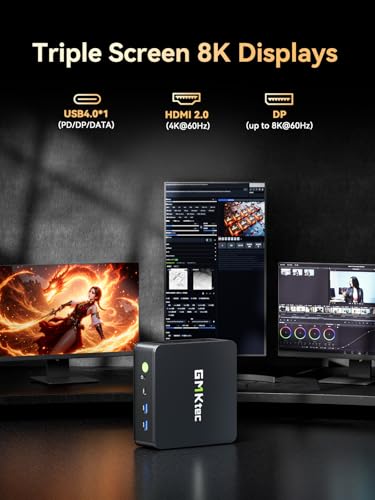
GMKtec M6 Ultra Gaming Mini PC Ryzen 7640HS 32GB RAM DDR5 1TB SSD | Desktop Mini Computers Office Home, Dual NIC LAN 2.5GbE, Triple 4K Display, WiFi 6, USB4, BT5.2, DP, HDMI 2.0



As an Amazon Associate we earn from qualifying purchases. Product prices and availability are accurate as of the date/time indicated.

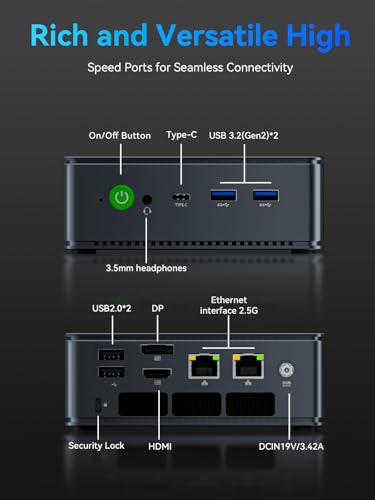
GMKtec M5 Ultra Gaming Mini PC Computer Ryzen 7 7730U 16GB RAM 256GB SSD | Office Personal Desktop (Beats 7430U/ 7525U), Dual NIC LAN 2.5GbE, Triple 4K Display, WiFi 6E, USB-C, BT 5.2, DP, HDMI 2.0




As an Amazon Associate we earn from qualifying purchases. Product prices and availability are accurate as of the date/time indicated.

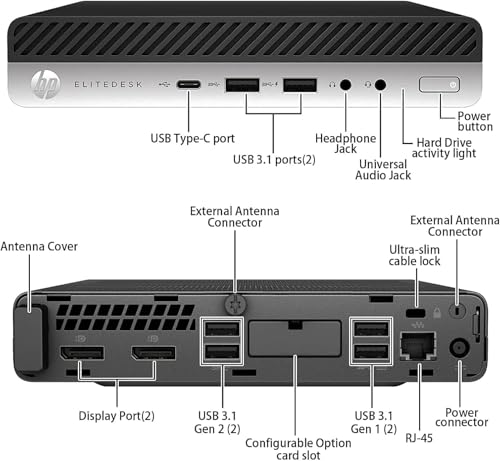
HP EliteDesk 800 G5 High-Performance Mini PC Desktop Computer, 9th Gen Intel Core i5-9500T, 32GB DDR4 RAM, 512GB SSD, Keyboard & Mouse, 4K Support, WiFi, Windows 11 Pro (Renewed)



As an Amazon Associate we earn from qualifying purchases. Product prices and availability are accurate as of the date/time indicated.
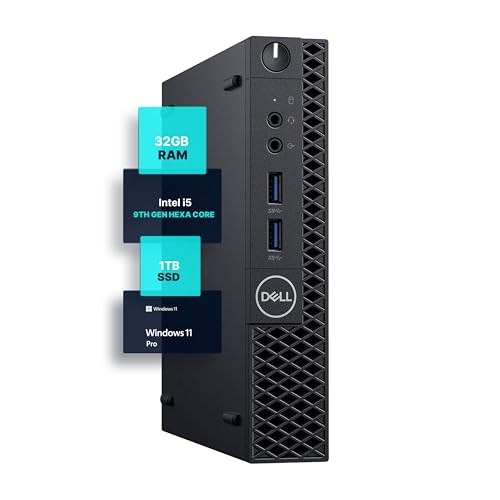
Dell Optiplex 3070 Micro PC | Windows 11 Pro | Intel i5-9500 | 32GB RAM + 1TB SSD | 5G WiFi + BT | Mini Desktop Computer (Renewed)


As an Amazon Associate we earn from qualifying purchases. Product prices and availability are accurate as of the date/time indicated.

BOSGAME P3 Lite Mini PC AMD Ryzen 7 6800H, 32GB DDR5 RAM 1TB NVMe SSD | Dual 2.5GbE LAN, USB4, Triple 4K Display, Desktop Computer for Office, Home, Workstation


As an Amazon Associate we earn from qualifying purchases. Product prices and availability are accurate as of the date/time indicated.
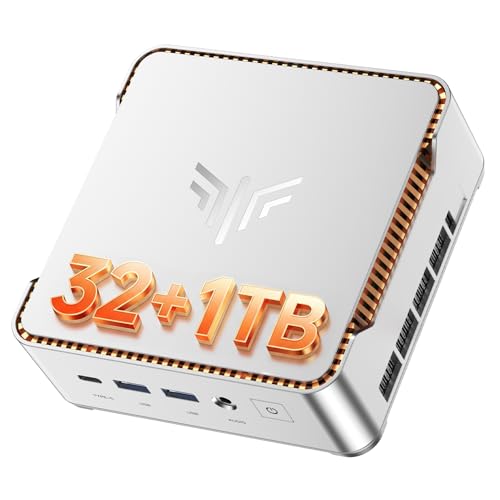
KAMRUI P2 Mini PC i5-12600H, 32GB DDR4 1TB SSD, Triple 4K, Win11 Pro | Upgradeable to 4TB SSD storage,Powers heavy multitasking, Coding, Design and triple-4K display workflows quietly.


As an Amazon Associate we earn from qualifying purchases. Product prices and availability are accurate as of the date/time indicated.
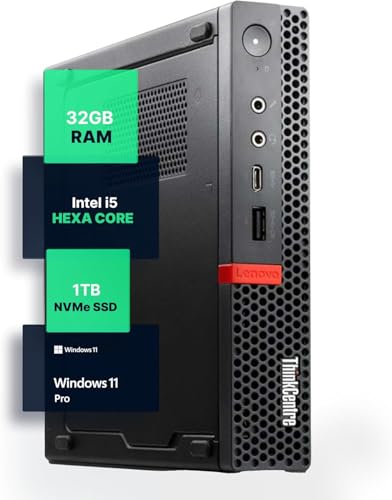
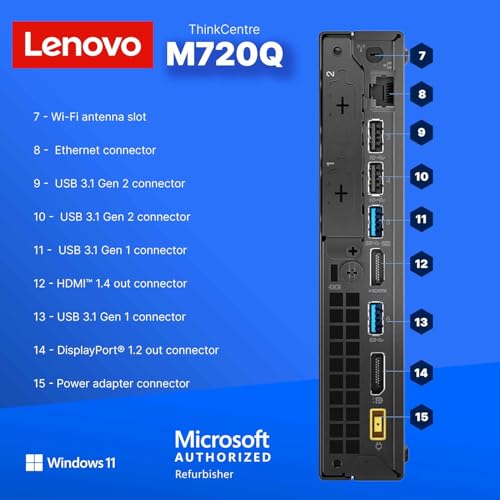
Lenovo M720Q ThinkCentre Mini PC | Windows 11 Pro | Intel i5-8400T | 32GB RAM + 1TB NVME | 5G WiFi + BT | Home or Office Micro Desktop Computer (Renewed)



As an Amazon Associate we earn from qualifying purchases. Product prices and availability are accurate as of the date/time indicated.

GEEKOM A7 Mini PC,Ryzen 7 7730U(Low Power)32GB RAM &500GB SSD(Expandable) | Business Efficiency(15W TDP) Up to 64GB RAM and 4TB SSD, Agentic AI Desktop for Creator&Office,SD,2xUSB-C, 3-Year Coverage


As an Amazon Associate we earn from qualifying purchases. Product prices and availability are accurate as of the date/time indicated.
The table keeps to what each title states. Price tier is relative inside this set, not a quote; check the live listing for the current figure.
| Model | What the title states | Price tier | Best for |
|---|---|---|---|
| GMKtec M6 Ultra | Ryzen 7640HS, 32GB DDR5, 1TB SSD, dual 2.5GbE, USB4, triple 4K | Mid | Fast all-rounder with network ports |
| GMKtec M5 Ultra | Ryzen 7 7730U, 16GB RAM, 256GB SSD, WiFi 6E | Budget | Near-miss: only 16GB in the title |
| HP EliteDesk 800 G5 (renewed) | Core i5-9500T, 32GB DDR4, 512GB SSD, keyboard and mouse | Budget | Cheapest route to 32GB, light office use |
| Dell OptiPlex 3070 Micro (renewed) | i5-9500, 32GB, 1TB SSD, 5G WiFi | Budget | Roomy storage on a renewed budget |
| BOSGAME P3 Lite | Ryzen 7 6800H, 32GB DDR5, 1TB NVMe, dual 2.5GbE, USB4 | Premium | Heaviest stated CPU, creative and dev work |
| KAMRUI P2 | Core i5-12600H, 32GB DDR4, 1TB SSD, up to 4TB, triple 4K | Mid | Multitasking with storage growth |
| Lenovo M720Q (renewed) | Core i5-8400T, 32GB, 1TB NVMe, 5G WiFi | Budget | Quiet home office, older silicon |
| GEEKOM A7 | Ryzen 7 7730U, 32GB, 500GB SSD, up to 64GB RAM and 4TB SSD, 3-year coverage | Premium | Low-power desk box with stated upgrade room |
What 32GB buys you on a small desktop
Memory is the part of a mini PC that costs the most to fix later, so it pays to know whether you need it. Sixteen gigabytes covers a normal office day. Thirty-two matters when your work leaves several memory-hungry programs open at the same time, or when integrated graphics borrow a slice of the same pool.
That last point is easy to miss. These machines have no separate video card, so the graphics chip reserves part of system RAM for itself. On a 16GB box that reservation comes out of an already modest budget; on a 32GB box it barely registers.
A worked example: one developer’s memory budget
The figures below are planning assumptions we chose for illustration, not measurements of any listed unit. Real usage varies by application and version.
| Workload (assumed) | Planning figure | Why it is assumed |
|---|---|---|
| Operating system and background services | About 4GB | Typical idle footprint for a current desktop OS with security software |
| Browser with roughly 30 tabs | About 6GB | Modern pages often hold hundreds of megabytes each |
| Chat and video-call apps | About 2GB | Electron-style clients are memory hungry |
| Code editor plus a few containers | About 8GB | Depends heavily on the stack |
| One small virtual machine | About 8GB | Allocation set by the user |
| Integrated graphics reservation | 0.5 to 2GB | Often adjustable in firmware settings |
| Total | About 28.5 to 30GB | Fits in 32GB, overflows 16GB |
Under those assumptions a 16GB machine would lean on the SSD as overflow, and every app switch would feel slower. If your own list looks more like the first three rows, you are in 16GB territory and the M5 Ultra becomes a reasonable cheaper option.
Memory type, channels and the spec words that matter
The architecture question is simple to state: how fast can the processor pull data from memory, and can it keep up with the work you give it? Two things decide that, the memory generation and whether it runs in dual-channel mode.
| Spec concept | What to look for | Why it matters |
|---|---|---|
| DDR5 vs DDR4 | DDR5 on the Ryzen 7640HS and 6800H listings; DDR4 on the Intel boxes | DDR5 has higher bandwidth, which mostly helps integrated graphics |
| Dual-channel | Two memory modules, not one 32GB stick | Two modules usually give better bandwidth; the titles do not say how the 32GB is split |
| Maximum capacity | Only the GEEKOM title states a 64GB ceiling | Tells you whether an upgrade is possible |
| CPU generation and power | Newer H-series versus older T-series chips | Newer chips do more per watt; T-series parts are low power and quiet |
| Display outputs | HDMI, DisplayPort, USB-C or USB4 count | Triple-4K claims depend on which ports are used together |
For published figures on the processors named in these titles, AMD lists the Ryzen 7 7730U as an eight-core, 15W-class part, the Ryzen 7 6800H as eight cores in the 45W class, and the 7640HS family as six cores. Intel lists the Core i5-12600H as 12 cores (four performance, eight efficiency) with 16 threads, and the i5-9500T and i5-8400T as six-core, six-thread chips in the 35W class. Confirm each against the maker’s spec page, because third-party databases occasionally disagree.
One naming detail: the GMKtec M6 Ultra title says “Ryzen 7640HS” with no tier. That model number belongs to the Ryzen 5 line, so expect a Ryzen 5 7640HS and verify it on the listing.
How these eight were picked
The set comes from listings that surface for this search, filtered on the titles saying 32GB where possible. Nobody on the team used or measured these units. Judgments rest on published specifications, manufacturer documentation and buyer reviews, and every claim that comes from a seller’s own title is marked as a claim. One listing misses the 32GB mark and stays in as a clearly labeled near-miss.
The eight listings, one by one
GMKtec M6 Ultra
The title packs in 32GB of DDR5, a 1TB SSD, dual 2.5GbE LAN, WiFi 6, USB4 and triple 4K output. That network pair is rare at this size and handy for a small server, a firewall box or a desk that needs a wired backup link. “Gaming” in the name should be read as marketing: with integrated graphics, it suits light and older games at best.
- Pros: DDR5 and a modern six-core family; two 2.5GbE ports; USB4 for fast storage or a dock
- Cons: Title omits the Ryzen tier; HDMI 2.0 only, so 4K at 60Hz is the practical ceiling there; triple-4K claim needs port checking
Memory is the headline: DDR5 at 32GB gives the integrated graphics more bandwidth than the DDR4 boxes in this set can offer. The triple-display claim is only as good as the ports behind it, so map each monitor to an HDMI, DisplayPort or USB-C output before assuming all three run at 4K. If you plan to host a router or firewall virtual machine, the pair of 2.5GbE jacks is the standout feature.
Who it suits: someone who wants a quick, quiet desktop with serious connectivity. Ask before buying: is the 32GB two modules, and can the SSD be swapped?
GMKtec M5 Ultra
This one fails the keyword on its own title: 16GB RAM and a 256GB SSD. It is in the set because search engines group it with the others, and because it shares the Ryzen 7 7730U with the GEEKOM listing at a lower tier. The “beats 7430U and 7525U” line is the seller’s comparison and nothing here confirms it.
- Pros: Lowest tier in the set; WiFi 6E and dual 2.5GbE; same eight-core chip family as a premium listing
- Cons: Only 16GB; small 256GB drive; skip it if 32GB is a hard requirement
If you do consider it, price the memory upgrade first: add the cost of a 32GB kit to the listing price and compare the total with the M6 Ultra and the GEEKOM A7. Also confirm the maximum supported capacity and whether the module is socketed, since a soldered module would end the idea. The WiFi 6E claim only pays off with a compatible router.
Who it suits: a buyer who would upgrade the memory later. Check whether the slots are accessible and what maximum the maker lists, then price the upgrade before comparing it with a 32GB box.
HP EliteDesk 800 G5 Mini (Renewed)
A business mini PC with a Core i5-9500T, 32GB of DDR4, a 512GB SSD, a keyboard and mouse, Windows 11 Pro and 4K support. Renewed corporate hardware tends to be tidy and easy to service, and this is the lowest-cost route to 32GB in the set. The processor is an older six-core, six-thread part, so it will lag the Ryzen boxes in sustained multi-tasking.
- Pros: 32GB at a budget tier; peripherals included; business-class chassis
- Cons: Older processor with no hyper-threading; “Renewed” grade and warranty vary; 512GB is modest
Business machines of this class are generally designed for easy servicing, and the keyboard and mouse in the title remove one more purchase. Still, renewed covers a range of conditions, so look for a stated grade, the length of the seller’s guarantee and a clear note on what was reset or replaced. For a quiet reception desk or a family computer, those older cores are enough.
Who it suits: light office, back-office and kiosk roles that need memory for browser tabs more than raw speed. Ask before buying: who renews it, and what is the return window?
Dell OptiPlex 3070 Micro (Renewed)
The title offers 32GB of RAM and a 1TB SSD with 5G WiFi and Bluetooth, which makes it the most storage per dollar among the renewed trio. One detail looks off: the title says “i5-9500” without the T suffix that micro-format chassis normally carry. It may be a typo or a different configuration, so confirm the exact processor on the product page before ordering.
- Pros: 1TB SSD at a budget tier; small footprint; Windows 11 Pro in the title
- Cons: Ambiguous CPU wording; renewed condition; the title does not state the RAM type
The 5G WiFi in the title means the 5GHz band, not cellular, which is a common point of confusion. Weigh the 1TB drive against the HP’s 512GB, and set that storage advantage against the unclear processor wording. If the seller confirms a different chip than the one in the title, ask what that means for noise and power draw.
Who it suits: a home office that stores large files locally. Ask before buying: does the listing photo show the processor label?
BOSGAME P3 Lite
This listing stacks a Ryzen 7 6800H, 32GB DDR5, a 1TB NVMe SSD, dual 2.5GbE, USB4 and triple 4K. The 6800H is an eight-core, 45W-class mobile chip, the heaviest-rated processor in the roundup on paper. The higher power class means more fan work under load, so look for buyer comments on noise.
- Pros: Eight cores with DDR5; two fast LAN ports; USB4 for docks and external drives
- Cons: Highest tier in the set; higher power draw than the 15W-class boxes; the title gives no upgrade ceiling
Pairing 32GB of DDR5 with an eight-core processor suits work that spreads across many threads: compiling, running a few virtual machines or exporting video from an editor. USB4 adds room for fast external storage or a dock. Since this is among the highest tiers in the group, compare it with the KAMRUI P2 and ask whether the extra cost buys anything you will use.
Who it suits: developers, editors and anyone compiling or exporting regularly. Ask before buying: how is the cooling described in recent buyer reviews?
KAMRUI P2
A Core i5-12600H, 32GB of DDR4 and a 1TB SSD that the title says can grow to 4TB, plus triple 4K and Windows 11 Pro. The 12600H mixes four performance and eight efficiency cores, which suits many small threads such as browser tabs, chat and background builds. The wording about “powers heavy multitasking” and “quietly” is promotional language, not a specification.
- Pros: Strong multithreaded chip; clear storage ceiling; middle tier
- Cons: DDR4 rather than DDR5; lesser-known brand, so check the support terms; no USB4 mentioned
The 12th-generation Core i5-12600H is a hybrid design, so efficient cores handle background tasks while performance cores take the heavy ones, which usually suits an always-open pile of apps. The 4TB ceiling in the title is a practical advantage over drives that top out lower. As the brand is less established, read the warranty page and look for buyer comments about support response.
Who it suits: multitaskers who value a roomy drive. Ask before buying: what does the warranty cover, and who handles claims?
Lenovo ThinkCentre M720Q (Renewed)
Core i5-8400T, 32GB, a 1TB NVMe drive and 5G WiFi with Bluetooth. The Tiny chassis is known for being compact and quiet, yet the processor is the oldest in this set. Treat it as a capable office terminal, not a creative workstation.
- Pros: Quiet, small business chassis; 32GB and 1TB at a budget tier; Windows 11 Pro
- Cons: Oldest processor in the group; limited modern ports; renewed condition varies
Compact business desktops of this type are designed to sit under a monitor or mount behind one, which suits a clutter-free desk. The processor is a six-core, six-thread 35W-class part, so heavy multitasking is where it will show its age. Compare it with the HP: both offer 32GB, but this one lists a 1TB NVMe drive and the HP a 512GB SSD with peripherals.
Who it suits: a home-office desk with documents, video calls and web apps. Ask before buying: does the listing confirm the NVMe slot and Windows license state?
GEEKOM A7
The Ryzen 7 7730U in a low-power 15W configuration, 32GB, a 500GB SSD, and a stated ceiling of 64GB RAM and 4TB of storage. It also lists two USB-C ports, an SD slot and three-year coverage, the longest term in the set. “Agentic AI desktop” is marketing language; nothing in the title specifies an NPU or software.
- Pros: Only title with a stated RAM ceiling; three-year coverage; efficient eight-core chip
- Cons: Premium tier for a lower-power chip; 500GB drive is small next to the 1TB rivals; Zen 3 architecture is older than the 7640HS
The headline selling points are the upgrade ceiling and the coverage period, which together suggest a machine meant to last. The 15W label signals an efficiency-first setup, so expect less peak performance than the H-series boxes. A 500GB drive is an unusual size, so check what the listing means by expandable and whether a second storage slot exists.
Who it suits: buyers who want a quiet, efficient box they can upgrade later. Ask before buying: what are the coverage terms and are they stated in writing?
Power, heat and noise: what the chip class implies
None of the titles gives a noise figure or a thermal result, so any claim about silence is inference. What you can reason from is the processor class. A 15W-class part such as the Ryzen 7 7730U has little heat to shed, so its cooler can stay slow most of the day. A 35W T-series Intel chip sits in a similar position for light work. The 45W-class Ryzen 7 6800H and the Core i5-12600H can draw much more for short bursts, which is when small fans spin up.
That does not make them bad choices. It means the fan curve and the chassis matter more, and those are things only buyer comments reveal. Search recent reviews for words like “fan noise”, “idle temperature” and “throttling” before you commit, and favor a seller that publishes a clear return window in case the box is louder than your desk can tolerate.
Placement matters too. A mini PC tucked into a closed cabinet or strapped behind a monitor mount loses airflow, and a chip that would idle quietly in open air can run warmer there. Leave a few centimeters of clearance around vents, keep it off thick carpet, and treat dust as a maintenance item: a quick blast of compressed air twice a year keeps small heatsinks working as designed.
Mistakes buyers make with 32GB mini PCs
- Paying for DDR5 and ignoring the CPU. A faster memory standard cannot rescue an older six-core chip in a heavy compile or export.
- Assuming 32GB means upgradeable. Only one title here states a ceiling. For every other unit, confirm slot count and maximum capacity.
- Trusting “triple 4K” without counting ports. Count the real HDMI, DisplayPort and USB-C outputs, then match them to your monitors and cables.
- Skipping the renewed grade. Cosmetic condition and warranty differ between renewers, so the lowest tier is not always the best value.
- Buying a tiny SSD. A 256GB or 500GB drive fills fast once a virtual machine or media library arrives; budget for a larger drive from the start.
Which listing for which user
| If you are… | Start with | Why |
|---|---|---|
| Running office apps on a tight budget | HP EliteDesk 800 G5 or Lenovo M720Q | 32GB at the lowest tier, low-power chips |
| Storing big files locally | Dell OptiPlex 3070 Micro or KAMRUI P2 | 1TB drives, with a stated 4TB limit on KAMRUI |
| Compiling code or exporting video | BOSGAME P3 Lite | Eight cores with DDR5 |
| Wanting network and dock flexibility | GMKtec M6 Ultra | Dual 2.5GbE with USB4 |
| Planning to grow RAM later | GEEKOM A7 | 64GB limit stated in the title |
| Not sure you need 32GB | GMKtec M5 Ultra | Cheaper, and 16GB may do |
Workload fit: a short decision flow
- Do you keep a virtual machine, containers or a large spreadsheet open next to a browser? If no, 16GB may be enough and the M5 Ultra deserves a look. If yes, continue.
- Is the work CPU-heavy, such as compiling, encoding or exporting? If yes, lean toward the BOSGAME P3 Lite or KAMRUI P2. If no, continue.
- Do you need to run more than two monitors? Match the port list against your cables, then see our guide to mini PCs for dual 4K office monitors.
- Do you want to add memory or storage later? Favor the GEEKOM A7 or KAMRUI P2, which state their limits.
- Is silence and cost the priority? Pick a renewed business box and accept the older CPU.
Before you click buy: a verification checklist
| Check | Problem if skipped | Fix |
|---|---|---|
| Exact processor name | Typos such as a missing “5” or “T” hide the real chip | Match the model against the maker’s spec page |
| RAM layout | One 32GB stick may run single-channel | Ask the seller or read buyer comments |
| Renewed grade and warranty | Cosmetic wear and short cover | Read the grade and the return window |
| Port list vs monitors | A triple-4K claim that needs ports you lack | Count HDMI, DisplayPort and USB-C outputs |
| Included OS license | Unactivated Windows | Look for activation notes in recent buyer reviews |
| Storage upgrade path | A small drive you cannot expand | Compare with our notes on SSD types and sizes |
Display pairing is its own decision: our list of monitors for PC covers resolutions and panel types worth matching to a small desktop.
Verdict
For most buyers who truly need 32GB and modern speed, the BOSGAME P3 Lite is the strongest stated spec, with the GMKtec M6 Ultra as the more affordable DDR5 alternative and the KAMRUI P2 as the multitasking pick with storage headroom. If the budget is the constraint, the renewed HP EliteDesk 800 G5 puts 32GB at the lowest tier, with the trade-off of an older processor. The GEEKOM A7 makes sense only if you value the stated 64GB ceiling and three-year coverage over raw speed. The GMKtec M5 Ultra is a sensible choice only if you decide 16GB is enough.
Frequently asked questions
Is 32GB of RAM overkill in a mini PC?
Not if you keep many browser tabs, a code editor, containers or a virtual machine open together. Office work, video calls and streaming sit comfortably in 16GB. The extra 16GB mostly buys headroom, so the system does not start swapping to the SSD when several heavy apps run at once. If your day is email and documents, put the money into a faster CPU or SSD instead.
Does DDR5 matter more than the CPU in a mini PC?
Usually the CPU matters more for everyday speed. DDR5 offers higher bandwidth than DDR4, which helps integrated graphics and some data-heavy tasks, but a modern six or eight core processor with DDR4 will still feel quicker than an old quad-class chip with anything. Treat DDR5 as a useful extra on newer Ryzen systems, not a reason to overpay on its own.
Can I add more memory later if the listing says 32GB?
It depends on the model. Many mini PCs use two SO-DIMM slots and accept more, but some sellers solder memory or cap the maximum. One listing here states support up to 64GB; for the others the title is silent, so check the seller’s spec page or ask before assuming an upgrade path exists.
Are renewed business mini PCs a good way to get 32GB cheaply?
They can be, if you accept older processors. Renewed small-form-factor business machines from Dell, HP and Lenovo are usually quiet and easy to service, but the CPUs date from older generations and warranty terms differ by renewer. Read the renewed grade, return window and what is included in the box before ordering.
How many monitors can these mini PCs drive?
Several titles advertise triple 4K output, usually through a mix of HDMI, DisplayPort and USB-C or USB4 ports. Those are seller claims, and real limits depend on refresh rate, cable type and which ports share a graphics output. Match your monitors to the exact port list on the listing before you buy.
Which of these is the quietest?
Nothing in the titles measures noise. As a rule, low-power chips such as the 15W-class Ryzen 7 7730U and the 35W-class Intel T-series parts need less cooling than 45W-class mobile chips, so they tend to run quieter. Buyer comments on fan behavior under load are the best available evidence.


Write Your Review
No reviews yet. Be the first to share your experience!