

The best 4K gaming PC in 2026 is built around the graphics card, not the processor: an RTX 5080 class card with a Ryzen 7 9800X3D, 32 GB of DDR5, a 2 TB NVMe drive and an 850W to 1000W power supply is the sweet spot for smooth 60 to 120 fps at 3840 x 2160. Step down to an RTX 5070 Ti or Radeon RX 9070 XT to save several hundred dollars and still play almost everything at 4K with upscaling, or step up to an RTX 5090 if you want 120 fps or more in the heaviest games and have the budget for a 1000W-plus power supply.
This guide is organised by build tier rather than by individual brand-name boxes, because the same specifications are sold by many system builders and the components inside decide the 4K experience. Each tier lists real, current parts, the reason for the pairing, the power and cooling it needs, and who it suits. Use it as a checklist whether you build the machine yourself or compare prebuilt listings. Figures come from manufacturer specification pages and published benchmark roundups from TechSpot, PCBench and others, and prices are general market ranges that move quickly.
Our top picks



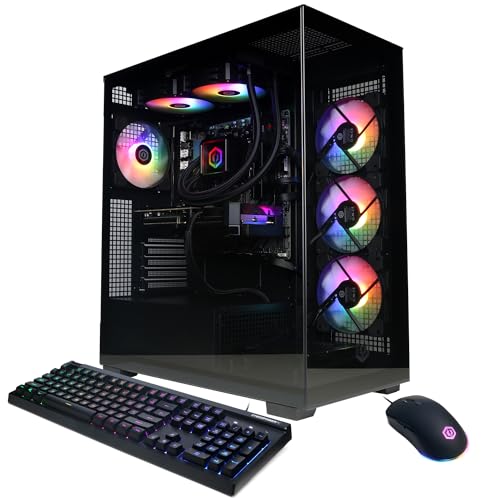
As an Amazon Associate we earn from qualifying purchases at no extra cost to you.
Quick comparison of the build tiers
| Tier | Best for | GPU and CPU | Key specs | Typical system price range |
|---|---|---|---|---|
| 1. Upscaling-first entry | Lowest cost 4K with DLSS | RTX 5070 (12 GB) + Ryzen 5 9600X | 32 GB DDR5-6000, 1 TB NVMe, 750W PSU | 1,300-1,600 USD |
| 2. Value 4K | Best price to performance | Radeon RX 9070 XT (16 GB) + Ryzen 5 9600X | 32 GB DDR5-6000, 2 TB NVMe, 750W PSU | 1,500-1,900 USD |
| 3. Balanced 4K | Ray tracing at 4K | RTX 5070 Ti (16 GB) + Ryzen 7 7800X3D | 32 GB DDR5-6000, 2 TB NVMe, 850W PSU | 1,900-2,400 USD |
| 4. High-end 4K | Best overall | RTX 5080 (16 GB) + Ryzen 7 9800X3D | 32 GB DDR5-6000, 2 TB NVMe, 850-1000W PSU, 240-360mm AIO | 2,600-3,300 USD |
| 5. Intel option | Mixed gaming and productivity | RTX 5080 + Core Ultra 7 265K | 32 GB DDR5-6400, Z890 or B860 board, 1000W PSU | 2,500-3,200 USD |
| 6. Creator and gamer | 4K gaming plus rendering | RTX 5080 + Ryzen 9 9950X3D | 64 GB DDR5-6000, 4 TB NVMe, 1000W PSU, 360mm AIO | 3,500-4,300 USD |
| 7. No-compromise | Maximum 4K frame rates | RTX 5090 (32 GB) + Ryzen 7 9850X3D | 64 GB DDR5-6000, 4 TB NVMe, 1000-1200W PSU, 360mm AIO | 4,500-6,000 USD |
What a 4K gaming PC actually needs
A 4K display draws about 8.3 million pixels per frame, four times as many as 1080p and about 2.25 times as many as 1440p. That is why the graphics card sets the experience. Published averages show the RTX 5070 Ti and Radeon RX 9070 XT near 80 to 85 fps at native 4K with high settings in a 52-game TechSpot comparison, the RTX 5080 near 100 fps and the RTX 5090 around 135 to 145 fps in PCBench and Technical City data. Averages hide the range, so a heavy ray-traced title may run at half those numbers while an esports game runs at several times more.
The other components support that card. A processor with enough cores and cache keeps 1 percent lows steady, 32 GB of DDR5 prevents memory shortages in modern open-world games, a fast NVMe SSD removes loading stutter, and a properly sized power supply and case keep a 300 to 575 watt graphics card cool and stable.
Tier 7, the no-compromise build: RTX 5090 with Ryzen 7 9850X3D
The GeForce RTX 5090 has 32 GB of GDDR7 on a 512-bit bus and a 575W total graphics power rating, and NVIDIA lists 1000W as the required system power. It is the only card that reaches roughly 120 fps or more at 4K across demanding games without leaning on upscaling. Pair it with the Ryzen 7 9850X3D, an eight-core processor with 96 MB of L3 cache, a boost up to 5.6 GHz and a 120W rating, which reviewers describe as the fastest gaming CPU available. Choose 64 GB of DDR5-6000 if you also create content, a 4 TB NVMe drive, a 1000W to 1200W ATX 3.x power supply with a native 12V-2×6 connector, and a 360mm liquid cooler.
Who it suits: players with a 4K 240Hz OLED monitor who want maximum frame rates. Main trade-off: cost and heat. The card alone can cost more than an entire value build, and it dumps up to 575 watts into the case.
Tier 4, best overall: RTX 5080 with Ryzen 7 9800X3D
The GeForce RTX 5080 has 16 GB of GDDR7, a 256-bit bus with about 960 GB/s of memory bandwidth, a 360W rating and NVIDIA lists 850W for the system. It averages close to 100 fps at native 4K in large benchmark suites and about 20 percent more than a Radeon RX 9070 XT. Combine it with a Ryzen 7 9800X3D, which has eight cores, 16 threads, 96 MB of L3 cache and a 120W rating, plus 32 GB of DDR5-6000, a 2 TB NVMe SSD and a 240mm to 360mm liquid cooler or a high-end air cooler. A 1000W power supply gives headroom, although an 850W unit meets the stated minimum.
Who it suits: most buyers who want a dependable 4K machine for several years. Main trade-off: 16 GB of video memory is adequate today, but the heaviest texture packs and path-traced titles can use most of it.
Tier 5, the Intel option: RTX 5080 with Core Ultra 7 265K
The Intel Core Ultra 7 265K has 20 cores (eight performance and 12 efficient), 30 MB of L3 cache, a turbo up to 5.5 GHz, a 125W base power and a 250W maximum turbo power on the LGA 1851 socket. It does not match the large-cache AMD chips for gaming at lower resolutions, but at 4K the graphics card dominates, so the gap is small, and it is stronger than eight-core AMD chips for rendering and compiling. Pair it with a Z890 or B860 board, 32 GB of DDR5-6400 and a 360mm liquid cooler.
Who it suits: buyers who split time between games and heavy applications, or who already prefer the Intel platform. Main trade-off: higher power draw than the AMD chips and a shorter socket upgrade path.
Tier 6, creator and gamer: RTX 5080 with Ryzen 9 9950X3D
The Ryzen 9 9950X3D has 16 cores, 32 threads, 128 MB of L3 cache and a boost up to 5.7 GHz at a 170W rating. It plays games nearly as well as the 9800X3D and is dramatically faster in video editing, 3D rendering and software compilation. With an RTX 5080, 64 GB of DDR5-6000 and a 4 TB NVMe drive, this build handles 4K gaming in the evening and a full edit workflow during the day. Use a 360mm liquid cooler and a 1000W power supply.
Who it suits: streamers, editors and developers who game at 4K. Main trade-off: the processor adds a large premium over the 9800X3D, which gives similar gaming results.
Tier 3, balanced 4K: RTX 5070 Ti with Ryzen 7 7800X3D
The GeForce RTX 5070 Ti has 16 GB of GDDR7, a 256-bit bus, about 896 GB/s of bandwidth and a 300W rating. It averages roughly 82 to 84 fps at native 4K in published data and supports DLSS 4 with multi frame generation, which can lift displayed frame rates well above that in supported games. The Ryzen 7 7800X3D, with 96 MB of L3 cache and a 120W rating, is an excellent partner because the graphics card is the limit at 4K and the chip costs less than the newest options. Use 32 GB of DDR5-6000, a 2 TB NVMe drive and an 850W power supply.
Who it suits: players who want strong ray-traced performance without paying for an RTX 5080. Main trade-off: in the most demanding games you will use upscaling to hold 60 fps or more.
Tier 2, value 4K: Radeon RX 9070 XT with Ryzen 5 9600X
The Radeon RX 9070 XT carries 16 GB of GDDR6 on a 256-bit bus and a 304W rating. TechSpot’s 52-game test found it within about 4 percent of the RTX 5070 Ti at native 4K, averaging around 81 fps, and it usually costs less. Pair it with the Ryzen 5 9600X, a six-core Zen 5 chip with 32 MB of L3 cache and a 65W rating, which keeps system cost and power draw low. Use 32 GB of DDR5-6000, a 2 TB NVMe drive and a 750W power supply.
Who it suits: buyers who want the best 4K frame rate per dollar and play mostly rasterised games. Main trade-off: ray tracing and upscaling features are better supported on NVIDIA cards in some titles, and six CPU cores leave less headroom.
Tier 1, upscaling-first entry: RTX 5070 with Ryzen 5 9600X
The GeForce RTX 5070 has 12 GB of GDDR7 and is the cheapest card in this guide that makes sense for a 4K display, as long as you use DLSS upscaling. At native 4K it will struggle in newer games, but with DLSS in Quality or Balanced mode, it holds a playable 60 fps in many titles. The 12 GB of memory is the limit, so lower texture settings in the most demanding games. A Ryzen 5 9600X, 32 GB of DDR5, a 1 TB NVMe drive and a 750W power supply complete a build that can be upgraded later.
Who it suits: first 4K builds on a tight budget. Main trade-off: little headroom for future games, and the card will be the first part you replace.
Decision matrix: which tier fits you
| Your situation | Choose | Why |
|---|---|---|
| 4K 60Hz TV or monitor, tight budget | Tier 1 or Tier 2 | 60 fps is achievable with upscaling and a 16 GB card |
| 4K 120Hz or 144Hz monitor | Tier 3 or Tier 4 | The RTX 5070 Ti and 5080 reach this with upscaling and frame generation |
| 4K 240Hz OLED | Tier 7 | Only the RTX 5090 gets close to using the panel |
| Game and edit video | Tier 5 or Tier 6 | More cores speed up rendering |
| Quiet, small-case build | Tier 2 or Tier 3 | Lower power means less heat |
| Keep the system for five or more years | Tier 4 | The RTX 5080 and AM5 platform leave room to upgrade |
Worked example: sizing the power supply
Take the RTX 5090 build. The graphics card is rated at 575 watts, the Ryzen 7 9850X3D at 120 watts, and the motherboard, memory, drives and fans add roughly 80 to 100 watts. That totals about 780 to 800 watts of sustained load. Graphics cards also produce short power spikes above their rating, and power supplies are most efficient and quietest between 40 and 70 percent load, so a 1000W unit is the recommended choice, matching NVIDIA’s stated requirement. For an RTX 5080 build, 360 plus 120 plus 100 gives roughly 580 watts, which is 58 percent of a 1000W unit and fits inside the 850W recommendation with comfortable headroom. Look for ATX 3.x certification and a native 12V-2×6 cable rather than an adapter.
Cooling, case airflow and noise
Case choice
A 4K gaming machine produces 400 to 700 watts of heat under load. Choose a case with a mesh front panel, at least two intake fans and room for a 360mm radiator at the top or front. Poor airflow can cost 5 to 10 percent of performance through thermal throttling. Check the maximum graphics card length, as an RTX 5090 board can be longer than 330 mm, and the clearance for the power connector.
CPU cooling
The 65W Ryzen 5 9600X runs well on a mid-range air cooler. The 120W X3D chips and the Core Ultra 7 265K benefit from a good dual-tower air cooler or a 240mm to 360mm liquid cooler. The 170W Ryzen 9 9950X3D is best on a 360mm unit.
Noise
Noise at 4K is mostly from the graphics card fans. Choose a model with a large three-fan cooler, set a moderate fan curve and cap the frame rate at the monitor’s refresh rate so the card does not work harder than needed.
Prebuilt versus self-built
Prebuilt systems from large builders save time and include a warranty, and reputable examples such as the Alienware Aurora, Lenovo Legion Tower 7i and HP OMEN 45L are sold with RTX 5080 and RTX 5090 options. The trade-offs are proprietary power supplies or motherboards in some models, limited upgrade choices and sometimes weaker memory or storage than the headline CPU and GPU suggest. When you compare listings, read the full specification for the power supply wattage, memory speed, storage size and cooler type, not only the processor and graphics card. Building your own gives you control over each component and usually costs less for the same parts, but you carry the assembly work and handle warranties part by part.
How to choose: a checklist
- Pick the GPU for your target frame rate: 60 fps suggests an RTX 5070 Ti or RX 9070 XT, 100 fps suggests an RTX 5080, and 120 fps or more suggests an RTX 5090.
- Match the monitor: a 4K 240Hz OLED needs a very powerful card to justify it.
- Size the power supply: add the GPU rating, the CPU rating and 100 watts, then choose a unit rated about 25 to 40 percent higher.
- Use 32 GB of DDR5 at minimum: choose 64 GB for content creation.
- Choose a 2 TB SSD: modern games often exceed 100 GB each.
- Verify the cooling: case airflow and radiator size matter as much as the part list.
Frequently Asked Questions
What graphics card do I need for 4K gaming?
For smooth 60 fps at high settings, an RTX 5070 Ti or Radeon RX 9070 XT is the practical minimum, as both average around 80 fps at native 4K in large benchmark suites. An RTX 5080 gives more headroom and an RTX 5090 is the choice for 120 fps or more in demanding games.
How much RAM do I need for a 4K gaming PC?
32 GB of DDR5 is the recommended amount for gaming and general use. Choose 64 GB if you also edit video, work with large projects or run many applications while you play.
Is 16 GB of video memory enough for 4K?
For nearly all games in 2026, yes. The heaviest titles with high-resolution texture packs and path tracing can use most of it, so the RTX 5090 with 32 GB gives extra room for future games and creative work.
What power supply should I buy for an RTX 5080 or RTX 5090?
NVIDIA lists 850W for the RTX 5080 and 1000W for the RTX 5090. Choose an ATX 3.x supply with a native 12V-2×6 connector, and consider a unit a step above the minimum for quieter operation and headroom.
Can a 4K gaming PC use an AMD processor and an NVIDIA card?
Yes. Any AM5 or LGA 1851 processor works with any current graphics card. The most common high-end pairing is an AMD Ryzen X3D chip with an NVIDIA RTX card.
Should I buy a prebuilt or build my own 4K gaming PC?
A prebuilt system is a good choice if you value convenience and a single warranty, as long as the power supply, cooling and memory are adequate. Building your own usually offers better value and upgrade flexibility if you are comfortable with assembly.





Write Your Review
No reviews yet. Be the first to share your experience!