

Key takeaways
- Build better pc setups with our guide to complete prebuilt gaming PCs, plus how to match your monitor, desk, chair, and peripherals around the tower.
As an Amazon Associate, we earn from qualifying purchases.
Direct Answer
A good PC setup is a balanced system built around a capable prebuilt gaming PC, a monitor that matches the graphics card, and comfortable peripherals on a desk with room to move. The tower does the heavy work, so it needs a current graphics card, at least 16GB of memory, and fast solid-state storage, while the monitor, keyboard, mouse, and headset shape how the setup feels day to day. When those pieces fit each other and the space they sit in, the result runs modern games smoothly and stays comfortable for long sessions.
Note: the four picks are complete prebuilt gaming PCs, the heart of each setup here. The rest of the guide covers the monitor, peripherals, desk, and layout around them.
Our Top Picks
- Skytech Gaming Chronos Mini — Best overall compact centerpiece: Intel Ultra 7 processor, RTX 5060 graphics card, and 32GB of memory in a small mesh case.
- iBUYPOWER Slate MESH (SMI7N5701) — Best for demanding games: Intel Core i7-14700F, RTX 5070, and 32GB of memory.
- CyberPowerPC Gamer Xtreme VR (GXiVR8040A14) — Best balanced mid-range pick: Intel Core i7-13700F and an RTX 4060 Ti with 16GB of graphics memory.
- MSI Codex R2 (A14NVL5-454US) — Best first setup: Intel Core i5-14400F and a current-generation RTX 5060 graphics card in a ready-to-play tower.
Quick Comparison
| PC | Processor | Graphics | Memory | Storage | Best for |
|---|---|---|---|---|---|
| Skytech Gaming Chronos Mini | Intel Ultra 7 270K | NVIDIA GeForce RTX 5060 8GB | 32GB DDR5 | 1TB NVMe SSD | Compact, powerful all-round setup |
| iBUYPOWER Slate MESH SMI7N5701 | Intel Core i7-14700F | NVIDIA GeForce RTX 5070 12GB | 32GB DDR5 | 1TB NVMe SSD | Demanding games at higher settings |
| CyberPowerPC Gamer Xtreme VR GXiVR8040A14 | Intel Core i7-13700F | NVIDIA GeForce RTX 4060 Ti 16GB | 16GB DDR5 | 1TB NVMe SSD | Balanced 1440p gaming |
| MSI Codex R2 A14NVL5-454US | Intel Core i5-14400F | NVIDIA GeForce RTX 5060 8GB | 16GB DDR5 | 1TB NVMe SSD | A first gaming setup |
How to Choose
A PC setup is a chain, and the tower is only the first link. Before you pick a machine, think about the games you play, the monitor you plan to use, and the desk it will live on. A card built for 1080p play will feel wasted on a 4K display, and a powerful tower will feel cramped on a narrow desk. Begin with the tower, then match everything else to it.
Graphics card first. The graphics card decides which games you can run and at what settings. For 1080p play, a current mid-range card such as an RTX 5060 or RTX 4060 Ti is a solid foundation. For 1440p play with higher settings, look for more graphics memory, such as the 12GB RTX 5070 or the 16GB RTX 4060 Ti. The card also decides the monitor: a 1080p card pairs with a 1080p high-refresh display, while a stronger card earns a 1440p panel.
Processor second. The processor handles game logic, background tasks, streaming, and everyday work. A modern Intel Core i5 is enough for most gaming, while a Core i7 or Intel Ultra 7 gives extra headroom for streaming and multitasking. All four picks here sit in that comfortable range, so none will hold back its graphics card.
Memory and storage. 16GB of memory is the floor for a modern gaming setup, and 32GB is the comfortable choice if you keep a browser, voice chat, and a game open at once. For storage, 1TB of NVMe solid-state storage is the right baseline, because modern games are large. Check for a spare drive slot before you buy, so adding storage later is simple.
Cooling and case size. A gaming PC generates heat, and the case has to move it out. Mesh front panels, multiple fans, and liquid cooling all help, and they matter more in a small room with poor airflow. Measure your desk first and leave a few inches of clearance on every side for airflow.
Monitor, peripherals, and desk. A 27-inch 1440p display at 144Hz or higher is the sweet spot for most desks, and it pairs well with every pick here. If your desk is shallow, a 24-inch display keeps the screen at a comfortable distance. Allow at least 48 inches of desk width for a tower, monitor, keyboard, and mouse pad. A keyboard, a mouse that fits your grip, and a headset you can wear for hours matter more than they look on a spec sheet.
Connectivity and warranty. Wi-Fi is standard on all four picks here. Check the listing for USB ports, display outputs, and Bluetooth if you use wireless peripherals. Also check the warranty: the Skytech Chronos Mini lists a one-year labor and parts warranty with lifetime technical support. Confirm the warranty terms on the listing, because they vary by model and seller.
The Picks in Detail
1. Skytech Gaming Chronos Mini — Best Overall Compact Setup Centerpiece

The Skytech Gaming Chronos Mini is the most complete package in this guide, and the pick to begin with if you want a powerful setup that does not dominate the room. Its Intel Ultra 7 270K boosts up to 5.4 GHz alongside an NVIDIA GeForce RTX 5060 with 8GB of GDDR7 graphics memory, 32GB of DDR5 memory at 5600 MHz, and a 1TB NVMe SSD. A 360mm liquid cooler and a 650W Gold power supply sit inside a compact mesh case, with a keyboard and mouse included.
What makes this machine a strong centerpiece for pc setups is the balance: a current processor and graphics card, generous memory, and fast storage, all in a case that fits on or beside a normal desk. The compact footprint suits a bedroom or a shared living space, and the mesh front panel and liquid cooling help it stay cool in a tight spot, where small cases usually struggle.
Key specs: Intel Ultra 7 270K (up to 5.4 GHz); NVIDIA GeForce RTX 5060, 8GB GDDR7; 32GB DDR5, 5600 MHz; 1TB NVMe SSD; 650W Gold power supply; 360mm liquid cooler with ARGB fans; Wi-Fi (confirm the standard on the listing — the title says Wi-Fi 6, the spec text lists 802.11AC), Ethernet, HDMI, DisplayPort, USB; Windows 11 Home; case about 16.6 by 11.3 by 14.4 inches; keyboard, mouse, power cord, setup guide included.
Pros: Strong all-round configuration with 32GB of memory and a current graphics card; compact mesh case fits smaller desks; 360mm liquid cooling and a 650W Gold power supply; keyboard and mouse included.
Cons: 8GB of graphics memory limits the most demanding settings at 1440p; compact case leaves less room for future upgrades; the exact graphics card brand may vary, so confirm the details on the listing.
2. iBUYPOWER Slate MESH (SMI7N5701) — Best for Demanding Games

The iBUYPOWER Slate MESH SMI7N5701 is the strongest performer in this guide, and the right pick if you play demanding games at higher settings and want the setup to stay capable for years. It pairs an Intel Core i7-14700F with an NVIDIA GeForce RTX 5070 carrying 12GB of memory, plus 32GB of DDR5 RGB memory at 5200 MHz and a 1TB NVMe SSD. A keyboard and mouse are included, and the mesh case is built around airflow for long sessions under load.
This is the machine to build a setup around if your monitor is a 1440p high-refresh panel, because the RTX 5070 has the headroom to drive it. It also suits players who stream or record while they play, since the processor and memory can run a game and a streaming app at once.
Key specs: Intel Core i7-14700F; NVIDIA GeForce RTX 5070, 12GB; 32GB DDR5 RGB, 5200 MHz; 1TB NVMe SSD; Slate 8 Mesh case; Windows 11 Home; keyboard and mouse included.
Pros: Strongest graphics card in this guide, with 12GB of graphics memory; 32GB of memory and a Core i7 handle gaming plus streaming; mesh case designed for airflow under load; keyboard and mouse included.
Cons: Power supply wattage and wireless details are not stated in the listing title, so confirm them on the listing; a full-size mesh tower needs more desk or floor space than a compact case; more graphics power than a 1080p monitor can show, so pair it with a 1440p display.
3. CyberPowerPC Gamer Xtreme VR (GXiVR8040A14) — Best Balanced Mid-Range Pick
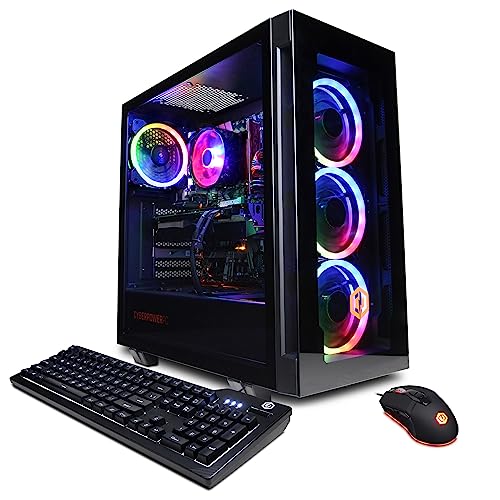
The CyberPowerPC Gamer Xtreme VR GXiVR8040A14 is the balanced pick in this guide, and the one to choose if you want a capable 1440p setup without stepping up to the strongest hardware on the list. Its Intel Core i7-13700F pairs with a GeForce RTX 4060 Ti carrying 16GB of graphics memory, a generous amount for the class that helps at 1440p. 16GB of DDR5 memory and a 1TB NVMe SSD cover modern games comfortably, and the tower is Wi-Fi ready with Windows 11 Home.
The 16GB of graphics memory sets this machine apart from other mid-range towers. Games with large texture packs lean on graphics memory, and more of it gives the setup extra staying power as games grow more demanding. The tower is about 18.5 by 8.2 by 18.7 inches and weighs about 34.2 pounds, so plan for a sturdy spot on the floor or a deep desk.
Key specs: Intel Core i7-13700F, 2.1 GHz base; NVIDIA GeForce RTX 4060 Ti, 16GB; 16GB DDR5; 1TB NVMe SSD; Wi-Fi ready, 802.11ac, 6 USB 3.0 ports, 2 USB 2.0 ports; Windows 11 Home; about 18.5 by 8.2 by 18.7 inches, about 34.2 pounds.
Pros: 16GB of graphics memory is generous for a mid-range card and helps at 1440p; Core i7 processor and 1TB NVMe storage cover modern games well; plenty of USB ports; Wi-Fi ready for rooms away from the router.
Cons: 16GB of system memory is the floor rather than the comfortable 32GB of the other picks; power supply wattage is not stated in the listing, so confirm it there; the tower is heavy, so set it down once and leave it there.
4. MSI Codex R2 (A14NVL5-454US) — Best First Setup

The MSI Codex R2 A14NVL5-454US is the simplest entry point in this guide, and the right pick if this is your first gaming setup. It pairs an Intel Core i5-14400F with a GeForce RTX 5060 with 8GB of GDDR7 graphics memory, 16GB of DDR5 memory, and a 1TB NVMe SSD. An 80+ Gold power supply, Wi-Fi 6E, and air cooling with ARGB fans mean it arrives ready to connect to a monitor and play. Windows 11 Home is installed, and the tower is built to be easy to open if you add storage or memory later. Confirm whether a keyboard and mouse are included on the listing before you buy.
This is the setup to choose for a clean, straightforward path into PC gaming. The Core i5 and RTX 5060 handle 1080p play with ease and cope well at 1440p in most games. There is nothing to assemble before the first game.
Key specs: Intel Core i5-14400F; NVIDIA GeForce RTX 5060, 8GB GDDR7; 16GB DDR5; 1TB NVMe SSD; 80+ Gold power supply; Wi-Fi 6E, ARGB fan air cooling; Windows 11 Home; confirm included peripherals on the listing.
Pros: Straightforward first setup with a current-generation graphics card; 80+ Gold power supply and easy-to-open design; capable 1080p and 1440p gaming combination; Windows 11 Home installed and ready to use.
Cons: 16GB of memory is the baseline, and heavy multitaskers may want more later; the listing does not state clearly whether a keyboard and mouse are included, so confirm on the listing; less headroom than the Core i7 picks for streaming alongside gaming.
Who Should Choose What
First-time PC gamers should begin with the MSI Codex R2. It needs no assembly, and its Core i5 and RTX 5060 cover the games most new players actually play. Spend what you save on a good monitor and a comfortable chair, which will shape the setup more than a stronger graphics card would.
Players with a small room or a small desk should look at the Skytech Gaming Chronos Mini. Its compact mesh case fits where a full tower will not, and its 32GB of memory and current graphics card mean the small size costs nothing in everyday performance. Keep the case off the floor with clear air at the mesh front panel.
Players who want a balanced 1440p setup should choose the CyberPowerPC Gamer Xtreme VR. The 16GB of graphics memory on its RTX 4060 Ti gives it room for texture-heavy games, and the Core i7 keeps the system responsive while a game, voice chat, and a browser run together. Pair it with a 27-inch 1440p monitor for the best match.
Players who play demanding games or stream should choose the iBUYPOWER Slate MESH. The RTX 5070 and 32GB of memory give it the most headroom in this guide, and the mesh case keeps air moving under load for hours. This is the setup to pick if you want to stop thinking about hardware and just play.
Common Mistakes
Buying a monitor the graphics card cannot drive. A 4K monitor looks impressive, but a mid-range card will struggle to fill it. Match the monitor to the card: 1080p or 1440p for the picks here, at 144Hz or higher so the smoothness is visible.
Ignoring desk measurements. Towers are bigger than they look in photos. Measure the width, depth, and height of the spot before you buy, and remember a tower needs clearance for airflow on at least one side. The Chronos Mini is compact, but the CyberPowerPC tower is about 18.5 inches tall and 34.2 pounds, so it needs a firm, flat home.
Forgetting about memory. 16GB is the floor for modern gaming, and it is where two picks here sit. If you run a browser with many tabs, voice chat, and a game at once, 32GB is worth having, and the Skytech and iBUYPOWER picks include it. Check for a free memory slot before you buy.
Buying peripherals as an afterthought. The keyboard, mouse, and headset are the parts you touch for every minute of play. A mouse that is too small or a headset that pinches after an hour will spoil an otherwise well-chosen setup. Give comfort the same attention you give the tower.
FAQ
Do I need to build my own PC for a good setup?
No. A prebuilt gaming PC arrives assembled, with Windows installed and the components matched to each other. Building your own gives you control over every part, but a prebuilt machine is the faster route to a working setup, with a warranty that covers the whole system rather than each part separately.
How much memory does a gaming setup need?
16GB of memory is the minimum for modern gaming, and it is what the CyberPowerPC and MSI picks carry. 32GB is the comfortable choice if you stream, record, or keep many apps open, and it is what the Skytech and iBUYPOWER picks carry. Either way, confirm whether a free memory slot is available for a future upgrade.
What monitor pairs well with these PCs?
A 27-inch 1440p monitor at 144Hz or higher is the best match for the iBUYPOWER Slate MESH and the CyberPowerPC Gamer Xtreme VR. The Skytech Chronos Mini and the MSI Codex R2 also pair well with a 1440p display, and they are excellent with a 1080p high-refresh monitor if your desk is shallow. Avoid a 4K monitor with these mid-range cards unless you will lower settings in demanding games.
Can I upgrade a prebuilt gaming PC later?
In most cases, yes. Memory and storage are the easiest upgrades. Before you buy, confirm the case has a spare drive bay or memory slot, and check the power supply wattage if you plan to fit a stronger graphics card later. Opening the case can affect warranty coverage on some models, so keep the original terms in mind.
Do these PCs include a keyboard and mouse?
The Skytech Chronos Mini, the iBUYPOWER Slate MESH, and the CyberPowerPC Gamer Xtreme VR all list a keyboard and mouse in the box, so those three work as soon as you connect a monitor. The MSI Codex R2 listing does not state the included peripherals clearly, so confirm on the listing and budget for a keyboard and mouse if you choose that machine.
Conclusion
A good PC setup begins with the right tower and ends with the room around it. The four prebuilt PCs here cover the range most players need: the MSI Codex R2 for a first setup, the CyberPowerPC Gamer Xtreme VR for balanced 1440p play, the Skytech Gaming Chronos Mini for a compact and powerful desk, and the iBUYPOWER Slate MESH for demanding games and streaming. Pick the tower that matches the games you play, pair it with a monitor your graphics card can drive, and leave room for comfortable peripherals and clean airflow. Get those pieces right, and the setup will feel good on day one and stay capable for a long time after.
More from Amazon
Programs that pair well with the guide above. Offers and eligibility are set by Amazon and may change.
Free shipping on eligible items, Prime Video and more. Eligible new members can start with a free trial.
Start a Prime free trialAd-free music streaming. Eligible new subscribers can start with a free trial.
Try Music Unlimited freeA Prime membership for ages 18-24 with a trial period. Eligibility is set by Amazon.
See Prime for Young AdultsAudiobooks and podcasts to listen to on the go. Eligible new members can start with a free trial.
Try Audible freeAs an Amazon Associate we earn from qualifying purchases.
Write Your Review
No reviews yet. Be the first to share your experience!