

Our Short List of 3

- Best for: A desk or bedroom dock where one or two people play close to the screen.
- Screen size: 42 inches
- Resolution: 4K (3840 x 2160)
- Display: OLED evo
- Refresh rate: 144Hz
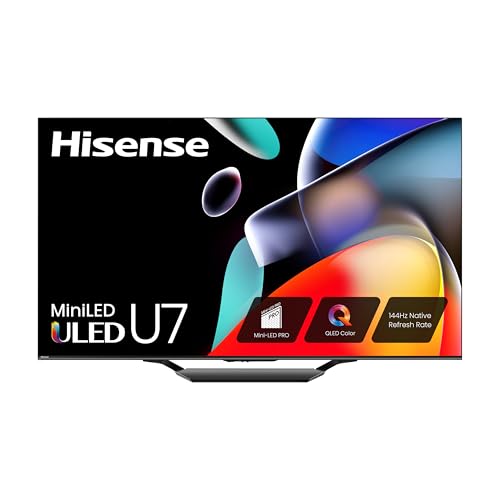
- Best for: Living rooms where three or four players share one screen.
- Screen size: 55 inches
- Resolution: 4K UHD (3840 x 2160)
- Display: Mini-LED ULED with QLED color
- Dimming: Full Array Local Dimming

- Best for: Bright small rooms where glare and daylight wash out dimmer panels.
- Screen size: 43 inches
- Resolution: 4K (3840 x 2160)
- Display: Neo QLED with Quantum Mini LED
- HDR: Neo Quantum HDR+
All 3 Picks at a Glance
| Product | Specs | Action |
|---|---|---|
| LG 42-Inch OLED evo C4 (OLED42C4PUA) |
| Check price on Amazon |
| Hisense 55-Inch U7N (55U7N) |
| Check price on Amazon |
| Samsung 43-Inch QN90D (QN43QN90D) |
| Check price on Amazon |
Key takeaways
- The best TVs for Nintendo Switch pair low input lag and a proper game mode with the right size for your room. Specs and ASINs checked against each Amazon listing.
The Nintendo Switch is an easy console to buy the wrong TV for. It outputs a maximum of 1080p from its dock, so the 4K panel in every pick here is upscaling rather than showing native detail, and paying for flagship resolution buys you nothing in sharpness. What actually decides how a Switch game feels is input lag in game mode, how cleanly the TV upscales a 1080p signal, and whether the screen size suits how far away you sit. Those three things drive every choice in this guide.
This article is for Switch owners setting up a dock at a desk, in a bedroom or a family living room, and for parents buying a first gaming TV. One honesty note up front: the newer Switch 2 can output 4K when docked, so buyers planning that upgrade get more from these panels. Every product was selected from the features and specifications stated on its Amazon listing.
Quick Picks
As an Amazon Associate we earn from qualifying purchases.
| Product | Best for | Key spec from title |
|---|---|---|
| LG 42-Inch OLED evo C4 (OLED42C4PUA) | Desk and bedroom dock setups | 42-inch OLED evo 4K, 144Hz, HDMI 2.1 |
| Hisense 55-Inch U7N (55U7N) | Family living rooms that play together | 55-inch Mini-LED 4K, 144Hz Game Mode Pro, VRR |
| Samsung 43-Inch QN90D (QN43QN90D) | Bright rooms and small spaces | 43-inch Neo QLED 4K Mini LED, Motion Xcelerator 144Hz |
How to Choose
Input lag and game mode come first
The Switch renders at 60 frames per second at most, so a TV’s job is to add as little delay as possible between your button press and the screen. That delay lives or dies in the TV’s game mode, which strips out picture processing to cut lag. Every pick here lists a dedicated game mode or gaming feature set on its Amazon page. When you set the TV up, the game mode has to be enabled per input; the same TV can feel responsive on one HDMI port and sluggish on another if only one port has game mode switched on.
Understand the 1080p ceiling before paying for 4K
A docked original Switch sends a 1080p signal, full stop. On a 4K TV the picture you see is the TV’s upscaling of that signal, so upscaling quality matters more than the panel’s native resolution. Good upscalers keep edges in games like Mario Kart and Zelda clean rather than smeared. This is also why screen size is a real trade-off: the same 1080p image stretched across a huge panel looks softer than on a 42 or 43 inch screen viewed up close. Switch 2 owners are the exception, since that console can feed a 4K signal when docked.
Match size to seating distance and multiplayer
Split-screen multiplayer changes the size calculation completely. Four players reading one screen in Mario Kart or Smash Bros. need a panel big enough that each quadrant stays legible from the sofa, which pushes family rooms toward 55 inches. A solo player at a desk or in a bedroom sits much closer, where a 42 or 43 inch TV doubles neatly as a monitor-sized display and keeps the upscaled 1080p image tight. Measure your viewing distance first, then let it pick the size class for you.
Ports, VRR and the extras that actually matter
The Switch dock needs one ordinary HDMI port; it does not use HDMI 2.1 bandwidth. Extra HDMI ports matter only because most rooms also host other devices. Variable refresh rate and 120Hz or 144Hz panels do nothing for the original Switch itself, which is capped at 60Hz output, but they future-proof the screen for a Switch 2 or another console and make the TV better for general use. Treat those features as a bonus for the room, not as a reason to buy for the Switch alone, and spend first on game mode and upscaling.
The 3 Best Options
LG 42-Inch OLED evo C4 (OLED42C4PUA)
- Best for: A desk or bedroom dock where one or two people play close to the screen.
- Screen size: 42 inches
- Resolution: 4K (3840 x 2160)
- Display: OLED evo
- Refresh rate: 144Hz
A desk or bedroom dock where one or two people play close to the screen.
It is a premium small TV, and its gaming extras far exceed what the Switch can use; the value case rests on picture quality and future consoles.
The 42-inch C4 is the closest thing to a purpose-built Switch screen in this guide. Its compact size suits a desk or bedroom, where the upscaled 1080p image stays dense and clean, and the OLED panel’s near-instant pixel response keeps fast side-scrollers and platformers free of smearing. LG lists a full gaming stack on this model, including HDMI 2.1 ports and variable refresh support, which the Switch cannot use today but a future console in the same spot will. For a dedicated gaming corner, it is the most complete package here.
Hisense 55-Inch U7N (55U7N)
- Best for: Living rooms where three or four players share one screen.
- Screen size: 55 inches
- Resolution: 4K UHD (3840 x 2160)
- Display: Mini-LED ULED with QLED color
- Dimming: Full Array Local Dimming
Living rooms where three or four players share one screen.
The 1080p Switch signal is stretched over a large 4K panel, so sit at a sensible distance; up close, the upscaling has visibly more work to do than on the smaller picks.
The U7N is the family room answer. At 55 inches, split-screen quadrants stay readable from a sofa, and the Mini-LED backlight with full array local dimming keeps bright party games punchy under normal room lighting. Hisense lists 144Hz Game Mode Pro and VRR on this model, which again outrun the Switch itself but make the TV a strong all-rounder for the room’s other devices. Google TV covers streaming for the household, so the same screen handles movie night without a separate box. For a shared living room, this is the balanced pick.
Samsung 43-Inch QN90D (QN43QN90D)
- Best for: Bright small rooms where glare and daylight wash out dimmer panels.
- Screen size: 43 inches
- Resolution: 4K (3840 x 2160)
- Display: Neo QLED with Quantum Mini LED
- HDR: Neo Quantum HDR+
Bright small rooms where glare and daylight wash out dimmer panels.
This 43-inch model has been listed as discontinued by at least one major retailer, so confirm the Amazon listing is live and sold at a sensible offer before ordering.
The QN90D brings a bright Mini-LED panel to the small-screen class, which makes it the pick for a Switch docked in a bright bedroom, kitchen-adjacent play space or sunlit spare room where an OLED can look dim by comparison. Samsung lists its Motion Xcelerator 144Hz processing and Gaming Hub on this model, and the Neo QLED panel holds color well at the wide angles of a casual group gathered around a small screen. At 43 inches it also works as an oversized desk display for a hybrid gaming and study setup.
Which One Fits Your Situation
A desk setup for one player
Choose the LG C4. The 42-inch size sits comfortably at desk distance, the OLED response keeps 2D and fast-moving games crisp, and the upscaled 1080p picture looks its sharpest on the smallest, densest screen in this guide. It is also the easiest of the three to repurpose as a PC gaming display later.
A family room built around multiplayer
Choose the Hisense U7N. Four-way split screen is the deciding use case, and 55 inches keeps every player’s view readable from the sofa. Its brightness handles a normally lit living room, and Google TV means the same purchase covers the household’s streaming without extra hardware or another remote to lose.
A bright spare room or a first TV of your own
Choose the Samsung QN90D. Its Mini-LED brightness is the antidote to a room you cannot darken, and the 43-inch size fits bedrooms and small flats where a 55-inch set would dominate. Just verify the listing carefully at checkout, as noted in its entry above, because this size has been winding down at retail.
Common Mistakes
- Paying for a giant 4K panel expecting sharper Switch games, when the console’s 1080p dock output means a smaller screen often looks cleaner.
- Leaving game mode off and blaming the console for input lag that the TV’s processing is adding.
- Buying on refresh rate alone: the original Switch cannot output above 60Hz, so 120Hz and 144Hz panels help other devices, not this one.
- Forgetting the second use of the room, then ending up with a dim OLED in a sunlit play space or an oversized screen two feet from a desk chair.
- Assuming Switch 2 and Switch need the same TV: the newer console can output 4K docked, which changes how much a 4K panel earns its keep.
Frequently Asked Questions
Does the Nintendo Switch need a 4K TV?
No. A docked original Switch outputs 1080p at most, and every TV in this guide upscales that signal to fill its 4K panel. A good 1080p TV would serve the console itself, but 4K sets dominate the market and their upscalers, game modes and brightness are what you are really buying. The Switch 2 is different: it can output 4K when docked, so it uses these panels fully.
What TV size is best for Nintendo Switch?
It depends on seating distance and player count. Solo players at a desk or in a bedroom do best with 42 to 43 inches, where the upscaled image stays sharp. Family rooms built for three and four player split screen should look at 55 inches so each player’s section of the screen stays readable from the sofa.
Does a 120Hz or 144Hz TV make Switch games smoother?
Not for the original Switch, which outputs at up to 60 frames per second regardless of the panel. A high-refresh TV does not hurt, and its game mode is usually where the low input lag lives, but the smoothness you see is the console’s 60Hz signal. High refresh rates pay off with a Switch 2, a PC or another console sharing the screen.
Why does game mode matter so much for Switch?
Outside game mode, a TV applies motion smoothing, noise reduction and other processing that can add noticeable delay between your input and the on-screen result. Platformers, fighting games and rhythm titles expose that delay immediately. Game mode disables most of that processing. Every pick here lists a gaming mode or gaming feature set, and enabling it on the port your dock uses is the single most important setup step.
More from Amazon
Programs that pair well with the guide above. Offers and eligibility are set by Amazon and may change.
Free shipping on eligible items, Prime Video and more. Eligible new members can start with a free trial.
Start a Prime free trialAd-free music streaming. Eligible new subscribers can start with a free trial.
Try Music Unlimited freeA Prime membership for ages 18-24 with a trial period. Eligibility is set by Amazon.
See Prime for Young AdultsAudiobooks and podcasts to listen to on the go. Eligible new members can start with a free trial.
Try Audible freeAs an Amazon Associate we earn from qualifying purchases.
Write Your Review
No reviews yet. Be the first to share your experience!