

Our Short List of 3
All 4 Picks at a Glance
| Product | Specs | Action |
|---|---|---|
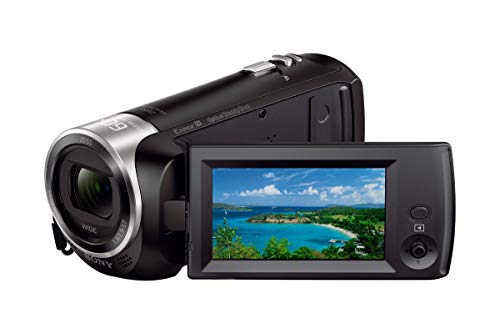 Sony HDRCX405 Handycam | Check price on Amazon | |
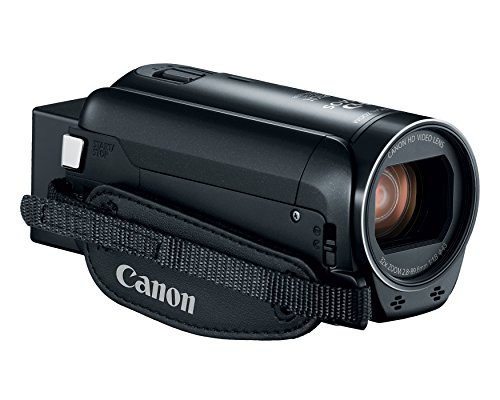 Canon VIXIA HF R800 | Check price on Amazon | |
 Panasonic HC-V180K | Check price on Amazon | |
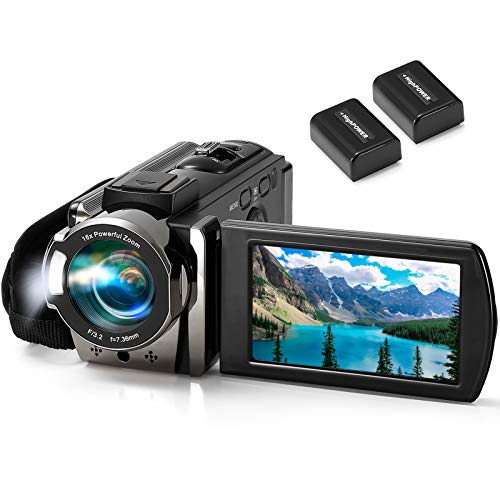 kimire Video Camera Camcorder 604S | Check price on Amazon |
Key takeaways
- Find the best affordable video cameras for family memories, school projects, and online videos, with long zoom, steady footage, and simple controls.
The best affordable video cameras prove that you do not need a large budget to record clear, steady video. A phone can shoot video, but a dedicated video camera gives you a long optical zoom, a comfortable grip, a flip-out screen you can see in sunlight, and a battery you can swap when it runs low. For family gatherings, school projects, sports days, and online videos, those practical advantages matter more than a long list of advanced settings, and they are exactly what the cameras in this guide provide.
An affordable video camera is a camcorder built for everyday recording. It records in Full HD, zooms far beyond a phone, steadies the image while you walk, and stores hours of footage on a memory card. The models in this guide cover the main ways people use a camcorder: a proven name-brand camcorder with a long zoom for family events, a second name-brand camcorder with a touch screen and a microphone input for school and community projects, a third with a very long zoom for sports and wildlife from a distance, and a compact budget model for a first camera or a backup.
How to Choose
1. Video Resolution and Frame Rate
Resolution decides how sharp your footage looks on a television or a computer screen, and frame rate decides how smooth motion appears. The cameras in this guide record in Full HD 1080p, which looks clean on modern screens and keeps file sizes manageable. A frame rate of 60 frames per second makes sports, children running, and panning shots look smoother than 30 frames per second, while 30 frames per second suits interviews, speeches, and everyday scenes. One camera in this guide records its Full HD video at 15 frames per second, which is noticeably less smooth, so treat it as a basic starter rather than a camera for fast action. Check the frame rate in the listing before you order, since a headline resolution number alone does not tell you how motion will look.
2. Optical Zoom Range
Optical zoom is the most useful feature on a camcorder, and it is the main reason to buy one instead of using a phone. Optical zoom moves glass inside the lens, so the image stays sharp as you zoom in, while digital zoom crops the image and softens it. The cameras in this guide list optical zoom from 16x digital zoom on the budget model to 50x optical zoom on the longest-reaching model. A 30x optical zoom is enough for a school play from the back row or a soccer game from the sideline, while a 50x optical zoom reaches across a field or a lake. When you compare models, look for the optical zoom number, not the digital zoom number, and remember that the longest zoom needs a tripod to keep the image from shaking.
3. Image Stabilization
Image stabilization keeps your footage watchable when your hands move, and it matters more the longer the zoom. Optical stabilization moves lens elements to cancel small shakes, while electronic stabilization crops the frame slightly and shifts the image to smooth it. The name-brand camcorders in this guide use optical stabilization, which works well while walking or zooming. The budget model uses a simpler anti-shake setting, which helps a little but does not match optical stabilization. If you plan to record while walking, at a sports event, or at full zoom, put stabilization near the top of your list. A small tripod or a monopod also helps, and every camera in this guide has a tripod mount on the bottom.
4. Screen, Viewfinder, and Controls
A flip-out screen lets you record yourself, check the framing, and shoot from a low or high angle without guessing. The cameras in this guide have screens from 2.7 inches to 3.0 inches, and most rotate so you can face the lens toward yourself for a vlog or an interview. A touch screen makes it faster to change settings and to tap to focus, while button controls work well with gloves or in cold weather. Look for a simple menu layout if the camera is for a beginner or a student, since a camera that is easy to operate gets used more often than one with a confusing menu. A wrist strap and a comfortable grip matter too, because a camcorder is held for long stretches at events.
5. Audio: Microphone and Speaker
Built-in microphones on a camcorder capture usable sound for family videos, but they also pick up wind, handling noise, and voices behind the camera. A microphone input is a valuable feature if you plan to record interviews, school plays, or online videos, because an external microphone can sit close to the speaker while the camera sits farther back. One camera in this guide has a microphone input, which makes it the stronger pick for projects where sound matters. Check whether the camera also has a headphone jack, so you can listen while recording and catch a problem before the event ends. For outdoor recording, a simple wind cover over the microphone makes a bigger difference than any menu setting.
6. Battery Life and Storage
A camcorder is only useful while its battery lasts, so check the battery type and whether spares are easy to find. The name-brand camcorders in this guide use removable rechargeable batteries, and a spare battery in a pocket is the simplest way to cover a long event. The budget model ships with two batteries in the box, which is handy for a first camera. Storage is a memory card, and the card size decides how many hours of video you can record before the card fills. Full HD video at a high quality setting fills a card faster than at a lower setting, so a 64GB card is a sensible starting point for a day of recording. Check the listing for the card type and the maximum size the camera accepts before you buy a card.
7. Size, Weight, and Who Will Use It
An affordable video camera should be light enough to carry all day and simple enough that the person using it actually enjoys it. The cameras in this guide weigh well under a pound for the body in most cases, and they fit in a small bag with a spare battery and a memory card. A compact budget model suits a student or a first-time camcorder owner, while a slightly larger name-brand model suits a parent or a teacher who records regularly. If the camera is for a child or a beginner, look for a simple auto mode that handles exposure and focus on its own, so the user can concentrate on framing the shot rather than fighting the settings.
Top Picks
Sony HDRCX405 Handycam
View the Sony HDRCX405 Handycam on Amazon
The Sony HDRCX405 is the proven name-brand pick in this guide. It records Full HD 1080p video at 60 frames per second, uses a ZEISS lens with 30x optical zoom, and steadies the image with optical image stabilization, so handheld footage stays smooth while you walk or zoom. The 9.2-megapixel sensor handles low light better than a budget sensor, and the 2.7-inch LCD screen flips out for self-recording and for shooting from low angles. A built-in USB cable tucks into the hand strap for charging and file transfer, which is handy when you are away from home.
This camera is for someone recording family events, holidays, and school activities who wants a reliable camcorder from a long-standing camera maker. It is a good match for a parent filming a sports day or a recital from the back of a hall, where the 30x zoom and the stabilization do the heavy lifting. One caveat is that this is an older model, first released years ago, and the maker has since moved on to newer designs, so confirm the exact model HDRCX405/B on the listing before ordering and check that the listing is for a new unit rather than a bundle with different contents. Another is that it has no microphone input, so interviews and stage performances rely on the built-in microphone. Live-check this ASIN before publishing, since tracker data showed limited current new stock for this older model.
Canon VIXIA HF R800
View the Canon VIXIA HF R800 on Amazon
The Canon VIXIA HF R800 is the pick for projects where sound and control matter. It records Full HD 1080p video, uses a 57x advanced zoom with a 32x optical zoom at its core, and steadies the image with optical stabilization. The 3.0-inch touch panel LCD makes it quick to change settings and to tap to focus, and the camera includes a microphone input and a headphone jack, which is rare at this level and valuable for interviews, school plays, and community videos. The DIGIC DV 4 image processor handles color and exposure smoothly, and the camera records to a memory card in a compact body that is easy to carry all day.
This camera is for someone recording school projects, church services, interviews, or online videos where clear sound matters as much as clear video. It is a good match for a teacher or a community volunteer who needs to place a microphone near the speaker while the camera sits farther back. One caveat is that the 57x advanced zoom figure combines optical and digital zoom, so the sharpest zoom is the 32x optical portion, and the image softens as you push into the digital range. Another is that this is also an older model, so confirm the exact model HF R800 in black on the listing before ordering, and avoid renewed listings unless you specifically want one. The camera is light and simple to operate, which makes it a good fit for a first serious camcorder.
Panasonic HC-V180K
View the Panasonic HC-V180K on Amazon
The Panasonic HC-V180K is the pick for the longest reach in this guide. It records Full HD 1080p video, uses a 50x optical zoom with a 28mm wide-angle starting point, and steadies the image with 5-axis hybrid optical stabilization, so footage stays smooth even at long zoom. The 2.7-inch touch LCD makes it easy to change settings, and the Level Shot function helps keep the horizon straight when you pan. The 10-megapixel still photo mode captures decent stills between video clips, and the camera records to a memory card in a light, compact body.
This camera is for someone who needs to record from a distance, such as a sports parent on the far sideline, a wildlife watcher at a lake, or a traveler filming a landscape. It is a good match for outdoor recording where the subject is far away and the zoom does the work. One caveat is that a 50x zoom needs steady support at full reach, so a tripod or a monopod helps more here than on any other camera in this guide. Another is that the maker lists this model as discontinued at some retailers, so confirm the exact model HC-V180K on the Amazon listing before ordering and live-check availability before publishing. The camera has no microphone input, so it relies on the built-in microphone for sound.
kimire Video Camera Camcorder 604S
View the kimire Video Camera Camcorder 604S on Amazon
The kimire 604S is the budget pick in this guide, and it suits a first camcorder or a backup camera. It records Full HD 1080p video, captures still photos up to 24 megapixels, and has a 3.0-inch LCD screen that rotates 270 degrees for self-recording. A 16x digital zoom reaches across a room or a small yard, a fill light helps in dim indoor light, and the camera works as a webcam when connected to a computer. Two batteries ship in the box, along with a remote control, so a beginner can start recording without buying extra accessories.
This camera is for someone buying a first video camera on a tight budget, such as a student, a hobbyist starting an online channel, or a family that wants a simple camera for birthdays and holidays. It is a good match for indoor recording and short clips where the subject is close to the camera. One caveat is that its Full HD video records at 15 frames per second, which looks less smooth than the 30 or 60 frames per second of the other cameras here, so it is not the right pick for sports or fast action. Another is that its 16x zoom is digital, not optical, so the image softens as you zoom in, and its anti-shake setting is simpler than the optical stabilization on the name-brand models. Keep expectations in line with its role as a starter camera.
Comparison Table
| Camera | Video | Zoom | Stabilization | Screen | Microphone Input | Batteries |
|---|---|---|---|---|---|---|
| Sony HDRCX405 | Full HD 1080p, 60fps | 30x optical | Optical | 2.7-inch LCD | No | Removable rechargeable |
| Canon VIXIA HF R800 | Full HD 1080p | 32x optical, 57x advanced | Optical | 3.0-inch touch LCD | Yes | Removable rechargeable |
| Panasonic HC-V180K | Full HD 1080p | 50x optical | 5-axis hybrid optical | 2.7-inch touch LCD | No | Removable rechargeable |
| kimire 604S | Full HD 1080p, 15fps | 16x digital | Anti-shake setting | 3.0-inch rotating LCD | No | Two batteries included |
Which One Is Right for You?
If you want a reliable, proven camcorder for family events and you plan to record handheld, the Sony HDRCX405 is the natural starting point, with its 30x optical zoom, optical stabilization, and smooth 60 frames per second video. If you record interviews, school plays, or online videos where sound matters, the Canon VIXIA HF R800 earns its place with a microphone input, a headphone jack, and a touch screen that makes settings quick to change.
If you need to record from a distance, such as a sports field or a lakeshore, the Panasonic HC-V180K is the strongest choice, thanks to its 50x optical zoom and 5-axis stabilization, as long as you use a tripod at full reach. If you are buying a first video camera on a tight budget, or you need a simple backup camera for indoor clips, the kimire 604S fits, with its rotating screen, two batteries, and webcam mode, as long as you keep it to close subjects and slow movement.
Before you order, settle the practical questions. Decide how far away your subjects will be, and pick a zoom range that covers that distance without leaning on digital zoom. Decide whether you need a microphone input for interviews or stage work. Then confirm the exact model on the listing, since several of these cameras have been sold for years in bundles with different accessories, and check that the listing is for a new unit.
Frequently Asked Questions
Is a camcorder better than a phone for video?
A camcorder gives you a long optical zoom, a comfortable grip, a flip-out screen, and a swappable battery, which a phone does not match. The optical zoom keeps the image sharp as you zoom in, while a phone leans on digital zoom that softens the image. A phone is more convenient for short clips and for sharing, while a camcorder is better for long events and sports, where you need to zoom across a room or a field.
What memory card do I need for a video camera?
Most camcorders record to a memory card, and the card size decides how many hours of video you can record before the card fills. A 64GB card is a sensible starting point for a day of Full HD recording at a high quality setting. Check the listing for the card type and the maximum size the camera accepts before you buy a card, and carry a spare card for long events so you are not forced to delete clips in the middle of a recording.
Can an affordable video camera record in low light?
It can, but low light is the hardest challenge for a small sensor. The name-brand camcorders in this guide use larger sensors and better processing than the budget model, so they handle dim rooms and evening events more cleanly. The kimire 604S includes a fill light that helps at close range indoors. For the cleanest low-light footage, record near a window or a lamp, avoid zooming in fully in dim light, and use a tripod so the camera can hold a steady exposure.
Do I need a tripod for a video camera?
You do not need one for everyday handheld recording, since the optical stabilization in the name-brand models handles small shakes well. A tripod becomes valuable at long zoom, for interviews, for stage performances, and for any recording longer than a few minutes, since it keeps the framing steady and frees your hands. Every camera in this guide has a tripod mount on the bottom, and a small, light tripod is enough for these compact camcorders.
Disclosure: As an Amazon Associate, we may earn from qualifying purchases.
More from Amazon
Programs that pair well with the guide above. Offers and eligibility are set by Amazon and may change.
Free shipping on eligible items, Prime Video and more. Eligible new members can start with a free trial.
Start a Prime free trialAd-free music streaming. Eligible new subscribers can start with a free trial.
Try Music Unlimited freeA Prime membership for ages 18-24 with a trial period. Eligibility is set by Amazon.
See Prime for Young AdultsAudiobooks and podcasts to listen to on the go. Eligible new members can start with a free trial.
Try Audible freeAs an Amazon Associate we earn from qualifying purchases.


Write Your Review
No reviews yet. Be the first to share your experience!