
Key takeaways
- Compare the best tablets for books: glare-free e-readers and one LCD tablet with warm light, long battery life and library support for long reading sessions.
As an Amazon Associate, we earn from qualifying purchases made through links on this page.
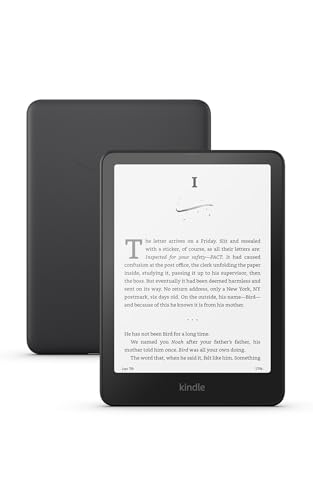

A tablet bought for books lives or dies by its screen. Long reading sessions punish glossy panels, bright backlights and heavy glass slabs, which is why the strongest picks for this job are mostly dedicated e-readers: their E Ink screens are glare-free in sunlight, sip power for weeks between charges, and weigh less than a paperback. This roundup treats e-readers as reading tablets in their own right, because the search intent behind “tablets for books” is a device built around reading, and Amazon, Rakuten Kobo and BOOX all sell these devices as exactly that. Four of the five picks below are E Ink devices from those three makers. The fifth is a compact LCD tablet, included for readers who want one screen that handles books alongside apps, notes and media.
Every pick is a current model sold on Amazon US, checked against the manufacturer’s own specification sheet. The real differences are screen technology, size, library access and how the device handles color, library loans and audiobooks, so the sections below lean on those points rather than raw processing power.
What to look for in a tablet for books
Screen type. E Ink is the default choice for books. It reflects ambient light instead of shining light into your eyes, stays readable outdoors, and only draws meaningful power when the page changes. Color E Ink (Kaleido panels) renders covers, comics and highlighted passages in muted color at a lower color resolution than its black-and-white mode. An LCD tablet is sharper for mixed media and handles apps far better, but it reflects more light and its battery is measured in hours, not weeks.
Size and weight. Six inches suits pockets and one-handed reading on a train. Seven inches is the current sweet spot: a full page of a novel fits comfortably, and the devices still weigh around 200 grams. Anything much above 250 grams gets tiring to hold one-handed over a long chapter, which is why the larger LCD pick below is the compact mini size rather than a full-size slate.
Front light and warm light. Every pick here has a built-in front light, and all but the smallest add adjustable warm tones that shift the page from white toward amber. Warm light matters for evening reading, and an even light across the page matters more than peak brightness.
Battery claims. E Ink battery figures are quoted by makers under light test conditions, typically half an hour of reading a day with wireless off. Treat “weeks” as a relative measure between devices, not a promise. LCD battery figures are quoted for video playback and drop with screen brightness.
Library and format support. This is where the brands separate. Kindle devices read the Kindle Store catalogue and, in the US, library loans sent from Libby. Kobo devices have OverDrive built in, so library borrowing happens on the device itself, and they open EPUB files natively. BOOX runs Android with Google Play, so the Kindle, Kobo, Libby and Google Play Books apps all sit side by side. The iPad takes the same app route with the widest catalogue access of the group.
Waterproofing and audiobooks. IPX8 waterproofing, listed for the Kindle and Kobo picks, covers reading in the bath or by a pool. Audiobook support runs over Bluetooth on the e-readers here, since none of them has a headphone jack or speakers worth using.
Kindle Paperwhite (16 GB, 2024): the default novel reader
The 12th-generation Paperwhite is the safe center of this category. Its 7-inch glare-free E Ink screen runs at 300 ppi, so text edges stay clean at normal reading distance, and Amazon fits a front light with adjustable warm tones for evening sessions. At 211 grams it is light enough for one-handed reading, and the IPX8 waterproofing means a dropped splash or a bath soak is not a disaster. Storage is 16 GB, which holds thousands of plain-text novels, and charging is over USB-C.
For book buyers, the draw is the ecosystem. The Kindle Store catalogue is the deepest of any store here, Libby loans in the US can be sent straight to the device, and Audible audiobooks play over Bluetooth headphones. Amazon quotes up to 12 weeks of battery under its test conditions of half an hour of reading a day with wireless off; heavier daily reading shortens that, but it still lands in weeks rather than days.
The limitations are structural. The Paperwhite is locked to Amazon’s store and file handling: EPUB books arrive through the Send to Kindle service rather than native support, and there is no built-in OverDrive browser for library shelves. There are no page-turn buttons, and the 7-inch page, while comfortable for novels, crowds dense PDFs and large-format textbooks.
Best for: readers who buy most of their books from Amazon and want the simplest, lightest long-session reader.
Kindle Colorsoft Signature Edition (32 GB): color covers and comics
The Colorsoft takes the Paperwhite formula and swaps in a 7-inch color E Ink display. Black-and-white text still renders at 300 ppi, while color content renders at 150 ppi, which is enough for book covers, graphic novels, maps and color highlighting to read clearly, if softly. It carries 32 GB of storage, an auto-adjusting front light that reacts to ambient light, wireless charging, and the same IPX8 waterproofing as the Paperwhite, in a 219-gram body.
This is the Kindle to pick when the library is visual: children’s picture books, comics, cookbooks and travel guides all gain from color, and yellow highlighting in a plain novel is easier to scan. Battery is quoted by Amazon at up to 8 weeks under the same half-hour-a-day test conditions, a step down from the monochrome Paperwhite because the color layer draws more from the light and the panel.
The trade-offs are clear in the specs. Color on Kaleido-style panels is muted next to any LCD, and the 150 ppi color resolution softens fine illustrated detail. It also inherits the Kindle ecosystem limits described above, so library borrowing still routes through Libby rather than an on-device OverDrive shelf.
Best for: Kindle readers who want color for comics, covers and highlighting without leaving Amazon’s store.
Kobo Libra Colour: library borrowing built in
Rakuten Kobo’s Libra Colour is the strongest library reader in this group because OverDrive is built into the device: with a library card, borrowing happens on the Kobo itself, no phone or computer relay needed. The 7-inch E Ink Kaleido 3 screen matches the Colorsoft’s split of 300 ppi for text and 150 ppi for color, and Kobo adds physical page-turn buttons on a wider grip bezel, which many long-session readers prefer to tapping glass. It weighs 199.5 grams, the lightest of the 7-inch color pair, and carries 32 GB of storage plus IPX8 waterproofing.
Format support is the other Kobo strength. It opens EPUB and EPUB3 files natively, along with PDF and MOBI, so books bought from sources other than the Kobo Store are less of a fight. ComfortLight PRO adjusts brightness and color temperature, Bluetooth handles Kobo audiobooks, and the device supports the Kobo Stylus 2 for notes and color annotation, though the stylus is a separate purchase.
The limits are about catalogue and polish. The Kobo Store is large but not identical to the Kindle Store, and Kindle purchases cannot move across. There is no wireless charging, and the color screen shares the muted Kaleido look of its rival. Readers outside OverDrive’s supported regions also lose the headline library feature.
Best for: library borrowers and EPUB readers who want page-turn buttons and on-device OverDrive access.
BOOX Go 6: the open Android e-reader
The BOOX Go 6 is the pick for readers who refuse to pick a store. It runs Android 12 with Google Play on a 6-inch E Ink Carta 1300 screen at 300 ppi, so the Kindle app, Kobo app, Libby, Google Play Books and a web browser all live on one glare-free device. At 146 grams it is by far the lightest pick here, genuinely pocketable, and the front light adjusts between cool and warm tones. Storage is 32 GB with a microSD slot for expansion, the only expandable reader in this roundup.
That openness cuts both ways. Android on E Ink means app interfaces built for fast LCDs redraw slowly, and general tablet tasks feel sluggish even though page reading is fine. The 6-inch page is the smallest here, which suits novels but squeezes PDFs, manga and textbooks. Battery life depends heavily on which apps run in the background, so it lands well short of the sealed Kindle and Kobo devices, and there is no waterproofing on the spec sheet.
Best for: readers split across several bookstores who want one small E Ink device that runs every reading app.
iPad mini (A17 Pro, 128 GB, Wi-Fi): the LCD all-rounder
The iPad mini is the one LCD tablet that earns a place in a books roundup. Its 8.3-inch Liquid Retina screen runs at 326 ppi with an antireflective coating and True Tone, which trims glare and shifts color temperature to match the room, and at 293 grams it is the only full tablet here that stays plausible for one-handed reading. Apple Books is built in, and the Kindle, Kobo, Libby and Google Play Books apps are all native, so its book access is the widest of the group. The 128 GB of storage on this model swallows large audiobook and comic libraries whole.
For mixed use it pulls further ahead: PDFs and textbooks render in full color at full resolution, note-taking with Apple Pencil works in the margins, and the same device handles mail, video and the web between chapters. Apple quotes up to 10 hours of battery for video playback, and reading with the brightness up sits in that hours range rather than the weeks range of the E Ink picks.
That is the core limitation. An LCD, even a coated one, reflects more light outdoors and tires eyes sooner over multi-hour sessions than E Ink, and nightly charging replaces the e-readers’ monthly routine. It is also the heaviest device here by a wide margin.
Best for: readers who want books plus everything else, especially PDFs, textbooks and app-based libraries, on one compact tablet.
Comparison table
| Pick | Display | Size | Storage | Weight | Waterproofing | Battery basis |
|---|---|---|---|---|---|---|
| Kindle Paperwhite (2024) | E Ink, 300 ppi | 7 in | 16 GB | 211 g | IPX8 | Up to 12 weeks (maker test) |
| Kindle Colorsoft Signature Edition | Color E Ink, 300/150 ppi | 7 in | 32 GB | 219 g | IPX8 | Up to 8 weeks (maker test) |
| Kobo Libra Colour | E Ink Kaleido 3, 300/150 ppi | 7 in | 32 GB | 199.5 g | IPX8 | Weeks per charge (maker test) |
| BOOX Go 6 | E Ink Carta 1300, 300 ppi | 6 in | 32 GB + microSD | 146 g | None listed | Days, app dependent |
| iPad mini (A17 Pro) | Liquid Retina LCD, 326 ppi | 8.3 in | 128 GB | 293 g | None | Up to 10 hours video (maker test) |
FAQ
Is an e-reader better than a tablet for reading books?
For plain books, usually yes. E Ink screens are glare-free outdoors, the devices weigh less, and a charge lasts weeks. A tablet wins when the reading is color-heavy, PDF-based or mixed with apps and notes, which is why one LCD pick is included above.
Can I read library books on these devices?
Yes, by different routes. The Kobo Libra Colour has OverDrive built in for on-device borrowing. Kindle models accept Libby loans sent from the app in the US. The BOOX Go 6 and iPad mini run the Libby app directly.
How much storage does a book reader need?
Text novels are tiny, so even 16 GB holds thousands of them. Storage begins to matter with audiobooks, comics and illustrated books, which is where the 32 GB e-readers and the 128 GB iPad pull ahead.
Is a color E Ink screen worth it for books?
If your reading is covers, comics, children’s books or color highlighting, yes. For plain novels, color adds nothing to the page itself, and monochrome models run longer per charge.
Which of these handles PDFs best?
The iPad mini, by a wide margin: its LCD shows full-color PDFs at full resolution with fast zooming. Among the e-readers, the 7-inch models cope with simple PDFs, but dense textbook pages get small.
Conclusion
For most people buying a tablet purely for books, the Kindle Paperwhite is the balanced pick: light, waterproof, sharp, and tied to the deepest bookstore. Choose the Kobo Libra Colour instead if library borrowing is your main source of books, or the Colorsoft if you want Kindle with color. The BOOX Go 6 suits readers split across stores who value openness over polish, and the iPad mini is the right call when books share the device with study, work and media. Match the pick to where your books actually come from, and any of the five will read comfortably for hours.
More from Amazon
Programs that pair well with the guide above. Offers and eligibility are set by Amazon and may change.
Free shipping on eligible items, Prime Video and more. Eligible new members can start with a free trial.
Start a Prime free trialAd-free music streaming. Eligible new subscribers can start with a free trial.
Try Music Unlimited freeA Prime membership for ages 18-24 with a trial period. Eligibility is set by Amazon.
See Prime for Young AdultsAudiobooks and podcasts to listen to on the go. Eligible new members can start with a free trial.
Try Audible freeAs an Amazon Associate we earn from qualifying purchases.
Write Your Review
No reviews yet. Be the first to share your experience!