

Key takeaways
- The best office desktop computer under $600 is the Lenovo IdeaCentre Tower at $539.99 — a new, warrantied tower with a modern DDR5 platform and a real upgrade path.
A $600 office desktop budget puts you in an awkward spot in November 2026. Brand-new towers from Acer, HP, and Lenovo exist at this price, but they almost all run entry-level chips — Intel’s Processor 300 or N150 — with 8GB of RAM. Meanwhile, a refurbished Dell or HP enterprise tower with a Core i7 and 16GB of memory costs about the same. The honest answer depends on which side of that trade you prefer: a new machine with a warranty, or a used one with far more power.
We checked real listings on Amazon US, Best Buy, and manufacturer stores in November 2026. Every price below is a November 2026 snapshot — check the current price on Amazon before buying.
Quick Picks
| Desktop | Best For | CPU | RAM / Storage | Price (Nov 2026) |
|---|---|---|---|---|
| Lenovo IdeaCentre Tower | Best overall | Intel Processor 300 | 8GB DDR5 / 256GB SSD | $539.99 |
| Beelink EQR7 | Best mini PC | Ryzen 7 7735U | 16GB / 500GB SSD | $549 |
| Acer Aspire XC-1715 | Best budget | Intel Processor N150 | 8GB DDR5 / 512GB SSD | $386.99 |
| Dell OptiPlex 7090 Tower (Renewed) | Best refurbished power | Core i7-11700 | 16GB / 512GB SSD | $593.56 |
| HP ProDesk 600 G4 (Refurbished) | Best complete setup | Core i5-8500 | 16GB / 1TB SSD | $594.99 |
How to Choose an Office Desktop Under $600
Start with the CPU, not the brand. For office work — documents, spreadsheets, email, video calls, and a browser full of tabs — any modern quad-core chip is enough. The Intel Processor 300 in the Lenovo tower and the N150 in the Acer are both fine for that. What they are not fine for is heavy multitasking with large spreadsheets or photo editing. If that is your workload, the refurbished Core i7-11700 in the Dell is in a different league, and it costs about the same.
8GB of RAM is the floor, 16GB is the sweet spot. Windows 11 plus Chrome plus Teams or Zoom will happily eat 8GB. A machine with 16GB — the Beelink, the Dell, and the HP here — stays smooth with twenty tabs open during a video call. If you buy an 8GB machine, make sure the RAM is upgradeable: the Lenovo tower takes standard DDR5 DIMMs, a real advantage over soldered mini PCs.
Insist on an SSD, and check the size. Every pick here has an SSD, which is non-negotiable in 2026 — a spinning hard drive makes even a fast CPU feel slow. But 256GB fills up fast, so the 512GB and 1TB options here are worth the small premium if you store files locally.
New versus refurbished is the real decision. A new machine gives you a manufacturer warranty and a clean Windows install. A refurbished enterprise desktop gives you a stronger CPU, more RAM, and a bigger SSD for the same money, but with a shorter seller warranty. Buy refurbished only from a seller with a stated return policy, and check that Windows 11 Pro is included and activated.
Watch out for Windows 11 compatibility. Some cheap refurbished desktops still ship with 6th- and 7th-gen Intel CPUs that Microsoft does not officially support on Windows 11. Every refurbished pick in this guide is Windows 11 compatible.
1. Lenovo IdeaCentre Tower — Best Overall
Specs: Intel Processor 300 (dual-core, up to 4.4GHz) | 8GB DDR5 | 256GB SSD | Wi-Fi 6 | Windows 11 Home | Wired keyboard and mouse included
The Lenovo IdeaCentre Tower is the best office desktop computer under $600 for most buyers because it is the most honest new machine at this price. It is a proper tower from a major brand, sold new with a warranty, with a modern DDR5 platform and Wi-Fi 6. The Intel Processor 300 is a modest dual-core chip, but it is a current-generation part that handles Word, Excel, Outlook, Zoom, and a dozen browser tabs without complaint.
The real strength here is upgradeability. Unlike the mini PCs in this guide, the IdeaCentre Tower is a standard desktop: you can add a second stick of RAM to reach 16GB and swap in a larger SSD. At $539.99 in November 2026, it leaves room in the budget for that RAM upgrade.
The compromises: 8GB of RAM is tight for heavy multitasking, 256GB of storage fills up fast, and the integrated graphics will not run games. For a home office, though, this is the safe, sensible default.
Pros:
– New machine with a manufacturer warranty
– Modern DDR5 platform with a real upgrade path
– Wi-Fi 6 and a wired keyboard and mouse in the box
– Quiet, standard tower that fits under any desk
Cons:
– 8GB of RAM is the minimum for Windows 11 in 2026
– 256GB SSD fills up quickly
– Dual-core CPU is not built for heavy multitasking
Best for: Home offices and small businesses that want a new, warrantied tower with an upgrade path.
2. Beelink EQR7 — Best Mini PC
Specs: AMD Ryzen 7 7735U (8 cores, up to 4.75GHz) | 16GB LPDDR5 | 500GB SSD | Wi-Fi 6 | Windows 11 Pro | Dual 2.5GbE LAN
The Beelink EQR7 is the most powerful new machine in this guide, and it is barely bigger than a paperback. Its Ryzen 7 7735U has eight cores — four times the core count of the Lenovo’s Processor 300 — and it comes with 16GB of RAM and Windows 11 Pro, a meaningful upgrade for business users who need BitLocker, Remote Desktop, or domain joining. At $549 in November 2026, it costs about the same as the Lenovo tower and gives you far more performance per dollar.
The trade-off is form factor. This is a mini PC: the RAM is soldered, so 16GB is what you get forever, and there is no room for a graphics card or a second hard drive. It also ships without a keyboard, mouse, or monitor. On the other hand, it mounts behind a monitor, sips power, and runs quietly.
One caution: Beelink is a specialist mini-PC brand with online-only support, so buy from an authorized seller so the warranty is real.
Pros:
– Eight-core Ryzen 7 is the fastest CPU among the new picks
– 16GB of RAM and Windows 11 Pro included
– Tiny footprint, quiet, and very power-efficient
– Dual 2.5GbE LAN is handy for wired office networks
Cons:
– Soldered RAM cannot be upgraded
– No keyboard, mouse, or monitor included
– Specialist brand with online-only support
Best for: Anyone who wants maximum performance in a tiny, quiet box and already owns peripherals.
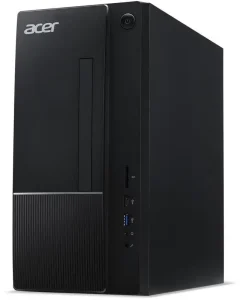
3. Acer Aspire XC-1715 — Best Budget
Specs: Intel Processor N150 (quad-core, up to 3.6GHz) | 8GB DDR5 | 512GB SSD | Wi-Fi | Windows 11 Home | Keyboard and mouse included
The Acer Aspire XC-1715 is the cheapest way to get a new, name-brand office desktop in November 2026. Best Buy listed the 8GB/512GB configuration at $386.99 on clearance (list price $429.99), and the 1TB SSD version was $589.99 in catalog listings — either way, it is the only pick here that leaves real money in your pocket for a monitor.
The N150 is an efficient quad-core chip from Intel’s Twin Lake family. It is not fast, but it is honest: documents, email, web browsing, and video calls all run fine, and the 512GB SSD is twice the storage of the Lenovo tower.
Be clear-eyed about the limits. The N150 uses a single-channel memory controller, which caps memory bandwidth, and 8GB may not be upgradeable depending on the configuration — check the exact listing before buying. This is a machine for one person doing ordinary office work, not for a shared family PC or a power user. But at under $400, it is hard to argue with.
Pros:
– The lowest price of any new name-brand pick here
– 512GB SSD is generous at this price
– Compact tower with keyboard and mouse included
– Very low power consumption and near-silent running
Cons:
– N150 is the slowest CPU in this guide
– Single-channel memory limits performance headroom
– 8GB of RAM may not be upgradeable, depending on the configuration
Best for: Tight budgets, second desks, and light office work where price matters most.
4. Dell OptiPlex 7090 Tower (Renewed) — Best Refurbished Power
Specs: Intel Core i7-11700 (8 cores, up to 4.9GHz) | 16GB DDR4 | 512GB SSD | Windows 11 Pro | Tower form factor
If raw performance per dollar is what matters, the renewed Dell OptiPlex 7090 Tower is the best office desktop computer under $600 — full stop. Its Core i7-11700 is an eight-core desktop chip that outclasses every new CPU in this guide, and it comes with 16GB of RAM, a 512GB SSD, and Windows 11 Pro. At $593.56 in November 2026, you are getting a machine that cost well over $1,000 new for less than a budget tower.
This is an off-lease enterprise machine, professionally refurbished, with a seller warranty rather than Dell’s. Buy from a seller with a clear return policy and verify the exact configuration — “OptiPlex 7090” covers many builds, and you want the i7-11700 with 16GB and an SSD.
The tower form factor is a plus: standard parts, easy RAM and storage upgrades, and plenty of USB ports. If you are comfortable buying refurbished, this is the most computer $600 buys in November 2026.
Pros:
– Core i7-11700 is by far the fastest CPU in this guide
– 16GB of RAM and Windows 11 Pro included
– Standard tower with easy upgrades
– Enterprise build quality — these machines are built to last
Cons:
– Refurbished, with a seller warranty rather than Dell’s
– Exact configuration varies by listing — verify before buying
– No keyboard, mouse, or monitor included
Best for: Power users, multitaskers, and anyone comfortable buying refurbished to get far more performance.
5. HP ProDesk 600 G4 (Refurbished) — Best Complete Setup
Specs: Intel Core i5-8500 (6 cores, up to 4.1GHz) | 16GB DDR4 | 1TB SSD | Windows 11 Pro | Keyboard and mouse included
The refurbished HP ProDesk 600 G4 is the most complete package in this guide: a six-core Core i5, 16GB of RAM, a full 1TB SSD, Windows 11 Pro, and a keyboard and mouse in the box — all for $594.99 in November 2026. The 1TB SSD is the largest storage of any pick here, which matters if you keep years of documents, photos, or local backups on the machine.
The i5-8500 is a generation older than the Dell’s i7-11700, so it is the slower of the two refurbished picks, but it is still comfortably faster than any new CPU in this price range for office work.
As with the Dell, verify the exact configuration, confirm Windows 11 Pro is activated, and buy from a seller with a return policy. The 600 G4 is an older platform, so do not expect Wi-Fi 6 or USB-C on every unit.
Pros:
– 1TB SSD is the most storage in this guide
– 16GB of RAM and Windows 11 Pro included
– Keyboard and mouse in the box — a genuinely complete setup
– Six-core business CPU still beats new budget chips
Cons:
– Older 8th-gen platform lacks Wi-Fi 6 and modern ports on some units
– Refurbished, with a seller warranty
– Slower than the Dell OptiPlex 7090 for the same money
Best for: Buyers who want the biggest SSD and a ready-to-work setup with nothing else to buy.
What to Avoid
A desktop with a hard drive instead of an SSD. Some very cheap office desktops still ship with a 1TB spinning hard drive. They look like a bargain and feel like a ten-year-old machine. If the listing does not say SSD, do not buy it.
6th- and 7th-gen Intel refurbished PCs. Machines built on Core i5-6500 or i7-6700 chips are cheap for a reason: Microsoft does not officially support them on Windows 11, and Windows 10 support ended in October 2025. They are a security risk in 2026, no matter how low the price.
The “too good to be true” 32GB/1TB listing. Refurbished sellers sometimes advertise a low price for a base configuration and a much higher one for the configuration in the title. Always check which configuration the price actually buys.
FAQ
Is a refurbished office desktop reliable?
Generally, yes — if you buy the right one. Off-lease Dell OptiPlex and HP ProDesk machines were built for business use and are usually refurbished by professional sellers with a warranty of 90 days to a year. Check the seller’s rating and return policy, and avoid machines with 6th- or 7th-gen CPUs.
How much RAM does an office desktop need in 2026?
8GB is the minimum for Windows 11 with a browser and Office open. 16GB is the comfortable amount, and it is what we recommend if you keep many tabs open or run video calls alongside your work. Three of the five picks here have 16GB.
New or refurbished — which is better under $600?
New buys you a warranty and peace of mind; refurbished buys you far more performance for the same money. If you are comfortable checking a listing carefully, refurbished is the better value. If you want zero hassle, buy the Lenovo tower.
Does an office desktop under $600 include a monitor?
Usually not. The HP ProDesk, Lenovo, and Acer here include a keyboard and mouse, but none of the five picks includes a monitor. Budget $100–$150 for a decent 24-inch 1080p monitor if you do not already own one.
Verdict
The best office desktop computer under $600 is the Lenovo IdeaCentre Tower at $539.99 — a new, warrantied tower with a modern DDR5 platform and a real upgrade path.
But refurbished enterprise machines offer more for the money. If you are comfortable buying renewed, the Dell OptiPlex 7090 Tower at $593.56 gives you an eight-core Core i7 and 16GB of RAM that no new machine under $600 can match. And if every dollar counts, the Acer Aspire XC-1715 at $386.99 is a perfectly good new office PC that leaves money for a monitor. Prices are November 2026 snapshots — check the current price on Amazon before buying.
As an Amazon Associate, we earn from qualifying purchases.
Suggested internal links for pcreviewer.org
- Best Office Desktop Computer Under $500
- Best Office Desktop Computer Under $400
- Best Office Desktop Computer Under $300
More from Amazon
Programs that pair well with the guide above. Offers and eligibility are set by Amazon and may change.
Free shipping on eligible items, Prime Video and more. Eligible new members can start with a free trial.
Start a Prime free trialAd-free music streaming. Eligible new subscribers can start with a free trial.
Try Music Unlimited freeA Prime membership for ages 18-24 with a trial period. Eligibility is set by Amazon.
See Prime for Young AdultsAudiobooks and podcasts to listen to on the go. Eligible new members can start with a free trial.
Try Audible freeAs an Amazon Associate we earn from qualifying purchases.
Write Your Review
No reviews yet. Be the first to share your experience!