

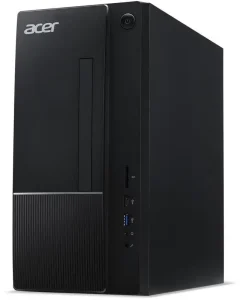
Four hundred dollars is a brutally honest budget for an office desktop. It is enough to buy a genuinely good machine — but only if you shop in the right places. No major brand sells a new, full-size office tower with a modern processor for under $400 in November 2026. Acer’s cheapest current Aspire tower starts around $500, and HP and Lenovo’s entry towers sit in the same range. So the real choice under $400 is between two kinds of machine: a brand-new mini PC with a modern low-power chip, or a refurbished business desktop that originally cost a company $1,000 or more.
Both routes work. A new mini PC gives you a warranty, Wi-Fi 6, and Windows 11 out of the box — but a small chip and, in some models, soldered memory. A refurbished Dell OptiPlex, HP EliteDesk, or Lenovo ThinkCentre gives you a sturdier chassis, a real desktop processor, and room to upgrade — but an older CPU and a shorter warranty. This guide covers both, with five picks that are actually in stock and actually under $400. Every price below is a snapshot from November 2026 — check the current price on Amazon before buying, because budget desktop prices move fast.
Quick Picks
| Desktop | Best For | CPU | RAM / Storage | Price (Nov 2026) |
|---|---|---|---|---|
| Beelink Mini S13 | Best overall | Intel N150 | 16GB / 512GB SSD | $349 |
| HP EliteDesk 805 G6 Mini | Best business mini PC | Ryzen 5 Pro 4650G | 16GB / 512GB SSD | $354.99 |
| Dell OptiPlex 5070 Bundle | Best complete setup | Intel Core i5 (9th gen) | 16GB / 128GB SSD | $354.99 |
| ASUS NUC 14 Essential | Best brand-name mini PC | Intel N150 | 8GB / 512GB SSD | $299.95 |
| Lenovo ThinkCentre (Restored) | Best budget | Intel Core i5-7500T | 16GB / 128GB SSD | $230.24 |
How to Choose an Office Desktop Under $400
Start with the processor generation, not the brand. A Core i5 sounds good until you learn it is a 6th- or 7th-generation chip from 2016. For office work in 2026, aim for an Intel 8th generation or newer, an AMD Ryzen 3000 series or newer, or a modern low-power chip like the Intel N100 or N150.
Windows 11 support is the single biggest trap at this price. Microsoft’s supported CPU list starts at Intel 8th generation and AMD Ryzen 2000 series. Many refurbished listings advertise “Windows 11 Pro” on 6th- and 7th-generation machines. That install usually works today, but it arrived through a workaround, and Microsoft does not guarantee future feature updates on it.
Get 16GB of RAM if you can. Eight gigabytes runs a browser and Office, but the moment you add a video call, a dozen tabs, and a spreadsheet, 8GB starts swapping to disk and everything stutters. If you do buy an 8GB machine, make sure the RAM is upgradeable — a second stick is a $20 fix later.
An SSD is non-negotiable. A mechanical hard drive as the boot drive makes even a fast processor feel slow in 2026. Every pick in this guide boots from an SSD. If a listing offers a 1TB hard drive instead of a 256GB SSD, take the SSD — you can always add cheap external storage later.
Count the total cost, not just the box. A $230 desktop is not a deal if you still need a monitor, keyboard, and mouse. A $355 bundle that includes a 24-inch monitor and peripherals can be the cheaper purchase overall. Mini PCs also need a monitor, so factor in $80–$120 for a basic 24-inch display if you do not already own one.
1. Beelink Mini S13 — Best Overall
Specs: Intel N150 quad-core (up to 3.6GHz) | 16GB DDR4 RAM | 512GB SSD | Wi-Fi 6, Bluetooth 5.2, dual 2.5GbE LAN | Windows 11 Home | Dual 4K display output
The Beelink Mini S13 is the best office desktop under $400 because it is the only pick that gives you everything at once: a current-generation processor, 16GB of RAM, a 512GB SSD, and Windows 11 — new, with a warranty, for $349. The Intel N150 is a low-power quad-core chip from Intel’s Twin Lake refresh, and while it will never win a benchmark against a desktop Core i5, it is exactly the right chip for office work: silent, cool-running, and fast enough for documents, spreadsheets, video calls, and forty browser tabs.
The 16GB of RAM is what separates the S13 from most mini PCs at this price, and the 512GB SSD means you will not be managing storage from day one. Connectivity is unusually generous — dual 2.5GbE Ethernet ports, Wi-Fi 6, and dual display output.
Pros: New with a warranty; 16GB RAM and 512GB SSD at this price; dual 2.5GbE LAN; silent and tiny; Wi-Fi 6.
Cons: The N150 is a low-power chip — heavy multitasking with large Excel files will feel slower than a desktop Ryzen or Core i5; Windows 11 Home, not Pro; no room for a graphics card or a second internal drive.
Best for: Anyone who wants a new, zero-hassle office PC that just works.
2. HP EliteDesk 805 G6 Mini — Best Business Mini PC
Specs: AMD Ryzen 5 Pro 4650G (6 cores, 12 threads) | 16GB RAM | 512GB SSD | Windows 11 Pro | DisplayPort, HDMI, USB-C
If the Beelink is the best new mini PC, the HP EliteDesk 805 G6 Mini is the best business mini PC — and arguably the most capable machine in this guide. The Ryzen 5 Pro 4650G is a six-core, twelve-thread desktop-class processor, roughly twice as fast as the N150 in multi-threaded work. It was built for corporate desks, so the chassis is metal, the cooling is quiet, and the machine is designed to be serviced rather than thrown away.
This is a refurbished unit, and that is the honest trade: you get a far stronger processor and Windows 11 Pro — with BitLocker, remote desktop hosting, and group policy support that Home lacks — for $354.99, but the warranty is the seller’s, not HP’s. The Ryzen 5 Pro 4650G is officially supported for Windows 11, so there is no workaround-install worry here. With 16GB of RAM and a 512GB SSD, there is nothing to upgrade on day one, and the machine will happily drive two monitors.
Pros: Six-core Ryzen Pro processor — the fastest CPU in this guide; Windows 11 Pro included; 16GB RAM and 512GB SSD; business-grade build quality; officially Windows 11 supported.
Cons: Refurbished, so warranty terms depend on the seller; no Wi-Fi on some configurations — check the listing before buying.
Best for: Home offices and small businesses that want real desktop performance in a tiny box.
3. Dell OptiPlex 5070 Bundle — Best Complete Setup
Specs: Intel Core i5 (9th gen) | 16GB DDR4 RAM | 128GB SSD | 24-inch LED monitor, wireless keyboard and mouse included | Built-in Wi-Fi | Windows 11 Pro
The Dell OptiPlex 5070 bundle wins on total cost. For $354.99 you get the desktop, a 24-inch monitor, a wireless keyboard, and a mouse — everything needed to start working the day the box arrives. Bought separately, the monitor and peripherals alone would cost $100 or more, which makes the computer itself effectively a $250 machine. The 9th-generation Core i5 is officially supported for Windows 11, and 16GB of RAM means it handles real multitasking without complaint.
The compromise is storage: 128GB is a small SSD in 2026, and after Windows and Office, roughly 80GB remains. That is fine for cloud-first office work — documents in OneDrive or Google Drive, email in the browser — but anyone who stores large local files should budget $25–$30 for a 500GB SATA SSD upgrade.
Pros: Monitor, keyboard, and mouse included — the cheapest way to a complete desk; 9th-gen Core i5 with official Windows 11 support; 16GB RAM; easy to upgrade.
Cons: 128GB SSD is small and will need an upgrade for local file hoarders; refurbished, so cosmetic condition varies.
Best for: Setting up a first home office, a reception desk, or a student’s workspace from nothing.
4. ASUS NUC 14 Essential — Best Brand-Name Mini PC
Specs: Intel N150 quad-core | 8GB RAM | 512GB SSD | 2.5GbE LAN, triple display support | Windows 11
ASUS bought Intel’s NUC business, and the NUC 14 Essential is what that looks like at the budget end: a properly engineered mini PC from a major brand, with a clean BIOS, reliable drivers, and support you can actually reach. The N150 chip is the same modern low-power processor as the Beelink S13, and the 512GB SSD and triple-display support make it a solid office machine for $299.95 — the cheapest new machine in this guide.
The trade against the Beelink is memory: 8GB instead of 16GB. For a single-user office workload — email, documents, video calls, a dozen tabs — 8GB is workable, but it is the floor, not the ceiling. The NUC’s RAM is upgradeable, and a 16GB kit is a cheap future upgrade.
Pros: Major-brand engineering and support; new with a full warranty; triple display support; 2.5GbE LAN; 512GB SSD.
Cons: 8GB RAM is the minimum for comfortable office work in 2026; no keyboard, mouse, or monitor included.
Best for: Buyers who want a name-brand mini PC with real support behind it.
5. Lenovo ThinkCentre (Restored) — Best Budget
Specs: Intel Core i5-7500T quad-core | 16GB DDR4 RAM | 128GB SSD | Built-in Wi-Fi, keyboard and mouse included | Windows 11 Pro
At $230.24, the restored Lenovo ThinkCentre is the cheapest way into a usable office desktop in this guide — and it is a better machine than its price suggests. Sixteen gigabytes of RAM, an SSD, Wi-Fi, and a keyboard and mouse in the box mean it is ready to work out of the box, and the ThinkCentre line is built to the same business standards as Dell’s OptiPlex and HP’s ProDesk. For email, documents, spreadsheets, and video calls, it does the job.
The honest caveat is the processor. The Core i5-7500T is a 7th-generation chip from 2017, which means it is not on Microsoft’s official Windows 11 supported list. The listing ships it with Windows 11 Pro installed, and it runs — but that install arrived through a workaround, and Microsoft does not guarantee future feature updates on unsupported hardware. Treat this as a Windows 10-era machine that happens to run Windows 11 today.
Pros: Lowest price in this guide; 16GB RAM; keyboard and mouse included; solid business-grade chassis.
Cons: 7th-gen processor has no official Windows 11 support; 128GB SSD is small; refurbished with a seller warranty.
Best for: A tight budget, a second desk, or a short-term office setup.
What to Avoid
Old “gaming” desktops with 7th-gen Intel chips and Windows 10. A renewed HP Pavilion with a Core i7-7700T for $399.99 looks tempting until you notice it ships with Windows 10 Pro. Windows 10 support ended in October 2025, so you would be buying a machine whose operating system no longer receives security updates — at the top of the budget. The same warning applies to Dell OptiPlex 3040 bundles built on 6th-generation chips.
Hard-drive-only desktops. Any desktop in 2026 that boots from a mechanical hard drive will feel slow no matter what processor it has. If a listing leads with “1TB HDD” and buries the storage type, walk away.
Barebone kits priced like complete PCs. The ASRock DeskMini X600 at $159.99 looks like the cheapest desktop here, but it is a barebone: no processor, no memory, no storage, no operating system. By the time you add those, you have spent more than the Beelink S13 costs complete.
Mini PCs with no TPM 2.0. Some ultra-cheap mini PCs skip the TPM 2.0 security chip, which Windows 11 requires. Before buying any new mini PC, confirm TPM 2.0 is present.
8GB of soldered RAM. Eight gigabytes is acceptable only if you can add more later. A mini PC with 8GB soldered down and no upgrade slot will feel cramped within a year.
FAQ
Is $400 enough for a good office desktop in 2026?
Yes, with the right expectations. You will not get a new name-brand tower with a desktop-class processor — those start around $500. You will get either a very good new mini PC or a strong refurbished business desktop, and either one handles real office work comfortably.
Should I buy new or refurbished under $400?
Buy new if you want a warranty, silent operation, and Windows 11 with no questions asked — the Beelink Mini S13 and ASUS NUC 14 Essential are the picks. Buy refurbished if you want the most performance per dollar — the HP EliteDesk 805 G6 Mini is the strongest machine in this guide.
Is a refurbished Dell OptiPlex safe to buy?
Generally yes, from a reputable seller with a stated warranty and return window. A 9th-generation or newer OptiPlex with an SSD is a solid machine. Avoid 6th- and 7th-generation models advertised with Windows 11, since that install is not officially supported.
How much RAM do I need for office work?
Sixteen gigabytes is the comfortable answer for 2026. Eight gigabytes works for light use, but struggles once you add many browser tabs and large spreadsheets. If you buy 8GB, make sure it is upgradeable.
Do these desktops come with a keyboard and mouse?
The refurbished Dell and Lenovo picks include a keyboard and mouse; the Dell OptiPlex 5070 bundle adds a monitor too. New mini PCs from Beelink and ASUS do not include peripherals, so budget $25–$40 for a keyboard and mouse if you do not already own them.
Verdict
The best office desktop computer under $400 is the Beelink Mini S13 at $349. It is the only pick that combines a new machine, a current-generation processor, 16GB of RAM, a 512GB SSD, and Windows 11 with no compromises that matter for office work. If you want more raw performance and Windows 11 Pro, the HP EliteDesk 805 G6 Mini at $354.99 is the strongest machine here — a six-core Ryzen Pro in a business-grade chassis. And if you are starting from an empty desk, the Dell OptiPlex 5070 bundle at $354.99 is the cheapest route to a complete working setup, monitor included.
As an Amazon Associate, we earn from qualifying purchases.
Suggested internal links for pcreviewer.org
- Best Office Desktop Computer Under $500
- Best Office Desktop Computer Under $300
- Best All-in-One Desktop Under $400
More from Amazon
Programs that pair well with the guide above. Offers and eligibility are set by Amazon and may change.
Free shipping on eligible items, Prime Video and more. Eligible new members can start with a free trial.
Start a Prime free trialAd-free music streaming. Eligible new subscribers can start with a free trial.
Try Music Unlimited freeA Prime membership for ages 18-24 with a trial period. Eligibility is set by Amazon.
See Prime for Young AdultsAudiobooks and podcasts to listen to on the go. Eligible new members can start with a free trial.
Try Audible freeAs an Amazon Associate we earn from qualifying purchases.
Write Your Review
No reviews yet. Be the first to share your experience!