
Our Short List of 3

- Best for: Marketers on macOS who approve creative and present to clients most days.
- Processor: Apple M4 chip, 10-core CPU, 8-core GPU
- Memory: 16GB unified memory
- Storage: 256GB SSD
- Display: 13.6-inch Liquid Retina, 2560 x 1664, 500 nits, Wide color (P3)

- Best for: Windows marketers who edit and approve visual content and present over HDMI.
- Processor: AMD Ryzen 7 8840HS, 8 cores, 16 threads, up to 5.1 GHz
- Graphics: AMD Radeon 780M integrated graphics
- Memory: 16GB LPDDR5X RAM
- Storage: 512GB Gen 4 SSD
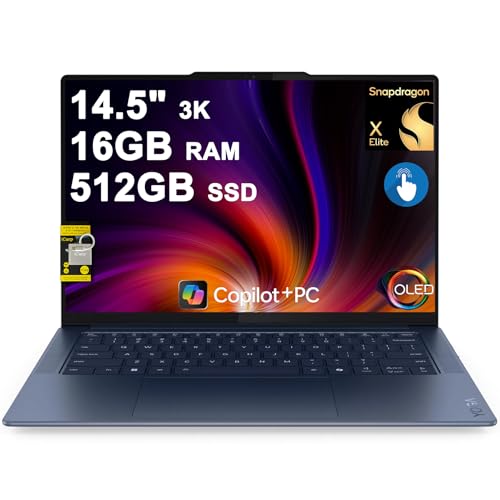
- Best for: Design-heavy marketers who want the sharpest, brightest screen in this roundup.
- Processor: Qualcomm Snapdragon X Elite, 12 cores, up to 3.4 GHz
- Graphics: Integrated Qualcomm Adreno GPU
- Memory: 16GB RAM
- Storage: 512GB SSD
All 4 Picks at a Glance
| Product | Specs | Action |
|---|---|---|
| Apple MacBook Air 13 (M4) |
| Check price on Amazon |
| ASUS Zenbook 14 OLED |
| Check price on Amazon |
| Lenovo Yoga Slim 7x 14.5 |
| Check price on Amazon |
 Acer Swift Go 14 |
| Check price on Amazon |
Key takeaways
- Four light laptops for marketing work, picked on listing-stated wide-gamut screens, low weight, memory and cameras for content, calls and travel.
Marketing work punishes two laptop weaknesses faster than most jobs: a dull screen that makes brand colours look wrong, and a heavy chassis that stays on the desk when it should be at a shoot, a client office or an event. Raw processor speed is rarely the real decision. The screen’s stated colour coverage and the weight printed in the listing matter more, because those two facts shape every deck, social asset and approval round.
This shortlist is for content marketers, social and brand staff, and generalists who split the week between browser tools, design apps and video calls. Every pick below was chosen from its Amazon listing: each one states a carry weight there, and the screens were picked on the display details those listings print, including a named wide-gamut figure on the colour-focused models.
Quick Picks
As an Amazon Associate we earn from qualifying purchases
| Product | Best for | Key spec from title |
|---|---|---|
| Apple MacBook Air 13 (M4) | macOS marketers who present and approve creative daily | 13.6-inch Liquid Retina, Wide color (P3) |
| ASUS Zenbook 14 OLED | Windows content work with long battery claims | 14-inch WUXGA OLED touch, 100% DCI-P3 |
| Lenovo Yoga Slim 7x 14.5 | The sharpest screen here for design-heavy days | 14.5-inch 3K OLED touch, 100% DCI-P3 |
| Acer Swift Go 14 | A high-resolution OLED screen in a silver shell | 14-inch OLED 2880 x 1800, 90Hz |
How to Choose
Start With the Colour Figure Printed in the Listing
Marketing laptops live or die on how faithfully they show brand colour. Look for a gamut figure stated in the listing itself, such as Wide color (P3) on the MacBook Air or 100% DCI-P3 on the Zenbook and the Yoga Slim. A named figure means the panel was built and sold for colour work, not just brightness. If a listing only says “vivid” or “stunning” with no gamut named, treat the screen as unproven for approving creative, however sharp the resolution sounds.
Weigh the Machine, Not the Marketing Words
“Slim” and “thin and light” appear in almost every laptop title, so ignore the adjectives and find the number. Every machine in this roundup states a weight between 2.73 and 2.91 pounds in its listing, which is the range that disappears into a tote or a small backpack alongside a charger and notebook. Once a 14-inch laptop passes roughly three and a half pounds, it starts getting left behind on shoot days and client visits, which defeats the point of buying a portable machine for field marketing work.
Match Memory and Storage to a Tab-Heavy Workflow
A normal marketing day means a campaign dashboard, an analytics suite, a design tool, a chat app and a presentation open at once, often across two browsers. Sixteen gigabytes of memory is the sensible floor for that load, and all four listings here state 16GB. Storage fills with photo exports, video clips and presentation versions faster than most people expect, so 512GB is the comfortable starting point; the 256GB MacBook configuration suits marketers whose assets live in shared cloud drives rather than on the machine.
Check the Camera and Ports Before the Processor
Client calls and recorded updates are part of the job, so the webcam line in the listing deserves a read. The MacBook Air states a 12MP Center Stage camera, while the Windows picks here state 1080p or FHD IR cameras, which also enable face sign-in. Ports decide how painful presenting is: HDMI on the Zenbook means walking into a meeting room without a dongle, while the Yoga Slim’s three USB-C ports assume you already carry adapters for older displays and drives.
The 4 Best Options
Apple MacBook Air 13 (M4)
- Best for: Marketers on macOS who approve creative and present to clients most days.
- Processor: Apple M4 chip, 10-core CPU, 8-core GPU
- Memory: 16GB unified memory
- Storage: 256GB SSD
- Display: 13.6-inch Liquid Retina, 2560 x 1664, 500 nits, Wide color (P3)
Marketers on macOS who approve creative and present to clients most days.
The 256GB storage fills quickly with local photo and video assets, and there are only two USB-C ports for accessories.
For marketers inside the Apple ecosystem, this is the low-friction default. The listing states a 13.6-inch Liquid Retina display with Wide color (P3) and support for one billion colours, so social creative and presentation decks hold their intended hues when you approve them. The stated 12MP Center Stage camera suits client calls and recorded walkthroughs, and at 2.73 pounds the machine travels without negotiation. Sixteen gigabytes of unified memory covers the usual stack of browser tools, documents and light design work, while the fanless-style thin shell, at 0.44 inches, slips into slim bags.
ASUS Zenbook 14 OLED
- Best for: Windows marketers who edit and approve visual content and present over HDMI.
- Processor: AMD Ryzen 7 8840HS, 8 cores, 16 threads, up to 5.1 GHz
- Graphics: AMD Radeon 780M integrated graphics
- Memory: 16GB LPDDR5X RAM
- Storage: 512GB Gen 4 SSD
Windows marketers who edit and approve visual content and present over HDMI.
The listing notes the unit is professionally upgraded and customised by the seller, so confirm the exact configuration and warranty terms on the page before ordering.
This Zenbook suits Windows-based content marketers who want the colour figure spelled out. Its listing states a 14-inch WUXGA OLED touch display with a 100% DCI-P3 colour gamut and 500-nit peak HDR brightness, which is exactly the evidence you want before trusting a screen with brand assets. The Ryzen 7 processor and 16GB of memory handle dashboards, documents and photo edits together, and the stated weight of 2.82 pounds keeps it realistic for event days. An HDMI port in the listing is a quiet advantage for presenting in rooms with older screens.
Lenovo Yoga Slim 7x 14.5
- Best for: Design-heavy marketers who want the sharpest, brightest screen in this roundup.
- Processor: Qualcomm Snapdragon X Elite, 12 cores, up to 3.4 GHz
- Graphics: Integrated Qualcomm Adreno GPU
- Memory: 16GB RAM
- Storage: 512GB SSD
Design-heavy marketers who want the sharpest, brightest screen in this roundup.
The Snapdragon processor runs Windows on Arm, so check that any specialist desktop software you depend on supports it, and note that every port is USB-C.
The Yoga Slim carries the most ambitious screen in this group. Its listing states a 14.5-inch 3K OLED touch display at 2944 x 1840 with 100% DCI-P3 coverage and a 1000-nit HDR peak, which gives design-leaning marketers extra resolution for layout work and timelines. The Snapdragon X Elite processor pairs with 16GB of memory and a 70Wh battery, and the whole machine is listed at 2.82 pounds in Cosmic Blue. Wi-Fi 7 and an FHD IR privacy camera round out a specification aimed at people who work from several locations each week.
Acer Swift Go 14
- Best for: Marketers who want a sharp OLED screen and a familiar Intel Windows setup.
- Processor: Intel Core Ultra 5 125H
- Graphics: Intel Arc graphics
- Memory: 16GB LPDDR5X RAM
- Storage: 512GB SSD
Marketers who want a sharp OLED screen and a familiar Intel Windows setup.
The listing’s stated average battery life of nine hours is the shortest figure in this group, so plan on carrying the charger for full days out.
Acer’s entry is the straightforward high-resolution option. The listing states a 14-inch OLED display at 2880 x 1800 with a 90Hz refresh rate, driven by an Intel Core Ultra 5 125H processor and Intel Arc graphics, which covers campaign documents, browser-based design tools and presentation work without drama. Memory and storage match the rest of this group at 16GB and 512GB, and the stated weight is 2.91 pounds, the heaviest here by a small margin but still easy to carry. The silver shell and standard Windows 11 Home setup keep it simple for mixed teams.
Which One Fits Your Situation
You Approve Creative and Present to Clients All Week
Choose the MacBook Air 13 if your tools already live in the Apple ecosystem. The P3 wide-colour display stated in its listing keeps brand work consistent, the 12MP Center Stage camera handles client calls well, and the 2.73-pound weight is the lightest here. Pick the 512GB configuration instead if your photo and video assets live on the machine rather than in shared drives.
You Work in Windows and Edit Content Yourself
The ASUS Zenbook 14 OLED fits this pattern best. Its listing states the full 100% DCI-P3 gamut figure, the Ryzen 7 chip and 16GB of memory cover editing alongside dashboards and documents, and the built-in HDMI port removes one adapter from your bag. The 75Wh battery and 2.82-pound weight support long event and travel days away from a desk.
Your Days Split Between Design Tools and Locations
Take the Lenovo Yoga Slim 7x when screen quality leads the decision. The 3K OLED panel with its stated 100% DCI-P3 coverage and high HDR peak brightness gives layouts and images the most room and punch here, while Wi-Fi 7 and a 2.82-pound chassis suit café, office and studio rotation. Just confirm your essential Windows software runs on its Arm-based processor first.
You Want a Capable Screen Without Extra Frills
The Acer Swift Go 14 is the pick for a marketer whose work is mostly documents, decks, dashboards and browser-based design. Its 2880 x 1800 OLED screen is sharper than the Zenbook’s panel on paper, and the Intel processor avoids any software compatibility questions. Accept the shorter stated battery figure and keep the charger in your bag on long days.
Common Mistakes
- Buying on screen size alone and never checking whether the listing states a colour gamut figure at all.
- Trusting words like “ultralight” in a title instead of finding the actual weight printed in the product details.
- Choosing 8GB of memory for a workflow built on dashboards, analytics and design tools running side by side.
- Ignoring the webcam specification, then spending a year of client calls looking soft and poorly lit.
- Assuming every USB-C laptop drives older meeting-room displays without an adapter or an HDMI port.
Frequently Asked Questions
How much memory does a marketing laptop actually need?
Sixteen gigabytes is the practical target for this work. A typical day stacks a campaign dashboard, analytics, a design tool, chat and a presentation across many browser tabs, and 16GB keeps that load responsive. Every laptop in this roundup states 16GB in its listing. Eight gigabytes can work for purely document-based roles, but it leaves little headroom once creative tools join the mix.
Why does colour gamut matter for marketing work?
Brand assets are approved on the laptop screen, so a panel that cannot show the intended colour range can pass creative that looks different on customer phones and printed material. Listings that state Wide color (P3) or a 100% DCI-P3 figure give you written evidence of wider coverage. It is not a guarantee of perfect calibration, but it separates colour-focused panels from basic office screens.
Is a Snapdragon Windows laptop safe for marketing software?
Browser-based tools, which cover most marketing platforms, run normally, and the Yoga Slim’s listing positions it for creator and business work. The caution is specialist desktop software: some older or niche Windows applications may not offer Arm versions. Check the support pages for any essential desktop program before choosing a Snapdragon machine, and keep an Intel, AMD or Apple option in mind if one tool is non-negotiable.
Should marketers choose a 13-inch or a 14-inch screen?
A 13-inch machine like the MacBook Air minimises weight for people who move between meetings all day and dock at a desk monitor for detailed work. A 14-inch screen gives layouts, spreadsheets and timelines more breathing room when the laptop is the only display. In this group the weight difference is small, so choose by how often you work undocked rather than by the diagonal alone.
More from Amazon
Programs that pair well with the guide above. Offers and eligibility are set by Amazon and may change.
Free shipping on eligible items, Prime Video and more. Eligible new members can start with a free trial.
Start a Prime free trialAd-free music streaming. Eligible new subscribers can start with a free trial.
Try Music Unlimited freeA Prime membership for ages 18-24 with a trial period. Eligibility is set by Amazon.
See Prime for Young AdultsAudiobooks and podcasts to listen to on the go. Eligible new members can start with a free trial.
Try Audible freeAs an Amazon Associate we earn from qualifying purchases.

Write Your Review
No reviews yet. Be the first to share your experience!