

Our Short List of 3

- Best for: Desk-based cloud gaming with GeForce NOW, Xbox Cloud Gaming, or Luna.
- 16.0-inch WQXGA 2560 x 1600 IPS display with 120Hz refresh rate
- Intel Core i5-1240P processor
- 16GB LPDDR4X memory
- 256GB Gen 4 SSD storage

- Best for: Players who want a dedicated gaming Chromebook with an RGB keyboard and a large screen.
- 16-inch WQXGA 2560 x 1600 IPS display with 120Hz refresh rate
- Intel Core i5-1240P processor with Intel Iris Xe Graphics
- 8GB LPDDR4 memory
- 256GB SSD storage
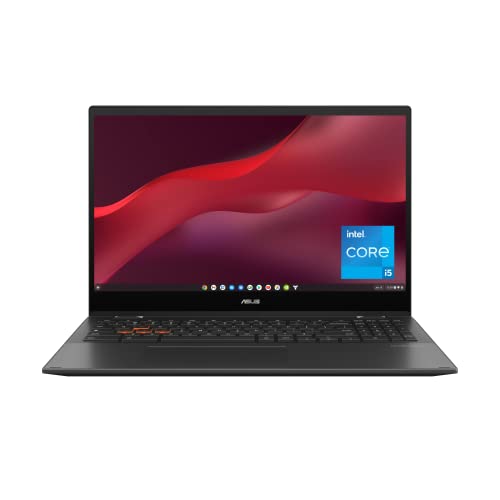
- Best for: Touch play, flip-around sessions, and players who want the fastest display here.
- 15.6-inch Full HD 144Hz touch display
- Intel Core i5-1135G7 processor, up to 4.2 GHz, 4 cores
- 16GB RAM
- 512GB M.2 NVMe PCIe 3.0 SSD storage
All 3 Picks at a Glance
| Product | Specs | Action |
|---|---|---|
| Acer Chromebook Plus 516 GE |
| Check price on Amazon |
| Acer Chromebook 516 GE |
| Check price on Amazon |
| ASUS Chromebook Vibe CX55 Flip |
| Check price on Amazon |
Key takeaways
- Best Chromebook for gaming in 2026: compare four cloud-gaming Chromebooks with fast 120Hz and 144Hz displays, strong wireless, and smooth streaming.
The best Chromebook for gaming in 2026 is the Acer Chromebook Plus 516 GE, because its 120Hz WQXGA display, 16GB of memory, and wired Ethernet port give cloud services the smoothest path to your screen. Chromebooks do not run demanding PC games locally, so the right pick is the one that streams GeForce NOW, Xbox Cloud Gaming, and Luna without stutter. If you want a smaller machine or a touchscreen instead, the ASUS Chromebook Vibe CX55 Flip and the Acer Chromebook Plus Spin 714 cover touch play and travel.
This guide is for players who already subscribe to a cloud service, students who want one machine for class and evening play, and anyone moving from a Windows gaming laptop to something lighter. Every pick below comes from an Amazon listing title and specification list, with the display, processor, memory, storage, and wireless details checked against what Amazon shows for that ASIN.
Quick Picks
As an Amazon Associate we earn from qualifying purchases
| Product | Best for | Key spec from title |
|---|---|---|
| Acer Chromebook Plus 516 GE | Desk-based cloud gaming sessions | 16-inch WQXGA 120Hz display, Core i5-1240P, 16GB RAM |
| Acer Chromebook 516 GE | A dedicated gaming Chromebook with an RGB keyboard | 16-inch WQXGA 120Hz display, Core i5-1240P, 8GB RAM |
| ASUS Chromebook Vibe CX55 Flip | Touch play and flip-around sessions | 15.6-inch Full HD 144Hz touch display, Core i5-1135G7, 16GB RAM |
| Acer Chromebook Plus Spin 714 | Travel and handheld-style play | 14-inch Full HD touch display, Core Ultra 5 115U, 8GB RAM |
How to Choose
Start With the Display, Not the Processor
Cloud gaming turns the screen into the most important part of the machine, because the game is rendered on a server and streamed to you as video. A 120Hz or 144Hz panel makes fast camera movement look smoother than a standard 60Hz panel, and a sharper WQXGA panel shows more detail in open-world scenes than a Full HD one. Touch support matters too when a game or a streaming app is easier to tap than to click. Before comparing processors, compare the refresh rate and resolution of each candidate, since those two numbers shape every minute you spend playing.
Treat Wi-Fi and Ethernet as Gaming Hardware
A streamed game is only as steady as the connection carrying it, so wireless and wired networking deserve the same attention as the chip inside. Wi-Fi 6E adds a 6 GHz band that is usually less crowded than the bands your neighbours use, which helps keep latency low during evening sessions. A wired Ethernet port is even better for a desk setup, because it removes wireless interference from the chain entirely. If you plan to play in a room far from your router, check which wireless standard the Chromebook lists and whether it also offers an Ethernet port.
Memory and Storage Decide How Smooth ChromeOS Feels
Streaming itself needs little local power, but ChromeOS still has to run the browser, the streaming app, voice chat, and a dozen tabs at the same time. A machine with 16GB of memory keeps those layers running together without forcing the system to shuffle data, while an 8GB machine is fine when you keep your tab count modest. Storage matters less for cloud play, yet a 256GB or 512GB SSD still leaves room for Android games, downloaded media, and school or work files. Match the memory to your multitasking habits rather than to the game library.
Match the Machine to Your Cloud Service
GeForce NOW, Xbox Cloud Gaming, and Luna each have their own app or browser path on ChromeOS, and each benefits from a slightly different setup. GeForce NOW rewards a high refresh display and a wired connection, Xbox Cloud Gaming pairs well with a controller over Bluetooth, and Luna works best when the browser stays light and fast. Check that the Chromebook you like supports the service you already pay for, that its keyboard layout suits long sessions, and that its ports cover the controller, headset, and external display you plan to use.
The 4 Best Options
Acer Chromebook Plus 516 GE
- Best for: Desk-based cloud gaming with GeForce NOW, Xbox Cloud Gaming, or Luna.
- 16.0-inch WQXGA 2560 x 1600 IPS display with 120Hz refresh rate
- Intel Core i5-1240P processor
- 16GB LPDDR4X memory
- 256GB Gen 4 SSD storage
Desk-based cloud gaming with GeForce NOW, Xbox Cloud Gaming, or Luna.
The 16-inch body is large and heavy for a bag, so measure your desk and carrying case first.
This is the most complete gaming Chromebook in the group, and the one to pick when cloud gaming is the main job rather than a side activity. Its 16-inch WQXGA panel runs at 120Hz, its 16GB of memory keeps ChromeOS calm during long sessions, and its wired Ethernet port gives streamed games a stable link that wireless alone cannot match. The backlit keyboard and Chrome OS setup make it equally useful for study and work between matches, so it earns its place as the default recommendation for desk players.
Watch out for: The 16-inch body is large and heavy for a bag, so measure your desk and carrying case first.
Acer Chromebook 516 GE
- Best for: Players who want a dedicated gaming Chromebook with an RGB keyboard and a large screen.
- 16-inch WQXGA 2560 x 1600 IPS display with 120Hz refresh rate
- Intel Core i5-1240P processor with Intel Iris Xe Graphics
- 8GB LPDDR4 memory
- 256GB SSD storage
Players who want a dedicated gaming Chromebook with an RGB keyboard and a large screen.
8GB of memory can feel tight if you keep many tabs and apps open during a session.
The original 516 GE is the gaming Chromebook that started the category, and it still covers the essentials: a large 120Hz screen, a capable Intel processor, and a four-zone RGB backlit keyboard that marks it out from ordinary Chromebooks. Its 8GB of memory handles streaming and everyday multitasking well, and the 256GB SSD leaves room for Android titles and files. It suits players who want the gaming look and the big screen without needing the extra memory of the newer Plus model.
Watch out for: 8GB of memory can feel tight if you keep many tabs and apps open during a session.
ASUS Chromebook Vibe CX55 Flip
- Best for: Touch play, flip-around sessions, and players who want the fastest display here.
- 15.6-inch Full HD 144Hz touch display
- Intel Core i5-1135G7 processor, up to 4.2 GHz, 4 cores
- 16GB RAM
- 512GB M.2 NVMe PCIe 3.0 SSD storage
Touch play, flip-around sessions, and players who want the fastest display here.
The Full HD panel is less sharp than the WQXGA screens on the Acer models.
The Vibe CX55 Flip is built around cloud gaming from the first line of its listing, and its 144Hz touchscreen is the fastest display in this group. The 15.6-inch Full HD panel responds to touch, which suits games and streaming apps that benefit from tapping, and the flip design lets the screen fold back for handheld-style play. With 16GB of memory and a 512GB SSD, it also carries the largest storage of the four, so it fits players who mix streaming with downloaded Android games and media.
Watch out for: The Full HD panel is less sharp than the WQXGA screens on the Acer models.
Acer Chromebook Plus Spin 714
The Spin 714 is the traveller of the group: a 14-inch convertible Chromebook Plus with a touch display, a stylus pen, and a newer Core Ultra 5 processor. Its smaller frame fits easily in a bag, and the 2-in-1 design lets it fold into tent or tablet shapes for play on a train, in a cafe, or on the couch. The 512GB SSD and 8GB of memory cover streaming plus everyday work, while Wi-Fi 6E and the backlit keyboard keep sessions comfortable away from a desk.
Specs
- 14-inch Full HD IPS touch display
- Intel Core Ultra 5 115U processor
- 8GB LPDDR5 memory
- 512GB SSD storage
- Backlit keyboard
- Wi-Fi 6E wireless
- Stylus pen included
- Chrome OS
Best for: Travel, couch play, and anyone who wants a convertible Chromebook for cloud gaming.
Watch out for: The 60Hz-class Full HD panel is not listed with a high refresh rate, so fast games look less smooth than on the 120Hz models.
Which One Fits Your Situation
You Play Mostly at a Desk
Pick the Acer Chromebook Plus 516 GE. Its 16GB of memory, 120Hz WQXGA display, and wired Ethernet port are built for long, steady sessions at a fixed setup. Plug in a controller and a headset, connect the Ethernet cable, and the machine disappears behind the game. It is the steadiest streaming setup in this guide.
You Want the Classic Gaming Chromebook
Pick the Acer Chromebook 516 GE. It carries the RGB keyboard and large 120Hz screen that defined the first gaming Chromebooks, and its 8GB of memory is enough for streaming with a modest number of tabs open. It is the straightforward choice when you want the gaming look without extra memory.
You Like Touch Controls and a Faster Screen
Pick the ASUS Chromebook Vibe CX55 Flip. Its 144Hz touchscreen is the quickest panel in this guide, and the flip design suits games that play better with taps and swipes. The 16GB of memory and 512GB of storage also give it room for downloaded games alongside streaming. The flip design also suits handheld-style play on the couch.
You Carry Your Chromebook Everywhere
Pick the Acer Chromebook Plus Spin 714. The 14-inch convertible body, stylus pen, and touch display make it the easiest of the four to carry and to use in tight spaces. It trades the high refresh display for portability, which is the right call when most of your play happens away from a desk.
Common Mistakes
- Buying a Chromebook expecting demanding PC games to install and run locally, when most AAA play on ChromeOS happens through streaming.
- Choosing a standard 60Hz screen and then wondering why fast games look choppy next to a 120Hz or 144Hz panel.
- Playing far from the router on a crowded wireless band instead of using Wi-Fi 6E or a wired Ethernet connection.
- Picking the smallest memory option while planning to run a streaming app, voice chat, and many browser tabs at once.
- Skipping the controller check and discovering too late that a favourite gamepad does not pair cleanly with ChromeOS.
Frequently Asked Questions
Can a Chromebook run PC games?
A Chromebook cannot install and run most Windows PC games locally, because ChromeOS is a different system from Windows. Instead, players stream games through GeForce NOW, Xbox Cloud Gaming, Luna, or a similar service, which renders the game on a server and sends video to the Chromebook. Android games from the Play Store also run directly on many models.
Do I need a cloud gaming subscription?
Yes, for AAA titles you need a subscription to a cloud service such as GeForce NOW, Xbox Cloud Gaming, or Luna, plus the game itself where the service requires ownership. Some services offer a free tier with limits on session length and queue times. Check which tier fits your play habits before committing to a monthly plan.
Is 8GB of memory enough for cloud gaming?
Yes, 8GB is enough for streaming alone, because the heavy work happens on the service servers rather than on the Chromebook. It starts to feel tight only when you add voice chat, many browser tabs, and Android apps to the same session. If you multitask heavily while you play, the 16GB models in this guide are the safer pick.
Can I use a controller with a Chromebook?
Yes, most modern controllers pair with Chromebooks over Bluetooth or USB, and cloud services are designed around controller input. Pair the controller before launching a game, check that the service recognises it, and keep its firmware current. A wired USB connection is the most reliable option when Bluetooth feels laggy.
More from Amazon
Programs that pair well with the guide above. Offers and eligibility are set by Amazon and may change.
Free shipping on eligible items, Prime Video and more. Eligible new members can start with a free trial.
Start a Prime free trialAd-free music streaming. Eligible new subscribers can start with a free trial.
Try Music Unlimited freeA Prime membership for ages 18-24 with a trial period. Eligibility is set by Amazon.
See Prime for Young AdultsAudiobooks and podcasts to listen to on the go. Eligible new members can start with a free trial.
Try Audible freeAs an Amazon Associate we earn from qualifying purchases.
Write Your Review
No reviews yet. Be the first to share your experience!