
Our Short List of 3
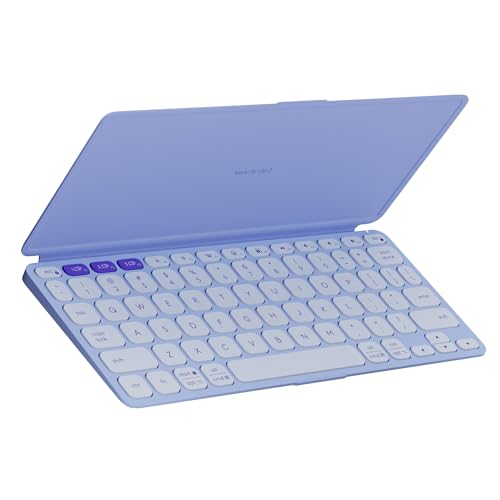
- Best for: Daily mobile typing, travel, and multi-device use
- Key specs: Scissor-switch keys, built-in cover, pairs with 3 devices, works with Android, iOS, macOS, Windows, and ChromeOS, coin-cell battery with a multi-year life
- Watch out for: No backlight; shallow key travel can tire fingers on very long sessions

- Best for: iPhone owners who want the lightest keyboard possible
- Key specs: Ultra-slim sealed design, iOS shortcut keys, Bluetooth pairing, rechargeable battery lasting months, spill-resistant surface
- Watch out for: No multi-device switching; iOS-first layout is less convenient on Android

- Best for: First-time buyers and anyone who wants a capable board at a modest outlay
- Key specs: 78-key QWERTY layout, scissor-switch keys, 6 mm profile, Bluetooth pairing with iOS, Android, macOS, and Windows, months of battery life
- Watch out for: No backlight; pairs with one device at a time
All 5 Picks at a Glance
| Product | Specs | Action |
|---|---|---|
| Logitech Keys-To-Go 2 (Lilac) |
| Check price on Amazon |
| Logitech Keys-to-Go (Blush Pink) |
| Check price on Amazon |
| Arteck HB098 Ultra-Slim Bluetooth Keyboard (Black) |
| Check price on Amazon |
 Arteck HB030B Backlit Bluetooth Keyboard |
| Check price on Amazon |
 Logitech Keys-To-Go (Teal) |
| Check price on Amazon |
Key takeaways
- The best bluetooth keyboards for smartphone use, from ultra-slim travel boards to backlit pocket keyboards, compared on size, keys and battery life.
The best bluetooth keyboards for smartphone use turn a phone into a serious writing tool. Typing a long email, a document, or a set of notes on a glass screen is slow and error-prone, and a small physical keyboard fixes that without adding a laptop to the bag. The right board pairs in seconds, fits in a jacket pocket or a small bag, and gives real keys under the fingers, so a phone becomes a workable writing station anywhere there is a flat surface.
The five keyboards in this guide cover the main ways people type on a phone. There is an ultra-slim Logitech board that folds its own cover over the keys, a classic Logitech keyboard built specifically for iPhone and iPad, two Arteck boards that trade a little bulk for a lower outlay and a backlit option, and the original Logitech Keys-To-Go for travellers who want the lightest possible setup. Each one connects over Bluetooth to iOS and Android phones, and each one earns its place for a different kind of mobile typing.
A phone keyboard lives or dies on portability. A board that stays at home is no use to someone who writes on trains, in cafes, or between meetings, so size and weight matter as much as key feel. Battery life matters too, because a keyboard that needs charging every week becomes another cable to remember. The guide below weighs all of that, so the pick that fits a daily commute is easy to separate from the pick that suits a desk beside a phone stand.
How to Choose
Size and weight
A smartphone keyboard should disappear into a bag. Boards under 250 grams and under 25 centimetres long slip into a jacket pocket or a small pouch, while a full-size board is better left on a desk. Measure the bag first, then the keyboard, and remember that a phone stand or a case adds bulk too.
Key feel and layout
Scissor-switch keys give a short, crisp press that suits fast typing, while membrane keys feel softer and quieter. Check the layout before buying: a cramped board with tiny keys slows touch typists, and missing arrow keys make editing text on a phone frustrating. A standard QWERTY row with a proper space bar is the minimum worth accepting.
Multi-device pairing
A keyboard that pairs with three devices and switches between them with one key is far more useful than a board locked to a single phone. Easy-Switch style pairing lets one keyboard serve a phone, a tablet, and a laptop, which is exactly how most people end up using it.
Battery life
Coin-cell boards can run for months or longer on a single cell, while rechargeable boards need a USB cable every few weeks or months depending on use. A backlit board drains faster with the light on, so check whether the backlight can be turned off or dimmed. A keyboard that dies mid-sentence is worse than a slightly heavier one.
Operating system support
Most Bluetooth keyboards work with iOS and Android, but the shortcut keys differ. iPhone users should look for boards with iOS-specific function keys, while Android users should check that the layout matches their language and that media keys behave. A board aimed at one platform can still work on the other, but the shortcuts may not line up.
Build and spill protection
A keyboard that travels gets knocked around, so a rigid body or a built-in cover protects the keys in a bag. Spill-resistant coatings help when the board shares a table with a coffee cup. Fabric-covered boards feel pleasant but pick up marks, while hard plastic wipes clean.
Backlighting
A backlit keyboard is worth having for evening work in dim rooms, trains, and flights. Adjustable brightness matters more than colour choice, because a single bright setting can be distracting in the dark. Boards without a backlight last longer on a charge and cost less, so weigh the trade-off honestly.
Top Picks
Logitech Keys-To-Go 2 (Lilac)
- Best for: Daily mobile typing, travel, and multi-device use
- Key specs: Scissor-switch keys, built-in cover, pairs with 3 devices, works with Android, iOS, macOS, Windows, and ChromeOS, coin-cell battery with a multi-year life
- Watch out for: No backlight; shallow key travel can tire fingers on very long sessions
Logitech Keys-To-Go 2 on Amazon
The Keys-To-Go 2 is the most portable serious keyboard in this guide, and the pick for anyone who writes on a phone away from a desk. It weighs around 220 grams, measures roughly the length of a phone, and folds its own built-in cover over the keys when it goes into a bag. The scissor keys are spaced like a laptop keyboard, so touch typists adjust within minutes, and it pairs with up to three devices with a single key tap to switch between them.
It works across Android, iOS, macOS, Windows, and ChromeOS, which makes it the most flexible board here for people who move between a phone, a tablet, and a laptop. The coin-cell batteries last for years rather than weeks, so there is no cable to remember and no charging routine to maintain. The lilac finish is the variant linked here, and the same model is sold in other colours under different listings.
The trade-off is the lack of a backlight, which makes evening typing harder in a dark room, and the shallow key travel, which some typists find tiring over very long sessions. It is also a premium board, so buyers on a tight outlay should look at the Arteck picks below. For a commuter or a frequent traveller who types on a phone every day, though, nothing else here packs this small or lasts this long between battery changes.
Logitech Keys-to-Go (Blush Pink)
- Best for: iPhone owners who want the lightest keyboard possible
- Key specs: Ultra-slim sealed design, iOS shortcut keys, Bluetooth pairing, rechargeable battery lasting months, spill-resistant surface
- Watch out for: No multi-device switching; iOS-first layout is less convenient on Android
The original Keys-to-Go is the keyboard that defined the ultra-slim phone keyboard, and it remains the pick for iPhone owners who want a board designed around Apple devices. It is barely over 6 millimetres thick, weighs less than most phones, and was built for iPhone, iPad, and Apple TV, with iOS shortcut keys that match the platform. Setup is a one-time Bluetooth pairing, and after that it connects automatically whenever it is switched on.
The sealed fabric-style surface resists spills and crumbs, which matters for a board that shares a table with drinks and snacks, and the keys are quiet enough for a library or a shared office. It runs on a rechargeable battery that lasts for months between charges, so it is easy to keep in a bag and forget about until it is needed. The blush pink finish is the variant linked here.
The trade-off is that this is an older design, so it lacks the multi-device switching of the newer Keys-To-Go 2 and the backlight of the Arteck boards. Its iOS-first layout is also less convenient for Android users, whose shortcut keys will not line up as neatly. For an iPhone owner who wants the lightest possible keyboard and does not need to switch between three devices, it is still a strong choice.
Arteck HB098 Ultra-Slim Bluetooth Keyboard (Black)
- Best for: First-time buyers and anyone who wants a capable board at a modest outlay
- Key specs: 78-key QWERTY layout, scissor-switch keys, 6 mm profile, Bluetooth pairing with iOS, Android, macOS, and Windows, months of battery life
- Watch out for: No backlight; pairs with one device at a time
The Arteck HB098 is the value pick in this guide, and the board for anyone who wants a capable phone keyboard without paying a premium. It is a slim 78-key board with scissor-switch keys, a 6-millimetre profile, and a weight of just over 200 grams, so it slips into a bag as easily as the Logitech boards. It pairs over Bluetooth with iOS, Android, macOS, and Windows, and it carries system-specific function keys for each platform.
Battery life is generous for a rechargeable board, with months of use from a single charge under normal typing, and the two AAA batteries are easy to replace when they eventually run down. The black finish is the variant linked here, and the same board is sold in silver under a separate listing. The full QWERTY layout includes dedicated hotkeys for volume, playback, and copy and paste, which speed up everyday phone work.
The trade-off is the lack of a backlight and the absence of multi-device switching, so it is a one-phone board rather than a shared desk board. The plastic body also feels less premium than the Logitech boards, though it has held up well in everyday use. For a first phone keyboard, or a spare to keep in a second bag, it is hard to beat.
Arteck HB030B Backlit Bluetooth Keyboard
- Best for: Evening and low-light typing on a phone
- Key specs: Seven-colour backlight with adjustable brightness, zinc-alloy body, Bluetooth pairing with iOS, Android, macOS, and Windows, rechargeable battery
- Watch out for: Bulkiest board here; backlight shortens battery life at full brightness
The Arteck HB030B is the only backlit keyboard in this guide, and the pick for anyone who types on a phone in the evening, on night trains, or in dim rooms. Seven backlight colours with adjustable brightness make the keys readable in the dark, and the zinc-alloy body gives it a solidity the other Arteck board lacks. It pairs over Bluetooth with iOS, Android, macOS, and Windows, and it carries system-specific function keys for each platform.
The rechargeable battery lasts for months with the backlight off, and a reasonable stretch with it on, which is a fair trade for the visibility it adds. At under 10 inches long it still fits in most bags, though it is a little wider and heavier than the ultra-slim boards, so it suits a bag rather than a jacket pocket. The low-profile keys are quiet, which helps in shared spaces.
The trade-off is that it is the bulkiest board here, and the backlight shortens battery life noticeably when it is used at full brightness. It also pairs with one device at a time, so it is not a multi-device board. For evening writers and anyone who works in low light, though, the backlight is worth the extra bulk.
Logitech Keys-To-Go (Teal)
- Best for: iPhone owners who prefer the teal finish
- Key specs: Ultra-slim sealed design, iOS shortcut keys, Bluetooth pairing, rechargeable battery lasting months, spill-resistant surface
- Watch out for: No multi-device switching; iOS-first layout is less convenient on Android
The original Keys-To-Go in teal is the same proven design as the blush pink variant, linked here in a second colour for buyers who want a different finish. It is the same ultra-slim, spill-resistant board with quiet keys, iOS shortcut keys, and a rechargeable battery that lasts for months. It pairs over Bluetooth with iPhone, iPad, and Apple TV, and it works with other Bluetooth devices too, though its layout is aimed squarely at Apple users.
The teal finish is a useful alternative for anyone who wants the board to stand out in a bag, or who simply prefers the colour. The typing experience is identical to the blush pink version, with the same shallow, quiet keys and the same sealed surface that shrugs off crumbs and splashes. It is the lightest board in this guide alongside its sibling, and the easiest to carry every day.
The trade-off is the same as the blush pink model: no multi-device switching, no backlight, and an iOS-first layout that is less convenient on Android. Buyers should also confirm they are ordering the colour they want, since the different finishes sit on separate listings. For an iPhone owner who likes the teal finish, it is the same reliable board in a more distinctive colour.
Comparison Table
| Keyboard | Best for | Size and weight | Multi-device | Backlight | Battery |
|---|---|---|---|---|---|
| Logitech Keys-To-Go 2 (Lilac) | Daily mobile typing and travel | Around 220 g, pocketable | Yes, 3 devices | No | Coin cell, multi-year |
| Logitech Keys-to-Go (Blush Pink) | iPhone owners, lightest carry | Under 250 g, 6 mm thick | No | No | Rechargeable, months |
| Arteck HB098 (Black) | First-time buyers, value | Around 217 g, 6 mm profile | No | No | AAA, months |
| Arteck HB030B | Evening and low-light typing | Wider, heavier than slim boards | No | Yes, 7 colours | Rechargeable, months |
| Logitech Keys-To-Go (Teal) | iPhone owners, teal finish | Under 250 g, 6 mm thick | No | No | Rechargeable, months |
Which One Is Right for You?
For daily typing on the move, the Logitech Keys-To-Go 2 is the strongest all-round choice. It is the smallest board that still feels like a real keyboard, it switches between three devices, and its battery lasts for years. Commuters and travellers will notice the difference within a week.
For iPhone owners who want the lightest board and nothing else, either original Keys-to-Go variant does the job. Choose blush pink or teal purely on the finish, since the typing experience is identical, and accept that the board is a one-device companion rather than a shared desk tool.
For a first phone keyboard or a spare, the Arteck HB098 is the sensible buy. It types well, costs less than the Logitech boards, and slips into any bag. For evening work, step up to the Arteck HB030B, whose backlight is the feature that matters most once the lights go down.
Frequently Asked Questions
Do these keyboards work with both iPhone and Android?
Yes, all five pair over Bluetooth with iOS and Android phones. The Logitech boards aimed at Apple devices carry iOS shortcut keys, which work on Android too but with different shortcuts, while the Arteck boards carry system-specific function keys for each platform.
Can I pair one keyboard with a phone and a tablet?
The Logitech Keys-To-Go 2 pairs with up to three devices and switches between them with one key. The other four boards pair with one device at a time, so switching means re-pairing or using the other device’s on-screen keyboard.
How long does the battery last?
The Keys-To-Go 2 runs on coin cells that last for years under normal use. The rechargeable Logitech boards last for months between charges, and the Arteck HB098 lasts for months on two AAA batteries. The backlit Arteck HB030B lasts longest with the backlight off.
Is a backlit keyboard worth it for a phone?
It is worth it if you type in the evening, on night transport, or in dim rooms, where finding keys by feel is slow. If you type mainly in daylight, a non-backlit board is lighter, cheaper, and lasts longer on a charge.
Disclosure: As an Amazon Associate, we may earn from qualifying purchases.
More from Amazon
Programs that pair well with the guide above. Offers and eligibility are set by Amazon and may change.
Free shipping on eligible items, Prime Video and more. Eligible new members can start with a free trial.
Start a Prime free trialAd-free music streaming. Eligible new subscribers can start with a free trial.
Try Music Unlimited freeA Prime membership for ages 18-24 with a trial period. Eligibility is set by Amazon.
See Prime for Young AdultsAudiobooks and podcasts to listen to on the go. Eligible new members can start with a free trial.
Try Audible freeAs an Amazon Associate we earn from qualifying purchases.


Write Your Review
No reviews yet. Be the first to share your experience!