

Key takeaways
- ATX vs micro ATX vs mini ITX: board dimensions, slot counts, power delivery and case fit side by side, with a size-picking flow and a 6-point fit check.
Pick ATX if you want the most slots, memory sockets and cooling room, micro ATX if you want most of that in a smaller and usually cheaper package, and mini ITX only if the size of the finished PC matters more than expandability. All three run the same processors and graphics cards, so the choice is about layout, not raw speed.
This guide relies on published form factor dimensions, manufacturer documentation and general building knowledge. Nobody on the editorial team has assembled boards for this article, and individual models differ, so treat the typical figures as guides and confirm on the board and case pages you are considering.
Size and slot comparison at a glance
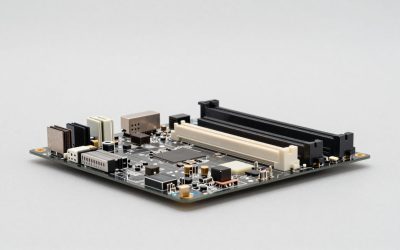
The three standards are defined mainly by their outline, and the board footprint sets how many slots and connectors can fit. The numbers below are the commonly quoted maximums for each standard; real boards can have fewer.
| Spec | ATX | Micro ATX | Mini ITX |
|---|---|---|---|
| Typical size | About 305 x 244 mm | About 244 x 244 mm | About 170 x 170 mm |
| Expansion slot positions | Up to 7 | Up to 4 | 1 |
| Memory slots (typical) | 4, sometimes 2 | 2 or 4 | 2, rarely 4 on special designs |
| M.2 storage slots (typical) | 2 to 4 or more | 1 to 3 | 1 to 2, some on the back |
| Typical case size | Mid or full tower | Compact tower | Small cube or slim case |
| Price position | Widest range | Often budget friendly | Often a premium for the size |
Slot count is the quickest filter. A single graphics card and one NVMe drive is easy anywhere. A capture card, a sound card, a network card and a second graphics card need the space only larger boards provide.
Expansion capacity and how PCIe lanes are shared
People often assume a smaller board has fewer lanes, but the lanes come from the processor and chipset, not the board outline. What the board size changes is how many physical slots and M.2 sockets exist to use them. On mainstream platforms, a few of those sockets share bandwidth, so filling an extra M.2 slot can disable a SATA port or reduce the speed of a secondary slot.
That sharing is spelled out in the manual, in the section most buyers skip. Read it before picking a board if you plan to run several drives. For a typical gaming build with one graphics card and one or two drives, none of this will matter.
The main practical limit on mini ITX is the single slot. Many boards already include wireless networking, so that rarely needs a slot; but a capture card plus a graphics card cannot coexist. Micro ATX gives you room for one extra card beside the graphics card, if the case supports it.
Power delivery and heat behavior
Voltage regulator modules supply clean power to the processor. They live around the socket, and the space available shrinks with the board. Smaller boards often use compact heatsinks and fewer power phases, while larger boards can carry bigger ones. For a mid-range processor at stock settings, a well-designed small board is adequate. For a high-end processor running long renders or heavy all-core loads, or if you plan to overclock, a board with a stronger power design and a decent heatsink offers more margin.
The size is only a rough predictor. Some mini ITX boards are built with premium power stages, and some low-end ATX boards are thin on cooling. Compare the specific model: look at the listed phase count, the heatsink coverage and whether reviewers mention thermal throttling with your processor class.
Airflow around the socket matters too. In tiny cases, a low-profile cooler may leave the power section with little airflow, so pair compact boards with a plan for case fans. Our guide to low-profile coolers for mini ITX builds covers the height limits that come with that choice.
Case compatibility and component clearance
Cases list the board sizes they accept, and the rule of thumb is that a case supports its own size and anything smaller. An ATX tower normally takes micro ATX and mini ITX boards; a mini ITX case takes only mini ITX. Building the other way around does not work, because a larger board will not physically fit.
| Clearance to check | Why it matters | Where to find it |
|---|---|---|
| CPU cooler height | Tall air coolers hit the side panel in small cases | Case spec page, cooler spec page |
| Graphics card length and thickness | Long, thick cards may not fit compact cases | Case maximum GPU length, card dimensions |
| Power supply format | Small cases often need a compact format | Case manual |
| Radiator or fan mounts | Limits liquid cooling and airflow | Case cooling section |
| Drive bays | Fewer bays in small cases | Case storage section |
Big air coolers deserve a particular warning. A cooler such as the one compared in our large dual-tower cooler comparison assumes an ATX-width case, and may block memory slots or the side panel in a compact build.
Cost, noise and upgrade path
Price differences between sizes are not fixed, but the pattern is familiar. Micro ATX boards are often the cheapest way to get a current chipset, because they drop slots most buyers never use. Mini ITX boards frequently cost more than a comparable micro ATX board, since the engineering is denser, and compact cases and small power supplies can add to the total as well. ATX covers the widest spread, from entry boards to top-end models.
Noise follows the same logic as heat. Large cases fit large, slow fans that move air quietly. Small cases often rely on small, faster fans or compact coolers, which are easier to hear under load. Upgrades are easier on larger boards too: more memory sockets and drive slots mean fewer replacements when you grow. If you expect to change the graphics card for a bigger one, leave room in the case now rather than later.
Small cases can also be a sensible choice. Many people value a PC that sits unobtrusively on a desk, and with careful parts selection a compact build can run quietly and reliably. The trade is that every part must be chosen with the others in mind.
A flow for choosing the size
Answer these questions in order and stop at the first that applies.
- Do you need more than one expansion card besides the graphics card, or four memory sockets from day one? Choose ATX.
- Do you want a modest tower, a lower price and one extra card slot? Choose micro ATX.
- Is the finished PC supposed to sit on a shelf, fit a small desk or travel? Choose mini ITX, then pick the case first.
- Are you a first-time builder with no strong space limit? Choose ATX or micro ATX for easier cable routing.
- Planning a demanding processor with long sustained loads? Favor the larger board, or verify the power design of the smaller one.
If you land on micro ATX, our roundup of micro ATX motherboards is a place to compare specific models.
Worked example: a sample parts plan
Assume a builder wants a 1440p gaming PC with one graphics card, a single NVMe drive and a second drive added later. The graphics card is 300 mm long and 3 slots thick. The builder prefers a quiet tower air cooler.
| Choice | Fits the plan? | Notes under these assumptions |
|---|---|---|
| ATX board and mid tower | Yes | Plenty of room for the card and cooler; easy second drive |
| Micro ATX board and compact tower | Yes, if the case lists the card length | Check the cooler height and drive bays |
| Mini ITX board and small case | Only with a short case and compact cooler | May force a smaller card or a liquid cooler |
The point is not that one answer is correct, but that the card length and cooler choice often decide the size before the board does.
Layout and installation verification
Before you buy, run this checklist.
- Board size appears in the case’s supported list.
- Maximum graphics card length exceeds the card, with a few millimeters of margin.
- Cooler height is below the case’s stated limit.
- Power supply format matches the case.
- Memory type and count suit the board.
- Enough M.2 and SATA ports remain after sharing rules.
When you build, install the processor, memory and M.2 drive on the board outside the case where possible, since access is tight in small enclosures. Confirm the standoffs match the board before it goes in, and follow the manufacturer’s instructions for connectors and power cables.
Frequently asked questions
Can a micro ATX board go in an ATX case?
Usually yes. The standard mounting holes for the smaller boards are a subset of the ATX pattern, so micro ATX and mini ITX boards generally fit an ATX mid-tower, leaving empty space. Always confirm on the case’s spec page that it lists your board size, and check that the standoffs line up before tightening anything.
Does a smaller board mean lower gaming performance?
Not by itself. The processor and graphics card determine most game performance, and a mini ITX board holds the same chips as a larger one. The differences are usually fewer slots and connectors, tighter spacing and sometimes a lighter power-delivery design, which matters most with demanding processors under long all-core loads.
How many memory slots do these boards have?
Mini ITX boards almost always have two memory slots. Micro ATX and ATX boards commonly have two or four, depending on the model. Two slots can still carry a large amount of memory with high-capacity modules, but you lose the cheap upgrade path of adding a second pair later. Check the individual board’s listing.
Is mini ITX harder to build in?
Generally, yes. Cooler height limits, graphics card length, power supply format and cable routing all get tighter. It is manageable if you plan the parts around the case first, check clearances on the maker’s pages, and build in a sensible order. First-time builders often find a larger board far more forgiving.
Which size runs cooler?
It depends on the case and parts more than the board size. Smaller cases give hot components less air and less room for large heatsinks, so temperatures often rise unless the cooling is chosen carefully. A roomy ATX build with good airflow gives you the most margin, while a compact build can still be fine with sensible component choices.
More from Amazon
Programs that pair well with the guide above. Offers and eligibility are set by Amazon and may change.
Free shipping on eligible items, Prime Video and more. Eligible new members can start with a free trial.
Start a Prime free trialAd-free music streaming. Eligible new subscribers can start with a free trial.
Try Music Unlimited freeA Prime membership for ages 18-24 with a trial period. Eligibility is set by Amazon.
See Prime for Young AdultsAudiobooks and podcasts to listen to on the go. Eligible new members can start with a free trial.
Try Audible freeAs an Amazon Associate we earn from qualifying purchases.




Write Your Review
No reviews yet. Be the first to share your experience!