

Key takeaways
- A 1000W to 1200W power supply if yours is smaller, plus a native 12V-2×6 cable.
- A case with enough length and airflow, or extra fans if your case is tight.
- A monitor that can use the card, such as a 4K display at 144Hz or higher.
- A processor that does not limit the card at your chosen resolution.
- Electricity: a 575W card running four hours a day uses about 2.3 kWh daily from the card alone, which is roughly 840 kWh a year; multiply by your local rate per kWh to see the running cost.
The safest places to buy a GeForce RTX 5090 in 2026 are authorized retailers with clear return policies: Best Buy for the Founders Edition in the United States, Micro Center for in-store partner cards, Newegg and B&H Photo for shipped partner cards sold directly by the store, and the card makers’ own web shops. Supply of this 32GB flagship has been tight, so the real task is not finding a listing but telling a legitimate offer from a marked-up resale, setting up restock alerts, and confirming that your power supply and case can actually handle a 575-watt graphics card.
This guide explains each buying route, what to expect from stock in 2026, how to verify a listing is trustworthy, and what to check in your PC before the box arrives. Product facts come from NVIDIA’s published specifications and retailer pages; stock and pricing change daily, so use this as a method rather than a promise of availability.
Our top picks

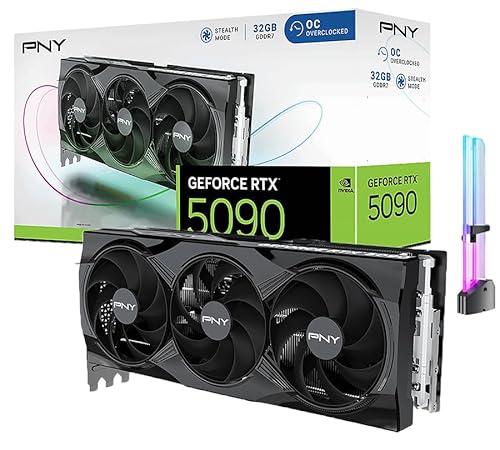


As an Amazon Associate we earn from qualifying purchases at no extra cost to you.
What you are buying: RTX 5090 at a glance
| Specification | GeForce RTX 5090 | Why it matters when buying |
|---|---|---|
| GPU architecture | NVIDIA Blackwell (GB202) | Same chip across all models; differences are coolers and clocks |
| CUDA cores | 21,760 | Roughly a third more than the previous flagship’s core count |
| Memory | 32GB GDDR7, 512-bit bus | Suits 4K gaming, large AI models and heavy video work |
| Total graphics power | 575W | Needs a strong power supply and good case airflow |
| Recommended power supply | 1000W minimum per NVIDIA | Many buyers choose 1000W to 1200W for headroom |
| Power connector | One 16-pin 12V-2×6 | Make sure your PSU has a native cable or a quality adapter |
| Founders Edition cooler | Two-slot, dual-fan design | Compact; partner cards are often three to four slots |
| Display outputs | DisplayPort 2.1b, HDMI 2.1b | Supports high-refresh 4K and 8K setups |
Every RTX 5090 uses the same silicon, so you are choosing a cooler, a warranty and a retailer rather than a different level of performance. Factory overclocked models gain a few percent at most. Do not pay a large premium for a model name alone.
Route 1: Best Buy for the Founders Edition
The Founders Edition is NVIDIA’s own design and the card most buyers want at list price. In the United States, Best Buy has been the only retailer that sells it, and it appears in small, irregular drops. Listings show “sold out” for most of the time, and a drop can disappear in minutes. Trackers reported that Best Buy last had the card at list price in early 2026.
To improve your odds, sign into your Best Buy account ahead of time, save a payment method and shipping address, and enable the “notify me” button on the product page. Join the paid membership only if you already shop there, since it does not guarantee access. Beware of listings that mimic Best Buy on third-party resale pages. The genuine sale is on the retailer’s own site, sold and shipped by Best Buy.
Trade-off: the best price, but the lowest availability.
Route 2: NVIDIA Marketplace and regional partners
NVIDIA runs a marketplace page that links to approved sellers in each country. In some regions, it routes to partner shops that hold Founders Edition stock; in others, it has had no stock for long periods. Check the marketplace page for your country, because stock rules differ outside the United States. If the page shows no available sellers, do not assume a third-party site with the same logo is official.
Trade-off: reliable provenance, but stock depends heavily on your region.
Route 3: Micro Center in-store pickup
Micro Center has been the outlier among US sellers, offering partner-model RTX 5090 cards in limited numbers across a handful of stores. Many of these are in-store pickup only, with no shipping, and stock is often one or two units per location. Call your local store or check the inventory by store on its site in the morning, since cards can sell out within hours of delivery.
Micro Center also ships prebuilt systems and sells bundles, such as a graphics card with a motherboard or processor, which can improve the total value of an upgrade. A bundle is only worth it when you needed those parts anyway.
Trade-off: fair pricing and no shipping risk, but you must live near a store and move fast.
Route 4: Newegg and B&H Photo
Newegg and B&H Photo list many RTX 5090 partner cards from ASUS, MSI, Gigabyte, Zotac, PNY and others. Stock appears and vanishes, and prices are often well above NVIDIA’s list for the Founders Edition. Pay close attention to who the seller is. On Newegg, a listing can be “sold by Newegg” or by a marketplace seller. The first is a direct retailer sale with standard returns; the second is a third-party seller whose price and policy can be very different.
B&H Photo is a long-established retailer with clear return policies and usually fewer marketplace sellers. Both stores offer restock notifications and let you set price-tier filters. Choose “sold and shipped by” the retailer wherever possible.
Trade-off: the most partner-card choice, but a higher price and a need to check the seller on every listing.
Route 5: Manufacturer web stores
ASUS, MSI, Gigabyte and other board partners run their own web shops in some regions, and they occasionally release their own limited drops, often at a fair price for a premium model. Buying direct gives a clean warranty record under your name and avoids reseller markups. Check that you are on the official domain, and follow the brand’s social accounts or newsletter for drop dates.
Trade-off: clean warranty and fair price, but drops are rare and the models are mostly premium.
Route 6: Prebuilt gaming PCs with an RTX 5090
System builders such as CyberPowerPC, iBuyPower, Alienware, Origin-style custom builders and local PC shops can sometimes get RTX 5090 cards when single-card retail stock is empty. A prebuilt costs more than the sum of parts, but it solves power, cooling and cable fitting for you, and the card arrives pre-installed with a warranty. This is a reasonable path if you were going to replace the whole machine anyway.
Verify the configuration before ordering. Check the power supply wattage and brand, the memory kit, the cooling, and the motherboard. Some prebuilts pair a flagship card with a modest PSU or slow memory, which wastes the card’s potential. Make sure the listing states the exact RTX 5090 board partner when that matters to you.
Trade-off: easiest way to get the card, but you pay for the system around it.
Route 7: Used and resale markets
Resale listings on marketplaces and forums are the last resort. Prices are often far above list, and there is more risk of scams, counterfeit listings and cards from lots with unknown history. If you go this way, prefer platforms with buyer protection, pay only through the platform, ask for a photo showing the serial number and a handwritten note, and test the card within the return window. Avoid anyone who asks for payment by gift card, cash app or a friends-and-family transfer.
Reports in 2026 point to third-party prices that are several times the list price during shortages. Waiting for a legitimate restock is often better than paying a steep premium, particularly because new stock tends to return after supply catches up.
Trade-off: immediate availability, but the highest price and the highest risk.
Comparison of all routes
| Route | Price level | Availability | Risk | Best for |
|---|---|---|---|---|
| Best Buy (Founders Edition) | Lowest (list) | Very low, random drops | Low | Patient buyers with alerts |
| NVIDIA Marketplace partners | List where available | Region dependent | Low | Buyers outside the US |
| Micro Center in store | Moderate | Low, per store | Low | Buyers near a store |
| Newegg and B&H direct | Moderate to high | Medium | Low if retailer-sold | Partner-model shoppers |
| Manufacturer web store | Moderate | Rare drops | Low | Warranty-minded buyers |
| Prebuilt PC | Higher overall | Better than retail | Low | Full-system upgrades |
| Resale market | Highest | High | High | Last resort only |
How to check that a listing is legitimate
- Confirm the domain. Type the retailer’s address yourself instead of following an ad or message link. Look-alike domains are a common trick.
- Check who sells and ships. The page should say “sold and shipped by” the retailer. If a marketplace seller appears, check their rating and age.
- Compare against the list price. A price far below NVIDIA’s list is almost certainly a scam. A price far above it means resale markup.
- Read the return policy. Graphics cards often have a shorter return window than other products, and some stores apply restocking fees. Know the terms before paying.
- Use a protected payment method. Credit cards and platform-protected payments give you dispute rights. Avoid bank transfers to strangers.
- Record the unboxing. Film opening the box so you can prove the card’s condition if a dispute arises.
Restock tactics that work
Set up multiple alerts rather than relying on one. Retailer notification emails often arrive after stock is gone, so pair them with a stock-tracking service or a community Discord that posts drops. Create accounts at each retailer in advance, store payment details, and test the checkout flow on a cheaper item so you are not typing under time pressure. Use a wired connection or a stable network, and avoid running multiple browser sessions that can trigger bot checks.
Check on weekday mornings in the retailer’s time zone. Drops often come with inventory updates early in the day. Do not pay for “guaranteed” bot services or sign up for paid alert groups that promise a card; many have no better data than free trackers.
Before the card arrives: confirm your PC can handle it
Power supply
NVIDIA recommends a 1000W power supply for the RTX 5090. If you have a processor that draws a lot under load, a 1200W unit gives more margin. Pick a unit with a native 12V-2×6 cable and an ATX 3.1 certification where possible. Check the manufacturer’s specifications for the connector rating rather than relying on adapter claims.
Case size and airflow
Partner cards often occupy three to four slots and can exceed 330 millimetres in length. Measure your case’s maximum GPU length and check whether the front radiator or fans interfere. A 575-watt card dumps a great deal of heat into the case, so use at least two intake and two exhaust fans or a case with a mesh front.
Cable bending
The 16-pin connector should be fully seated and the cable should not bend sharply near the plug. Leave roughly thirty-five millimetres of straight run before any bend, and use the vertical clearance in your case to avoid pressure on the side panel.
Motherboard slot and processor
The card uses PCIe 5.0 x16 but works in PCIe 4.0 slots with only a small loss in most games. Pair it with a modern processor such as a current Ryzen X3D chip or a recent Intel Core Ultra model, otherwise the CPU can limit the card at lower resolutions.
Monitor
The card makes most sense with a 4K high-refresh display or an ultrawide. At 1080p or 1440p on a mid-range monitor, a lower tier card may deliver nearly the same experience for much less money.
Is it worth waiting or choosing a different card?
Memory shortages linked to AI demand and reported production cuts have kept high-end GeForce supply tight in 2026. If you can wait, supply normally recovers and street prices fall toward list. If you cannot, consider the RTX 5080, which is easier to find and uses far less power, or an RTX 5070 Ti if your target is 1440p. The 5090 is the right choice if you need the 32GB of memory for large AI models, 8K output, or maximum 4K frame rates with ray tracing.
Choosing between partner models once you find stock
When a legitimate partner card appears, you rarely get to compare calmly, so decide your priorities in advance. Cooler size is the first trade-off. A three-slot card runs quieter than a two-slot Founders Edition at the same power, but it needs more case room and a sturdy support bracket, because the weight can sag the PCIe slot over time. Check the thickness and length in the manufacturer’s spec sheet and compare it with your case’s clearance.
The second trade-off is the warranty. Board partners differ in length of coverage and in how they handle claims, and registering the card soon after purchase can extend coverage with some brands. Read the terms before you pay a premium for a factory overclock that adds only a few percent in games.
Third, consider noise and look. Premium models add larger fans, vapor chambers and RGB lighting. If you value silence, look for reviews that report fan noise at full load in decibels rather than only temperatures. If you plan a vertical mount, check that the connector location suits your cable routing.
A simple budget check before you commit
The card is only part of the cost of moving to this tier. Add up the extras before you buy, so a surprise does not stall the build:
- A 1000W to 1200W power supply if yours is smaller, plus a native 12V-2×6 cable.
- A case with enough length and airflow, or extra fans if your case is tight.
- A monitor that can use the card, such as a 4K display at 144Hz or higher.
- A processor that does not limit the card at your chosen resolution.
- Electricity: a 575W card running four hours a day uses about 2.3 kWh daily from the card alone, which is roughly 840 kWh a year; multiply by your local rate per kWh to see the running cost.
If the total puts the upgrade out of reach, an RTX 5080 or a previous-generation flagship can deliver most of the experience at a far lower total outlay.
Frequently Asked Questions
Where is the safest place to buy an RTX 5090?
Buy directly from an authorized retailer such as Best Buy, Micro Center, Newegg (sold by Newegg), B&H Photo or a card maker’s official store. These sellers have clear return policies and legitimate supply chains. Avoid unsolicited messages and look-alike websites.
Why is the RTX 5090 so hard to find?
Demand from gamers, creators and AI users exceeds supply, and reports of memory shortages and production cuts have tightened availability. Founders Edition drops are small, and partner cards sell out quickly in many regions.
Is the Founders Edition better than partner cards?
Performance is almost identical because all cards use the same chip. The Founders Edition is compact and usually the best value at list price, while partner cards may offer higher clocks, larger coolers, different noise levels or a longer warranty.
What power supply do I need for an RTX 5090?
NVIDIA recommends at least 1000W. A high-quality 1000W to 1200W unit with a native 12V-2×6 connector is a common choice, especially if you have a high-power processor.
Should I buy a used RTX 5090?
Only through a platform with buyer protection and after verifying the serial number. Avoid payment methods without protection. The risk of scams and altered cards is higher for a card in short supply.
Can I buy an RTX 5090 outside the United States?
Yes. Check NVIDIA’s marketplace page for your country, local authorized retailers and the board partners’ regional web shops. Stock, taxes and warranty terms vary by country, so confirm that the card includes a local warranty.





Write Your Review
No reviews yet. Be the first to share your experience!