

Key takeaways
- BIOS updates: new platforms receive memory-compatibility fixes during the first year. Update before installing the operating system.
- Memory tuning: AMD chips benefit from DDR5-6000 with low latency; Intel chips scale a little more with faster kits.
- Thermals: Ryzen boosts until it hits about 95 degrees Celsius by design, which is normal. Intel chips are limited by power limits you can set in the BIOS.
- Integrated graphics: Ryzen 5 9600X includes basic RDNA 2 graphics for display output and troubleshooting, a handy fallback if your GPU fails.
- Cooler mounting: AM5 uses the same mounting holes as AM4, so many older coolers fit with the bundled bracket; Intel LGA1700 and LGA1851 share a pattern, too.
For gaming, a Ryzen 5 such as the Ryzen 5 9600X is the better pick over a Core i5 in 2026 because it matches or beats Intel’s mid-range chips in games while drawing less power and sitting on a socket with a longer future. For rendering, compiling and other heavy multi-threaded work, a Core i5 or Core Ultra 5 with 10 to 14 cores usually finishes sooner, because Intel packs extra efficiency cores into the chip. The right answer depends on whether your day is gaming or working, and on how much you can spend on the motherboard and memory.
The names cause some confusion, so note the generations. “Ryzen 5” covers AMD’s six-core mid-range line from the older Ryzen 5 5600 on the AM4 socket through the Ryzen 5 7600 and 9600X on AM5. “Core i5” covers Intel’s mid-range line through the 14th generation (such as the Core i5-14600K and Core i5-13400F), while Intel’s current desktop generation is branded Core Ultra 5, for example the Core Ultra 5 245K. This guide treats all of those as the Intel side of the comparison.
Our top picks

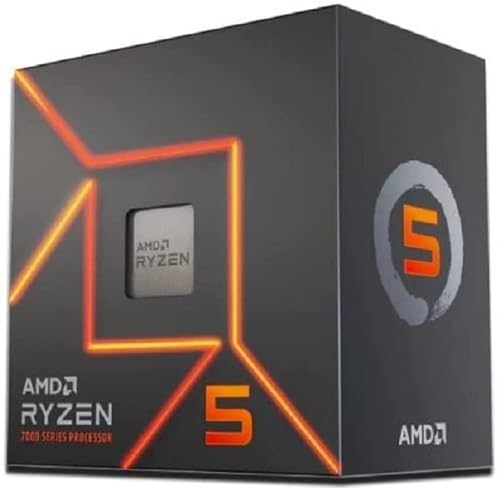


As an Amazon Associate we earn from qualifying purchases at no extra cost to you.
Spec comparison of popular mid-range chips
| Processor | Socket | Cores / threads | Boost clock | Base power | Memory |
|---|---|---|---|---|---|
| Ryzen 5 9600X | AM5 | 6 / 12 | 5.4 GHz | 65 W | DDR5 |
| Ryzen 5 7600X | AM5 | 6 / 12 | 5.3 GHz | 105 W | DDR5 |
| Ryzen 5 7600 | AM5 | 6 / 12 | 5.1 GHz | 65 W | DDR5 |
| Ryzen 5 5600 | AM4 | 6 / 12 | 4.4 GHz | 65 W | DDR4 |
| Core Ultra 5 245K | LGA1851 | 14 (6P + 8E) / 14 | 5.2 GHz | 125 W | DDR5 |
| Core i5-14600K | LGA1700 | 14 (6P + 8E) / 20 | 5.3 GHz | 125 W | DDR4 or DDR5 |
| Core i5-13400F | LGA1700 | 10 (6P + 4E) / 16 | 4.6 GHz | 65 W | DDR4 or DDR5 |
Specifications follow AMD’s and Intel’s published product pages. “P” means performance cores and “E” means efficiency cores. Intel’s Core Ultra 5 245K does not use Hyper-Threading, so it has 14 threads on 14 cores.
Gaming: Ryzen 5 has the small edge
Sources disagree on the exact margin, which is typical for CPU comparisons that use different graphics cards and games. XDA Developers found the Core Ultra 5 245K roughly 9 to 12 percent slower than the Ryzen 5 9600X in games on average, while Tech4Gamers measured a gap closer to 2 percent. Aggregated coverage from outlets such as Hardware Unboxed and Tom’s Hardware puts the typical difference at 2 to 5 percent at 1080p, with the Ryzen ahead in most games. At 1440p and 4K the gap shrinks toward zero because the graphics card becomes the limit.
The older Core i5-14600K trades blows with the Ryzen 5 7600X in games and is a strong gaming chip if you already own an LGA1700 board. For most players the lesson is simple: with a mid-range or better graphics card at 1440p, either brand will deliver nearly identical frame rates, so choose on platform and price.
Productivity: Intel’s extra cores win
The Core i5 and Core Ultra 5 lines have 10 to 14 cores against six on a Ryzen 5. In multi-threaded work such as video encoding, 3D rendering and code compilation, that advantage is large. XDA reported roughly 50 percent better results for the 245K in rendering-type workloads, while Tech4Gamers found about 9 percent in a broader productivity average. Both agree Intel leads. If you edit video with Intel Quick Sync hardware acceleration, the integrated graphics in Intel’s chips are also a meaningful bonus for export speed.
The Ryzen 5 9600X can narrow the productivity gap: some motherboards expose a 105 W power mode that raises sustained clocks, which tests by TechSpot and Tom’s Hardware found closed much of the deficit. For light editing, coding and office work, a six-core Zen 5 chip is more than enough.
Power, heat and noise
The Ryzen 5 9600X is rated at 65 W and typically draws roughly 60 to 80 W while gaming, according to Gaming PC Guru’s summary of published tests. The Core Ultra 5 245K is rated at 125 W base and often pulls 100 to 125 W in games and more under all-core loads. Tech4Gamers claims the opposite for efficiency, so treat single-source figures carefully. In general AMD’s recent six-core chips run cooler and are easier to cool with an inexpensive tower cooler, while Intel’s K-series chips want a better cooler to avoid throttling in long renders.
A worked running-cost example
Suppose you play four hours a day. If the Ryzen averages 70 W and the Intel chip averages 110 W in your games, the 40 W difference over a year is 40 W times 4 hours times 365 days, or 58.4 kWh. At an electricity rate of 0.15 per kWh, that is about 8.8 per year. The difference matters little for most households, but it adds up in warm rooms where extra heat means more fan noise.
Platform and upgrade path
AM5 is the socket for current Ryzen 5 chips and AMD has committed to supporting it for several generations, so a Ryzen 5 9600X board can later accept a faster processor. Intel’s LGA1700 is a finished platform, and LGA1851 for Core Ultra 200S chips is expected to have a shorter life, which is a point against buying new Intel for upgradability. On the other hand, LGA1700 boards are inexpensive, and they support both DDR4 and DDR5, so a budget buyer with DDR4 memory can reuse it with a Core i5-13400F or 14600K and save real money. AM5 requires DDR5 memory.
Reliability notes for Intel 13th and 14th generation
Intel’s 13th and 14th generation Core processors, including the Core i5-13600K and 14600K, were affected by instability issues linked to high voltage requests. Intel released microcode updates, including the 0x12B version, and extended warranties on affected desktop chips. If you buy or own one, update the BIOS, keep power limits at Intel’s default profile and avoid the motherboard’s aggressive “unlimited power” presets. Non-K models such as the Core i5-13400F run at lower power and are less exposed. The Core Ultra 200S and Ryzen 9000 families are not affected by this particular issue.
Core count versus real-world use
Marketing numbers can mislead here. A Core i5 with 14 cores sounds more than twice as capable as a Ryzen 5 with six, but eight of those cores are efficiency cores that run slower and share cache. In a single-threaded task such as a game’s main thread or a web browser, only the performance cores matter, and there the two brands are close. In a fully threaded task such as rendering, the efficiency cores contribute roughly half to two-thirds of a performance core each, which is where Intel’s lead over a six-core Ryzen comes from. The practical test is to look at your own workload: if the CPU sits below 60 percent in the task manager while you work, extra cores will not help you.
Cache and why it affects games
Gaming performance depends heavily on cache size and memory latency. Ryzen 5 chips carry 32 MB of L3 cache shared across their cores, and AMD’s X3D variants stack much more cache on top, although those are priced in a higher class than a standard Ryzen 5. Intel’s mid-range chips use a different cache layout with larger L2 caches per core. This is one reason the two brands trade wins from game to game: titles that favor low memory latency lean AMD, while titles that scale with many cores lean Intel. Do not expect a single decisive winner across a whole library of games.
Integrated graphics and display fallbacks
If you buy a chip with the “F” suffix from Intel, it has no integrated graphics, so you need a discrete card to see anything on screen. Standard Intel chips include integrated graphics that support Quick Sync, a feature that speeds up video export in many editors and helps with media servers. AMD’s Ryzen 5 9600X includes a small RDNA 2 graphics block that handles desktop use and troubleshooting but is not meant for gaming. For a budget build without a graphics card, choose a Ryzen APU such as the Ryzen 5 8600G instead, whose stronger integrated graphics can run lighter games at 1080p.
Worked example: choosing for a 1440p gaming and editing PC
Imagine a player who games at 1440p on a mid-range graphics card and edits holiday videos on weekends. The Ryzen 5 9600X would give around 140 fps in a typical esports title and handle 4K video editing, with exports taking somewhat longer. The Core Ultra 5 245K or Core i5-14600K would show the same 140 fps within a few percent but finish export jobs noticeably sooner, perhaps 20 to 40 percent faster in multi-threaded encoders. If the editing is occasional, the lower power draw and upgrade path of the Ryzen may matter more; if editing is weekly, the Intel chip saves real time. This kind of reasoning, with your own hours of use, beats any benchmark chart.
Best pick by situation
Best for gaming: Ryzen 5 9600X
Six Zen 5 cores, a 5.4 GHz boost clock and a 65 W rating make it a quiet, efficient gaming chip on a platform you can upgrade later. Main trade-off: fewer cores for heavy rendering.
Best value on a tight budget: Ryzen 5 7600 or Core i5-13400F
The Ryzen 5 7600 gives you the AM5 platform at a lower chip price, while the Core i5-13400F lets you reuse DDR4 memory on an affordable board. Main trade-off: the 13400F is on a dead-end platform, and the 7600 needs DDR5.
Best for mixed work and play: Core Ultra 5 245K or Core i5-14600K
With 14 cores they handle encoding, compiling and multitasking much better than a six-core chip, while still gaming well. Main trade-off: higher power draw and a shorter upgrade path.
Best for an old AM4 system: Ryzen 5 5600
If you already own an AM4 board, a Ryzen 5 5600 is a cheap way to add speed without a new motherboard or memory. Main trade-off: no upgrade path beyond the AM4 chips.
Decision matrix
| Your situation | Best choice |
|---|---|
| Gaming only, new build | Ryzen 5 9600X or 7600 |
| Video editing and streaming on the same PC | Core Ultra 5 245K or Core i5-14600K |
| Reusing DDR4 memory | Core i5-13400F or 14600K |
| Small case, quiet cooler | Ryzen 5 9600X |
| Upgrade path matters | Any Ryzen 5 on AM5 |
| Upgrading an old AM4 board | Ryzen 5 5600 |
Motherboard and memory pairing
| Processor family | Sensible chipset | Memory sweet spot | Notes |
|---|---|---|---|
| Ryzen 5 9600X / 7600 | B650 or B850 | DDR5-6000 CL30, 32 GB | Enable EXPO in the BIOS |
| Ryzen 5 5600 | B550 | DDR4-3600 CL16, 16 to 32 GB | Cheapest route to a solid gaming PC |
| Core Ultra 5 245K | B860 or Z890 | DDR5-6400, 32 GB | Faster memory helps Intel more |
| Core i5-14600K | B760 or Z790 | DDR5-6000 or DDR4-3600 | Check the board supports your memory type |
| Core i5-13400F | B660 or B760 | DDR4-3200 to 3600 | Locked chip, so skip pricey boards |
Two sticks of memory are the safe default on any of these platforms, because four sticks often force lower speeds. Capacity of 32 GB is a comfortable target for gaming plus editing; 16 GB still works for gaming alone but leaves little room for a browser and capture software running together.
How to decide in five steps
- Write down your three most demanding tasks and note whether they are games or multi-threaded jobs.
- Set the platform first: if you own DDR4 and a recent Intel board, upgrading in place can be cheaper; otherwise pick AM5 for the longer upgrade path.
- Choose the graphics card budget next, because it influences frame rates more than the CPU does.
- Pick the cheapest chip in your chosen family that covers your heaviest task without throttling.
- Reserve money for a decent cooler and a reliable power supply rather than chasing the last 3 percent of speed.
What else to budget for
The processor is only part of the cost. AM5 and LGA1851 boards both need DDR5, and mid-range boards in the B650 or B860 class are plenty for these chips. You do not need a Z-series or X-series board unless you want heavy overclocking. A 65 W Ryzen runs fine with a basic tower cooler, while a 125 W Intel K chip is better served by a quality dual-tower air cooler or a 240 mm liquid cooler. Put the saved money into a better graphics card, since at 1440p the GPU decides your frame rate far more than a 3 percent CPU difference does.
When the cheaper chip is the smarter buy
Mid-range processors are rarely the bottleneck in a balanced build. A Ryzen 5 7600 or Core i5-13400F costs less than the newest models, and in a typical 1440p game the frame-rate difference is only a few frames per second. If the saved money goes into a graphics card one tier higher, the finished PC runs faster in every game that matters. The same logic applies to the cooler: a mid-priced air cooler keeps a 65 W chip quiet, while a flagship cooler adds almost nothing. Spend where the gains are visible, which usually means the GPU, the monitor and a fast SSD, and treat the CPU as the part that must simply be good enough for your heaviest task.
Ownership realities
- BIOS updates: new platforms receive memory-compatibility fixes during the first year. Update before installing the operating system.
- Memory tuning: AMD chips benefit from DDR5-6000 with low latency; Intel chips scale a little more with faster kits.
- Thermals: Ryzen boosts until it hits about 95 degrees Celsius by design, which is normal. Intel chips are limited by power limits you can set in the BIOS.
- Integrated graphics: Ryzen 5 9600X includes basic RDNA 2 graphics for display output and troubleshooting, a handy fallback if your GPU fails.
- Cooler mounting: AM5 uses the same mounting holes as AM4, so many older coolers fit with the bundled bracket; Intel LGA1700 and LGA1851 share a pattern, too.
Common mistakes
- Buying a K-series Intel chip and running it with a weak cooler, which causes throttling.
- Pairing a Ryzen 5 with slow memory. Choose DDR5-6000 for best results.
- Paying for a premium motherboard that a mid-range chip cannot use.
- Choosing on core count alone when your main workload is gaming.
- Ignoring the age of review data. Many comparisons were written at launch, before BIOS and driver updates changed results.
Frequently Asked Questions
Is Ryzen 5 better than Core i5?
For gaming, the latest Ryzen 5 chips are slightly better and use less power. For multi-threaded work, Core i5 and Core Ultra 5 chips are faster because they have more cores. Neither is universally better, so pick based on your main workload.
Is six cores enough in 2026?
Yes, for gaming and everyday use. Games rarely use more than six to eight cores well, and a modern six-core chip with high clocks performs strongly. Heavy rendering and encoding benefit from more.
Does the Ryzen 5 9600X need a good cooler?
No. At 65 W it runs well with a mid-range air cooler. A premium cooler can lower noise but is not required.
Should I still buy a Core i5-13400F?
It is a decent value if you already own DDR4 and want to avoid a platform change. For a new build with DDR5, a Ryzen 5 7600 offers an upgrade path that the 13400F cannot.
Which is better for streaming?
Intel chips with more cores handle game capture and encoding in software more comfortably, though a modern graphics card’s hardware encoder works equally well on both brands. A six-core Ryzen is adequate when you stream using the GPU’s encoder.




Write Your Review
No reviews yet. Be the first to share your experience!