
Our Short List of 3
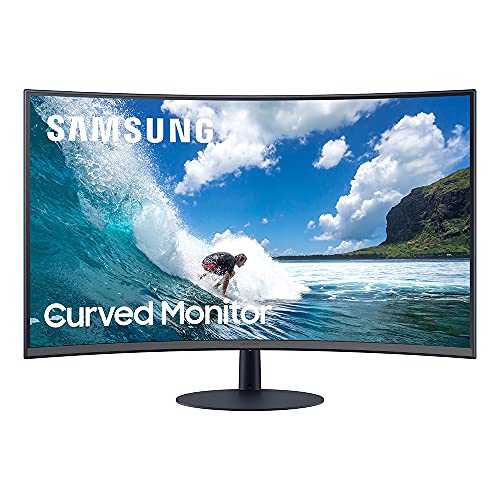
- Best for: A home office desk where documents, email and video calls fill the day.
- 27-inch FHD 1920×1080 curved 1000R panel
- 75 Hz refresh rate
- Built-in speakers
- HDMI + DisplayPort

- Best for: A slim second screen or a first curved monitor on a tidy desk.
- 27-inch FHD 1920×1080 curved panel
- Ultra Slim Design
- AMD FreeSync; 4 ms response time
- HDMI + DisplayPort
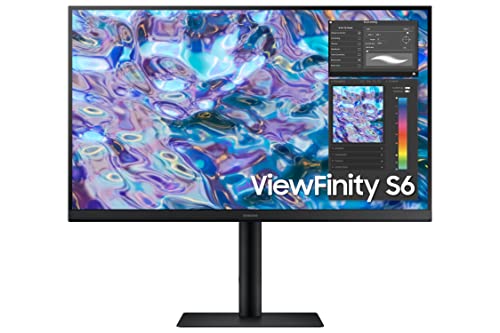
- Best for: Long reading sessions where sharper text and an adjustable stand matter most.
- 27-inch QHD 2560×1440 IPS panel
- 75 Hz refresh rate
- Height-adjustable stand
- HDMI + DisplayPort
All 3 Picks at a Glance
| Product | Specs | Action |
|---|---|---|
| Samsung T550 Series 27″ Curved |
| Check price on Amazon |
| Samsung CF39 Series 27″ Curved |
| Check price on Amazon |
| Samsung S61B Series 27″ QHD |
| Check price on Amazon |
Key takeaways
- Five Samsung computer monitors for work, study and everyday use — curved FHD picks, a QHD IPS model and the 5K ViewFinity S9, compared by size and panel.
Choosing a Samsung monitor comes down to how the screen will be used daily. A curved Full HD panel suits a desk where documents and video calls fill the hours, while a higher-resolution screen earns its place when spreadsheets, photo editing or design work need sharper text and finer detail. Size matters: a 27-inch display fits most desks without crowding it, and a 32-inch panel gives more room for two windows side by side. This guide compares five Samsung monitors, chosen from their listing titles and specifications, so each difference below comes from Samsung’s own listing.
The five picks cover everyday use. Two curved 27-inch Full HD models and a 32-inch curved screen serve general home and office use, a QHD IPS monitor adds sharper text and an adjustable stand, and the 5K ViewFinity S9 targets creative work that demands fine detail and a Thunderbolt 4 connection. Every monitor below is a Samsung-branded computer display, with no television, no other brand and no renewed listing in the group.
Quick Picks
As an Amazon Associate we earn from qualifying purchases
| Product | Best for | Key spec |
| Samsung T550 27″ Curved | Everyday desk work with a wrap-around view | 27-inch FHD curved 1000R panel |
| Samsung S3 S39GD 32″ Curved | A large screen for documents and casual play | 32-inch FHD curved panel, 100 Hz |
| Samsung CF39 27″ Curved | A slim, budget-friendly second screen | 27-inch FHD curved, Ultra Slim Design |
| Samsung S61B 27″ QHD | Sharper text and an adjustable stand | 27-inch QHD IPS, height-adjustable stand |
| Samsung ViewFinity S9 5K | Creative work and a single-cable setup | 27-inch 5K panel, Thunderbolt 4 |
How to Choose
Screen size and resolution
Begin with size, then resolution. A 27-inch display suits most desks and keeps text at a comfortable scale, while a 32-inch screen spreads two windows across more space and suits a wide desk. Resolution decides how sharp that space looks: Full HD is fine for email, browsing and video calls, while QHD adds noticeably crisper text for long reading sessions, and 5K turns a 27-inch panel into a fine-detail surface for photo and video work. Match the pair to the desk first — a large screen on a shallow desk forces the eyes to scan too far — then pick the resolution the work actually needs.
Curved or flat panel
Three of the five monitors here curve toward the viewer, and the curve changes how the edges feel at a normal desk distance. A curved panel keeps the corners at a more even distance from the eyes, which suits long sessions with documents or timelines spread across the width. The two flat panels — the QHD S61B and the 5K ViewFinity S9 — keep straight lines straight, which matters when the work involves grids, photo edges or design layouts. Neither shape is better in general; the curve suits immersive everyday use, while a flat panel suits work where geometry must stay true.
Panel type and viewing angle
Panel type decides colour and viewing angle. The IPS panels in the S61B and ViewFinity S9 hold colour steady when viewed from the side, which helps when a second person looks at the screen or the monitor sits at an angle on a corner desk. The curved panels in the T550, S39GD and CF39 take a different approach: the S39GD listing states 3000:1 contrast, which suits video with dark scenes, while a matte screen — stated for the S39GD and ViewFinity S9 — cuts reflections in a bright room. Check the viewing angle in the listing: 178 degrees on the S39GD and ViewFinity S9 means the image stays readable well off-centre.
Ports, refresh rate and extras
Ports decide what the monitor connects to without adapters. Every pick here has HDMI, and the T550, CF39, S61B and ViewFinity S9 add DisplayPort, while the ViewFinity S9 also brings Thunderbolt 4 for a single-cable laptop setup. Refresh rate matters for motion: the S39GD runs at 100 Hz, the T550 and S61B at 75 Hz, and the ViewFinity S9 at 60 Hz, which is fine for office and creative work but not a gaming-first choice. Extras worth weighing include built-in speakers on the T550, S39GD and CF39, a height-adjustable stand on the S61B, and the 4K SlimFit camera on the ViewFinity S9.
The 5 Best Options
Samsung T550 Series 27″ Curved
- Best for: A home office desk where documents, email and video calls fill the day.
- 27-inch FHD 1920×1080 curved 1000R panel
- 75 Hz refresh rate
- Built-in speakers
- HDMI + DisplayPort
A home office desk where documents, email and video calls fill the day.
The listing dates from May 2021, so check the page before ordering.
The T550 is the straightforward pick for a home office desk. Its 27-inch curved panel wraps the edges of the screen toward the viewer, and the 1000R curve suits long stretches of documents, email and video calls. Built-in speakers remove the need for separate desktop speakers, and the combination of HDMI and DisplayPort covers both a laptop dock and a desktop tower. The 75 Hz refresh rate keeps everyday motion smooth, and the TÜV Rheinland eye comfort certificate stated in the listing suits buyers who spend full days in front of the screen.
Watch out for: The listing dates from May 2021, so check the page before ordering.
Samsung S3 S39GD 32″ Curved
The S39GD is the pick for buyers who want the biggest screen in this guide without leaving Samsung. Its 32-inch curved panel gives two documents room to sit side by side, and the 100 Hz refresh rate is the fastest here, which keeps scrolling and casual play feeling fluid. Game Mode and Eye Saver Mode are stated in the listing, the matte screen cuts glare in a bright room, and the 2025 model year means a current design. Built-in speakers and a 3000:1 contrast ratio round out a screen built for long days.
Specs
- 32-inch FHD 1920×1080 curved panel
- 100 Hz refresh rate
- Game Mode and Eye Saver Mode
- HDMI; built-in speakers
- 3000:1 contrast; 250 cd/m² brightness
- 178° viewing angle; matte screen
- Model LS32D39DGANXZA; 2025 model
Best for: A wide desk where two documents or a game and a chat window share the screen.
Watch out for: Two crawl copies (197 and 359 days) agree on specs, but the listing is still worth a fresh check.
Samsung CF39 Series 27″ Curved
- Best for: A slim second screen or a first curved monitor on a tidy desk.
- 27-inch FHD 1920×1080 curved panel
- Ultra Slim Design
- AMD FreeSync; 4 ms response time
- HDMI + DisplayPort
A slim second screen or a first curved monitor on a tidy desk.
Three crawl copies (205, 237 and 264 days) agree on specs; still confirm the listing before ordering.
The CF39 is the slim, simple option for a second screen or a first curved monitor. Its Ultra Slim Design keeps the profile thin on the desk, the 27-inch curved panel suits everyday browsing and office work, and AMD FreeSync is stated in the listing for smoother motion. HDMI and DisplayPort cover the usual connections, VESA compatibility allows a monitor arm, and the wide viewing angle keeps the image readable from a nearby seat. The 4 ms response time stated in the listing is the fastest response figure among the curved picks here.
Watch out for: Three crawl copies (205, 237 and 264 days) agree on specs; still confirm the listing before ordering.
Samsung S61B Series 27″ QHD
- Best for: Long reading sessions where sharper text and an adjustable stand matter most.
- 27-inch QHD 2560×1440 IPS panel
- 75 Hz refresh rate
- Height-adjustable stand
- HDMI + DisplayPort
Long reading sessions where sharper text and an adjustable stand matter most.
The crawl is 320 days old — the stalest in this guide — so re-check the listing first.
The S61B is the pick for buyers who read all day and want sharper text without jumping to 4K or 5K. Its 27-inch QHD panel packs 2560×1440 pixels, which the listing describes as 1.7 times the pixel density of Full HD, and the IPS panel holds colour steady from the side. The height-adjustable stand is the only one of its kind in this guide, so the screen can sit at eye level without a riser. HDMI and DisplayPort cover the usual sources, and FreeSync is stated in the listing.
Watch out for: The crawl is 320 days old — the stalest in this guide — so re-check the listing first.
Samsung ViewFinity S9 5K
The ViewFinity S9 is the creative pick in this guide, and the only 5K screen here. Its 27-inch panel shows 5120×2880 pixels, which suits photo editing and video work where fine detail decides the result. Thunderbolt 4 allows a single-cable connection to a laptop, the matte display cuts reflections, and the 4K SlimFit camera is built in for video calls. Brightness of 600 cd/m² is the highest stated in this guide, and the 178-degree viewing angle keeps colour consistent from the side.
Specs
- 27-inch 5K 5120×2880 IPS panel
- Thunderbolt 4 + DisplayPort
- Matte display; 4K SlimFit camera
- 60 Hz refresh rate; 600 cd/m² brightness
- 178° viewing angle; AMD FreeSync
- Model LS27C902PAMXUE; 2023 model
Best for: Photo and video work where fine detail and a single-cable laptop setup matter.
Watch out for: The listing shows “90 days limited warranty” — unusual for a new Samsung monitor — so re-check the offer before ordering.
Which One Fits Your Situation
A home office desk
Pick the T550. The 27-inch curved panel suits documents and video calls, built-in speakers remove a separate purchase, and HDMI plus DisplayPort cover a laptop dock and a desktop tower. The eye comfort certificate stated in the listing fits full days in front of the screen, and the 75 Hz refresh rate keeps everyday motion smooth. It is the simplest fit for a desk used for work first and everything else second.
A wide desk with two windows open
Pick the S39GD. The 32-inch curved panel gives two documents room to sit side by side without constant switching, and the 100 Hz refresh rate is the fastest in this guide. The matte screen suits a bright room, Game Mode and Eye Saver Mode are stated in the listing, and built-in speakers keep the desk free of extra boxes. It is the best fit when width, not resolution, is the priority.
Long reading and sharp text
Pick the S61B. The QHD panel shows text noticeably sharper than the Full HD picks, the IPS panel holds colour steady from the side, and the height-adjustable stand lets the screen sit at eye level without a riser. FreeSync and the usual HDMI and DisplayPort connections cover everyday sources. Just re-check the listing first, since the crawl behind this pick is 320 days old.
Creative work and a single cable
Pick the ViewFinity S9. The 5K panel shows the finest detail in this guide, the matte display cuts reflections, and Thunderbolt 4 connects a laptop with one cable. The 4K SlimFit camera covers video calls without a separate webcam, and 600 cd/m² brightness is the highest stated here. Check the warranty note on the listing first — a 90-day limited warranty is unusual for a new Samsung monitor.
Common Mistakes
- Buying on size alone and ignoring resolution — a 32-inch Full HD panel shows larger text, not sharper text.
- Assuming every curved monitor suits design work — flat panels keep straight lines straight where geometry matters.
- Skipping the ports check — only the ViewFinity S9 has Thunderbolt 4, so a single-cable laptop setup needs that model.
- Forgetting the warranty note — the ViewFinity S9 listing shows a 90-day limited warranty, so confirm the offer is a new Samsung listing before ordering.
- Picking the biggest screen for a shallow desk — a 32-inch panel on a short desk forces the eyes to scan too far.
Frequently Asked Questions
Which Samsung monitor is best for office work?
The T550 is the best fit for most office desks. Its 27-inch curved Full HD panel suits documents, email and video calls, built-in speakers remove the need for separate speakers, and HDMI plus DisplayPort cover a laptop dock and a desktop tower. The eye comfort certificate stated in the listing suits full days in front of the screen.
Is a curved Samsung monitor good for photo editing?
A curved panel suits general use, but the flat ViewFinity S9 is the better pick for photo editing. Its 5K panel shows the finest detail in this guide, the matte display cuts reflections, and the IPS panel holds colour steady from the side. The curved picks trade a little geometry accuracy for a wrap-around view, which matters less for documents than for precise image work.
Do these Samsung monitors have built-in speakers?
Three of the five do. The T550, S39GD and CF39 listings all state built-in speakers, so those three work for video calls and casual video without extra hardware. The S61B and ViewFinity S9 listings state no speakers, so plan for separate speakers or headphones with those two. Check the listing for the exact model before ordering, since speaker setups vary between Samsung lines.
What should I check before ordering the ViewFinity S9?
Check the warranty and seller on the listing first. The listing shows a 90-day limited warranty, unusual for a new Samsung monitor and a possible third-party or renewed offer. Confirm the offer is a new Samsung listing, and check that the Thunderbolt 4 connection suits the laptop being used. The 5K panel, matte display and 4K SlimFit camera are all stated in the listing itself.
More from Amazon
Programs that pair well with the guide above. Offers and eligibility are set by Amazon and may change.
Free shipping on eligible items, Prime Video and more. Eligible new members can start with a free trial.
Start a Prime free trialAd-free music streaming. Eligible new subscribers can start with a free trial.
Try Music Unlimited freeA Prime membership for ages 18-24 with a trial period. Eligibility is set by Amazon.
See Prime for Young AdultsAudiobooks and podcasts to listen to on the go. Eligible new members can start with a free trial.
Try Audible freeAs an Amazon Associate we earn from qualifying purchases.









Write Your Review
No reviews yet. Be the first to share your experience!