
Our Short List of 3


All 3 Picks at a Glance
| Product | Specs | Action |
|---|---|---|
| Epson EcoTank Pro ET-5850 Wireless Color All-in-One Supertank Printer with Scanner, Copier, Fax and Ethernet, White | Check price on Amazon | |
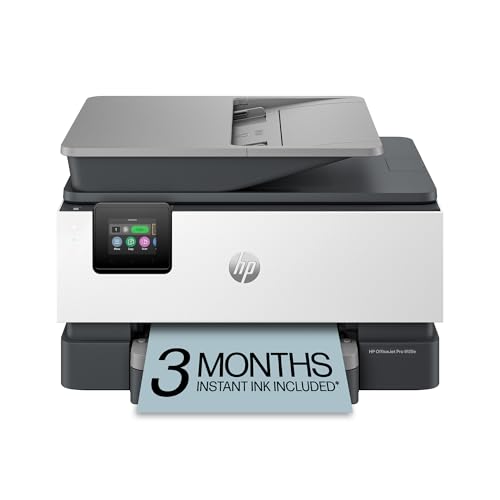
| HP OfficeJet Pro 9125e Wireless All-in-One Color Inkjet Printer, Print, scan, copy, fax, ADF, Duplex printing best-for-office, 3 month Instant Ink trial included, AI-enabled (403X0A) | Check price on Amazon | |
| Canon Megatank GX4020 All-in-One Wireless Supertank Printer with Print, Copy, Scan and Fax | Auto Document Feeder | Mobile Printing | 2.7″ LCD Touch Screen | Check price on Amazon |
Key takeaways
- Compare the best inkjet printers for small business, with print speed, ink costs, paper handling, duty cycle and wireless features ranked for offices.
A small business printer has to handle invoices, contracts, shipping labels, marketing flyers, and scanned paperwork day after day, often from more than one computer or phone. The right inkjet model keeps that work moving with a sensible duty cycle, a reliable automatic document feeder, two-sided printing, and ink that does not need constant replacement.
As an Amazon Associate, we earn from qualifying purchases.
Quick answer
For most small offices, a refillable tank inkjet with automatic duplex printing, a 50-sheet automatic document feeder, Wi-Fi and Ethernet, and a 500-sheet paper capacity is the strongest starting point. Tank models keep ink costs lower over time, while cartridge models suit lighter use. Choose the model whose duty cycle and paper handling match your weekly volume.
Epson EcoTank Pro ET-5850 Wireless Color All-in-One Supertank Printer with Scanner, Copier, Fax and Ethernet, White
The Epson EcoTank Pro ET-5850 is built around refillable ink tanks rather than cartridges, which makes it a strong fit for a small business that prints every day. Its PrecisionCore print head is listed at speeds up to 25 pages per minute in black and in color, so multi-page reports and client documents move through the machine without long waits. A 500-sheet front tray plus a rear specialty-paper feed reduces refills, and the 50-sheet automatic document feeder handles multi-page scanning, copying, and faxing. Automatic two-sided printing cuts paper use on longer documents, while the 4.3-inch color touchscreen gives staff a clear way to start jobs, check ink levels, and change settings at the machine. Wireless printing, Wi-Fi Direct, Ethernet, and voice-activated printing support shared use across desks and devices. The pigment-based DURABrite ink is designed for sharp text and durable business documents, and each replacement ink set is listed for up to 6,000 pages. With a monthly duty cycle listed at 66,000 pages, this model suits offices with steady, high-volume printing. Its large footprint means it needs a dedicated spot on a sturdy desk, and the upfront investment is higher than a basic cartridge model. For a business that values low running costs and fewer ink changes, that trade-off is easy to justify.
HP OfficeJet Pro 9125e Wireless All-in-One Color Inkjet Printer, Print, scan, copy, fax, ADF, Duplex printing best-for-office, 3 month Instant Ink trial included, AI-enabled (403X0A)
The HP OfficeJet Pro 9125e is a cartridge inkjet aimed squarely at office work, with print, scan, copy, and fax in one machine. It offers a 250-sheet paper capacity, which suits a small team that prints invoices, letters, and forms through the week without refilling the tray every day. Automatic duplex printing handles two-sided documents, and the automatic document feeder supports duplex scanning and copying, so double-sided originals do not need to be flipped by hand. Wireless connectivity, mobile printing, and AI-enabled features are designed to simplify setup and everyday use from phones, laptops, and desktop computers. The 3-month Instant Ink trial included with the printer can help a new office learn its real ink use before choosing a longer-term ink plan, although the ongoing cost of cartridges should be weighed against tank models for heavier volumes. Print quality is suited to sharp text documents and clear color charts, flyers, and presentations. The model is a practical choice for a small business that wants a familiar cartridge workflow, straightforward wireless setup, and dependable all-in-one functions without moving to a large tank system. It fits best where weekly volume is moderate and convenience matters as much as running cost.
Canon G7020 All-in-One Printer Home Office | Wireless Supertank (Megatank) Printer | Copier | Scan, | Fax and ADF with Mobile Printing, Black, Works with Alexa
The Canon G7020 uses a refillable MegaTank ink system, which is its main advantage for a small business with regular printing needs. One full set of ink bottles is listed for up to 6,000 black text pages or up to 7,700 vivid color pages, so the machine can run for long stretches before a refill is needed. That high yield helps keep ink costs predictable and reduces the interruptions that come with frequent cartridge changes. The printer covers print, copy, scan, and fax duties, with an automatic document feeder for multi-page originals and automatic duplex printing for two-sided output. Wireless connectivity, mobile printing, and Alexa compatibility support printing from phones and smart devices, while Ethernet gives a wired office a stable connection option. A 350-sheet paper capacity across its trays supports everyday office documents, envelopes, and forms. Print quality suits business letters, invoices, and color flyers, with clear text and solid color output. The black finish and compact footprint fit a small office desk better than many wide-format machines. Its print speed is more modest than the fastest models here, so a very busy office may prefer a quicker machine. For steady daily use with an emphasis on low ink cost, it is a strong pick.
Canon Megatank GX4020 All-in-One Wireless Supertank Printer with Print, Copy, Scan and Fax | Auto Document Feeder | Mobile Printing | 2.7″ LCD Touch Screen
The Canon MAXIFY GX4020 is designed as a small-office inkjet, with a refillable MegaTank system and a rated duty cycle of up to 33,000 pages per month. That duty cycle gives a growing business useful headroom above light home-office use, while the tank system keeps ink refills simple and infrequent. Print speeds are listed at 18 pages per minute in black and 13 pages per minute in color. The 2.7-inch LCD touchscreen provides a clear control panel for copying, scanning, and faxing, and the automatic document feeder handles multi-page originals without manual feeding. Automatic two-sided printing saves paper on longer documents, and the machine supports Wi-Fi, Ethernet, Wi-Fi Direct, AirPrint, and Mopria for printing from computers, phones, and tablets. One ink bottle set is listed for up to 6,000 black pages or up to 14,000 color pages, which helps a small office plan ink purchases around actual use rather than constant cartridge swaps. The white finish and compact design suit a shared workspace, and the maintenance cartridge is front-replaceable. Paper capacity is smaller than the largest models here, so offices with very high daily volume should check tray size against their workload. For a small team that wants tank economy in a tidy machine, it is a well-judged choice.
Brother INKvestment Tank 580 Wireless Color Inkjet All-in-One Printer | Includes up to 3 Years of Ink in-Box(1) and 3-Year Limited Warranty(2) (MFC-T580DW)
The Brother INKvestment Tank 580, model MFC-T580DW, is a wireless color inkjet all-in-one that includes up to three years of ink in the box, which is a clear advantage for a small business watching ongoing supply costs. The tank system uses large ink cartridges that last far longer than standard cartridges, so staff spend less time ordering and changing ink. It prints, copies, scans, and faxes, with duplex printing for two-sided documents and an automatic document feeder for multi-page scanning and copying. Wireless connectivity supports printing from computers, phones, and tablets across the office, and the machine is designed for home and home-office use that still needs dependable daily output. A three-year limited warranty adds reassurance for a business that depends on one main printer. Print quality suits everyday business documents, color charts, and marketing material, with clear text and clean color output. The machine is more compact than the largest tank models here, which helps where desk space is limited. Its paper capacity and speed suit moderate volumes rather than constant high-volume runs, so a very busy office should compare its duty cycle and tray size with larger models first. For a small team that wants long ink life, simple wireless sharing, and a longer warranty, it is a sensible option.
How to choose
Start with weekly volume, because that decides duty cycle, paper capacity, and ink system. A business printing several hundred pages a week benefits from a tank model and a larger tray, while a lighter office can use a cartridge model. Check the automatic document feeder sheet count and whether it supports duplex scanning. Confirm automatic duplex printing, Wi-Fi, Ethernet, and mobile printing support, so every computer and phone can reach the printer. Look at ink yield and how ink is supplied, and measure desk space and warranty length before deciding.
Who should skip
Skip a large tank inkjet if your office prints only a few pages a week, because the machine will sit idle and the extra capacity will not repay its size. Skip a cartridge model if your team prints hundreds of pages every week, because frequent cartridge changes will become a regular interruption. Skip any model without an automatic document feeder if staff regularly scan multi-page contracts. Skip a printer without Ethernet if your office relies on a wired network. Skip wide-format or photo-focused inkjets if your work is mainly text documents and invoices.
Frequently Asked Questions
What duty cycle should a small business inkjet printer have?
A small business should choose a duty cycle comfortably above its real monthly volume, not just equal to it. A rated duty cycle of tens of thousands of pages per month gives headroom for busy weeks, invoices, and marketing runs without pushing the machine to its limit. Check the recommended monthly volume as well as the maximum.
Is a tank inkjet or a cartridge inkjet better for a small office?
A tank inkjet usually suits steady or heavy printing, because refillable bottles and large ink supplies lower the cost per page and reduce how often ink must be changed. A cartridge inkjet suits lighter use, where convenience and simple cartridge swaps matter more than maximum yield. Compare your weekly page count with the ink yield before choosing.
Do small business inkjets need an automatic document feeder and duplex printing?
Most small offices benefit from both features. An automatic document feeder speeds up scanning and copying of multi-page contracts, invoices, and forms, while automatic duplex printing saves paper and produces professional two-sided documents. If your team scans paperwork daily, these features save more time than a slightly faster print speed.
How important is wireless printing for a small business?
Wireless printing is important when more than one person, computer, or phone uses the same printer. Wi-Fi, mobile printing, and Ethernet let staff print from different desks and devices without moving files or sharing a cable. A stable wireless setup, plus a wired Ethernet option, gives the most reliable shared access.
Final verdict
The Epson EcoTank Pro ET-5850 is the strongest overall pick for a busy small business, thanks to its high duty cycle, large paper capacity, fast print speed, and refillable tank system. The Canon G7020 and Canon MAXIFY GX4020 are strong tank alternatives for offices that want lower ink costs in a smaller machine, while the Brother INKvestment Tank 580 suits a small team that values long ink life and a longer warranty. The HP OfficeJet Pro 9125e is the best cartridge option here for moderate volume and simple wireless setup. Match the winner to your weekly volume and ink budget.
Product and ASIN Reference
| Product | ASIN |
|---|---|
| Epson EcoTank Pro ET-5850 Wireless Color All-in-One Supertank Printer with Scanner, Copier, Fax and Ethernet, White | B084TVW2D1 |
| HP OfficeJet Pro 9125e Wireless All-in-One Color Inkjet Printer, Print, scan, copy, fax, ADF, Duplex printing best-for-office, 3 month Instant Ink trial included, AI-enabled (403X0A) | B0CFM82NS2 |
| Canon G7020 All-in-One Printer Home Office | Wireless Supertank (Megatank) Printer | Copier | Scan, | Fax and ADF with Mobile Printing, Black, Works with Alexa | B081TZ38X2 |
| Canon Megatank GX4020 All-in-One Wireless Supertank Printer with Print, Copy, Scan and Fax | Auto Document Feeder | Mobile Printing | 2.7″ LCD Touch Screen | B0BN6XFFFP |
| Brother INKvestment Tank 580 Wireless Color Inkjet All-in-One Printer | Includes up to 3 Years of Ink in-Box(1) and 3-Year Limited Warranty(2) (MFC-T580DW) | B0FGBNCR52 |
More from Amazon
Programs that pair well with the guide above. Offers and eligibility are set by Amazon and may change.
Free shipping on eligible items, Prime Video and more. Eligible new members can start with a free trial.
Start a Prime free trialAd-free music streaming. Eligible new subscribers can start with a free trial.
Try Music Unlimited freeA Prime membership for ages 18-24 with a trial period. Eligibility is set by Amazon.
See Prime for Young AdultsAudiobooks and podcasts to listen to on the go. Eligible new members can start with a free trial.
Try Audible freeAs an Amazon Associate we earn from qualifying purchases.




Write Your Review
No reviews yet. Be the first to share your experience!