
Our Short List of 3

- Best for: A first smart monitor on a small desk or in a bedroom.
- 27-inch FHD (1920×1080) IPS display
- webOS 23 smart platform
- HDR10 support
- Built-in speakers

- Best for: A large 4K screen for streaming, casual gaming and light work.
- 32-inch 4K UHD display
- Samsung Vision AI
- Smart TV Apps
- Gaming Hub

- Best for: Video calls, streaming and work from one 4K screen.
- 32-inch 4K UHD display
- Streaming TV with Smart TV Apps
- Built-in speakers
- HDR10+ support
All 5 Picks at a Glance
| Product | Specs | Action |
|---|---|---|
| LG 27SR50F-W MyView Smart Monitor |
| Check price on Amazon |
| Samsung M7 M70F Smart Monitor |
| Check price on Amazon |
| Samsung M8 M80D Smart Monitor |
| Check price on Amazon |
 Samsung M8 2022 Smart Monitor |
| Check price on Amazon |
 LG 32SR85U-W MyView Smart Monitor |
| Check price on Amazon |
Key takeaways
- Compare 5 smart monitors from Samsung and LG with built-in streaming apps, speakers and webcams, and find the screen that works without a PC.
A smart monitor asks you to decide what the screen itself should do, not just how sharp its picture looks. A regular monitor sits dark until a computer wakes it, while a smart monitor opens streaming apps, joins video calls and edits documents on its own, so the real question is whether you want a PC in the middle of everything you watch and do. Buy the wrong one and you get a small television that cannot hold a laptop properly or a monitor whose apps feel like an afterthought.
This guide is for people who want one screen for streaming in the evening and light work during the day, for small desks where a television makes no sense, and for anyone whose laptop spends most of its life closed on a shelf. Every monitor below was picked from the product name and specifications on its Amazon listing, from a modest 27-inch LG screen for a bedroom desk to a 32-inch 4K Samsung with a camera for video calls.
Quick Picks
As an Amazon Associate we earn from qualifying purchases
| Product | Best for | Key spec from title |
|---|---|---|
| LG 27SR50F-W MyView Smart Monitor | A first smart monitor on a small desk | 27-inch FHD IPS display with webOS 23 |
| Samsung M7 M70F Smart Monitor | A 4K screen for streaming and light work | 32-inch 4K UHD display with Samsung Vision AI |
| Samsung M8 M80D Smart Monitor | Video calls and streaming in 4K | 32-inch 4K UHD with SlimFit Camera and HDR10+ |
| Samsung M8 2022 Smart Monitor | A smart monitor with a built-in webcam | 32-inch 4K UHD with Slim-fit Webcam |
| LG 32SR85U-W MyView Smart Monitor | A large 4K webOS screen for a main desk | 31.5-inch 4K UHD IPS display with webOS 23 |
How to Choose
Pick the smart system first, not the panel
A smart monitor is a small computer with a screen attached, so its operating system decides what you can do without a PC. Samsung screens run Tizen with Smart TV Apps and Gaming Hub, while LG screens run webOS with the ThinQ app, and the two systems do not carry the same apps in the same way. Check that the streaming services and office apps you actually use are listed for the model you are considering, because a missing app turns the smart half of the monitor into decoration. The remote matters too: a screen used without a keyboard needs a remote that moves through menus quickly, and a voice remote saves more time than any panel upgrade.
Match the size and resolution to your desk
A 27-inch Full HD screen suits a small desk and a viewing distance of an arm’s length, while a 32-inch 4K screen needs more depth so the whole picture stays in view. Resolution matters more as the screen grows: Full HD stretched across 32 inches looks soft for text, while 4K keeps documents and menus crisp at the same size. Measure your desk depth before you choose, and remember that a smart monitor often sits further back than a regular monitor because you watch films on it from a chair as well as working at it. If the desk is shallow, the smaller screen is the honest choice even when the larger one looks tempting.
Check the ports and the laptop connection
Smart monitors still need to work as ordinary monitors when you do plug a computer in, so look at the ports before you buy. A USB-C port that carries video and charges a laptop over one cable keeps a desk tidy, while a screen with only HDMI forces a separate charger and a cable for every device. Count the HDMI ports too, because a console, a streaming stick and a laptop quickly fill a single input, and swapping cables behind a wall-mounted screen gets old fast. USB-A ports for a keyboard, a mouse or a storage drive also matter when the screen runs on its own, since the monitor itself becomes the computer you are typing on.
Look at the camera, speakers and stand
The extras decide whether a smart monitor can replace a whole setup or just a screen. A built-in webcam turns the monitor into a video call station, but only if the camera detaches or covers itself when you want privacy, and a fixed camera that cannot move will frame you badly on a tall desk. Built-in speakers save the cost and clutter of a soundbar, yet thin screens hold small drivers, so expect clear voices rather than deep sound for films. The stand matters just as much: a height-adjustable stand with tilt and swivel lets the same screen serve a desk chair and a sofa, while a fixed stand locks you into one viewing angle for every use.
The 5 Best Options
LG 27SR50F-W MyView Smart Monitor
- Best for: A first smart monitor on a small desk or in a bedroom.
- 27-inch FHD (1920×1080) IPS display
- webOS 23 smart platform
- HDR10 support
- Built-in speakers
A first smart monitor on a small desk or in a bedroom.
Check the listing carefully before buying, because LG lists this model as discontinued on its own site and remaining stock may be limited.
The LG 27SR50F-W is the easiest way into smart monitors, and it makes sense for a bedroom desk or a small room where a 32-inch screen would dominate the space. Its 27-inch Full HD IPS panel is a comfortable size for working at arm’s length, and webOS 23 puts streaming apps on the screen without a computer or a stick. Built-in speakers and a remote control complete the package, so the screen works as a small television in the evening and a second display for a laptop during the day, with AirPlay 2 and Screen Share covering phones and tablets.
Samsung M7 M70F Smart Monitor
- Best for: A large 4K screen for streaming, casual gaming and light work.
- 32-inch 4K UHD display
- Samsung Vision AI
- Smart TV Apps
- Gaming Hub
A large 4K screen for streaming, casual gaming and light work.
There is no built-in webcam, so add a separate camera if you plan regular video calls.
The Samsung M7 M70F is the newest screen in this guide, a 2025 model that pairs a 32-inch 4K panel with Samsung Vision AI and the full Smart TV Apps library. It is the pick for someone who wants one large screen for films, casual gaming through Gaming Hub and everyday work, without paying for a camera they will never use. USB-C, HDMI and USB-A cover a laptop, a console and accessories at once, and the 4K resolution keeps text sharp across the wide panel. As the freshest model here it also carries the strongest signs of current availability.
Samsung M8 M80D Smart Monitor
- Best for: Video calls, streaming and work from one 4K screen.
- 32-inch 4K UHD display
- Streaming TV with Smart TV Apps
- Built-in speakers
- HDR10+ support
Video calls, streaming and work from one 4K screen.
The camera adds height to the screen, so check the clearance above your desk or under a shelf before ordering.
The Samsung M8 M80D is the most complete screen in this roundup, adding a SlimFit Camera and an ergonomic stand to the 32-inch 4K formula. HDR10+ and 4K AI Upscaling lift older video closer to the panel’s resolution, and the camera makes the monitor a ready-made video call station without a separate accessory. USB-C carries video and power for a laptop, the stand adjusts to suit a desk chair or a taller seat, and Gaming Hub covers cloud gaming when work ends. It is the screen to choose when you want the smart monitor to do everything and you would rather not buy add-ons later.
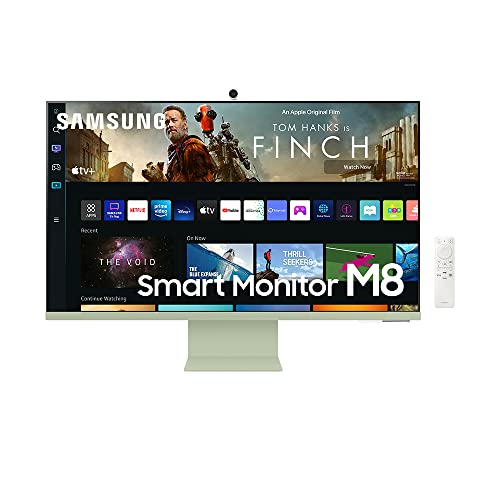
Samsung M8 2022 Smart Monitor
- Best for: A smart monitor with a built-in webcam in a distinctive colour.
- 32-inch 4K UHD display
- Smart Monitor and Streaming TV
- Slim-fit Webcam
- Netflix, HBO and Prime Video apps
A smart monitor with a built-in webcam in a distinctive colour.
This is a 2022 model, so confirm it is still in stock on Amazon before you rely on it as your pick.
The Samsung M8 from 2022 is the oldest screen here, but it remains the only model in this guide with a slim-fit webcam in its original design and a green finish that stands out from the usual black and white. Its 32-inch 4K panel carries the same streaming apps, AirPlay, Wi-Fi and Bluetooth as the newer M8, and the built-in speakers mean it works alone in a room with no other equipment. It suits a buyer who wants the M8 formula and the webcam without chasing the latest model year, and who is happy to check availability first, since a 2022 model may have thinner stock than the newer screens.
LG 32SR85U-W MyView Smart Monitor
- Best for: A large 4K webOS screen as the main monitor on a desk.
- 31.5-inch 4K UHD (3840×2160) IPS display
- webOS 23 smart platform
- USB-C port
- Detachable Full HD webcam
A large 4K webOS screen as the main monitor on a desk.
B&H Photo lists this model as no longer available, so confirm Amazon still has stock before buying.
The LG 32SR85U-W brings webOS to a large 4K screen, and it is the pick for someone who prefers LG’s smart system but wants more space than the 27-inch MyView offers. Its 31.5-inch 4K IPS panel keeps text crisp at this size, USB-C connects a laptop over a single cable, and the detachable Full HD webcam covers video calls without a permanent camera pointing at the room. HDR10 support and AirPlay 2 round out a screen that works as a main desk monitor by day and a streaming display in the evening, with the remote control handling both roles.
Which One Fits Your Situation
A small desk or a bedroom
Choose the LG 27SR50F-W. Its 27-inch Full HD panel fits a shallow desk without crowding it, and webOS 23 with built-in speakers turns it into a small television when the laptop closes. The remote control and AirPlay 2 mean you can open a film from the bed without touching a computer, and the white finish suits a light room better than a black slab.
Streaming and light work on one large screen
Choose the Samsung M7 M70F. The 32-inch 4K panel makes films and documents look their best, Samsung Vision AI and the Smart TV Apps library cover the evening, and USB-C keeps a laptop connected with one cable during the day. As the newest model here it is also the safest bet for availability, and it skips the camera to keep the price of the package focused on the screen itself.
Video calls without extra gear
Choose the Samsung M8 M80D. The SlimFit Camera is built in, the ergonomic stand adjusts to frame you properly, and the 4K panel with HDR10+ handles the rest of the day’s work and streaming. The M8 2022 offers the same webcam idea at an older model year, but the M80D adds the adjustable stand and the newer upscaling, which matter when the screen is your daily call station.
You prefer LG’s smart system at 4K size
Choose the LG 32SR85U-W. It keeps webOS 23 and the MyView approach of the smaller LG, but the 31.5-inch 4K panel gives documents and films far more room. The detachable webcam is a thoughtful touch for calls, since you can remove it when you want privacy, and USB-C makes the laptop connection a single cable.
Common Mistakes
- Buying a smart monitor and using it only as a dumb display, which wastes the apps, speakers and remote you paid for.
- Choosing a 32-inch Full HD screen for close desk work, where text looks soft compared with a 4K panel at the same size.
- Assuming every smart monitor has a webcam, when only the M8 models and the large LG in this guide include one.
- Forgetting to check that your streaming apps are available on Tizen or webOS before you buy, since the two systems do not carry identical libraries.
- Placing a 32-inch screen on a shallow desk, where the panel sits too close and forces constant head movement.
Frequently Asked Questions
Can a smart monitor replace a television?
A smart monitor can replace a small television in a bedroom or a study, because it runs the same streaming apps and has built-in speakers. It suits a single viewer sitting close to the screen, while a living room with several viewers at a distance still suits a larger television with a wider viewing angle and stronger sound.
Do smart monitors need a computer at all?
No, a smart monitor works on its own for streaming, browsing and light office work through its built-in apps. A computer is only needed for heavier tasks such as video editing, demanding games or software that has no version on the monitor’s smart platform, and even then the screen works as an ordinary monitor over HDMI or USB-C.
What is the difference between a smart monitor and a regular monitor?
A regular monitor only shows a signal from a connected device, while a smart monitor has its own operating system, apps, speakers and remote control, so it can stream and work without anything plugged in. A smart monitor still accepts HDMI and USB-C input, so it can act as a regular monitor whenever you connect a laptop or a console.
Is a 27-inch or a 32-inch smart monitor better?
A 27-inch screen suits a small desk and a viewing distance of about an arm’s length, especially in Full HD, while a 32-inch screen suits a deeper desk and benefits from 4K resolution to keep text sharp. Choose the size that fits your desk depth first, then let resolution follow, because a large screen placed too close is harder to use than a smaller one at the right distance.
More from Amazon
Programs that pair well with the guide above. Offers and eligibility are set by Amazon and may change.
Free shipping on eligible items, Prime Video and more. Eligible new members can start with a free trial.
Start a Prime free trialAd-free music streaming. Eligible new subscribers can start with a free trial.
Try Music Unlimited freeA Prime membership for ages 18-24 with a trial period. Eligibility is set by Amazon.
See Prime for Young AdultsAudiobooks and podcasts to listen to on the go. Eligible new members can start with a free trial.
Try Audible freeAs an Amazon Associate we earn from qualifying purchases.









Write Your Review
No reviews yet. Be the first to share your experience!