
Our Short List of 3

- Best for: Gamers who want USB-C, strong color, and blur reduction in one monitor.
- 27-inch Fast IPS panel, 2560 x 1440 QHD resolution
- 180Hz refresh rate, 1ms GTG response time
- DisplayHDR 400 and HDR10 support
- 133 percent sRGB color gamut

- Best for: Players who care about color richness as much as speed.
- 27-inch Nano IPS panel, 2560 x 1440 QHD resolution
- 165Hz refresh rate with 180Hz overclock
- 1ms GtG response time
- NVIDIA G-SYNC Compatible and AMD FreeSync Premium
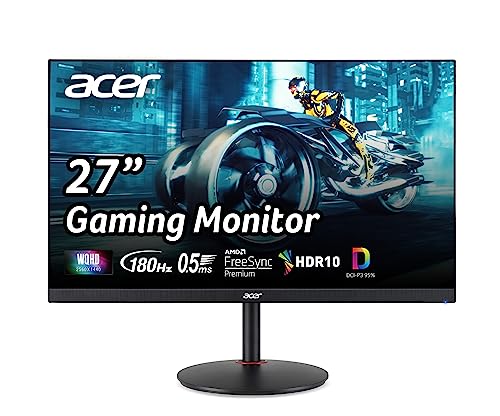
- Best for: Gamers who want wide-gamut color and FreeSync Premium in Acer’s Nitro line.
- 27-inch IPS panel, 2560 x 1440 WQHD resolution
- Up to 180Hz refresh rate over DisplayPort
- Up to 0.5ms response time
- AMD FreeSync Premium
All 4 Picks at a Glance
| Product | Specs | Action |
|---|---|---|
| ASUS ROG Strix XG27ACS |
| Check price on Amazon |
| LG UltraGear 27GP850-B |
| Check price on Amazon |
| Acer Nitro XV271U M3bmiiprx |
| Check price on Amazon |
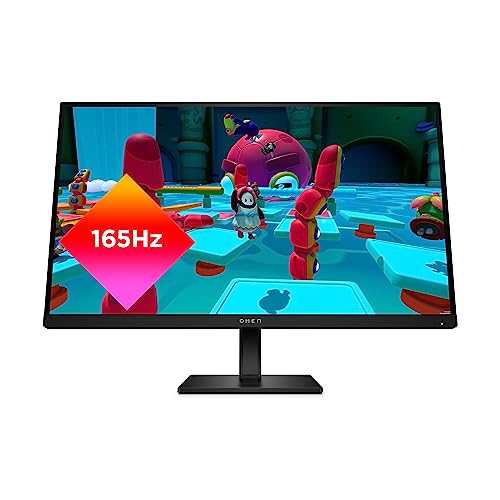 HP OMEN 27q |
| Check price on Amazon |
Key takeaways
- Compare five mid-range gaming monitors for PC, all 27-inch 1440p panels at 165 to 180Hz with fast IPS screens, adaptive sync, and adjustable stands.
The mid-range is where 1440p gaming monitors stop feeling like a compromise, and the real decision is which extras matter to you. Every serious option here pairs a 27-inch QHD panel with a 165Hz to 180Hz refresh rate, so the differences come down to color coverage, stand quality, ports such as USB-C, and how each brand handles motion blur. Picking on headline speed alone is how buyers end up with the wrong panel for their desk.
This guide is for PC gamers upgrading from a 1080p screen, players splitting time between competitive titles and story games, and anyone building a dual-purpose desk for work and play. The five picks below come from current Amazon listings by ASUS, LG, ASRock, Acer, and HP, and each one covers a distinct priority, from wide-gamut color to the lowest-friction 180Hz setup.
Quick Picks
As an Amazon Associate we earn from qualifying purchases
| Product | Best for | Key spec from title |
|---|---|---|
| ASUS ROG Strix XG27ACS | USB-C and all-round polish | 27-inch QHD, 180Hz, Fast IPS, USB-C |
| LG UltraGear 27GP850-B | Color-rich Nano IPS gaming | 27-inch QHD Nano IPS, 165Hz, 180Hz overclock |
| ASRock Phantom Gaming PG27QFT2A | Straightforward 180Hz value | 27-inch QHD IPS, 180Hz, DisplayHDR 400 |
| Acer Nitro XV271U M3bmiiprx | Wide color on a lean spec sheet | 27-inch WQHD IPS, up to 180Hz, FreeSync Premium |
| HP OMEN 27q | PC and console sharing one desk | 27-inch QHD IPS, 165Hz, FreeSync Premium |
How to Choose
Refresh Rate and the Cable That Unlocks It
A 165Hz or 180Hz badge only counts if your connection can carry it. On most mid-range monitors the full refresh rate at 1440p runs over DisplayPort, while HDMI ports often cap lower, so check the listing for the per-port limits before assuming a console or laptop will see the same speed as your desktop. Adaptive sync range matters too, because a wide range keeps motion smooth when frame rates dip below the maximum during demanding scenes. If your graphics card cannot hold the panel’s ceiling in every game, that range decides how graceful the fallback feels.
Panel Type and Color Coverage
Fast IPS has become the default panel in this class because it pairs quick response times with wide viewing angles and consistent color. Listings separate themselves with gamut figures, so compare the sRGB and DCI-P3 coverage printed on the product page rather than relying on marketing labels. A wider DCI-P3 figure suits players who also edit photos or video, while standard coverage is fine for gaming alone. Nano IPS and quantum-dot variants push color further, which shows up most in saturated game worlds.
Stand Adjustment and Desk Fit
A height-adjustable stand is worth more than most buyers expect, because screen height decides neck posture over long sessions. Look for listings that name height, tilt, swivel, and pivot adjustment explicitly, and check whether the monitor supports a VESA mount if you plan to use an arm later. Pivot into portrait orientation helps streamers and readers, while a compact base footprint matters on shallow desks. If a listing only mentions tilt, budget for a stand or arm upgrade from day one.
Ports, USB Hubs, and Console Sharing
Count the inputs against everything you own. Two HDMI ports plus DisplayPort covers a PC and two consoles, while USB-C with DisplayPort alt mode lets a laptop drive the screen over one cable. Some listings add a USB hub for peripherals or extras such as a tripod socket for a camera or light. HDR badges in this class mean DisplayHDR 400 or HDR10 support, which adds tone mapping rather than true local dimming, so treat HDR as a bonus instead of a deciding factor.
The 5 Best Options
ASUS ROG Strix XG27ACS
- Best for: Gamers who want USB-C, strong color, and blur reduction in one monitor.
- 27-inch Fast IPS panel, 2560 x 1440 QHD resolution
- 180Hz refresh rate, 1ms GTG response time
- DisplayHDR 400 and HDR10 support
- 133 percent sRGB color gamut
Gamers who want USB-C, strong color, and blur reduction in one monitor.
The full 180Hz rate needs a DisplayPort or USB-C connection, so check your GPU outputs.
The XG27ACS is the most complete package in this group, built around a 27-inch Fast IPS panel running at 180Hz with a 1ms gray-to-gray response time. Its listing highlights USB Type-C alongside DisplayPort and HDMI, which makes it easy to swap between a gaming desktop and a laptop, and Extreme Low Motion Blur Sync works alongside G-Sync compatibility for cleaner motion in fast shooters. Wide color coverage and DisplayHDR 400 support round out a spec sheet aimed at mixed gaming and content work.
LG UltraGear 27GP850-B
- Best for: Players who care about color richness as much as speed.
- 27-inch Nano IPS panel, 2560 x 1440 QHD resolution
- 165Hz refresh rate with 180Hz overclock
- 1ms GtG response time
- NVIDIA G-SYNC Compatible and AMD FreeSync Premium
Players who care about color richness as much as speed.
The headline 180Hz figure is an overclock setting, with 165Hz as the native rate.
LG builds this pick around a Nano IPS panel, a technology aimed at wider and more accurate color than standard IPS, with coverage listed at 98 percent of DCI-P3. The native refresh rate is 165Hz with an overclock to 180Hz, and the 1ms response time pairs with both NVIDIA G-Sync compatibility and AMD FreeSync Premium, so adaptive sync works across graphics card brands. A stand with height, tilt, and pivot adjustment plus a USB hub makes it an easy fit for desks that split time between gaming and everyday work.
ASRock Phantom Gaming PG27QFT2A
ASRock’s Phantom Gaming entry keeps the formula simple: a 27-inch IPS panel at 180Hz with a 1ms MPRT response time and FreeSync support for tear-free play. The listing includes DisplayHDR 400 and a stand that adjusts for height, swivel, and tilt, which is more ergonomic range than many value-focused rivals offer. One unusual extra is the integrated Wi-Fi antenna, designed to pass a stronger wireless signal through to the connected PC. For buyers who want the core 1440p high-refresh experience without paying for brand extras, this is the direct route.
Specs
- 27-inch IPS panel, 2560 x 1440 QHD resolution
- 180Hz refresh rate, 1ms MPRT response time
- AMD FreeSync support
- VESA DisplayHDR 400
- 99 percent sRGB and 90 percent DCI-P3 color gamut
- Height, swivel, and tilt adjustable stand
- Integrated Wi-Fi antenna
- HDMI and DisplayPort inputs
Best for: Buyers who want 180Hz and a full stand at the leanest spec sheet.
Watch out for: There is no USB-C input, so laptop users need a separate dock or adapter cable.
ASIN: B0FVD2KLJY
Acer Nitro XV271U M3bmiiprx
- Best for: Gamers who want wide-gamut color and FreeSync Premium in Acer’s Nitro line.
- 27-inch IPS panel, 2560 x 1440 WQHD resolution
- Up to 180Hz refresh rate over DisplayPort
- Up to 0.5ms response time
- AMD FreeSync Premium
Gamers who want wide-gamut color and FreeSync Premium in Acer’s Nitro line.
HDMI tops out at 144Hz on this model, so use DisplayPort for the full refresh rate.
Acer’s Nitro XV271U M3bmiiprx targets players who want wide color without moving up a tier. The listing quotes up to 180Hz over DisplayPort, response times down to 0.5ms, and 95 percent DCI-P3 coverage, a combination that suits colorful single-player games as well as fast competitive rounds. AMD FreeSync Premium handles frame pacing, and HDR10 support is included for compatible content. Connectivity stays practical with one DisplayPort 1.2 and two HDMI 2.0 ports, enough for a PC and a console to share the panel without cable swapping.
HP OMEN 27q
- Best for: Households splitting one monitor between a gaming PC and consoles.
- 27-inch IPS panel, 2560 x 1440 QHD resolution
- 165Hz refresh rate, 1ms GtG response time with overdrive
- 99 percent sRGB and 95 percent DCI-P3 color gamut
- AMD FreeSync Premium
Households splitting one monitor between a gaming PC and consoles.
At 165Hz it gives up a small speed step to the 180Hz picks in this guide.
The OMEN 27q is the console-friendly option in this set, with HP’s listing calling out compatibility with current game consoles alongside PC use. Its 27-inch IPS panel runs at 165Hz with a 1ms response time, and color coverage is listed at 99 percent sRGB and 95 percent DCI-P3, which is generous for the class. AMD FreeSync Premium keeps motion smooth, while two HDMI 2.0 ports and DisplayPort 1.4 cover a PC plus consoles. Height, tilt, and pivot adjustment and VESA mounting support make placement flexible on a shared desk.
Which One Fits Your Situation
You Play Competitive Shooters Most Nights
Frame clarity matters more than extras for ranked play, so start with the 180Hz picks. The ASUS XG27ACS adds blur-reduction sync on top of its refresh rate, while the ASRock PG27QFT2A delivers the same headline speed with a simpler feature set. Either way, connect over DisplayPort and enable adaptive sync so frame dips stay smooth instead of tearing.
Your Desk Doubles as a Home Office
Choose the monitor that treats work as a first-class job. The ASUS XG27ACS leads here because USB-C carries the picture from a laptop over one cable and its wide gamut suits documents, calls, and light editing. The LG 27GP850-B is the other strong candidate, adding a USB hub for peripherals and a fully adjustable stand for long workdays.
You Share the Screen With a Console
The HP OMEN 27q is built for this split, with two HDMI ports for consoles and a DisplayPort for the PC, plus a listing that names console compatibility directly. Remember that consoles use the HDMI refresh limits printed on the product page, so the PC connection is the one that sees the panel’s full speed at 1440p.
Colorful Story Games Are Your Priority
Wide-gamut panels make open worlds and cinematic titles look their best. The LG 27GP850-B and its Nano IPS screen lead on color coverage, with the Acer Nitro XV271U M3bmiiprx close behind at a leaner spec sheet. Pair either with HDR turned on for supported games, and keep expectations realistic about entry-level HDR brightness in this class.
Common Mistakes
- Assuming the advertised refresh rate applies to every port, when HDMI often caps lower than DisplayPort at 1440p.
- Buying for the HDR badge alone, even though DisplayHDR 400 and HDR10 support in this class add tone mapping without local dimming.
- Ignoring stand adjustment and then paying extra for a monitor arm that a better stock stand would have made unnecessary.
- Comparing response-time figures across brands as if they were measured the same way, when GTG and MPRT numbers come from different methods.
- Forgetting to enable the monitor’s overclock or high-refresh mode in the on-screen menu after connecting it.
Frequently Asked Questions
Is 1440p at 27 inches sharp enough for everyday use?
Yes, for most desks it is the sweet spot. A 27-inch 2560 x 1440 panel packs far more detail than a same-size 1080p screen, so text stays crisp at normal viewing distances and games show finer textures. It also asks less of your graphics card than a 4K panel, which helps hold the high frame rates these monitors are built to display.
Should I choose 165Hz or hold out for 180Hz?
The gap between 165Hz and 180Hz is small in practice, and most players would not notice it outside a side-by-side comparison. Choose based on the whole package instead: panel quality, color coverage, stand, and ports separate these monitors more than the final few hertz. If two picks are otherwise equal, take the 180Hz model, but do not pay a large premium for the number alone.
Do I need G-Sync or FreeSync on a mid-range monitor?
Adaptive sync is worth having because it matches the refresh rate to your frame rate and removes tearing without the input lag of traditional vertical sync. Most listings here support FreeSync, and several carry G-Sync compatibility for NVIDIA cards as well. Check the product page for the exact certification on the model you choose, since support varies between otherwise similar monitors.
Can these monitors run a console at 1440p and high refresh?
Several listings name console compatibility, and current consoles can output 1440p over HDMI, but the refresh ceiling depends on the port specification printed on the product page. Expect the full 165Hz or 180Hz over DisplayPort from a PC, and check the HDMI figure before assuming a console will match it. For mixed desks, two HDMI ports make switching far easier.
More from Amazon
Programs that pair well with the guide above. Offers and eligibility are set by Amazon and may change.
Free shipping on eligible items, Prime Video and more. Eligible new members can start with a free trial.
Start a Prime free trialAd-free music streaming. Eligible new subscribers can start with a free trial.
Try Music Unlimited freeA Prime membership for ages 18-24 with a trial period. Eligibility is set by Amazon.
See Prime for Young AdultsAudiobooks and podcasts to listen to on the go. Eligible new members can start with a free trial.
Try Audible freeAs an Amazon Associate we earn from qualifying purchases.









Write Your Review
No reviews yet. Be the first to share your experience!