
Our Short List of 3
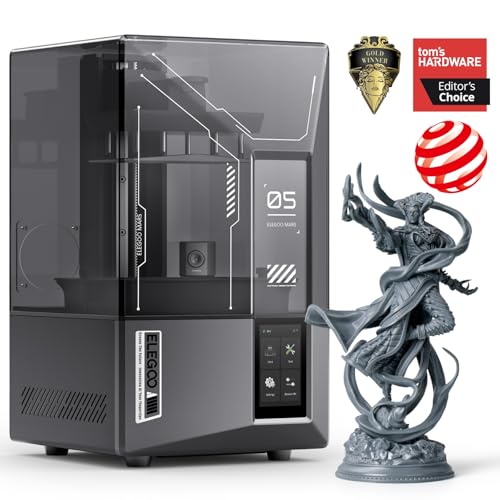


All 4 Picks at a Glance
| Product | Specs | Action |
|---|---|---|
| 1. ELEGOO Mars 5 Ultra — Best Compact Resin Printer for Miniatures | Check price on Amazon | |
| 2. ELEGOO Saturn 4 Ultra 12K — Best Mid-Size Resin Printer for Miniatures | Check price on Amazon | |
| 3. ANYCUBIC Photon Mono M7 Pro — Best High-Resolution Resin Printer for Miniatures | Check price on Amazon | |
 4. Phrozen Sonic Mini 8K S — Best Small Resin Printer for Fine Detail | Check price on Amazon |
Key takeaways
- Find the best resin printers for miniatures, from compact 8K machines to large 14K workhorses, with tips on resolution, build size, safety and resin choice.
The best resin printers for miniatures turn tiny digital sculpts into tabletop-ready figures with crisp faces, fine weapons, thin cloaks, and readable texture that filament printers struggle to reproduce at small scales. Resin printing uses a light source to cure liquid photopolymer resin layer by layer, and the resolution of the LCD screen decides how much detail survives on a 28 mm or 32 mm figure. If you paint Warhammer armies, print Dungeons and Dragons characters, or build display dioramas, the right resin printer is the single biggest upgrade you can make to your hobby bench.
Choosing badly, though, wastes resin and patience. A printer with a coarse screen blurs the details you care about most, while a machine that is too small forces you to split every large monster into awkward pieces. This guide explains what actually matters for miniature work, then compares four resin printers that suit different budgets, desk sizes, and batch sizes, so you can pick the one that fits how you print.
How to Choose a Resin Printer for Miniatures
Resolution and XY pixel size
Resolution is the first number to check, and it is also the easiest to misunderstand. A 9K, 12K, or 14K label describes the LCD panel, not the final detail on its own. What matters for miniatures is the XY pixel size, which is the width of a single pixel on the screen, usually measured in microns. Smaller pixels mean finer detail. A printer with 22 micron pixels can hold sharper edges on a sword blade or a belt buckle than one with 35 micron pixels, even if both screens carry impressive marketing labels. For 28 mm and 32 mm figures, look for a pixel size of 35 microns or smaller, and treat anything under 25 microns as excellent for display pieces.
Layer height matters too. Most miniature printers work well at 0.03 mm to 0.05 mm layers. Thinner layers give smoother curves on round surfaces such as helmets and shoulders, but they also extend print time. A good compromise for gaming pieces is 0.05 mm, dropping to 0.03 mm for heroes and display models where you want the smoothest possible finish.
Build volume
Build volume decides how many miniatures you can print at once and how large a single model can be. A compact printer with a build area around 150 mm wide is plenty for single 28 mm figures and small squads, and it uses less resin per print. A mid-size printer with a build area over 200 mm wide lets you print a whole squad, a large monster, or a terrain piece in one run, which saves hours across an army project. Bigger is not always better, though. A large vat needs more resin to fill, takes longer to clean, and occupies more desk space, so match the volume to the models you actually print rather than buying the largest machine by default.
Print speed and light source
Modern resin printers use a monochrome LCD screen and a UV light array. Monochrome screens last longer than older RGB screens and let more light through, which shortens exposure times. Some printers add a COB light source or a tilt-release mechanism that peels each layer away more gently, reducing failed prints and letting the machine run faster. Speed figures quoted by manufacturers assume fast-curing resin and thin layers, so treat them as a rough guide rather than a promise. For miniatures, reliability matters more than raw speed, because a failed print wastes the whole batch.
Auto leveling and ease of use
Leveling the build plate used to be the most frustrating part of resin printing. Many current printers now include automatic or leveling-free setup, which removes a common source of failed first layers. An AI camera, a resin level sensor, and Wi-Fi file transfer are genuinely useful extras: the camera lets you check a print without opening the cover, the sensor warns you before the vat runs dry, and Wi-Fi transfer means you no longer need to carry a USB stick back and forth. None of these features replace careful setup, but they do make the hobby friendlier for beginners.
Resin handling and safety
Resin printing is messier than filament printing, and safety is not optional. Liquid resin is a skin irritant, and uncured resin should never be poured down a drain. Budget for nitrile gloves, a wash station or a container of isopropyl alcohol, a UV curing station or a UV lamp, and good ventilation. A printer with a heated vat helps in cold rooms, because cold resin flows poorly and fails more often. Washable resins that clean with water exist, but they still need proper curing and disposal of the wash water according to local rules. Keep resin away from children and pets, wear gloves every time you handle the vat or a fresh print, and cure every model fully before painting.
Slicer software and file support
Every resin printer needs a slicer to turn a 3D model file into layers the printer understands. Most printers work with Chitubox, Lychee Slicer, or the manufacturer’s own software, and all three support the common file formats used by miniature designers. Check that your chosen printer supports the slicer you prefer, and that it reads the file format your model sources provide. Good support generation in the slicer is just as important as the printer itself, because miniatures with overhangs, weapons, and thin limbs need well-placed supports to survive the print.
Top Picks
1. ELEGOO Mars 5 Ultra — Best Compact Resin Printer for Miniatures
The ELEGOO Mars 5 Ultra is the pick for hobbyists who want sharp miniature detail without giving up half a desk. Its 7-inch 9K mono LCD and build volume of 153.36 x 77.76 x 165 mm suit single figures, small squads, and character models, and the compact footprint leaves room on the bench for a wash and cure station beside it.
Automatic leveling removes one of the biggest beginner headaches, and the printer adds an AI camera for remote monitoring, Wi-Fi file transfer, and intelligent detection features that flag common problems before they ruin a print. ELEGOO lists print speeds up to 150 mm per hour with suitable fast resin, which keeps small batches moving quickly. The tilt-release mechanism helps each cured layer separate cleanly from the film, which matters for delicate parts such as spears, antennae, and thin fingers.
This is the printer to choose if you paint one squad at a time, you print mostly 28 mm and 32 mm figures, or you are setting up your first resin station in a small space. Its main limitation is build volume: large monsters and vehicles will need to be split into parts, and printing a full army takes more runs than a larger machine would need. For most miniature painters, that trade is worth it for the smaller footprint and simpler workflow.
Check the ELEGOO Mars 5 Ultra on Amazon
2. ELEGOO Saturn 4 Ultra 12K — Best Mid-Size Resin Printer for Miniatures
The ELEGOO Saturn 4 Ultra 12K steps up to a 10-inch 12K monochrome LCD and a build volume of 8.62 x 4.84 x 8.66 inches, which is enough to print a whole squad, a large monster, or a terrain piece in a single run. That extra space is the difference between printing an army over a weekend and printing it over a fortnight, and it is the main reason to choose this machine over a compact model.
Smart automatic leveling, a tilt-release system, and print speeds up to 150 mm per hour carry over from the smaller Mars range, so the larger build area does not mean a slower or fussier workflow. The 12K screen keeps detail crisp across the wider build plate, which is important because a large screen with coarse pixels would waste the extra space on soft detail. Faces, armor trim, and weapon engraving stay readable even on models printed near the edges of the plate.
Choose the Saturn 4 Ultra 12K if you print whole warbands, large creatures, or terrain alongside your miniatures, or if you want one printer that can handle both small heroes and big centerpiece models. The trade-offs are a larger footprint, a bigger vat that needs more resin to fill, and a heavier machine to move when you clean the bench. If your desk space is tight, the Mars 5 Ultra above is the better fit.
Check the ELEGOO Saturn 4 Ultra 12K on Amazon
3. ANYCUBIC Photon Mono M7 Pro — Best High-Resolution Resin Printer for Miniatures
The ANYCUBIC Photon Mono M7 Pro is built for painters who want the finest detail a desktop resin printer can currently offer. Its 10.1-inch 14K mono LCD, COB LighTurbo 3.0 light source, and build volume of 223 x 126 x 230 mm combine a large print area with very fine pixels, so big batches do not come at the cost of soft detail.
ANYCUBIC lists print speeds up to 170 mm per hour when used with high-speed resin, and the printer adds dynamic temperature control for the resin vat, which helps keep prints consistent in cooler rooms where cold resin often causes failures. Leveling-free setup removes another common failure point, and the large build volume means you can print a squad of figures, or a large dragon, without splitting the model.
This is the strongest choice for display painters and for anyone printing highly detailed sculpts where fine texture is the whole point, such as ornate armor, fur, scales, and flowing cloth. It is also the most capable machine in this guide for batch printing an army. The main things to weigh are its larger size and the fact that its best speeds depend on high-speed resin, so standard resin will print more slowly. If you mostly print single gaming pieces and want the smallest possible machine, the Mars 5 Ultra is the simpler buy.
Check the ANYCUBIC Photon Mono M7 Pro on Amazon
4. Phrozen Sonic Mini 8K S — Best Small Resin Printer for Fine Detail
The Phrozen Sonic Mini 8K S proves that a small printer can still deliver excellent miniature detail. Its 7.1-inch monochrome 8K LCD offers 22 micron XY resolution, which is among the finest pixel sizes in this guide, and its build volume of 165 x 72 x 170 mm is sized for individual figures and small groups rather than whole armies.
That fine pixel size shows up where it counts: facial features, jewelry, buckles, and thin engraved lines come out cleanly, and layer lines are hard to spot on curved surfaces. The printer works at speeds up to 80 mm per hour, which is slower than the larger machines here, but miniature prints are small, so a single hero figure still finishes in a reasonable session. Its light body and small footprint make it easy to fit on a crowded hobby desk or to store away between projects.
Pick the Sonic Mini 8K S if you print mostly single display figures, if you want the sharpest detail in the smallest machine, or if you are adding a second printer dedicated to heroes and characters while a larger machine handles troops. Its limits are the obvious ones: the build plate is too small for large monsters and terrain, and batch printing an army will take many runs. For detail-first painters who print one beautiful model at a time, those limits rarely matter.
Check the Phrozen Sonic Mini 8K S on Amazon
Comparison Table
| Printer | Screen | XY Resolution | Build Volume | Best For |
|---|---|---|---|---|
| ELEGOO Mars 5 Ultra | 7-inch 9K mono LCD | Fine detail for 28 mm figures | 153.36 x 77.76 x 165 mm | Compact setup, beginners |
| ELEGOO Saturn 4 Ultra 12K | 10-inch 12K mono LCD | Crisp detail across a wide plate | 8.62 x 4.84 x 8.66 inches | Squads, monsters, terrain |
| ANYCUBIC Photon Mono M7 Pro | 10.1-inch 14K mono LCD | Very fine detail at large scale | 223 x 126 x 230 mm | Display pieces, large batches |
| Phrozen Sonic Mini 8K S | 7.1-inch 8K mono LCD | 22 microns | 165 x 72 x 170 mm | Single heroes, finest detail |
Which Printer Should You Buy?
If you are just starting out, the Mars 5 Ultra is the easiest recommendation: it is compact, it levels itself, and it prints the figures most hobbyists actually use. If you already know you will print whole armies or large monsters, the Saturn 4 Ultra 12K earns its extra desk space with every batch. The Photon Mono M7 Pro is the pick for painters who judge a printer by the finest texture it can hold, and the Sonic Mini 8K S is the specialist choice for single display models where detail matters more than volume.
Whatever you choose, remember that the printer is only half the system. Good resin, careful supports, proper washing and curing, and a safe workspace decide whether those crisp pixels turn into models you are proud to paint. Start with a standard grey resin while you learn, keep notes on the exposure settings that work for your room temperature, and print a small test figure before committing a whole plate to a new resin.
Frequently Asked Questions
What resolution do I need for 28 mm miniatures?
For 28 mm figures, a printer with an XY pixel size of 35 microns or smaller gives clean faces, weapons, and armor trim. Printers with pixels around 22 microns, such as the Phrozen Sonic Mini 8K S in this guide, hold even finer detail, which is most visible on display pieces. Layer height matters too: 0.05 mm layers suit gaming pieces, while 0.03 mm layers give smoother results on heroes and display models.
Is resin printing safe for home use?
Resin printing can be done safely at home with the right habits. Always wear nitrile gloves when handling liquid resin or uncured prints, work in a ventilated room, and keep resin away from skin, eyes, children, and pets. Wash prints in isopropyl alcohol or water, depending on the resin type, cure them fully under UV light, and dispose of used resin, wash liquid, and failed prints according to local hazardous waste rules. Never pour resin or wash liquid down a drain.
How much resin does a miniature use?
A single 28 mm figure typically uses only a few millilitres of resin, plus the supports that hold it to the build plate. Hollowing large models in the slicer saves a lot of resin, but hollow models need drain holes so uncured resin can escape, and they should be cured inside as well as outside. A one-litre bottle of resin usually prints dozens of standard gaming figures, which makes resin printing affordable per model once the printer is set up.
Do I need a wash and cure station?
A wash and cure station is not strictly required, but it makes the hobby much easier and more consistent. You can wash prints in a container of isopropyl alcohol and cure them under a UV lamp or in sunlight, but a dedicated station washes more evenly, cures more reliably, and keeps the mess contained. If you print often, a wash and cure station is one of the best accessories to buy after the printer itself.
Can I print large monsters on a small resin printer?
Yes, but you will need to split the model into parts in the slicer or in 3D modelling software, print each part separately, and glue them together after curing. Many miniature designers already provide pre-split files for large creatures. A larger printer such as the Saturn 4 Ultra 12K or the Photon Mono M7 Pro avoids this work for most monsters, so choose a bigger build volume if large creatures are a regular part of your projects.
Conclusion
The best resin printers for miniatures balance fine resolution, a build volume that matches your projects, and a workflow you will actually enjoy using. The ELEGOO Mars 5 Ultra is the best compact starting point, the ELEGOO Saturn 4 Ultra 12K is the best mid-size all-rounder, the ANYCUBIC Photon Mono M7 Pro offers the finest large-format detail, and the Phrozen Sonic Mini 8K S delivers superb sharpness in a small machine. Pick the one that fits your desk, your army, and the models you love to paint, set up a safe washing and curing routine, and your next squad will look better than anything a filament printer could produce at this scale.
Disclosure: As an Amazon Associate, we earn from qualifying purchases.
More from Amazon
Programs that pair well with the guide above. Offers and eligibility are set by Amazon and may change.
Free shipping on eligible items, Prime Video and more. Eligible new members can start with a free trial.
Start a Prime free trialAd-free music streaming. Eligible new subscribers can start with a free trial.
Try Music Unlimited freeA Prime membership for ages 18-24 with a trial period. Eligibility is set by Amazon.
See Prime for Young AdultsAudiobooks and podcasts to listen to on the go. Eligible new members can start with a free trial.
Try Audible freeAs an Amazon Associate we earn from qualifying purchases.










Write Your Review
No reviews yet. Be the first to share your experience!