
Our Short List of 3
All 3 Picks at a Glance
| Product | Specs | Action |
|---|---|---|
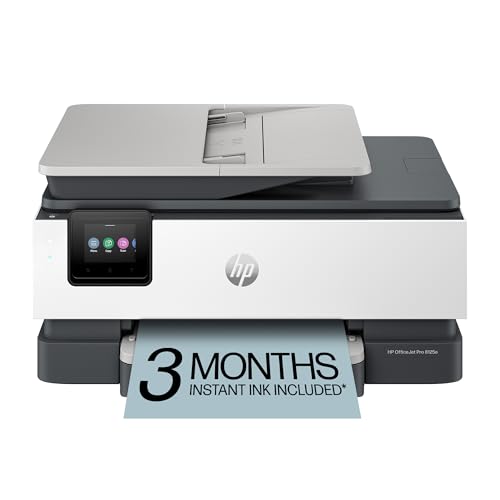 1. HP OfficeJet Pro 8125e — Best All-in-One for Personal Use | Check price on Amazon | |
 2. Brother HL-L2460DW — Best Laser Printer for Personal Use | Check price on Amazon | |
 3. Canon PIXMA TR4720 — Best Budget All-in-One for Personal Use | Check price on Amazon |
Key takeaways
- Find the best printers for personal use, from all-in-one inkjets to fast laser printers. Compare top picks for home documents, photos, and schoolwork today.
The best printers for personal use handle everyday home printing without fuss: school assignments, boarding passes, recipes, tax forms, and the occasional photo. A good personal printer is easy to set up, connects to your phone and laptop without a cable, and keeps running costs low enough that you never hesitate to print a page.
Choosing a home printer is mostly about matching the machine to how you print. A household that prints a few pages a week has different needs from one that prints homework every night. This guide explains the key differences between inkjet and laser printers, then compares three reliable models that suit personal use.
Inkjet or Laser: Which Is Right for You?
Inkjet printers spray tiny droplets of ink onto paper. They are the better choice for color printing, photos, and mixed documents, and they usually cost less up front. Their weakness is running cost: ink cartridges can be expensive, and ink can dry out if the printer sits unused for months.
Laser printers use toner powder and a heated roller to fuse text onto the page. They print black-and-white text faster and more cheaply per page, and toner does not dry out, so a laser printer is ideal for households that print mostly text and only occasionally. Color laser printers exist but cost more and are larger.
For most personal use, an all-in-one inkjet is the versatile default, while a monochrome laser is the smart pick if nearly everything you print is black-and-white text. Many households end up happy with either one, so the decision comes down to what lands on your paper tray most often.
How to Choose a Printer for Personal Use
Print Volume
Estimate how much you print in a typical month. Light users who print a handful of pages a week can choose almost any home printer. Moderate users who print schoolwork or work documents daily should pay attention to running costs and paper tray capacity, since refilling a small tray every day gets old fast.
All-in-One Functions
Most personal printers today are all-in-one machines that print, scan, and copy. A flatbed scanner is useful for digitizing school forms, old photos, and identification documents. An automatic document feeder, which scans multi-page documents without manual feeding, is worth having if you scan often.
Wireless and Mobile Printing
Wi-Fi printing is effectively standard now, and it matters. A wireless printer lets every phone, tablet, and laptop in the house print without cables. Look for support for mobile printing apps and voice assistant compatibility if those features fit your household. A printer with a small touchscreen is easier to set up and operate than one with a few blinking buttons.
Running Costs
The purchase price is only part of the cost of owning a printer. Check how many pages a cartridge or toner yields and whether the printer supports an ink subscription service, which can lower the cost per page for regular users. High-yield cartridges cost more up front but print more pages each, which usually works out cheaper over time.
Print Quality and Speed
For documents, look for crisp text at normal reading sizes and clean lines on charts. For photos, an inkjet with dedicated photo paper support produces noticeably better results than a laser printer. Print speed matters less at home than in an office, but a printer that manages around 10 pages per minute in color and 20 in black and white keeps short jobs from feeling slow.
Size and Noise
Measure your shelf or desk before buying. All-in-one printers with scanners are wider than print-only models, and some need clearance behind them for paper output. Laser printers tend to be bulkier and noisier than inkjets, though modern home models are quiet enough for a living room or study.
Top Picks: Best Printers for Personal Use
1. HP OfficeJet Pro 8125e — Best All-in-One for Personal Use
The HP OfficeJet Pro 8125e is a wireless all-in-one color inkjet printer that covers the full range of personal printing: documents, photos, scanning, and copying. It prints up to 20 pages per minute in black and 10 in color, with automatic two-sided printing and an automatic document feeder for multi-page scans. The 225-sheet input tray is generous for a home printer, so refills are infrequent.
Setup runs through the HP Smart app, and the printer supports mobile printing from phones and tablets as well as voice assistant printing. Self-healing Wi-Fi helps the printer reconnect on its own if the network drops, which removes a common source of home printing frustration. The touchscreen control panel makes copying and scanning straightforward without opening an app.
A three-month Instant Ink trial is included, which can lower ink costs while you settle into a routine. For households that print a mix of schoolwork, forms, and color documents, the OfficeJet Pro 8125e is a well-rounded all-in-one that does everything a personal printer needs to do.
View the HP OfficeJet Pro 8125e on Amazon
2. Brother HL-L2460DW — Best Laser Printer for Personal Use
The Brother HL-L2460DW is a compact monochrome laser printer for households that print mostly black-and-white text. It prints at up to 36 pages per minute, with automatic duplex printing and a 250-sheet paper tray. Wireless connectivity, mobile printing, and Ethernet are all included, so it fits into a home network easily.
The main advantage of this printer is running cost and reliability. Toner does not dry out between uses, so a household that prints in bursts, such as during tax season or exam periods, never wastes supplies. The compact design fits on a shelf or desk corner, and the straightforward controls keep setup simple.
It prints only in black and white and does not scan or copy, so it suits a household that already has a scanner or rarely needs one. For students and home workers who print essays, forms, and reading material in volume, the HL-L2460DW is fast, economical, and dependable.
View the Brother HL-L2460DW on Amazon
3. Canon PIXMA TR4720 — Best Budget All-in-One for Personal Use
The Canon PIXMA TR4720 is a compact wireless all-in-one inkjet that prints, copies, scans, and faxes. It is the smallest and simplest pick in this guide, which makes it a good fit for apartments, dorm rooms, and shared desks. It supports wireless and mobile printing, automatic two-sided printing, and an automatic document feeder.
Print speeds of up to 8.8 pages per minute in black and 4.4 in color are modest, but they are adequate for light personal use such as homework, boarding passes, and occasional color documents. The 100-sheet front tray suits low-volume printing, and the printer works with the Canon ink subscription plan for households that want predictable ink costs.
For personal use where space is tight and printing is light, the TR4720 covers the essentials at a friendly size. It is a practical choice for a first home printer or a second printer for a bedroom or study.
View the Canon PIXMA TR4720 on Amazon
Comparison Table
| Printer | Type | Functions | Print Speed (Black) | Duplex | Wireless | Best For |
|---|---|---|---|---|---|---|
| HP OfficeJet Pro 8125e | Color inkjet | Print, scan, copy | Up to 20 ppm | Yes | Yes | Best all-in-one |
| Brother HL-L2460DW | Mono laser | Print only | Up to 36 ppm | Yes | Yes | Fast text printing |
| Canon PIXMA TR4720 | Color inkjet | Print, scan, copy, fax | Up to 8.8 ppm | Yes | Yes | Compact budget pick |
Keeping Printing Costs Down
A few habits make home printing much cheaper. Print in draft mode for everyday documents, since full quality is rarely needed for a homework sheet or a checklist. Use two-sided printing by default to halve paper use. Keep the printer connected to Wi-Fi so firmware stays current, and store spare cartridges in a cool, dry place away from sunlight.
Ink subscription services can save money for regular users, but they only pay off if you print consistently. If you print rarely, standard cartridges or a laser printer with long-lasting toner are usually the cheaper path. Check the cost per page before committing to a subscription, and remember that you can cancel if your printing habits change.
For photos, use the correct paper setting in the print dialog and genuine photo paper for the best results. Printing photos at home is convenient for a few prints, but a photo printing service is usually cheaper for large batches.
Frequently Asked Questions
What type of printer is best for personal use?
An all-in-one inkjet is the best default for most households because it prints color documents and photos, scans, and copies. A monochrome laser printer is better if you print mostly black-and-white text and want the lowest cost per page with no ink drying out.
How much does it cost to run a home printer?
Running costs depend on the printer type and how much you print. Laser printers usually have the lowest cost per black-and-white page, while inkjets cost more per page but handle color and photos. Ink subscription services and high-yield cartridges can reduce the cost per page for regular users.
Do I need a printer with a scanner?
Most personal printers include a scanner, and it is useful for digitizing forms, school documents, and old photos. If you rarely scan, a print-only laser printer can save space and money. An automatic document feeder is worth having if you scan multi-page documents regularly.
Can I print from my phone?
Yes. Most modern home printers support wireless printing from phones and tablets through the manufacturer’s app, and many also support built-in mobile printing standards. Once the printer is on your Wi-Fi network, printing from a phone is usually as simple as choosing Print from the share menu.
Why does my inkjet printer ink dry out?
Inkjet ink can dry in the nozzles if the printer sits unused for weeks or months. Printing a test page every week or two keeps the nozzles clear. Laser printers do not have this problem because toner is a dry powder, which is one reason they suit occasional printers.
Conclusion
The best printers for personal use match the way your household actually prints. The HP OfficeJet Pro 8125e is the best all-in-one for mixed home printing, with fast color output, scanning, and a generous paper tray. The Brother HL-L2460DW is the pick for households that print mostly text and want speed and low running costs. The Canon PIXMA TR4720 is the compact, budget-friendly choice for light printing in small spaces.
Think about your print volume, whether you need color and scanning, and where the printer will live. Get those three decisions right, and a personal printer becomes a quiet, reliable part of the household instead of a source of frustration.
Disclosure: As an Amazon Associate, we earn from qualifying purchases.
More from Amazon
Programs that pair well with the guide above. Offers and eligibility are set by Amazon and may change.
Free shipping on eligible items, Prime Video and more. Eligible new members can start with a free trial.
Start a Prime free trialAd-free music streaming. Eligible new subscribers can start with a free trial.
Try Music Unlimited freeA Prime membership for ages 18-24 with a trial period. Eligibility is set by Amazon.
See Prime for Young AdultsAudiobooks and podcasts to listen to on the go. Eligible new members can start with a free trial.
Try Audible freeAs an Amazon Associate we earn from qualifying purchases.










Write Your Review
No reviews yet. Be the first to share your experience!